Table of Contents
Voice technology has swiftly transitioned from a luxury to an expectation. As millions of users now enjoy voice assistant integration in Android apps, companies are moving towards developing Android apps to provide smarter, quicker, and more user-friendly mobile experiences. According to studies, over 1 billion voice searches are conducted each month, and 50% smartphone users use voice commands for daily tasks.
This change justifies the adoption of an AI voice assistant for Android. Voice features ensure more readily accessible and enjoyable apps through product search, navigation, booking, customer support, and hands-free workflows.
The world is moving towards voice control, and as voice increasingly dominates user behaviour, businesses across retail, fitness, health care, finance, travel, and entertainment are seeking to incorporate AI-driven voice control to enhance their competitive edge.
This guide covers everything you need to know about adding a voice assistant to the app. You will learn about the price, timing, procedure, technical aspects, and business advantages of embracing voice technology.
What Is Voice Assistant Integration in Android Apps
The integration of voice assistants into Android applications enables Android users to interact with applications via speech rather than tapping the screen. It applies sophisticated speech recognition, natural language processing, and artificial intelligence to decode the intent of voice commands and take appropriate actions.
When companies venture into voice-enabled Android app development, they aim to create a user experience where verbal instructions replace manual ones. The application listens, comprehends, reacts, and acts. Android has SDKs, APIs, or custom machine learning models that can be used to implement an AI voice assistant. If you’re evaluating options, our team delivers both custom Android development and AI/ML services.
The feature is necessitated by users’ preference for quick, convenient access, particularly in multitasking or when disability is considered. Voice technology is also more personalised as the assistant gets to know how they use it, what they like, and their most-used commands and habits. Typical Operations that are performed by a user in voice-enabled applications.
Common Commands Users Perform in Voice-Enabled Apps
- Product or service search.
- Message or make calls to contacts.
- Bookings or reservations
- Navigation within the application.
- Open pages, settings, or menus
- Check order status or request support
Interactions based on voice lower friction and make the app look smarter and more human.
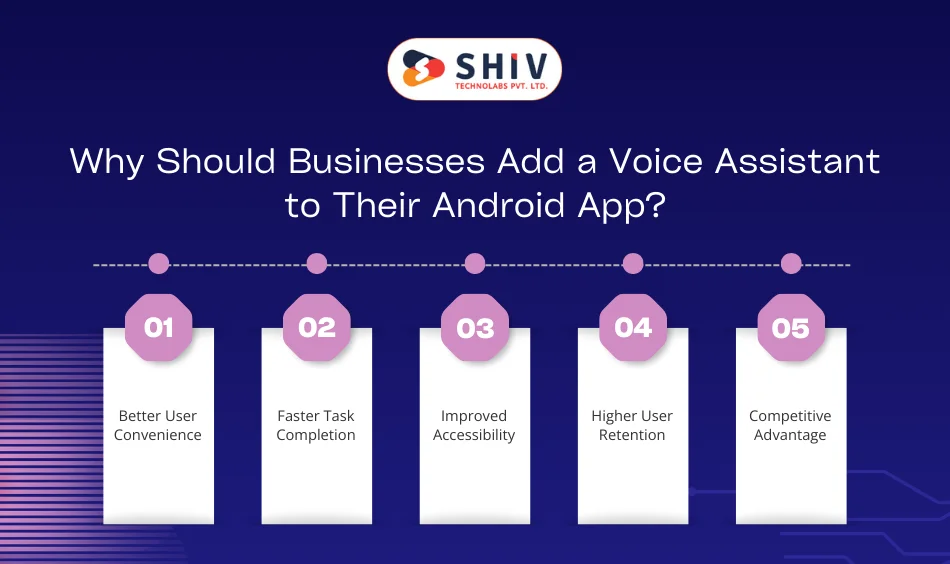
Why Should Businesses Add a Voice Assistant to Their Android App?
Voice assistant integration in Android apps is no longer optional. They are an effective aspect that will improve usability, accessibility, and engagement. Voice assistants in mobile apps are beneficial across industries.
Better User Convenience
The user does not have to enter data and scroll or jump between screens. This greatly enhances the app’s usability, particularly when a user is driving, preparing meals, working out, or multitasking.
Faster Task Completion
Voice controls save time on tasks. One sentence is enough to accomplish a search that would take 10 taps. This increases engagement and repeated use.
Improved Accessibility
Voice assistance is really advantageous for the visually impaired, older users, and people with mobility restrictions. Your application will be more accommodating, which will increase your audience.
Higher User Retention
Users become repeat customers when an app is smarter and easier to use. Voice engagement can be used effectively to boost customer daily active usage and loyalty.
Competitive Advantage
Voice-first brands are associated with modernity, innovation, and user-friendliness. This builds credibility and helps the app stand out in a saturated market.


How Much Does Voice Assistant Integration Cost in an Android App?
Exploring the Android app voice integration cost is important before planning its development. The cost varies based on complexity, the type of assistant, the SDKs used, and the level of AI customisation.
When researching how much voice assistant integration costs in Android apps, remember that the overall investment cost will vary depending on the number of features and the complexity of the voice experience you intend to provide. For deeper reference, check our AI integration cost explainer.
Here are the main factors that affect the cost:
- Voice assistant category: Google Assistant, Amazon Alexa, or in-house AI.
- Complexity of app features
- Requirements include an artificial intelligence engine and machine learning.
- Multi-language capabilities
- Integration level of API and SDK.
- UI notifications on voice interactions.
The following table displays cost details that portray the average development ranges.
Estimated Cost to Add a Voice Assistant in an Android App
Below are the estimated Android app voice integration costs:
| Factor | Description | Estimated Cost Range (USD) |
|---|---|---|
| Type of voice assistant | Google, Alexa, or custom AI voice | $1,000 to $4,000 |
| App complexity | Basic or multi-feature functionality | $2,000 to $6,000 |
| API and SDK integration | Dialogflow, Speech-to-Text, Azure, Lex | $500 to $2,000 |
| Voice UI and UX design | Interaction flows and voice screens | $1,000 to $3,000 |
| Testing and QA | Accuracy, performance, bug fixing | $800 to $2,000 |
| Full integration cost | Complete voice assistant feature | $3,000 to $10,000 |
These values present a realistic price range for most business applications.
How Long Does It Take to Add a Voice Assistant to an Android App
The timeline for the Android voice assistant app depends on the app’s size, the degree of integration, and the required AI features.
The mean time to add a voice assistant to Android app functionality could be estimated at 9-12 weeks. It involves implementation, testing, and deployment, as well as design and planning. Here’s a glimpse of the Android voice assistant app timeline.
| Development Phase | Tasks | Estimated Duration |
|---|---|---|
| Planning and Requirement Gathering | Feature list, SDK selection, architecture mapping | 1 to 2 weeks |
| Design and Prototyping | Voice interface design, command flows, UI mapping | 2 weeks |
| Integration and Coding | Implementing APIs, training speech models, command testing | 3 to 5 weeks |
| Testing and QA | Performance testing, accuracy refinement, bug fixing | 2 weeks |
| Deployment and Optimization | Store submission, monitoring, post launch adjustments | 1 week |
| Total Timeline | — | 9 to 12 weeks |
Factors Affecting Development Time
Although the average timeline is predictable, there are still some vital variables that influence the duration of adding a voice assistant to the Android app systems.
App Type and Backend Complexity
Even a basic shopping or fitness application is faster than a complex one, such as a banking or logistics system, because the number of voice commands is lower.
Existing API Usage or AI Model Development
Dialogflow or Speech-to-Text SDKs are faster to develop with. Training custom AI models takes longer.
Accent and Multi-Language Support
Inclusion of different languages or region-specific accents also leads to a great increase in the testing cycles.
Level of AI Customization
Very customised responses will improve the UX, but will require additional time during the training process and intent mapping.
Third Party Integrations
Applications that require CRM, ERP, or integration with other tools will increase development time.
What Are the Key Technical Requirements for Voice Assistant Integration?
The development of an AI-powered voice assistant integrated into an Android app will require a solid, stable technical foundation. An Android-based AI voice assistant is based on speech recognition, natural language processing, machine learning, and communication with the back-end. The developers have to program applications that understand what the user is saying and what the user intends to do, and give appropriate responses.
APIs and SDKs
Developers normally use specialised toolkits like.
- Google Assistant SDK
- Dialogflow CX or ES
- TensorFlow Lite for on-device machine learning.
- Amazon Lex
- Microsoft Azure Speech services.
If your roadmap includes custom pipelines, see our guide on AI/ML model integration, and explore our AI agent development for conversational orchestration.
Speech Recognition and NLP
Text-to-Speech programs turn audio writing into digital text. NLP engines then interpret meaning, the user intent is recognized, keywords are extracted, and the commands are matched against the predefined actions. These systems should be trained to be accurate, to handle dialect variation, and to exhibit a natural flow of conversation.
Backend Integration
Voice assistants use secure APIs to handle requests. The authentication, user information retrieval, execution of commands, and customized responses are done on the backend. A well-developed backend will ensure the assistant responds instantly and correctly.
Data Privacy and Compliance
Web voice interactions include sensitive user data. The developers should also be able to assure encryption, secure token storage, GDPR or HIPAA compliance where necessary as well as responsible data handling.
Popular Tools for Voice Integration in Android Apps
- Google Cloud Speech-to-Text
- Amazon Lex
- Microsoft Azure Speech services.
- OpenAI Whisper API
These tools are accurate, fast, multi-language, and enterprise-grade.
How to Choose the Right Team for Voice Assistant Integration
Selecting the team to create the voice technology is the most crucial, since the team must be knowledgeable in Android development, AI, natural language processing, and back-office architecture. Senior teams that provide services on the Android app development have the technical expertise required to harmonize a voice assistant without compromising on accuracy and stability.
Hire Certified Android Developers
An authorized Android team has knowledge on system-level permissions, audio API, memory management, and UI responsiveness. The voice assistant can slow, fail to recognize or use resources without proper architecture. Start with our Android development services.
Optimization of Performance and Cost
A professional team understands the way to use the correct SDKs, how to optimise the audio processing, and how to minimise the unnecessary API calls. This reduces development costs and ensures the assistant is responsive in real time.
Clear Selection Criteria
Some of the core areas to consider before hiring a development partner include previous projects, voice-enabled systems, integration, and code quality.
Checklist Before Hiring Developers
- Experienced in voice-enabled Android apps development.
- Well-defined cost and delivery schedules.
- Availability of post-launch support.
- Open communication and tracking of progress.
- Powerful portfolio of AI and mobile projects.
- Knowledge of NLP, ML engines and Android audio.
An efficient team will guarantee high implementation and reliability in the long term.
What Are the Key Benefits of Voice Assistant Integration for Businesses
A voice assistant is more than convenient in mobile applications. They change how users engage with the digital space and improve business performance across various aspects. The voice experience forms an application visualization that is intelligent, quick, and painless.
- Improved User Convenience: Users do not have to type, scroll, or navigate menus. This saves labour and enhances satisfaction.
- Quickened Navigation and Duty accomplishment: Voice commands reduce the user pathway by a huge margin. A query that would have required a few taps can be accomplished on a single sentence.
- Increased Accessibility for everyone: The voice capabilities make the app usable for the visually impaired, the elderly, and anyone who has difficulty typing.
- Greater Retention and Loyalty: There are better apps that are easier to use and have high retention rates. Voice communications stimulate the need to interact regularly.
- Mobile Apps Competitive Advantage: Voice-enabled applications are future-forward and up to date. Companies that embrace voice technology early are more competitive in the business environment.
- Enhanced Brand Image: Providing high-end voice features makes your brand more innovative and user-oriented.
- Future Readiness: With changing consumer preferences for voice-first technology, companies that adopt it today remain relevant in the long run.
Conclusion
Adding a voice assistant to your Android application is no longer a fantasy. It is a viable addition that adds to usability, customer engagement, access, and retention. Voice interfaces provide a more natural, intelligent experience in your app, and users love the ease of hands-free use.
Whether it’s an attempt to provide straightforward command-based functions or a highly personalised AI voice assistant on Android, the right development approach would ensure accuracy, reliability, and smooth operation.
Looking to partner with an experienced Android app development company? Shiv Technolabs is the best choice. We have the best team of Android developers with hands-on experience across various tech stacks to develop applications with end-to-end voice integrations.
At Shiv Technolabs, we offer Android app development services, implementing voice technology tailored to your industry requirements and application objectives.
Frequently Asked Questions (FAQs)
1. How much does it cost to integrate a voice assistant into an Android app?
The prices are based on functionality, choice of tools, and voice sophistication. The typical implementation ranges from $3,000 to $10,000, with more advanced assistants that include custom NLP or multilingual implementation possibly being more expensive.
2. How long does voice assistant integration take?
The majority of projects are completed in 8 to 12 weeks, depending on the design requirements, the number of commands, and the extent of AI personalisation. Complex workflows that require complex applications take longer to develop.
3. Can any existing app add a voice assistant feature?
Yes, voice functionality can be added to most applications using APIs and SDKs without rewriting the entire application. Intent mapping, audio processing, and backend communication allow developers to add voice functions.
4. Which SDKs are best for Android voice assistant integration?
The most popular ones are Google Dialogflow, Amazon Lex, Microsoft Azure Speech services, and OpenAI Whisper API. The best alternative is determined by the complexity of your app and the extent of customisation required.
5. Is it worth adding voice assistant features for small businesses?
Absolutely, small businesses also benefit from greater accessibility, enhanced user interactions, and improved customer satisfaction. The voice functionality will distinguish the app and enhance long-term engagement.