Table of Contents
More companies now move AI agents from demo to production, and the design pattern behind them shapes cost, speed, and control. That single choice reaches founders, CTOs, and product leaders before anyone writes a line of code. It comes down to one question: should one capable agent run the whole workflow, or should several specialist agents share the job?
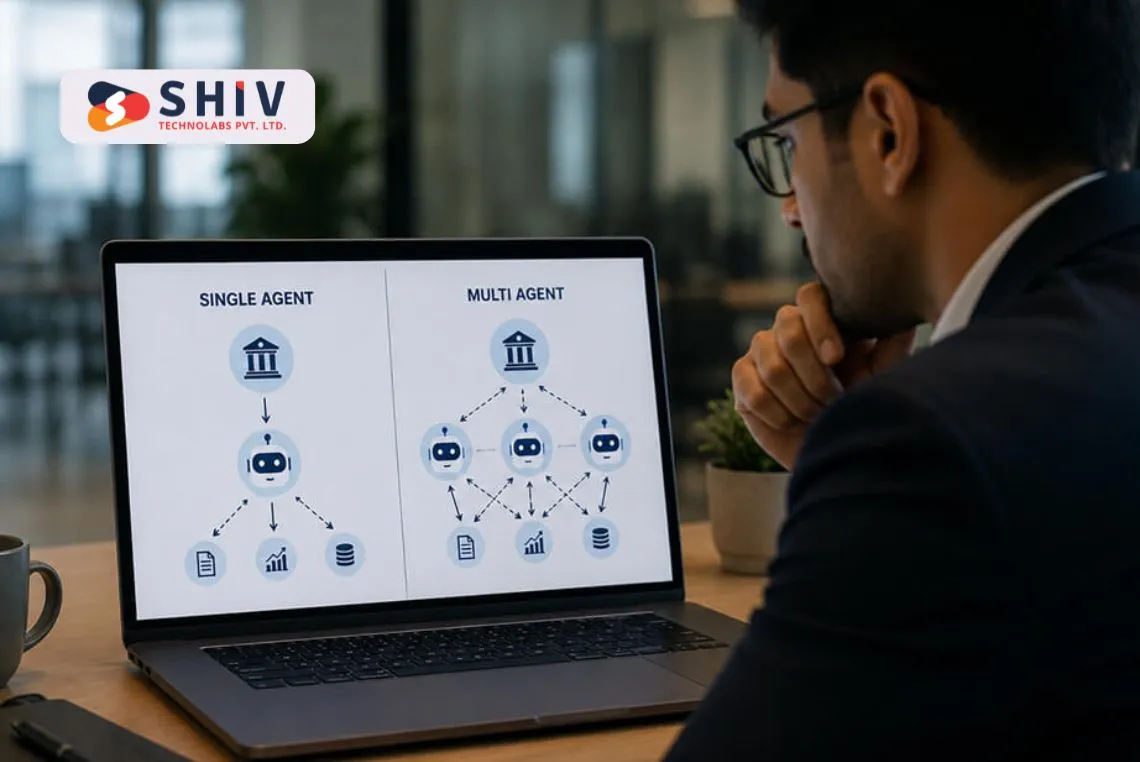
A single-agent system keeps one model in a loop with tools, memory, and clear rules. A multi-agent system splits work across roles and adds an orchestration layer that coordinates them. That layer brings real gains, and it also adds token cost, latency, debugging effort, and governance work.
Teams that map workflow complexity first tend to spend less and ship sooner. Many scope the problem with structured AI agent development services before they commit to a pattern. The right choice depends on how many tasks, tools, and approval steps your workflow truly needs.
This guide on single vs multi-agent architecture answers that question with business and engineering factors, not hype, so you can pick the right pattern before you build.
Single-Agent vs Multi-Agent Architecture in One Answer
Choosing between the two patterns comes down to workflow scope and risk. Here is the short version for busy teams.
| Pick Single-Agent When | Pick Multi-Agent When |
|---|---|
| One agent can finish the workflow | The job needs specialist roles |
| Tools and context stay limited | Tasks run in parallel |
| Approval rules stay simple | Outputs need independent review |
| Risk and audit needs are low | Handoffs get complex |
| You want a fast, cheap baseline | Governance and permissions matter |
Choose a single-agent architecture when one agent can finish the workflow with clear tools, limited context, and simple approval rules. Choose a multi-agent architecture when the workflow needs specialist roles, parallel work, independent review, complex handoffs, or stronger governance. Most teams should prove value with one agent first, then add orchestration only where a specific need appears. This single vs multi agent architecture decision affects budget, latency, and operational load for months.
How Single-Agent and Multi-Agent Architecture Work
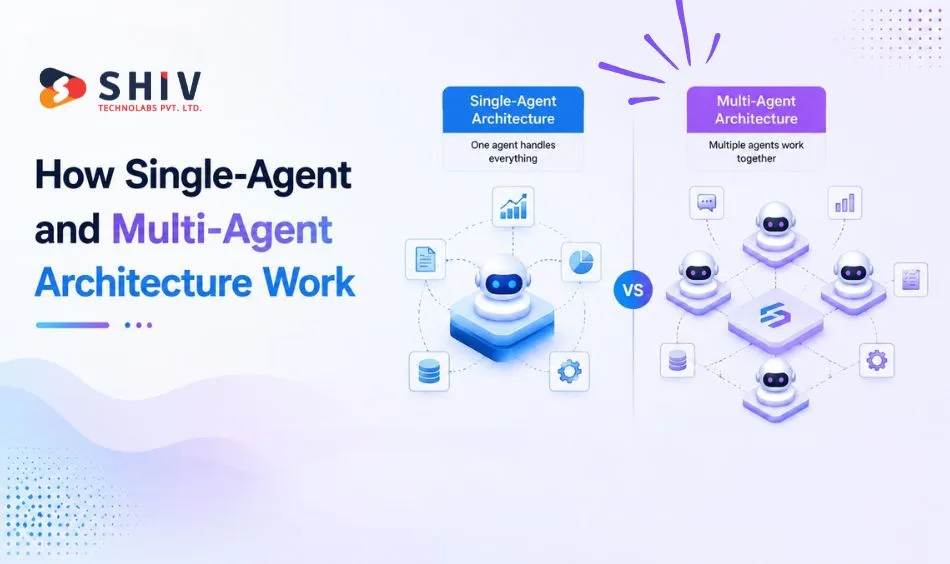
Both patterns build on one idea: an agent that reasons, calls tools, and acts in a loop. The difference is how many agents run and who coordinates them.
# What Is Single-Agent Architecture?
A single-agent architecture uses one language model that plans, calls tools, and returns a final answer. It holds the task in one context window and one instruction set, which keeps the design simple and cheaper to test. Teams building a first version often pair it with focused AI/ML development services to define tools and data access.
# What Is Multi-Agent Architecture?
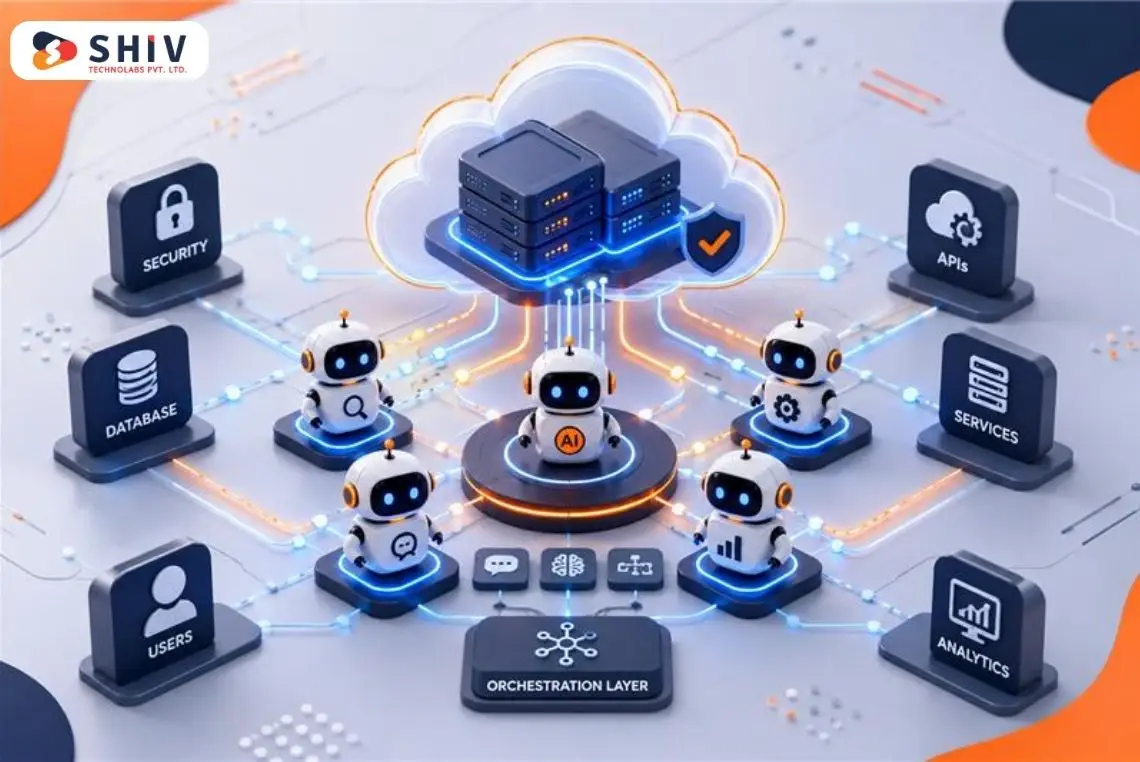
A multi-agent architecture splits a job across specialist agents that each own a role. An orchestrator or supervisor routes work, passes context, and combines outputs. According to IBM’s AI agent orchestration guide, orchestration coordinates multiple specialized agents within a unified system toward shared goals. Common patterns include supervisor-worker, orchestrator-worker, agent handoffs, and agents-as-tools.
Anthropic’s research team used a lead agent that generates subagents to search facets in parallel, which raised accuracy on open-ended tasks at higher token cost. The OpenAI Agents SDK documentation advises one rule: start with one agent, and add specialists only when they improve isolation or trace clarity.
Single-Agent vs Multi-Agent: What Is the Difference?
A side-by-side view makes the tradeoffs concrete across cost, speed, and control. This single vs multi-agent architecture comparison guides the sections that follow, so read it with your own workflow in mind.
| Decision Area | Single-Agent Architecture | Multi-Agent Architecture |
|---|---|---|
| Best use case | Narrow, well-defined task | Complex, multi-role process |
| Workflow complexity | Low to moderate | Moderate to high |
| Cost | Lower build and run cost | Higher build and run cost |
| Latency | Faster, fewer model calls | Slower, more calls and handoffs |
| Context handling | One context window | Shared state across agents |
| Tool access | Small, fixed tool set | Many tools split by role |
| Role specialization | One general role | Distinct specialist roles |
| Debugging | Simpler traces | Harder, cross-agent traces |
| Evaluation | One baseline to test | Per-role and handoff testing |
| Governance | Light permission rules | Role-based policies and approvals |
| Reliability | Fewer failure points | More coordination, more failure points |
| Maintenance | One prompt and toolset | Many prompts, routes, and policies |
When Is a Single-Agent Setup Enough?
Single-agent systems win when the job stays focused and the risk stays low. Consider a single-agent build in these cases.
- Narrow workflow with one clear goal
- A small, fixed tool set
- Predictable user inputs
- Limited decision risk
- A simple approval path
- Low context complexity
- One knowledge domain
- Limited integration needs
- An early proof of concept
- A smaller starter budget
# Practical Single-Agent Examples
Several common workflows fit a single agent well, each with a tight scope and small tool set.
- FAQ assistant with help-center tool access
- Lead qualification agent that scores inbound forms
- Internal document lookup over a knowledge base
- Simple ticket routing agent
- Basic report generation agent
Teams ship these first, then measure quality before adding orchestration. Many wire the tools and data with custom software development so each connection stays secure and logged.
When Does Multi-Agent Orchestration Become Worth the Cost?
Multi-agent systems earn their extra cost when one agent cannot hold the job safely. Look for these signals before you fund orchestration.
- Multiple specialist tasks in one flow
- Parallel work across subtasks
- A reviewer or critic role
- Complex tool routing
- Different permission levels by role
- A multi-step business process
- High-risk outputs that need checks
- Large context needs beyond one window
- Enterprise workflows with many systems
- A need for supervisor oversight
# Practical Multi-Agent Examples
Some workflows clearly reward a coordinated team of agents, each spanning several roles or approvals.
- B2B onboarding across data, docs, and account setup
- Sales research and proposal workflow
- ERP workflow automation across modules
- AI coding and QA workflow
- Finance document review workflow
- Customer success workflow with human approvals
Enterprise teams pair these builds with generative AI development services to plan roles, context flow, and evaluation before code lands.
Tool Access, Review Steps, and Human Approval
Role-based tool access keeps each agent in its lane and lowers risk. Give the refund agent refund tools only, and gate high-risk actions behind human approval. Log every tool call and handoff so you can trace a decision path. Agent SDKs can pause a run for approval before a sensitive action.
AI Agent Development Cost: Single-Agent vs Multi-Agent
Orchestration cost is more than build hours. It also adds running cost, monitoring, and governance over time. Use these planning ranges, then refine with a scoped estimate.
| Build Stage | Single-Agent | Multi-Agent |
|---|---|---|
| Proof of concept | $8,000 to $30,000 | $25,000 to $80,000 |
| MVP with tools and integrations | $20,000 to $75,000 | $60,000 to $200,000 |
| Enterprise system with governance and observability | Rare at this scale | $200,000 to $500,000+ |
| Ongoing run, monitoring, and support (per month) | $3,000 to $25,000 | $3,000 to $25,000 |
These figures are planning ranges, not fixed quotes. Final pricing depends on workflow complexity, number of agents, tool integrations, data access, security needs, and evaluation depth.
On timelines, planning and architecture design take 1 to 3 weeks. A single-agent proof of concept takes 3 to 6 weeks, and a multi-agent one takes 6 to 10 weeks. A production-ready multi-agent rollout takes 3 to 9 months, based on risk and integration depth.
These are planning ranges, not fixed quotes or timelines. Final pricing depends on workflow complexity, number of agents, tool integrations, data access, security needs, evaluation depth, observability, and human approval flows.
A clear single vs multi-agent architecture plan keeps these line items visible before you build.
| Orchestration Need | Extra Cost Added | When It Is Justified |
|---|---|---|
| Supervisor agent | Moderate | Routing spans many roles |
| Specialist agents | Moderate to high | Tasks need distinct skills |
| Handoffs | Lower | A specialist owns the next reply |
| Shared memory or state | Moderate | Agents must pass context |
| Evaluation layer | Moderate to high | Quality drives real decisions |
| Guardrails | Lower to moderate | PII and policy checks matter |
| Tracing | Lower to moderate | Cross-agent debugging is hard |
| Human approval | Moderate | High-risk or irreversible actions |
| Tool permission rules | Lower | Roles touch sensitive systems |
| Monitoring | Moderate | Cost and error visibility needed |
| Fallback handling | Lower to moderate | Failures must degrade safely |
| Post-launch support | Moderate to high | Prompt drift and data changes |
Single-Agent or Multi-Agent: Which Fits Your Use Case?
Real workflows make the choice easier than abstract rules. The matrix below suggests a starting pattern you can adjust after testing.
| Use Case | Better Architecture | Why |
|---|---|---|
| Customer FAQ | Single-agent | Narrow scope, small tool set |
| Lead qualification | Single-agent | Simple scoring, low risk |
| B2B onboarding | Multi-agent | Many steps and setup roles |
| Customer support triage | Single-agent, then handoffs | One router, escalate to humans |
| AI research assistant | Multi-agent | Parallel search across facets |
| Sales proposal automation | Multi-agent | Research, drafting, review roles |
| Finance approval workflow | Multi-agent | High risk, role-based approvals |
| ERP task automation | Multi-agent | Cross-module steps and permissions |
| Coding assistant | Single-agent, add QA later | One loop, add a review agent |
| Document review | Multi-agent | Extract, validate, summarize roles |
| Data analysis | Single-agent to start | One flow, scale if sources grow |
| Compliance workflow | Multi-agent | Audit trails and checks |
For data-heavy or reporting flows, scope the pipeline with AI development services first, since data quality often decides the design.
Latency, Cost, and Reliability Trade-offs
Every pattern trades speed and simplicity against role clarity and control. Each row below shows how a factor shifts, with a planning note.
| Tradeoff | Single-Agent Impact | Multi-Agent Impact | Planning Note |
|---|---|---|---|
| Token usage | Lower | Higher, more calls | Budget coordination tokens |
| Response time | Faster | Slower with handoffs | Set latency limits per step |
| Debugging | Simpler | Harder across agents | Add tracing early |
| Evaluation | One baseline | Per-role and handoff tests | Plan test data upfront |
| Tool errors | Contained | Can cascade | Add retries and fallbacks |
| Output consistency | Steady in scope | Better role clarity | Test edge cases |
| Data access | Simple rules | Role-based access | Map permissions by agent |
| Permissions | Few checks | Many checks | Gate high-risk actions |
| Audit trails | Light logs | Detailed logs | Keep decision paths |
| User approval | Simple gate | Multiple gates | Approve only risky steps |
| Maintenance | One prompt set | Many prompts and routes | Version everything |
Multi-agent systems can improve role clarity and review quality, and they often add runtime and operational costs. Weigh both against your latency budget.
How to Choose With an Architecture Decision Checklist
A short checklist turns a vague goal into a scoped build. Run it before you commit to either pattern.
- Workflow goal is clear
- Number of tasks is known
- Required tools are listed
- Data sources are mapped
- Risk level is defined
- Approval rules are clear
- Latency tolerance is known
- Budget range is realistic
- Evaluation method is planned
- Monitoring needs are defined
- Human handoff points are mapped
- First version scope is limited
Most teams that answer these clearly find a single-agent build covers the first version. A single vs multi-agent architecture choice then becomes a data-backed step, not a guess.
Governance and Observability Checklist
Production agents need control, not just capability. Strong oversight protects users, data, and your brand as usage scales.
The NIST AI Risk Management Framework groups this work into govern, map, measure, and manage functions, covering data access, oversight, and monitoring. Treat the items below as ongoing operations, not one-time setup.
- Define agent permissions
- Limit tool access by role
- Log tool calls
- Trace agent handoffs
- Record decision paths
- Define human approval rules
- Test failure scenarios
- Monitor costs
- Monitor latency
- Track hallucination risk
- Review sensitive data access
- Create fallback paths
Orchestration cost is not only development cost. It also covers governance, monitoring, and maintenance, so budget for these before you scale from one agent to many.
Evaluation and Testing Checklist
Testing agents differ from normal software because outputs vary run to run. Score each role and each handoff, not just the final reply.
- Test each agent role separately.
- Test handoffs
- Test tool calls
- Test edge cases
- Test refusal and fallback behavior
- Test hallucination controls
- Test human approval flows
- Compare a single-agent baseline
- Evaluate cost per completed task
- Evaluate response time
- Evaluate answer quality
- Evaluate business outcome
A single-agent baseline gives a fair reference. If the multi-agent version does not beat it on quality, cost, or speed, keep the simpler design.
A Rollout Path From Single-Agent to Multi-Agent
A staged path lowers risk and keeps spend tied to proof. Prove the workflow with one agent before you fund full orchestration, and add complexity only where a phase shows a clear need.
- Phase 1: Build a single-agent proof of concept
- Phase 2: Add tool access and test the workflow
- Phase 3: Add evaluation and guardrails
- Phase 4: Add specialist agents only where needed
- Phase 5: Add supervisor orchestration
- Phase 6: Add monitoring, governance, and cost controls
This path treats a single vs multi-agent architecture move as small, tested steps, where each phase earns the next. Teams that skip proof often pay for orchestration they never needed.
SaaS teams often stage this alongside SaaS development services to keep releases tight and roll changes out safely.
When Multi-Agent Architecture Is Not Worth It
Sometimes a simpler build serves you better than orchestration. Multi-agent design adds cost and moving parts that a small job does not need. Skip it in these cases.
- The workflow stays narrow.
- The budget stays small.
- Latency must stay very low
- The team lacks monitoring capacity
- The business logic is still unclear
- Tool access stays simple
- Evaluation data is missing
- Human review already covers the risk
- The use case is still experimental
Honest scoping saves money here. A single agent with good guardrails often beats a rushed multi-agent build on cost and reliability.
How Shiv Technolabs Helps You Choose the Right Architecture
Shiv Technolabs helps companies compare single-agent and multi-agent designs before they spend on development. Our teams map your workflow, define tool access, plan orchestration, set human approval rules, and estimate costs with clear ranges.
We also build production-ready AI agent systems with evaluation, tracing, and governance. A short single vs multi-agent architecture review gives you a scoped plan, a budget range, and a rollout path. Book an AI architecture review with Shiv Technolabs and start with a plan, not a guess.


Conclusion
Architecture choice shapes cost, latency, and control long after launch. A single vs multi-agent architecture decision comes down to workflow scope, risk, and readiness. Start with one agent where the job stays focused, and add orchestration only where a clear need appears. Prove value first, then fund the coordination layer with data behind you. When you want a scoped plan and a realistic budget, book an AI architecture review and move forward with confidence.
Frequently Asked Questions
# What Is Single-Agent Architecture?
Single-agent architecture uses one language model that plans, calls tools, and returns a final answer within a single context. It suits narrow workflows with a small tool set, clear inputs, and low risk, which keeps cost, latency, and testing simple.
# What Is Multi-Agent Architecture?
Multi-agent architecture splits a job across specialist agents that an orchestrator or supervisor coordinates. Agents pass context through handoffs, shared state, or agents-as-tools. It fits complex workflows that need parallel work, independent review, role-based permissions, and stronger governance, at higher cost.
# Which Is Better, Single-Agent or Multi-Agent Architecture?
Neither wins by default. A single-agent build fits narrow, low-risk workflows and costs less to run, while a multi-agent build fits complex processes with specialist roles and review steps. The right single vs multi-agent architecture depends on your workflow scope, risk level, and budget.
# When Is Multi-Agent Orchestration Worth the Cost?
Multi-agent orchestration is worth the cost when one agent cannot handle the workflow safely. Signals include specialist roles, parallel tasks, independent review, complex tool routing, and high-risk outputs. Prove the workflow with a single agent first, then add orchestration where needed.
# How Much Does a Multi-Agent AI System Cost?
Costs vary with scope. A multi-agent proof of concept runs about $25,000 to $80,000. A multi-agent MVP with orchestration and evaluation runs about $60,000 to $200,000. Enterprise systems with governance and integrations can run $200,000 to $500,000 or more, plus $3,000 to $25,000 monthly for support.
# Can I Start With One Agent and Move to Multi-Agent Later?
Yes. Start with a single-agent proof of concept in about 3 to 6 weeks, then add specialists as needs appear. A multi-agent proof of concept takes about 6 to 10 weeks, and a production rollout takes 3 to 9 months based on risk and integrations.