
Table of Contents
US enterprises face pressure to scale faster, control costs, and prove clear value from software investments. Our enterprise app development services in USA connect systems, reduce manual work, and give leaders timely data. We design secure foundations, practical workflows, and rapid access so teams deliver consistent results across regions.
We focus on real outcomes: shorter cycles, fewer errors, faster collections, and stronger customer interactions. Our teams define clear roles, dependable data flows, and reporting leaders can act on without delay. Security and compliance stay central, with audit-ready trails and strict controls across users, devices, and regions.
This approach gives IT a stable base and gives operations a faster path from request to delivery. Here are ten powerful features that define high-performing enterprise applications designed for growth.

Why Smart Enterprise App Features Are the Foundation of Business ROI
Workflows support revenue when steps are clear, data is consistent, and every action leaves a reliable trail. Strong enterprise app features cut rework, shorten cycle time, and help managers view performance in real time. That clarity protects margins during spikes, speeds billing, and keeps service levels steady across regions and teams.
Automation replaces repetitive tasks, locks rules into forms and approvals, and keeps records clean for audits. Analytics reveal bottlenecks, forecast demand, and track value by channel, customer group, product line, and team. Together, these enterprise app ROI improvement strategies turn daily activity into decisions that guide budgets and staffing.
Performance tracking ties features to outcomes such as error rate, backlog age, and first-contact resolution. Leaders compare trends by period and line of business, then adjust priorities without guessing or stale reports. Clear feedback loops help product teams ship changes that matter and retire functions that waste time.
Adoption rises when features match the way people actually work across roles, sites, and devices. Training stays short, support tickets drop, and teams ship accurate work on the first pass more often. That compounding effect makes software a driver of growth rather than a recurring cost with unclear value.
Must-Have Features for Enterprise Applications in USA
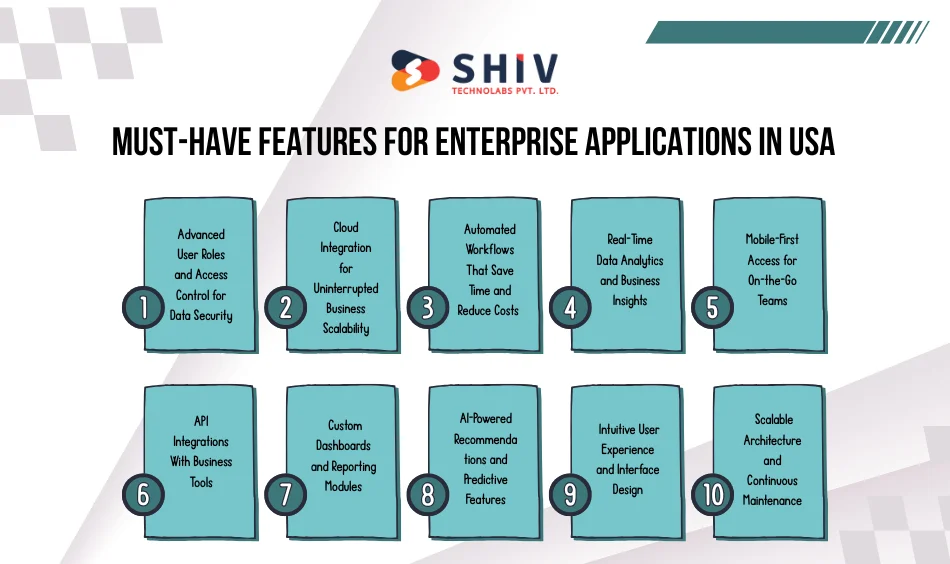
A durable enterprise stack starts with access control, reliable data flow, and strict security across users and devices. That base supports scale, protects sensitive records, and allows changes without breaking past work or policy rules. Leaders gain confidence to add modules, run audits faster, and support steady service levels during busy seasons.
These must-have features for enterprise applications in USA create that base and turn goals into daily habits. Access control, cloud services, automation, analytics, mobile, integrations, dashboards, AI, UX, and scalable architecture work together. The result is faster cycles, fewer mistakes, predictable upgrades, and clear reports leaders trust during reviews and planning.
We build each item as a small, testable unit that lands quickly and reduces outage risk. Teams get practical tools they can learn fast and use across sites, shifts, and roles. That approach keeps total cost in check while supporting growth across products and regions nationwide.
1. Advanced User Roles and Access Control for Data Security
Role-based access control assigns the right permissions to the right people across apps and data. Least-privilege rules, MFA, and SSO keep sensitive records safe while keeping daily work fast. Detailed audit logs record who changed what and when, which supports reviews and policy checks.
Clear roles also raise accountability. Managers can map duties to profiles and remove access when staff move teams. That prevents shadow access and reduces risk from human error. These enterprise app features protect critical systems and help pass audits without last-minute panic. You get steady operations, cleaner trails, and fewer surprises during compliance cycles.
2. Cloud Integration for Uninterrupted Business Scalability
Cloud services connect systems, files, and users without long outages or slow handoffs. Data sync keeps orders, inventory, and service tickets current across regions and time zones. Teams share the same truth, so billing and support do not fight stale records.
We build on trusted stacks that rank among the best technologies for enterprise app development. AWS, Azure, and GCP support growth, failover, and strong identity controls. Modern patterns such as containers and event queues help apps stay responsive during peak traffic. This approach keeps performance steady as demand rises and new modules join the stack. The result is higher uptime, faster releases, and fewer late-night fixes.
3. Automated Workflows That Save Time and Reduce Costs
Automation turns slow, manual steps into clear flows with rules you can track. Common cases include purchase approvals, case routing, price updates, and scheduled reports. Triggers move data between apps, while guards catch missing fields before they cause rework.
These flows tie directly to enterprise app ROI improvement strategies. You cut repeat tasks, reduce errors, and shorten cycle time from request to completion. Leaders see where work stalls and fix the bottleneck instead of guessing. Staff spend less time on forms and more time on customer tasks. Over weeks, those small gains stack into real savings and faster delivery. These enterprise app features bring speed and clarity without adding noise to daily work.
4. Real-Time Data Analytics and Business Insights
Live dashboards bring sales, service, and supply data into one clear view across regions for leaders. Interactive filters and drilldowns answer questions fast, so teams act before issues grow across departments and sites. Leaders compare trends by product, channel, and region to direct spend where returns rise faster.
Forecasting models read current signals, highlight risk, and help teams protect margin during peaks and shortages. These enterprise app features turn raw data into actions, linking every metric to owners and deadlines. You track cycle time, error rate, backlog age, and forecast accuracy, then tune plans each quarter.


5. Mobile-First Access for On-the-Go Teams
Field teams need quick access to orders, inventory, and service notes, even with spotty networks on site. We deliver cross-platform apps that run fast on iOS, Android, and modern browsers, with offline sync and smart caching. Biometric login and role-based views keep sensitive records protected while keeping work simple in the field.
Our mobile app development services in USA bring core workflows to phones and tablets without extra steps. Techs capture photos, voice notes, and signatures on site, and sync data when coverage returns. Leaders see real-time status, while crews close tasks faster and cut repeat visits across regions.
6. API Integrations With Business Tools
APIs connect your app with CRM, ERP, HR, finance, and support platforms your teams already use. Event-based sync posts changes instantly, so orders, tickets, and inventory stay aligned across systems and locations. That keeps handoffs clear and prevents duplicate data that creates billing or service mistakes later.
We design integrations for scale, audit trails, and retries, so spikes do not break key flows. Queues, webhooks, and mappers route data safely and keep rules consistent across business lines and regions. This approach supports growth, deeper automation, and faster onboarding when new tools join the stack. See our custom software development capabilities for complex integration work.
7. Custom Dashboards and Reporting Modules
Leaders need clear views they can trust during monthly and quarterly reviews across regions and lines. We build role-based dashboards with drilldowns, time filters, and scheduled exports that land in inboxes on schedule. Teams compare trend lines, spot drops early, and act with data that updates without manual steps.
KPI examples include order cycle time, first-contact resolution, aged backlog, and forecast accuracy across channels and products. Managers track goals by owner and see status before standups begin each day. Finance pulls accrual and write-off views that tie directly to transactions. These enterprise app features turn questions into actions, reduce guesswork, and raise confidence in every plan.
8. AI-Powered Recommendations and Predictive Features
Machine learning reads signals across orders, tickets, and sensors to guide faster, smarter decisions across teams. Common cases include next-best action, demand prediction, and maintenance alerts that prevent costly stops on critical lines. Workers see suggestions inside their normal screens, not in a separate tool that slows work.
We use proven stacks and patterns that rank among the best technologies for enterprise app development. Models update on new data, while guardrails record inputs and outcomes for audits and training. Leaders measure lift against control groups and keep what works. That cycle improves planning, protects margin, and supports steady growth with fewer surprises.
9. Intuitive User Experience and Interface Design
Clean layouts, readable labels, and clear steps cut training time and errors across sites and shifts nationwide. Forms show only fields that matter to the role and stage, which keeps attention on the task. Shortcuts, bulk actions, and helpful hints move work forward without extra clicks or confusion.
Accessibility standards guide colors, contrast, and keyboard paths for workers in varied environments and lighting. Microcopy explains terms in plain language and avoids jargon that slows new staff. This focus raises satisfaction, lowers support tickets, and keeps adoption high during releases. Good UX pays back every week in faster, cleaner work. See our React development services for modern, fast interfaces.
10. Scalable Architecture and Continuous Maintenance
A strong backend supports growth, frequent releases, and steady performance during seasonal peaks and product launches. We design services with clear boundaries, tested contracts, and versioned APIs so changes land safely. Observability tools track latency, error rates, and resource use, with alerts that reach owners fast.
Maintenance plans include patching, backups, and disaster tests that keep recovery steps current across teams. Cost reviews track spend against usage so leaders adjust plans before budgets drift. This discipline keeps systems ready for new modules and new demand without long outages or rushed rewrites. Explore our software development consultancy for planning and governance.
ROI Snapshot
| Feature | ROI Advantage | Example Use Case |
|---|---|---|
| Automation | Cuts manual effort | Approvals and reports |
| Cloud Integration | Reduces downtime | ERP syncing |
| Analytics | Enables decisions | Sales forecasting |
How Enterprise App Features Influence Development Cost in USA

Budgets vary with scope, integrations, and compliance rules across industries and states. Feature depth, user counts, and data volume also change the path and the price. Clear goals and phased plans reduce risk, shorten timelines, and keep spending tied to measured outcomes.
Integrations add cost when systems lack stable APIs or require custom mapping across fields. Advanced security, SSO, and audit trails add work but protect sensitive records during reviews. Mobile features raise effort when offline sync, media capture, and device controls are required in the field. These choices affect enterprise app development cost in USA, but they also raise long-term value.
Smarter features often pay for themselves through time savings and better decisions. Track cycle time, rework rate, and uptime gains to connect spend to returns. Phased delivery brings value earlier and lowers change risk with real user feedback at each step. That approach protects budgets while building a stronger, longer-lived product.
Cost Guide
| App Type | Cost Range (USD) | Ideal Use |
|---|---|---|
| Basic | $25,000–$40,000 | Internal operations |
| Mid-Level | $45,000–$80,000 | Department automation |
| Advanced | $90,000+ | AI and analytics apps |
Which Technologies Deliver the Best Results in Enterprise App Development?
Picks should match goals for scale, speed, skills, and cost across teams and regions. Cloud platforms such as AWS and Azure bring identity, storage, queues, and failover that support growth. Container platforms and serverless paths help apps stay responsive during spikes and planned events.
On the backend, Node.js and .NET handle APIs, workers, and event pipelines with strong community support. On the frontend, React powers fast, modular interfaces that teams can ship and extend quickly. For mobile, Flutter ships high-quality apps for iOS and Android from one codebase with strong device support. These stacks rank among the best technologies for enterprise app development and reduce vendor risk.
Advantages of modern stacks
- Faster releases with tested components and clear patterns.
- Strong security features and logging across services.
- Easier hiring due to common skills and active communities.
- Lower long-term cost through shared modules and repeated patterns.
Pick tools that fit your needs, not buzzwords. Measure the stack by uptime, throughput, test coverage, and total lifecycle cost. That focus keeps tech choices grounded in results for the business.
How Our Team Builds ROI-Focused Enterprise Apps in USA
We begin with discovery sessions that map goals, users, systems, and constraints by site and region. Our architects draft a plan with milestones, measures, and clear owners across both teams. Designers turn flows into wireframes and clickable drafts, then collect field feedback before build.
Developers ship in short cycles with automated tests, code reviews, and clear release notes. QA checks function, performance, and security with repeatable scripts and real usage data. After launch, we watch metrics, ship small fixes fast, and plan the next set with real numbers. These steps align with enterprise app ROI improvement strategies and keep progress tied to results.
Service differentiators
- Clear KPIs tied to features and budgets.
- Strong access control, logs, and audit trails.
- Mobile features shaped by real field cases across industries.
- Phased rollouts that protect uptime during busy periods.
- Honest maintenance plans with patching, backups, and disaster tests.
This process turns ideas into working software that cuts cost and supports growth month after month.
FAQs on Enterprise App Features and ROI
Q1. What are the most important enterprise app features for growth?
Automation, analytics, and AI lead the list, supported by access control, cloud services, and clear UX. These parts raise output, reduce errors, and bring leaders better insight with faster feedback.
Q2. How do features affect cost and ROI?
Depth, integrations, and security drive enterprise app development cost in USA. Track cycle time, rework, and uptime to show gains that pay back the spend.
Q3. Which technologies help with scale and long life?
Cloud platforms, containers, and modern frameworks rank among the best technologies for enterprise app development. They support growth, faster releases, and strong identity controls across regions.
Q4. Can mobile work improve enterprise systems?
Yes. Mobile app development services in USA bring core tasks to phones and tablets with offline sync and media capture. Field teams close work faster and reduce repeat visits.
Q5. How can I calculate ROI from my app?
Track baseline metrics, then compare after release. Use dashboards to measure cycle time, error rate, first-contact resolution, and forecast accuracy. Tie each result to a feature for clear proof.
Conclusion – Build Scalable Enterprise Apps That Deliver Lasting ROI
Smart enterprise app features raise output, cut errors, and give leaders visibility they can act on quickly. The right mix supports growth across products, channels, and regions while keeping records safe and audits smooth. With a solid base, new modules land faster and staff work with confidence at every step.
Invest in clear goals, proven stacks, and a delivery path that links every feature to a metric. Small, steady releases bring value earlier and reduce risk across the program. As a trusted enterprise app development company in USA, Shiv Technolabs builds secure, scalable applications that deliver real business value.