Table of Contents
The operation of a contemporary WooCommerce store cannot be limited to managing products and receiving orders. Online companies have been confronted with a large volume of orders, multi-channel stocking, complicated accounting regulations, and real-time customer demands. All this is manually managed, leading to delays, data mismatches, and operational bottlenecks. This is where the need for WooCommerce ERP integration comes in.
According to reports, WooCommerce generated $100,000 in sales across over 12k sites in 2025. WooCommerce integration allows businesses to integrate orders, inventory, accounting, and customer data into a single automated ecosystem with an ERP system. A competent WooCommerce development company can assist with this gap by creating safe and scalable ERP interconnections that will remove redundant tasks and minimize human error.
Automated companies can achieve faster order fulfillment and proper inventory management, and view financial data in real time through WooCommerce store processes. Professional integration can convert disparate manual processes into a centralized, automated system that scales with business growth.
This guide discusses the WooCommerce ERP integration functionality, its relevance in 2026, and how competent teams can assist companies with its implementation.
What Is WooCommerce ERP Integration and Why Does It Matter?
WooCommerce ERP integration is the process of linking a WooCommerce online shop to an Enterprise Resource Planning system to align business-critical data across departments. ERP is a hub for operations such as inventory management, accounting, customer relationship management, procurement, human resources, and reporting.
These systems are also compatible with WooCommerce, and in this case, all orders, stock updates, invoices, and customer records run smoothly across the front-end and back-end.
In eCommerce, there are no silos left after ERP integration. There is only one source of truth, not a tool to handle inventory, a tool to handle accounting, and a tool to handle orders in WooCommerce. The strategy enhances precision, minimizes operational cost, and enables sustainable expansion.
Companies that use WooCommerce ERP integration have a more convenient control over fulfillment, finance and analytics and have an opportunity to automate end-to-end processes of WooCommerce stores.
ERP Modules Commonly Used in WooCommerce Integrations
- Inventory and warehouse operations.
- Accounting and finance
- Customer relations management.
- Supplier and procurement management.
- Reporting and analytics
- Human resources and payroll
WooCommerce usually integrates with ERP systems via APIs, middleware, or vendor-provided proprietary connectors. For API work, see our Custom API Development page.
Popular ERP Systems Integrated with WooCommerce
| ERP System | Integration Method | Supported Features |
|---|---|---|
| Odoo | API or Connector | Orders, Inventory, Accounting |
| SAP | Middleware | Invoicing, Product Data |
| NetSuite | Custom API | CRM, Finance, Analytics |
| Microsoft Dynamics | Plugin or API | Order and Warehouse Management |
How Does WooCommerce ERP Integration Automate Business Operations?
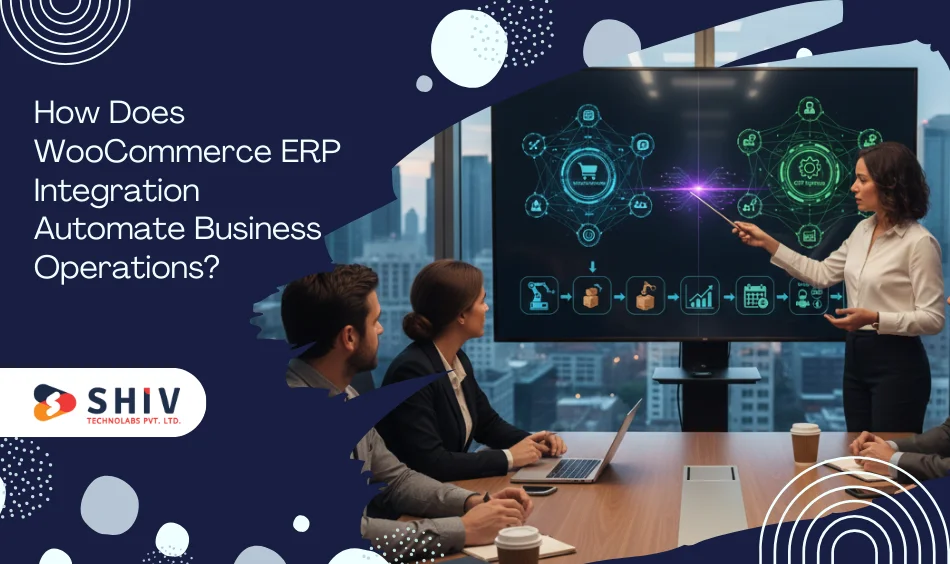
WooCommerce ERP integration converts disjointed workflows into automated data-driven procedures. The following are the fundamental automation focal areas that businesses gain immediate benefits from.
Order Syncing and Status Updates
WooCommerce orders are sent to the ERP system in real time. This eliminates manual order entry and ensures that fulfilment teams continuously work with accurate information.
- Real-time order development within ERP.
- Automated status updates to WooCommerce.
- Faster processing delays and fulfillment errors.
Most solutions for integrating WooCommerce ERP rely on these workflows.
Real-Time Stock Adjustments
Inventory updates in the ERP system automatically appear in WooCommerce. The store is updated immediately when stock is sold, received, or adjusted in the warehouse.
- Effective channel stock availability.
- Prevention of overselling
- Better coordination of the warehouse.
This is needed to scale WooCommerce store processes.
Automatic Invoice Generation
Within the ERP system, invoices are created when orders are confirmed. Economic information is not subject to redundancy.
- Faster billing cycles
- Real-time revenue tracking
- Greater accuracy in accounting.
Customer Record Management
WooCommerce customer data is synchronized with the ERP CRM modules, resulting in a single customer profile.
- Unified purchase history
- Better support and service processes.
- Improved customer segmentation.
Shipment Tracking Updates
The shipping data is sent back to WooCommerce to keep customers updated via the ERP or logistics systems.
- Auto-tracking of the tracking numbers.
- Reduced support inquiries
- Open communication of delivery.


When Should You Hire WooCommerce Integration Developers?
Multiple companies attempt to integrate ERP using plugins or simple connectors, only to encounter data discrepancies and poor performance. Professional assistance is necessary in the following situations.
Frequent Stock Mismatches
Overselling and cancellations occur when inventory levels differ between WooCommerce and the ERP. The developers use sound sync logic to ensure accuracy.
Delays in Manual Updates
If the teams use CSV imports or manual updates, integration developers will automate these processes to eliminate delays.
WooCommerce and ERP Data Conflicts
The discrepancies in product IDs, pricing policies, or tax logic mandate custom mapping, which highly skilled engineers do.
Increasing Order Volume Non-Automation
Manual processes are strained as order volume increases. Developers create scalable automation that enables expansion.
Multi-Warehouse / Multi-Store operation
Complex fulfillment logic documents demand intricate ERP logic and WooCommerce customization. For store builds and changes, review our eCommerce Development page.
Web Complexity Accounting and Taxes
The developers of ERP integration make sure that financial information will be synchronized with proper regional and tax regulations.
API Performance and Security Concerns
The API limits, security and error handling are handled professionally by experienced teams.
Long-term Maintenance and Support Requirement.
Integration is not something that is done once. Expert intervention is needed to update and monitor regularly. If you need a team extension, see Hire Dedicated WooCommerce Developers.
Professionally trained experts at Shiv Technolabs are familiar with ERP API, WooCommerce architecture, and testing. Hire WooCommerce integration developers from Shiv Technolabs to make complicated ERP installations straightforward and maintain your operations right and safe, as well as scalable. Collaborating with an established ERP integration firm like Shiv Technolabs for WooCommerce would reduce risk and ensure sustainability.
What Are the Key Steps in WooCommerce ERP Integration?
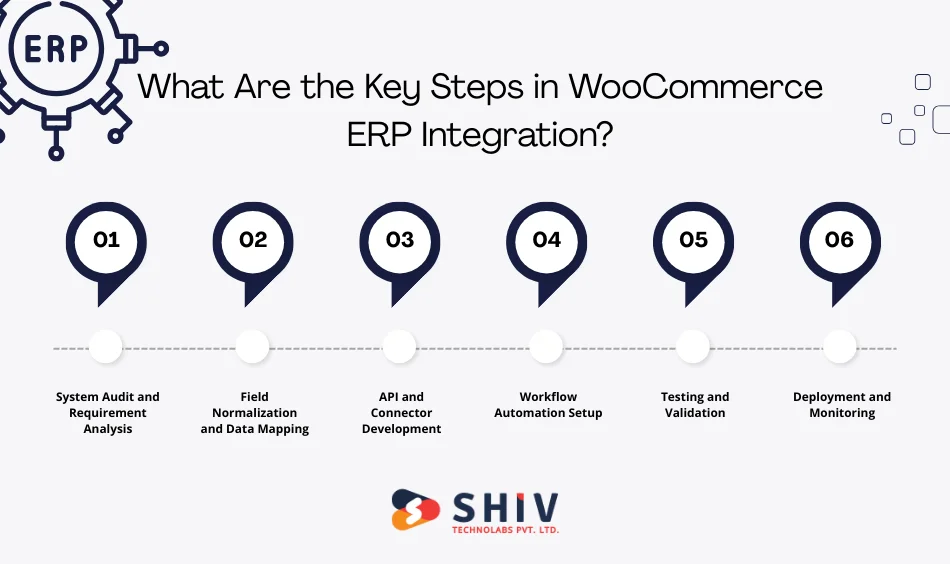
It is essential to have a structured method for integration. The fundamental implementation procedures are as shown below.
System Audit and Requirement Analysis
Developers review business processes, ERP features, and WooCommerce settings to clarify the scope of integration and data flow.
Field Normalization and Data Mapping
Product fields, SKUs, customer records, taxes, and pricing rules are mapped in order to maintain consistency in the exchange of data.
API and Connector Development
Custom APIs, middleware, or connectors are built to establish secure communication between systems.
Workflow Automation Setup
Business rules automate order sync, inventory updates, invoicing and customer data flows.
Testing and Validation
A lot of testing will provide accuracy, performance and error manageability in real conditions.
Deployment and Monitoring
The integration is implemented and fallback mechanisms and monitoring tools are in place.
These measures characterize robust WooCommerce ERP integration systems provided by a reliable ERP integration company.
Also Read: How Custom ERP Development Transforms eCommerce Businesses
What Are the Business Benefits of WooCommerce ERP Integration?
Some of the most essential benefits of WooCommerce ERP Integration are listed below:
Proper Inventory in Channels
Inventory that is driven by ERP maintains correct inventory levels on the stock at WooCommerce.
Faster Order Processing
Automation saves time in order handling and shortens the fulfillment cycle.
Better Cash Flow Tracking
Budgeting and forecasting are enhanced by real-time financial information.
Streamlined Multi-Store Operation
ERP and its centralized control simplify the management of several WooCommerce stores.
Improved Decision-Making Through Analytics
ERP analytics provides actionable insights into sales, inventory, and performance.
By implementing WooCommerce ERP integration, businesses gain a clear understanding of their operations and the ability to automate WooCommerce store operations.
Why Choose a Professional Team for WooCommerce ERP Integration?
WooCommerce ERP is not a plug-and-play operation. It links business-critical systems that process orders, inventory, payments, accounting, and customer information. The slightest error in reasoning, data mapping, or API processing may lead to inventory mismatches, incorrect financial statements, unsuccessful orders, and system outages. This is why a professional integration team should not only be employed but also be a key to long-term success.
Deep Understanding of WooCommerce and ERP Architecture
Professional teams are familiar with the data format and the events of WooCommerce and its communication with the REST APIs. Meanwhile, they are informed about how ERP systems ought to manage and address inventory logic, accounting regulations and transactional processes. This twofold knowledge makes data flow in the right direction across systems without disrupting the business processes.
- WooCommerce and ERP data mapping.
- Reasonable order, refund and cancellation procedure.
- Adequate synchronisation of inventory and accounting logic.
Custom Integration Instead of Generic Plugins
Ready-made plug-in products do not always work when companies expand or when the processes involved become more complex. Custom ERP integration logic that matches operations designed by a professional team.
- The product complex type includes product bundles and product variations.
- Pricing custom logic, tax and discount.
- Built-in integration with your fulfillment and accounting regulations.
This will avoid reworking and scaling problems in the future.
Secure, Stable and Scalable Implementation.
ERP integrations handle sensitive information, including customer data, financial data and payment details. Professional groups practice secure coding and maintain high performance standards.
- API encryption and authentication.
- Adequate error management and backoff.
- Scalability that serves as a growth facilitator for traffic and orders.
This makes the integration dependable during the high-selling seasons.
Detailed Testing and Quality Assurance.
Experienced integration teams do not roll out without testing. They guarantee that each workflow is validated before going live to avoid disrupting business.
- Test order sync under various conditions.
- Checking the accuracy of the inventory.
- Invoices verification and accounting.
- Performance testing and load testing.
This level of testing significantly reduces post-launch problems.
Continued Support, Supervising and Optimizing.
ERP integration cannot be a single setup. Systems change, APIs change and businesses change. Professional teams offer sustained support to ensure the smooth running of integrations.
- Sync failure and delay monitoring.
- WooCommerce or ERP version changes.
- Time optimization of performance.
This is long-term support that safeguards your investment in automation.
Reduced Risk-Faster Time-to-Market.
The teams of professionals adopt well-tested implementation frameworks, thereby reducing delays caused by trial-and-error.
- Well-defined project milestones and schedules.
- Minimized the Probability of operational risk in deployment.
- Reduced the time of transition between manual and automated systems.
The benefits of automation are realized in businesses in a shorter time without interfering with the operations.
Strategic Leadership Beyond Integration.
Seasoned teams do not just make connections between systems. They assist in streamlining workflows and suggest improved automation plans.
- Inventory management and optimization of fulfillment advice.
- Recent recommendations: reporting and analytics.
- Architecture planning (futurist architecture).
This tactical contribution introduces the long-term value that is not technical performance.
Contract an expert ERP integration firm to do WooCommerce customization, test, and support automation.
Conclusion
Integration of WooCommerce ERP is no longer an option for expanding eCommerce enterprises. It allows full automation of the end-to-end process, lessens the manual labor, and enhances the accuracy of inventory, orders, accounting, and management of customers. Professional integration provides long-term efficiency and scalability to businesses.
To explore more solutions and get expert help, check our WooCommerce development services for tailored integration support.
Shiv Technolabs specializes in building secure, scalable WooCommerce ERP integrations that align with real business workflows. Our expert team delivers custom automation backed by deep technical expertise and proven ERP development services.
Frequently Asked Questions (FAQs)
1. What is the primary objective of WooCommerce ERP integration?
It coordinates inventory, orders and accounting information to enable businesses to automate business and minimize human errors.
2. What ERP can be linked with WooCommerce?
There are popular alternatives such as Odoo, SAP, NetSuite and Microsoft Dynamics that can be used via APIs or middleware.
3. What is the time taken to integrate WooCommerce ERP?
Simple configurations can be completed in 2 to 3 weeks, whereas complicated customer integrations are more time-consuming.
4. Is ERP integration possible in accounting and invoicing?
Yes, the ERP system automatically generates invoices and processes financial records in real time.
5. Is ERP integration something that needs coding experience?
No, API development, testing, deployment and continuous support are done by professional developers.