Table of Contents
Developing a high-quality application is only half the battle; maintaining its integrity through rigorous testing and issue management is what defines long-term success. For any software development team, a Bug Tracking System (BTS) acts as the central nervous system, identifying, documenting, and resolving glitches before they reach the end-user.
This guide provides a deep dive into the mechanics of bug tracking and a step-by-step technical roadmap to build a custom solution tailored to your project.


What is a Bug Tracking System and Why Your App Needs One?
Building a software application is a journey of constant refinement. No matter how skilled a development team is, the presence of glitches—commonly known as bugs—is inevitable. A Bug Tracking System (BTS) is the central infrastructure that allows teams to identify, document, prioritize, and fix these issues systematically.
Without a structured system, feedback from testers and users often gets lost in long email chains or disorganized chat messages. This leads to recurring errors, frustrated developers, and eventually, a poor user experience.
A robust bug tracker does more than just list errors; it provides a historical record of code health, helps project managers allocate resources, and gives stakeholders a clear view of the software’s stability. In this guide, we will break down the mechanics of these systems and provide a technical blueprint for developing a custom solution tailored to your specific application requirements.
Core Components of a Functional Bug Tracking Workflow
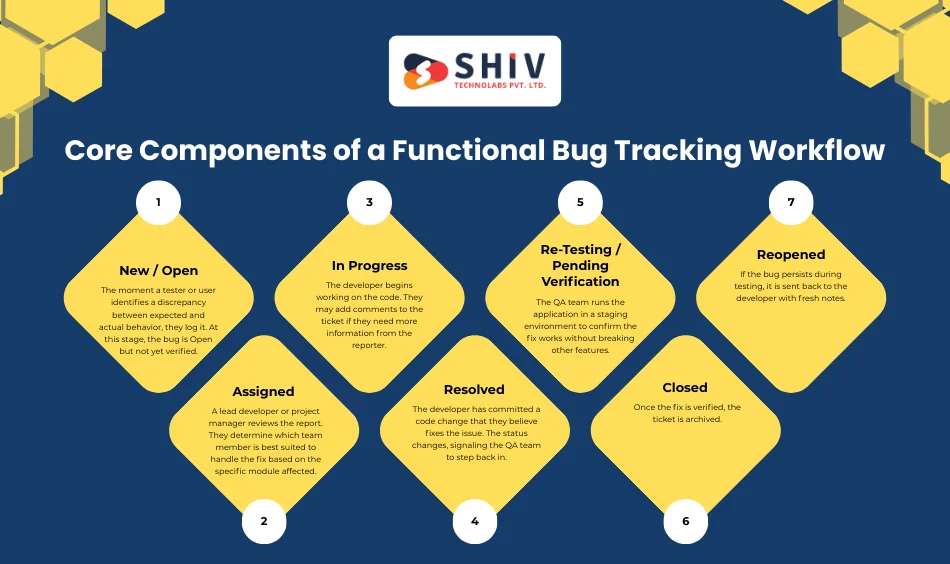
A defect is not just a static note; it is a task with a life cycle. To build an effective tracker, you must first understand the stages an issue moves through from discovery to resolution.
The Standard Bug Life Cycle
- New / Open: The moment a tester or user identifies a discrepancy between expected and actual behavior, they log it. At this stage, the bug is Open but not yet verified.
- Assigned: A lead developer or project manager reviews the report. They determine which team member is best suited to handle the fix based on the specific module affected.
- In Progress: The developer begins working on the code. They may add comments to the ticket if they need more information from the reporter.
- Resolved: The developer has committed a code change that they believe fixes the issue. The status changes, signaling the QA team to step back in.
- Re-Testing / Pending Verification: The QA team runs the application in a staging environment to confirm the fix works without breaking other features.
- Closed: Once the fix is verified, the ticket is archived.
- Reopened: If the bug persists during testing, it is sent back to the developer with fresh notes.
Importance of Metadata
Every entry in your system needs specific data points to be actionable. This includes the environment (iOS, Android, Chrome, Safari), the severity (how much it breaks the app), and the priority (how fast it needs a fix).


Essential Features Every Modern Bug Tracker Must Have
If you are planning to develop a custom solution for your organization, certain features are non-negotiable. These functionalities transform a simple list into a powerful management tool.
1. Granular Incident Reporting
A good report should leave no room for guesswork. Your system must allow users to attach screenshots, video recordings of the screen, and log files. Text descriptions should include Steps to Reproduce, Expected Result, and Actual Result.
2. Intelligent Prioritization and Severity Levels
Not all bugs are created equal. A typo on a login page is a low-priority UI issue; a database connection failure is a critical blocker. Your system should allow for clear categorization so developers know exactly what to tackle first when they start their day.
3. Role-Based Access Control (RBAC)
Security is paramount. You don’t want every user to have the ability to delete projects or modify system settings.
- Admins: Full control over users and project settings.
- Testers: Can create and verify bugs, but cannot change core code status.
- Developers: Can update the status of assigned tasks and add technical notes.
4. Real-Time Notifications
Timing is everything in software releases. When a Critical bug is logged, the relevant team members should receive an alert via email or internal communication tools like Slack. This prevents issues from sitting unaddressed for days.
5. Advanced Search and Filtering
As your project grows, you might end up with thousands of tickets. Finding a specific issue from six months ago requires robust filtering options based on dates, assignees, keywords, or specific app versions.
Technical Roadmap: How to Develop a Bug Tracking System
Developing a custom bug tracker requires a clear architectural plan. Here is a step-by-step guide to the development process.
Step 1: Defining the System Logic
Before writing any code, map out the logic. Will you allow Anonymous bug reporting? Will you support parent-child relationships where one large Epic bug contains several smaller sub-tasks? Decisions made here will dictate your database structure.
Step 2: Selecting the Tech Stack
For a modern web-based BTS, you need a stack that supports rapid data updates and high concurrency.
- Backend: Node.js with Express is an excellent choice for handling real-time updates. Alternatively, Python with FastAPI provides great performance and easy integration with data analysis libraries.
- Frontend: React.js or Vue.js allows you to build a dynamic dashboard where users can drag and drop tickets across status columns (Kanban style).
- Mobile Frontend: React Native for creating native iOS and Android versions of your tracker. By using React Native, you can share up to 80% of your business logic between the web and mobile platforms, significantly reducing development time.
- Database: PostgreSQL is a reliable choice. Its relational nature makes it easy to link users, projects, and bug reports while maintaining data integrity.
Step 3: Designing the Database Architecture
A well-structured database prevents data corruption. Consider the following relational model:
- Users Table: Stores credentials, profile photos, and role IDs.
- Projects Table: Contains project names, descriptions, and lists of team members.
- Tickets Table: This is the most complex table. It must store:
- Title and Description.
- Foreign keys linking to the Creator and Assignee.
- Enums for Status (Open, Closed, etc.) and Priority (Low, Med, High).
- Timestamps for Created At and Last Updated.
Step 4: Building the API
Your frontend will communicate with your database through a REST API. You will need endpoints such as:
GET /api/projects/:id/bugs>– To fetch all issues for a specific app.POST /api/bugs>– To submit a new report.PUT /api/bugs/:id/status>– To transition a bug through the life cycle.
Advanced Features: Adding Intelligence to Your System

To make your bug tracker stand out, consider adding features that move beyond simple data entry.
1. Automated Duplicate Detection
Large teams often report the same bug multiple times. Using basic natural language processing (NLP), your system can scan new titles and descriptions. If it finds a 90% match with an existing ticket, it can suggest merging the two, saving your project managers hours of manual work.
2. Smart Triage and Assignment
You can program the system to automatically assign bugs based on the tags used. If a bug is tagged with Payment Gateway, it can be routed immediately to the backend financial team. This reduces the ping-pong effect where tickets are passed around between different departments.
3. Integration with Git and CI/CD
Modern development happens in the terminal. Your custom BTS should integrate with version control systems. By using a specific syntax in a commit message (e.g., Fixes #102), the system can automatically move ticket #102 from In Progress to Resolved the moment the code is merged.
Best Practices for Implementing Bug Tracking in 2026
Building the tool is only the first step. You must also establish a culture of quality.
1. Shift-Left Testing
Don’t wait until the end of a sprint to log bugs. Encourage developers to use the system during the early stages of feature development. Finding a bug during the design or initial coding phase is significantly cheaper than fixing it after the app is live.
2. Standardized Bug Reporting Templates
Consistency is key. If one person writes The button doesn’t work and another writes a 5-step reproduction guide with logs, the developer will always prioritize the second one. Force a template within your system that requires specific fields to be filled before a ticket can be saved.
3. Clear Communication Channels
Use the comments section within the bug tracker for all technical discussions. Avoid discussing specific fixes in private messages. When the conversation stays within the ticket, anyone who joins the project later can understand the reasoning behind a particular fix.
4. Regular Bug Bashes
Once a month, have the entire team (including non-technical staff) spend an hour trying to break the application. This helps surface edge cases that automated tests might miss. Use the BTS to log everything found during these sessions.
The Strategic Value of a Custom Solution

While there are many off-the-shelf bug tracking tools available, they often come with high monthly fees per user or rigid workflows that don’t fit your team’s unique style. Developing your own system provides several advantages:
- Data Sovereignty: Your sensitive bug data and source code references stay on your own servers.
- Custom Workflows: You can build exactly the stages you need, whether you follow Agile, Scrum, or Waterfall.
- Cost Efficiency: For large organizations, a one-time development cost is often cheaper than paying thousands of dollars in annual subscriptions.
Building Better Software with Shiv Technolabs
At Shiv Technolabs, we understand that a bug tracking system is more than just a list of errors; it is a tool for professional growth and product excellence. By documenting every hurdle and fix, your team builds a knowledge base that prevents the same mistakes from happening twice.
Whether you are looking to build a custom internal tool to manage your development workflow or you need a partner to build a high-performing application from the ground up,
we provide the technical expertise to turn your vision into a reality. Our approach focuses on clean code, scalable architecture, and user-centric design.
By investing in a proper bug tracking strategy today, you ensure that your application remains competitive, reliable, and user-friendly in an ever-changing digital environment. Quality is not an accident; it is the result of systematic effort and the right tools.
Conclusion
A Bug Tracking System is the backbone of a successful software lifecycle. It transforms the chaotic process of identifying errors into a structured, manageable workflow. By centralizing communication, prioritizing tasks, and maintaining a historical record of fixes, you allow your development team to focus on what they do best: building great features.
Developing a custom tracker provides your organization with a tool that fits your specific needs, rather than forcing your team to adapt to rigid third-party software. With the right tech stack and a well-planned database, you can create a system that grows alongside your application, ensuring high-quality releases and a satisfied user base. At Shiv Technolabs, we help businesses build these critical internal infrastructures to maintain a competitive edge in software quality. Contact us today for more info!
Frequently Asked Questions
1. What is the difference between a bug and a feature request in a tracking system?
A bug is a flaw or error in the code that causes the application to behave in an unintended way or crash. A feature request is a suggestion for a new functionality that does not currently exist. Most tracking systems allow you to categorize these separately to help project managers plan future updates versus immediate fixes.
2. Is it better to build a custom bug tracker or use an existing tool?
Existing tools are great for quick setups. However, building a custom system is better if you have unique security requirements, need specific integrations with your own hardware or software, or want to avoid expensive monthly per-user licensing fees as your team expands.
3. How does a Bug Tracking System improve team productivity?
It removes the ambiguity of what I should work on next. By having a prioritized list of tickets, developers spend less time searching for information and more time writing code. It also prevents the forgotten bug scenario, where critical issues are missed because they weren’t documented in a central location.
4. Which team members should have access to the bug tracker?
Typically, the entire product team needs access. This includes:
- QA Testers: To log and verify issues.
- Developers: To view assignments and provide technical updates.
- Project Managers: To monitor progress and deadlines.
- Stakeholders/Clients: Often given Read-Only access to see the current stability of the project.
5. Can a Bug Tracking System be integrated with other tools?
Yes. Modern systems are often linked with version control platforms like GitHub or GitLab, communication tools like Slack, and CI/CD pipelines. This allows for automated updates—for example, moving a bug to Resolved automatically when a developer pushes a code fix.