Table of Contents
A single AI agent can answer questions, call tools, and complete defined tasks. A multi-agent system creates a different engineering challenge.
Several agents may plan, delegate, retrieve data, call APIs, share state, validate outputs, and request human approval. Each additional agent adds more compute, tokens, permissions, handoffs, and possible failure points.
That is why multi-agent cloud architecture matters. The architecture determines how agents run, communicate, access tools, share memory, recover from failures, and prove business value. Organizations building AI agent development solutions should therefore treat cloud architecture as part of the agent design from the beginning.
Gartner predicts that more than 40% of agentic AI projects could be canceled by the end of 2027. It cites escalating costs, unclear business value, and inadequate risk controls among the main reasons.
Quick Answer: Multi-agent cloud architecture is the production infrastructure used to run several AI agents reliably at scale. It combines agent runtimes, orchestration, shared state, memory, tool access, MCP, A2A communication, workflow engines, identity, governance, observability, cost controls, and human approval.
What Is Multi-Agent Cloud Architecture?
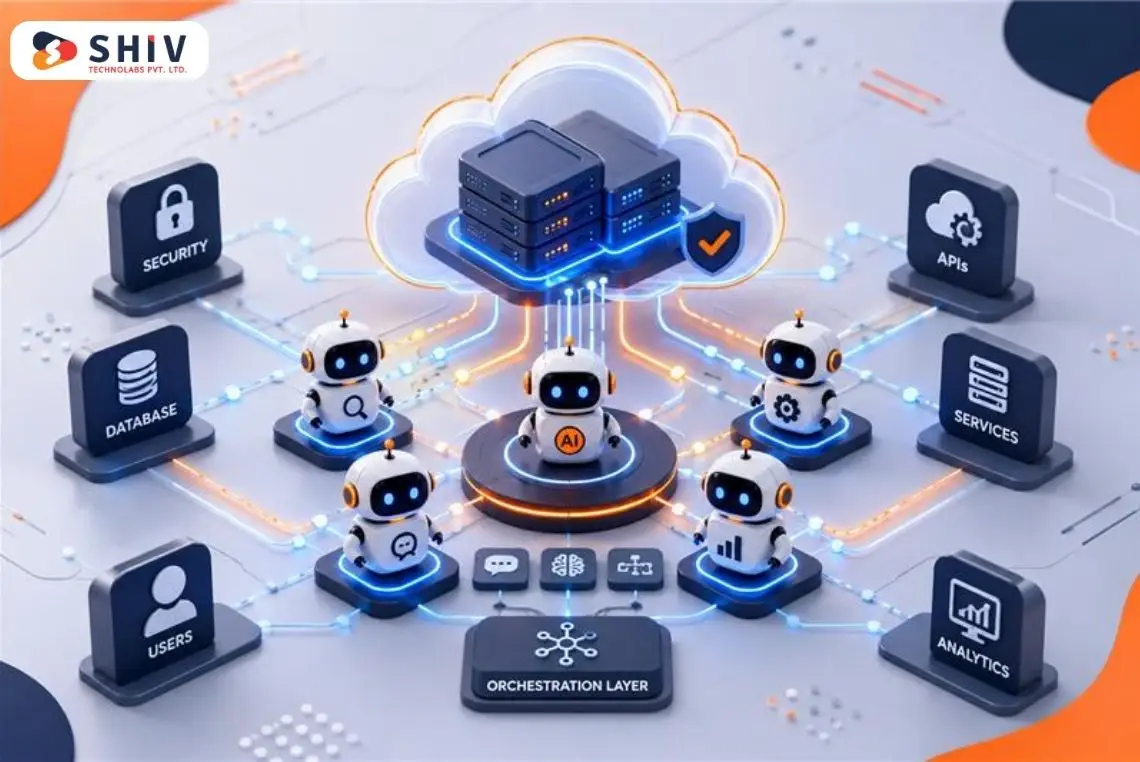
Multi-agent cloud architecture is a distributed system design for running multiple specialized AI agents under shared operational controls. It separates agent roles while connecting their runtime, memory, tools, communication, monitoring, and governance.
Google Cloud describes multi-agent systems as architectures where specialized agents divide complex processes into discrete tasks and work together under coordination.
- Specialized agents: Each agent has a defined role.
- Task delegation: Agents can pass work to other agents.
- Shared infrastructure: Cloud services manage memory, tools, and communication.
- Controlled access: Each agent can have specific permissions.
- Monitoring: Logs and tracing help track agent activity.
- Scalability: Cloud infrastructure supports more users and longer workflows.
AWS notes that a single agent request can trigger multiple inference calls, tool invocations, memory retrievals, and inter-agent communications. Each adds latency, cost, and another failure surface.
| Single Agent Setup | Multi-Agent Cloud Architecture |
| One agent handles most tasks | Specialized agents divide responsibilities |
| Simple tool calling | Governed tool access |
| Limited memory scope | Shared and isolated memory layers |
| Easier local debugging | Distributed tracing becomes important |
| Lower cost variance | Costs can multiply through delegation |
| Simpler permissions | Agent-level identities are needed |
Why Do Multi-Agent AI Projects Fail Before They Scale?
Many agentic AI projects do not fail because models cannot produce useful text. They fail because the surrounding architecture cannot control cost, business value, permissions, context, and accountability.
Cost Grows Faster Than Expected
Multi-agent workflows can multiply inference calls quickly. One user request may trigger a planner, several worker agents, an evaluator, retries, retrieval calls, and tool execution. If every agent uses a large model and receives long context, the cost per completed task can rise much faster than expected. The architecture needs model routing, token budgets, caching, termination rules, and concurrency limits.
Business Value Is Not Measured Clearly
Teams often measure prompts, tokens, and response quality while missing the business outcome. A system may look technically impressive but still fail to reduce workload, shorten processing time, improve accuracy, or lower operating cost. Each agent workflow needs clear success criteria tied to a measurable business result.
Risk Controls Are Added Too Late
Autonomous agents can move from answering questions to taking actions. That may include changing records, creating tickets, sending messages, approving transactions, or calling production APIs. Security cannot be added after the workflow is already autonomous. Gartner reported in May 2026 that governance failures can emerge when organizations do not distinguish between agent autonomy and permitted scope.
Tool Access Becomes Too Broad
Giving every agent access to every business tool makes development easier initially. It also creates unnecessary risk. A reporting agent may need read access to a database but should not automatically receive write permission to an ERP system. Permissions should follow the task, not the convenience of the architecture.
Context Conflicts Appear Across Agents
Separate agents may retrieve different versions of the same business definition. One may treat an “active customer” as someone with an order during 90 days. Another may use 12 months. Both agents can produce individually reasonable answers while creating an incorrect combined result.
Expert Insight: Adding more agents can increase capability, but it also increases coordination overhead. Every new agent should justify its additional cost and operational complexity.
What Are the Six Core Layers of Multi-Agent Cloud Architecture?
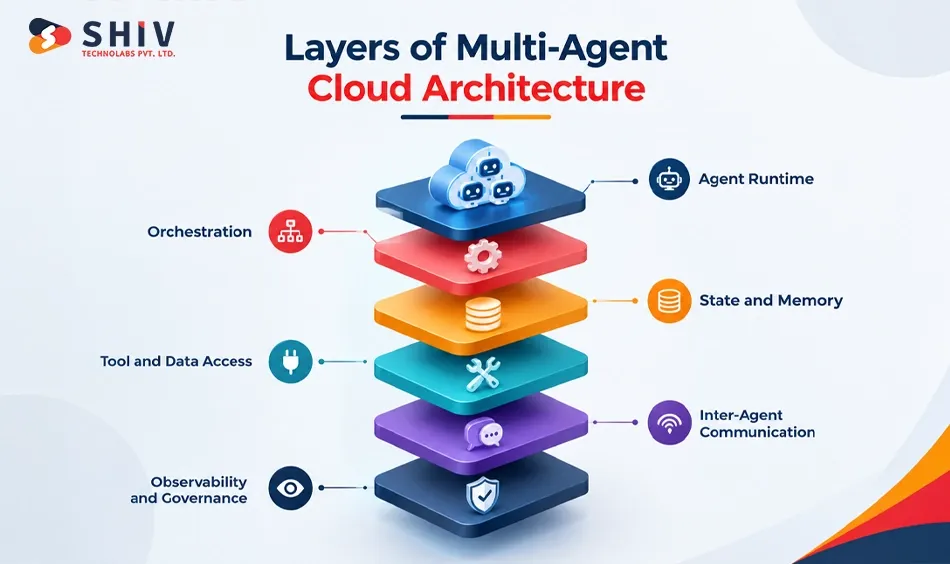
A scalable agentic AI architecture usually needs six connected layers: runtime, orchestration, state, tools, communication, and observability with governance. These layers separate responsibilities so teams can control each part independently.
Agent Runtime Layer
The runtime determines where each agent executes. It controls compute, process isolation, time limits, scaling behavior, networking, and access to secrets. The runtime may use serverless functions, containers, Kubernetes, or a managed agent platform.
Orchestration Layer
The orchestration layer decides what runs next. It assigns work, coordinates agents, manages retries, tracks workflow state, and determines when a task should stop. Without orchestration, independent agents can duplicate work or leave workflows partially completed.
State and Memory Layer
Agents need different kinds of memory. Session state stores temporary task context. Long-term memory may store useful historical information. Shared state carries information needed by several agents, while private memory keeps agent-specific context isolated.
Tool and Data Access Layer
Agents become operational when they can interact with business systems. The tool layer controls access to APIs, files, databases, SaaS platforms, search systems, and internal services. This layer should apply authentication, authorization, quotas, schemas, and logs.
Inter-Agent Communication Layer
Agents need a structured way to discover and communicate with one another. Communication may be implemented internally through orchestration or through standards such as Agent2Agent. The goal is to make delegation explicit and traceable.
Observability and Governance Layer
Every prompt, model call, memory access, agent handoff, and tool call should create useful telemetry. AWS recommends end-to-end observability across reasoning steps, tool usage, memory access, and agent handoffs.
| Layer | Main Responsibility | Failure Without It |
| Runtime | Execute agents safely | Uncontrolled processes |
| Orchestration | Route and coordinate work | Partial workflows |
| State and memory | Maintain context | Contradictory outputs |
| Tool access | Connect business systems | Uncontrolled actions |
| Agent communication | Coordinate agents | Integration complexity |
| Observability and governance | Trace and control behavior | Poor accountability |
Reference flow:
User → Application → API Gateway → Orchestrator → Supervisor → Worker Agents → Tool Gateway → Data/APIs → Evaluator → Approval → Response
Where Should AI Agents Run in the Cloud?
The right AI agent runtime depends on task duration, concurrency, customization, isolation, and operational requirements. No single runtime is ideal for every agent.
Serverless Runtime for Short Event-Based Agents
Serverless functions work well for short, stateless tasks triggered by events. Examples include classifying an incoming request, enriching a record, or invoking a simple tool. They can scale quickly and reduce infrastructure management. Their limits become visible with long-running reasoning, persistent connections, large dependencies, or complex state.
Containers for Custom Agent Services
Containers provide more control over libraries, runtimes, networking, and execution behavior. They suit agents that behave like independent application services. Containers also make it easier to keep dependencies consistent between development and production. The trade-off is greater operational ownership.
Kubernetes for Large Agent Systems
Kubernetes becomes useful when many agent services require controlled scheduling, scaling, service discovery, networking, and isolation. It can support heterogeneous workloads and custom infrastructure. However, Kubernetes adds platform complexity and should not be adopted simply because the system uses AI agents.
Managed Agent Platforms for Enterprise Teams
Cloud providers increasingly offer managed runtimes for agent workloads. These platforms can reduce work around runtime management, memory, evaluation, monitoring, and integration. The trade-off is stronger dependence on one cloud platform and its current capabilities.
Hybrid Runtime for Mixed Agent Workloads
Large systems often combine several runtime types. Short event handlers may use serverless functions. Long-running agents may use containers. Sensitive internal workflows may run inside private Kubernetes environments.
Expert Insight: Use serverless for short agent tasks, containers for custom services, Kubernetes for larger distributed workloads, and managed platforms when operational simplicity matters.
Which Multi-Agent Orchestration Pattern Should You Use?
The right orchestration pattern depends on workflow structure, agent count, latency needs, and control requirements. The pattern should match the work instead of forcing every problem into a supervisor model.
Sequential Pipeline Pattern
A sequential pipeline sends the output of one agent to the next. This works well when tasks naturally follow a fixed order. For example, one agent may extract information, another validate it, and a third prepare a final response. The limitation is latency because later steps wait for earlier ones.
Supervisor and Worker Pattern
A supervisor receives the main task and assigns work to specialized agents. This pattern is easy to reason about and suits many enterprise workflows. However, the supervisor can become a bottleneck as agent count, context, or concurrency grows.
Hierarchical Delegation Pattern
Large agent systems can use several levels of supervisors. A top-level planner may delegate work to domain supervisors, which then coordinate specialized workers. This can support larger workflows but makes accountability and tracing more difficult.
Event-Driven Coordination Pattern
Agents can react to events instead of being called through one central request path. This works well for asynchronous processes spanning several systems. The trade-off is traceability because one business workflow may cross queues, services, agents, and time boundaries.
Swarm or Peer-to-Peer Pattern
Peer agents can coordinate without one permanent central supervisor. This may help with collaborative problem solving or exploratory tasks. It also makes governance, termination rules, and ownership harder to control.
| Pattern | Suitable Work | Scaling Concern |
| Sequential | Ordered processing | Latency |
| Supervisor-worker | Delegated business tasks | Supervisor bottleneck |
| Hierarchical | Large workflows | Accountability |
| Event-driven | Async processes | Trace complexity |
| Peer-to-peer | Collaborative reasoning | Governance |
Expert Insight: The simplest pattern that completes the business workflow is usually the better starting point.
What Is the Difference Between MCP and A2A?
MCP governs how agents connect to tools and data. A2A governs how agents communicate and coordinate with other agents. They address different integration problems and can work together.
| Comparison Area | MCP | A2A | Business / Architecture Value |
| Primary role | Connects agents to tools and data | Connects agents to other agents | Separates resource access from agent collaboration |
| Main interaction | Agent ↔ API, database, file, app | Agent ↔ Agent | Creates clearer communication boundaries |
| Best use case | Data retrieval and tool execution | Delegation and task coordination | Helps teams assign the right protocol to the right job |
| Discovery model | Exposes available tools and resources | Uses Agent Cards for capabilities | Reduces hard-coded integrations |
| Integration benefit | Standardizes tool access | Standardizes agent communication | Lowers custom connector effort |
| Scaling value | Makes tool connections easier to manage | Supports coordination across specialized agents | Helps multi-agent systems grow with less integration complexity |
| Governance need | Permissions, authentication, tool controls | Agent identity, delegation rules, policy checks | Keeps access and autonomy controlled |
| Typical example | Agent reads CRM data through MCP | Agent sends a compliance task through A2A | Supports end-to-end enterprise workflows |
| Can they work together? | Yes | Yes | MCP handles resources while A2A handles collaboration |
How MCP and A2A Work Together
An AI agent might use MCP to retrieve customer data from a CRM, then use A2A to delegate a compliance check to another specialized agent. MCP handles resource access, while A2A handles agent collaboration.
How Should AI Agents Access Tools and APIs?
Tool access is where an AI agent moves from generating information to taking action. That transition requires stricter controls than ordinary model inference.
Tool Registry for Approved Actions
Maintain a registry of tools that agents are permitted to call. Each entry should define its purpose, parameters, permissions, expected outputs, and risk level. Agents should not dynamically access arbitrary internal endpoints.
API Gateway for Access Control
An API gateway can centralize authentication, rate limits, schemas, and logging. It also prevents every agent from managing access rules independently. For custom integrations, custom API development services can support controlled interfaces between agents and enterprise systems.
MCP Servers for Standardized Tool Access
MCP servers can expose approved resources and tools through a common interface. This can reduce framework-specific integration work while keeping tool access explicit.
Rate Limits, Quotas, and Timeouts
Autonomous agents can retry actions repeatedly. Set limits around request counts, concurrency, execution duration, and usage budgets. These controls prevent one faulty workflow from consuming excessive capacity.
Human Approval for High-Risk Actions
Some actions should require approval before execution. Examples include refunds, deleting records, creating financial commitments, changing permissions, or sending sensitive communications. The approval point should be part of the workflow rather than an informal operating procedure.
Audit Logs for Every Tool Call
Record who or what initiated each action. Useful logs include the agent identity, tool, parameters, result, timestamp, workflow, and approving user where applicable.
Consider: Tool access should be designed like production API access, not like a chatbot plugin list.
How Do You Control Multi-Agent AI Costs?
Multi-agent systems can become expensive because each delegation may add inference, context, retrieval, tool calls, evaluation, and retries. Cost control should therefore exist inside the architecture.
Route Tasks to the Right Model
Not every step requires the most capable model. Use stronger models for complex planning or judgment and smaller models for classification, routing, extraction, or formatting. AWS recommends matching model class, context length, and reasoning depth to task complexity.
Use Smaller Models for Simple Steps
A router deciding between three known destinations may not need the same model as a complex analytical agent. Separating task difficulty helps reduce unnecessary inference cost. It can also improve latency.
Cache Repeated Prompts and Context
Agents often retrieve the same policies, schemas, or instructions repeatedly. Caching stable prompts, retrieval results, and tool responses can reduce repeated computation. AWS explicitly recommends reuse before recomputation in its Agentic AI cost guidance.
Set Token Budgets by Agent and Workflow
Define token, iteration, and execution limits. A planner should not be allowed to delegate indefinitely. Budgets can exist at the agent, session, workflow, tenant, or application level.
Add Concurrency Limits
A sudden spike in requests can multiply across worker agents. Concurrency caps protect model endpoints, APIs, databases, and financial budgets from one workload burst.
Measure Cost Per Completed Task
Cost per million tokens helps with procurement, but cost per completed business task is more valuable when making architecture decisions. Track the total model, retrieval, tool, retry, and infrastructure cost required to finish one workflow.
Do You Know? The cheapest model is not always the cheapest workflow. A weak model that creates repeated retries can cost more overall.
How Should Identity, Isolation, and Governance Work?
Every production agent should operate as an identifiable principal with a defined purpose and narrow authority. Security should follow the agent’s role.
Agent Identity as a First-Class Principal
Do not treat all agents as one application user. Give agents identifiable service identities where the platform allows it. This makes permissions, logs, and incident analysis more precise.
Least-Privilege Access by Agent Role
Each agent should receive only the access required for its responsibilities. A research agent may need read access, and a billing agent may require narrowly scoped transaction permissions. These permission sets should not be interchangeable.
Tenant and Session Isolation
Multi-tenant systems must separate customer data. Tenant identity should travel through retrieval, memory, tool calls, logs, and workflows. Session boundaries should also prevent unrelated users from sharing context.
Sandboxed Execution for Risky Tasks
Agents that run generated code or manipulate files should execute inside restricted environments. Sandboxing limits access to the host system and reduces the blast radius of unsafe execution.
Human Approval for Irreversible Actions
High-impact actions should require an explicit decision from an authorized user. This includes financial transactions, deleting data, modifying permissions, or sending regulated communications.
Full Audit Trails for Decisions and Actions
A useful audit trail should connect the request, agent decision, model call, retrieved context, tool action, and final outcome. AWS’s Agentic AI Lens emphasizes agent identities, tool security, and end-to-end traceability.
Expert Insight: Autonomy and permission are different concepts. An agent can reason independently while still having tightly restricted authority.
What Should You Monitor in Multi-Agent AI Systems?
Traditional infrastructure metrics are not enough. Teams also need visibility into agent reasoning paths, tool calls, handoffs, quality, cost, and business outcomes.
Distributed Tracing Across Agent Workflows
One user request may cross multiple agents and systems. Use a shared trace identifier so teams can reconstruct the entire path. Without distributed tracing, one workflow can appear as several unrelated logs.
Prompt, Tool, and Model Call Tracking
Record which prompt template, model version, tool, and retrieval source supported each step. This helps identify whether a failure came from reasoning, data, or execution. Sensitive data still needs appropriate logging controls.
Evaluation Harness and Regression Suite
Agent changes can alter behavior unexpectedly. Maintain representative test tasks and expected outcomes. Run them when prompts, models, tools, retrieval logic, or orchestration rules change.
Outcome Metrics and Business KPIs
Measure whether the business task succeeded. Examples include resolved support cases, approved invoices, completed onboarding workflows, processing time, or human corrections required. AWS recommends measurable success criteria tied to the agent’s business purpose.
Cost, Latency, and Token Monitoring
Track cost and latency at the agent and workflow level. A total monthly cloud bill does not show which agent creates unnecessary spend.
Failure Replay and Root Cause Review
Store enough execution metadata to reproduce failures safely. Failed tasks should feed new regression scenarios. This allows operations data to improve future agent behavior.
Expert Insights: AgentOps should track prompts, models, tools, memory access, agent handoffs, latency, token use, task outcomes, failures, and human interventions.
What Are the Steps From Multi-Agent Prototype to Production?
Do not begin by building a large agent hierarchy. Start with one measurable workflow and increase complexity only when evidence supports it.
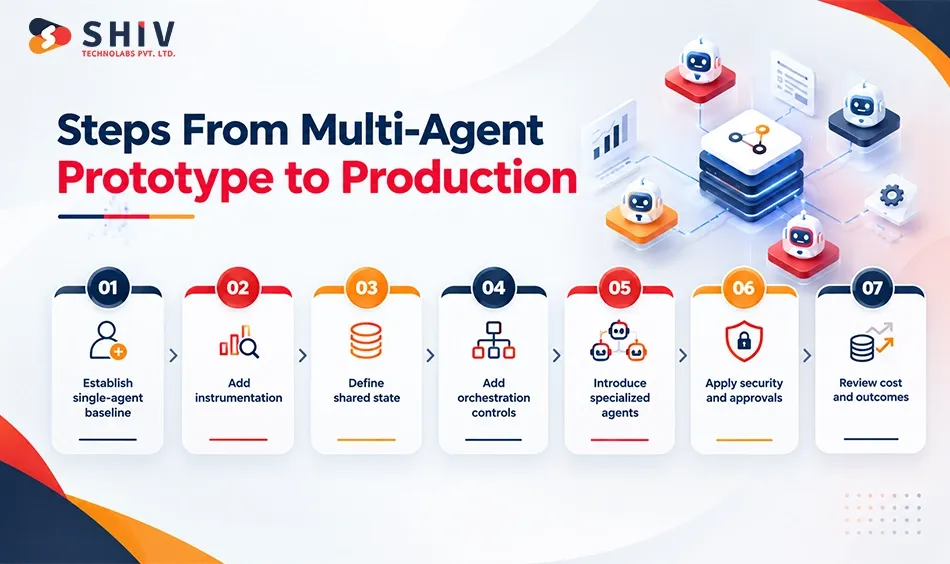
Start With a Single-Agent Baseline
Build the simplest version first. Measure task quality, latency, cost, failure rate, and human effort. If the workflow requires greater specialization, parallel execution, or task separation, single-agent versus multi-agent architecture becomes an important consideration. The choice should be based on the workflow’s needs rather than adding agents by default.
Add Instrumentation Before More Agents
Add tracing, evaluation, cost measurement, and outcome tracking early. Without this data, later complexity becomes hard to assess.
Define Shared State and Business Terms
Identify which definitions, policies, and records several agents need. Place authoritative definitions behind a governed shared layer.
Add Orchestration With Cost Limits
Introduce routing, retries, timeouts, iteration limits, and concurrency caps before expanding the system. These controls prevent multi-agent workflows from becoming unbounded.
Add Agents Against a Regression Suite
Introduce a second agent only when specialization improves the workflow. Run existing test scenarios after each architectural change.
Apply Identity, Permissions, and Approval Gates
Give every new agent a defined identity and access scope. Identify which actions require human approval before production release.
Review Cost Per Completed Task
After deployment, compare the total workflow cost with the original baseline. Expand only when additional agents improve quality, speed, automation, or another defined business outcome.
Expert Insight: A second agent should solve a measurable limitation in the first architecture. “More autonomous” is not enough justification by itself.
What Should Be Included in a Multi-Agent Architecture Checklist?
A production architecture review should cover runtime, orchestration, memory, retrieval, tools, communication, security, observability, reliability, and cost.
Runtime and Scaling Checklist
Confirm where agents execute and how instances scale. Document resource limits, timeouts, concurrency, networking, and failure isolation.
Orchestration and Workflow Checklist
Identify the coordination pattern. Define retries, termination rules, checkpoints, approvals, and recovery behavior.
Memory and RAG Checklist
Separate session, long-term, tenant, and shared memory. Define retrieval permissions, freshness rules, and authoritative data sources.
Tool Access and API Checklist
List approved tools and required permissions. Apply authentication, quotas, schemas, and audit logs.
Security and Governance Checklist
Define agent identities, tenant boundaries, secrets handling, autonomy limits, and human approval rules. Permissions should match each agent’s exact responsibility.
Observability and Cost Checklist
Trace complete workflows. Measure latency, model use, failures, token consumption, cost per task, and business outcomes.
What Multi-Agent Architecture Mistakes Should Teams Avoid?
Production failures often begin with architectural shortcuts made during the prototype phase.
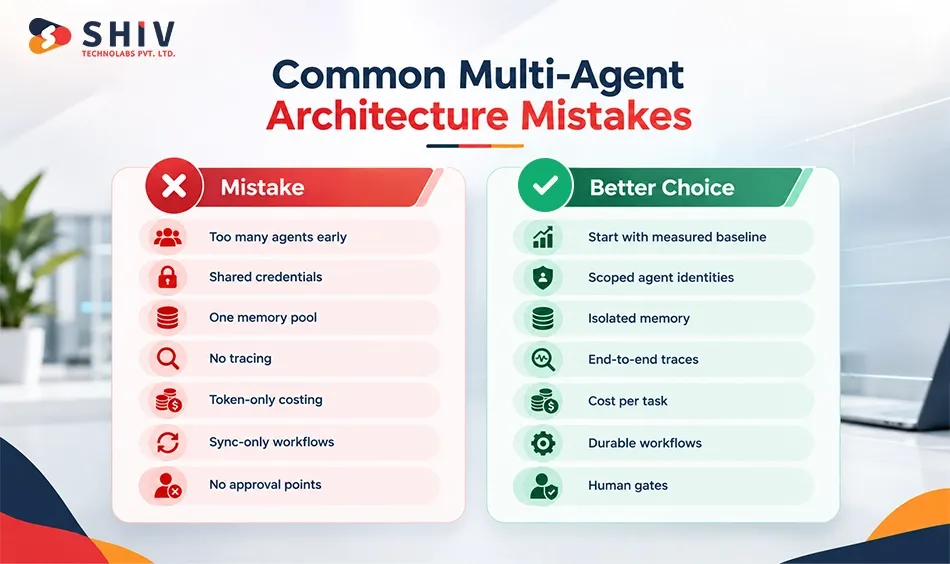
Adding Agents Before Instrumentation
Without baseline metrics, teams cannot tell whether additional agents improved the system. Measure the first agent before expanding.
Giving Every Agent the Same Tool Access
Shared credentials remove useful security boundaries. Create separate identities and permissions by role.
Using Shared Memory Without Tenant Boundaries
One shared memory layer can expose context across customers or workflows. Partition memory according to tenant, user, session, and sensitivity.
Skipping Distributed Tracing
Logs from individual services cannot explain a multi-agent workflow. Use one trace across the complete execution path.
Measuring Token Cost Instead of Task Cost
Token cost is only one component. A useful figure includes models, retrieval, tools, retries, infrastructure, and human review.
Running Long Tasks Through Synchronous Chat Only
Long workflows need durable state. Queues, events, and workflow engines offer better recovery than one persistent request.
Building Without Human Approval Gates
Autonomous execution should stop before actions with high financial, legal, or operational impact. Define approval boundaries before production launch.
How Can Shiv Technolabs Support Multi-Agent Cloud Architecture?
Shiv Technolabs helps businesses move multi-agent AI from early prototypes into structured production systems. We start by reviewing workflows, agent roles, integration needs, security boundaries, and where human approval should remain. Our AI development services support cloud-based AI systems, enterprise applications, and custom agent workflows.
Our team can design orchestration, routing, shared memory, retrieval, evaluation, and tool access around your existing environment. Agents can also connect with ERP, CRM, SaaS platforms, databases, and internal APIs through controlled interfaces with clear permissions and access rules.
After launch, teams can track task success, latency, failures, operating costs, and human intervention. This helps decide when to add more autonomy or agents. Businesses with wider platform needs can also use custom software development services when agent workflows must become part of larger enterprise systems.
Final Verdict: Multi-Agent AI Needs Governed Cloud Architecture
Scaling multi-agent AI is not mainly about adding more agents. Each agent needs a clear role, approved tools, reliable context, and defined limits so workflows do not become duplicated, inconsistent, or difficult to control.
Shared memory, permissions, and data freshness also need careful management. At the same time, teams should track model calls, retries, API usage, and infrastructure costs against completed business tasks rather than measuring usage alone. Observability brings these parts together. Teams should be able to see what each agent did, where failures occurred, and whether the final outcome was useful.
Frequently Asked Questions
What Is Multi-Agent Cloud Architecture?
Multi-agent cloud architecture connects specialized AI agents through shared infrastructure, tools, memory, orchestration, and security controls. It supports coordinated workflows across cloud environments.
Why Do Multi-Agent AI Systems Need Orchestration?
Orchestration controls how agents communicate, hand off tasks, access tools, and recover from failures. It helps prevent duplicated work and inconsistent outcomes.
How Does Shared Memory Work in Multi-Agent Systems?
Shared memory gives agents access to relevant context, task history, and business data. Access rules and freshness checks help keep information accurate.
What Is the Role of MCP in Multi-Agent Architecture?
MCP helps AI agents connect with tools, APIs, databases, and enterprise systems through a standard interface. It supports controlled access to external resources.
How Do You Secure Multi-Agent AI Systems?
Security requires agent-level permissions, authentication, secrets management, approval points, audit logs, and restricted access to sensitive tools or business data.
How Can Multi-Agent AI Costs Be Controlled?
Teams can track model calls, retries, API usage, infrastructure spending, and completed tasks. Cost controls should focus on business outcomes, not usage alone.
How Do You Monitor AI Agents in Production?
Production monitoring should track task completion, latency, tool calls, failures, costs, and human interventions. Tracing helps identify where workflow problems occur.
When Should a Business Use Multi-Agent AI?
Multi-agent AI fits workflows where several specialized tasks require coordination, tool access, or independent decision paths. Simple workflows may not need multiple agents.