Table of Contents
Customer feedback is the fastest way to learn what your MVP should become. But feedback can also turn into noise if it is not handled with a clear method. Some users report bugs, some ask for features, and some are confused about how your product works. If you treat all feedback the same, you waste time and ship the wrong changes.
In this guide, you’ll learn a practical way to bring customer feedback into your MVP without losing speed. We’ll cover how to spot the feedback that matters, how to sort it, how to decide what to build first, and how to ship updates safely. You’ll also see how to reply to users so they feel heard, and how to track whether a change worked.

Why Customer Feedback Matters More in an MVP Than in a Full Product?
An MVP is built to learn. You don’t have every feature. You don’t have every workflow. And you usually don’t have time to guess. Customer feedback reduces guesswork and helps you focus on what creates real value.
Here’s why feedback is extra important at the MVP stage:
- Your scope is small, so every change must count.
- Small issues feel bigger because users have fewer alternate paths.
- Your product message is still forming, so confusion shows up early in feedback.
- Early users are closer to the problem, so their comments often reveal what your team can’t see from inside.
# The feedback that matters most in an MVP
Not all feedback has the same weight. In an MVP, prioritize feedback that blocks progress or repeats across users.
1) “It’s broken” feedback (bugs and failures)
These include crashes, payment issues, login problems, broken forms, slow screens, or data not saving. If users can’t complete the main action, nothing else matters.
2) “I got stuck” feedback (UX friction)
These are moments where users don’t know what to do next, can’t find a button, or keep making the same mistake. This feedback often points to unclear steps, confusing labels, or missing guidance.
3) “I expected X” feedback (missing basics)
Sometimes users don’t ask for a big feature. They expect something simple like search, filters, export, or a profile edit. When many users expect the same basic capability, it can become a priority.
4) “I want this feature” feedback (requests)
Feature requests are useful, but many are personal preferences. Treat them as signals, not orders. You’ll later check how many users want it, how much it helps the core goal, and how hard it is to build.
5) “I don’t get it” feedback (value confusion)
This feedback is gold. If users don’t understand why your product exists or how it helps them, adding features won’t fix it. You may need better onboarding, clearer copy, or a simpler first-time flow.
Also Read: What Comes After MVP?
Set Up Your Feedback System Before You Collect More Feedback
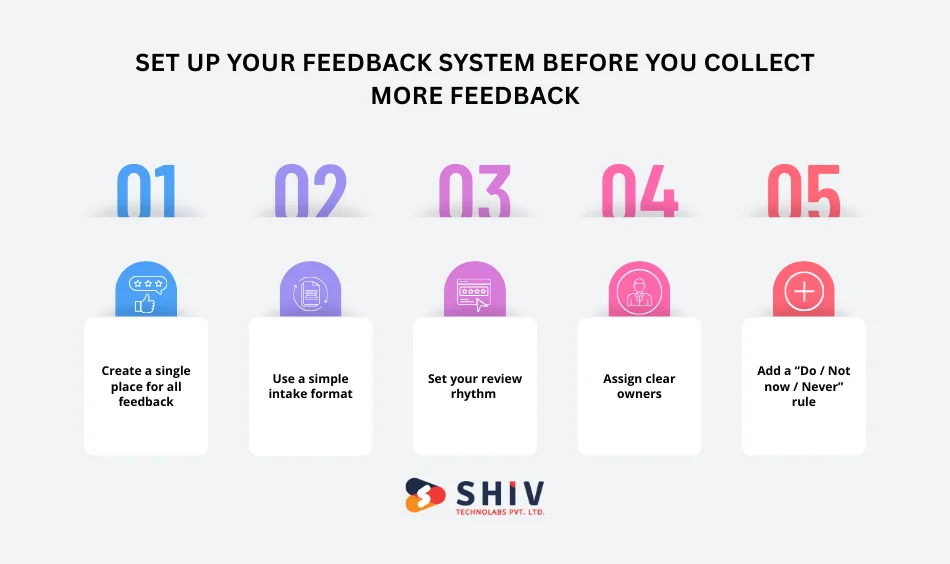
If feedback lives in scattered places, you can’t act fast. The best teams keep feedback in one place, review it on a fixed rhythm, and make decisions in a repeatable way.
1. Create a single place for all feedback
Pick one “home” for feedback (a board, tracker, or simple sheet). Then route everything into it:
- Support emails
- WhatsApp or chat messages
- Sales calls and demos
- App reviews
- In-app forms
- Internal QA notes
Rule: Feedback should not stay in DMs or call notes. Move it into the same place every time.
2. Use a simple intake format (so feedback is readable)
For every feedback item, capture these details:
- Who said it: Role + plan (trial/paid)
- Where it happened: Screen name or step
- What happened: Summary in plain words
- Impact: Blocker / major / minor
- Proof: Screenshot, video, or exact message (if available)
This takes 60 seconds, but saves hours later.
3. Set your review rhythm (so decisions don’t drag)
You don’t need long meetings. You need a steady routine.
- Daily (10 minutes): Crashes, payment issues, broken actions
- Weekly (30–45 minutes): Repeated UX friction + top requests
- Bi-weekly (60 minutes): Themes, roadmap choices, bigger changes
4. Assign clear owners
Feedback dies when everyone owns it. Give clear responsibility:
- Product owner: Sorts feedback, merges duplicates, proposes decisions
- Tech lead: Gives effort range, risk notes, and quick options
- Support/sales: Adds context (who asked, why it matters, urgency)
5. Add a “Do / Not now / Never” rule
To keep speed, every feedback item must end in one of these outcomes:
- Do: It affects the core path for many users
- Not now: Valid, but not the right time
- Never: Out of scope or pulls the product away from its goal
Write one line explaining the decision. That note helps the team stay aligned later.


The Best Ways to Collect MVP Feedback (Without Annoying Users)
Collecting feedback is easy. Collecting useful feedback without hurting usage is the real task. The goal is to ask at the right time, in the right place, with the right question.
1. In-app feedback (best for real context)
In-app feedback works because users are already doing something. You’re not relying on memory.
Where it works best
- After a key action (order placed, task completed, report generated)
- After repeated failure (3 errors, 2 retries, long wait)
- When a user exits a flow without finishing
What to ask
- One question only
- Example: “What stopped you from finishing this step?”
- Optional text box, never mandatory
What to avoid
- Popups on app open
- Long forms
- Asking for ratings before value is delivered
2. Short surveys (best for spotting patterns)
Surveys help you see trends across users, not deep stories.
When to use
- End of a trial
- After first successful use
- After 7–14 days of activity
Good survey rules
- 3–4 questions max
- Mix one multiple-choice + one open question
- Segment users (trial vs paid, role-based)
Useful questions
- “What was hardest to understand?”
- “What almost made you quit?”
- “What feature did you expect but didn’t find?”
3. NPS (use carefully in MVP stage)
Net Promoter Score can show loyalty, but it won’t tell you why on its own.
Best practice
- Ask the score
- Always ask the follow-up: “Why did you choose this number?”
- Read comments, not just the score
4. User interviews (best for deep clarity)
Five real conversations can save months of wrong work.
How often
- 5–7 users per month is enough
Simple interview structure (20–30 minutes)
- What problem were you trying to solve?
- What did you try before this product?
- Where did you get confused or slow?
- How do you solve this today if the product didn’t exist?
- What would make this a “must-have” for you?
Tip: Don’t defend the product. Listen and take notes.
5. Behavior tracking (what users do vs what they say)
User actions often reveal issues users don’t report.
Watch for
- Drop-offs in onboarding
- Repeated actions on the same screen
- Features never used
- Users returning to the same step again and again
Combine this data with written feedback to see the full picture.
Turn Raw Feedback into Clean, Actionable Items
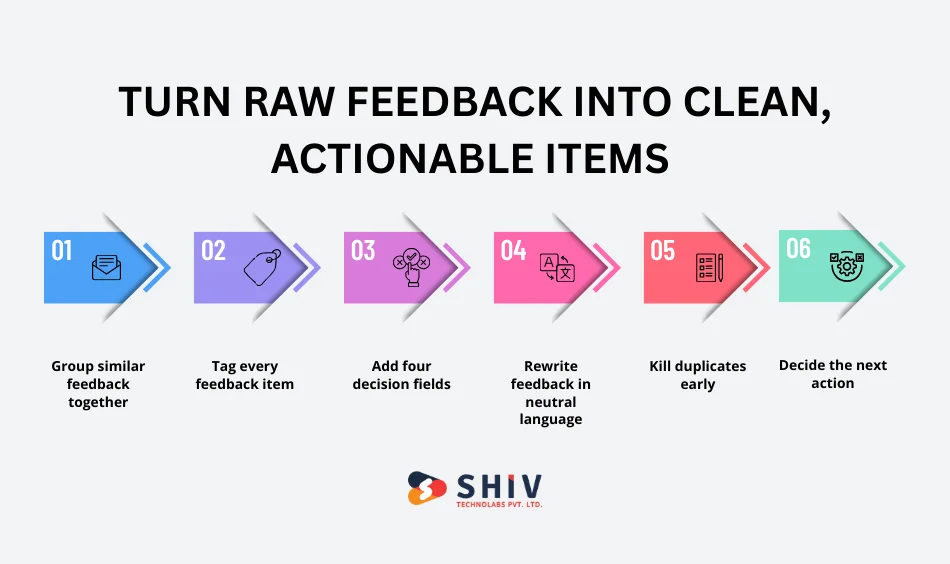
Raw feedback is messy. It comes as emotions, long messages, or vague requests. Your job is to turn it into something a team can act on.
Step 1: Group similar feedback together
Different users may say the same thing in different words.
Examples:
- “Checkout is confusing.”
- “I didn’t know which plan to choose.”
- “Pricing page made me stop.”
These belong to one group: pricing decision friction
Create one master item and attach all related comments to it.
Step 2: Tag every feedback item
Use a small, fixed set of tags so sorting stays easy.
Recommended tags
- Bug
- UX friction
- Feature request
- Performance
- Billing
- Onboarding
- Content or copy
- Integration
Avoid adding new tags every week.
Step 3: Add four decision fields
Every feedback item should answer these four questions:
- Who is affected? (user type, plan)
- Where did it happen? (screen, step)
- How bad is it? (blocker / major / minor)
- How often does it happen? (one user / few / many)
This turns emotion into clarity.
Step 4: Rewrite feedback in neutral language
User message:
“This feature makes no sense and wastes my time.”
Actionable version:
“Users don’t understand how to set filters on the reports screen.”
This keeps discussions focused and calm.
Step 5: Kill duplicates early
If the same feedback appears five times, don’t track five items.
- Keep one master item
- Link or count duplicates
- Review volume weekly
High volume often matters more than loud wording.
Step 6: Decide the next action
Every feedback item must move forward.
Choose one:
- Fix now
- Review later
- Reject with reason
No item should stay undecided for weeks.
Prioritize Feedback Without Internal Conflict
When feedback piles up, teams often argue instead of deciding. The fix is not more opinions, but a shared method that everyone follows.
1. Start with a simple rule
Feedback that blocks the core action always comes first. If users can’t sign up, pay, or complete the main task, that feedback moves to the top without debate.
2. Use RICE scoring for feature requests
RICE helps you compare requests using the same lens.
R – Reach
How many users face this issue in a month?
I – Impact
Does it lightly help, clearly help, or strongly help the main goal?
C – Confidence
How sure are you that this feedback represents a real need?
E – Effort
Rough time needed (in days or story points).
How to use it
- Score each factor on a small scale (1–5 works well)
- Divide the total value by the effort
- Higher score = higher priority
This removes emotion from decisions and keeps discussions short.
3. Use MoSCoW for release planning
Once items are scored, MoSCoW helps you shape the next release.
- Must: Release cannot go out without this
- Should: Strong value, but release can survive without it
- Could: Helpful, not urgent
- Won’t (for now): Intentionally postponed
This keeps releases realistic and avoids overloading sprints.
4. Use Kano to avoid low-value work
Some features sound exciting, but don’t change user behavior.
Kano helps you spot:
- Basic needs: Users expect them; absence causes frustration
- Performance needs: More is better
- Delighters: Nice surprises, but not required early
In an MVP, focus on the basics and performance. Delighters can wait.
5. Always separate “urgent” from “important.”
- A checkout bug is urgent and important
- A single custom request may be urgent to sales, but not important overall
Write this distinction in your tracker to keep clarity during reviews.
Validate Feedback Before You Build Anything
Not all feedback deserves code. Validation helps you confirm whether a change will truly help.
1. Ask “why” before “how.”
If a user asks for a feature, ask:
- What problem are they facing?
- What are they trying to achieve?
- What happens if they don’t get this?
Often, the real need is simpler than the request.
2. Use smoke tests to test interest
Before building:
- Add a button that leads to “Coming soon.”
- Create a simple landing section explaining the idea
- Track clicks or sign-ups
If no one clicks, you save weeks of work.
3. Test with clickable prototypes
For UX changes:
- Share a basic prototype
- Ask users to complete a task
- Watch where they hesitate
You’ll learn more in one session than from long feedback threads.
4. Run small experiments
Change one thing at a time:
- Button text
- Page order
- Default settings
Measure completion rate, drop-offs, or time taken. If the result improves, move forward.
Ship Feedback-Driven Changes Safely (Without Breaking Your MVP)
Moving fast does not mean pushing risky changes to everyone at once. MVPs need control, not chaos.
1. Release small, not everything together
Large updates hide problems. Small updates show results quickly.
Good practice
- One main change per release
- Clear reason for the change
- Easy rollback if something goes wrong
This makes it easier to see what actually worked.
2. Use controlled rollouts
Instead of releasing to all users at once, release in steps.
Common rollout methods
- Internal team only
- Small user group (5–10%)
- Gradual increase over a few days
If metrics drop or errors rise, pause and fix before going wider.
3. Protect unfinished work
Some changes are not ready for everyone.
What to do
- Hide unfinished features behind switches
- Show only to selected users
- Turn off instantly if issues appear
This keeps your live MVP stable while testing new ideas.
4. Write release notes that users understand
Most users don’t read long updates.
Use this format
- What changed
- Who it helps
- What the user should do (if anything)
Example:
“Improved checkout steps so payments take fewer clicks.”
Close the Loop: Tell Users You Acted on Their Feedback
Many teams collect feedback but forget to reply. This breaks trust.
1. Why closing the loop matters
When users see their input lead to change:
- They share better feedback
- They stay longer
- They feel part of the product
2. Simple ways to reply
You don’t need long messages.
Good options
- Short email: “You asked for this. We added it.”
- In-app note after login
- Personal reply for high-value users
Even a short reply shows respect.
3. Share progress openly
If a request is not done yet, say so.
Status ideas
- Planned
- In progress
- Shipped
- Not planned (with reason)
Clarity is better than silence.
Build a Simple Feedback-to-Release Workflow
A clear loop keeps teams aligned and fast.
1. The 7-step loop
- Collect feedback
- Group similar items
- Tag and rewrite clearly
- Score and prioritize
- Validate the idea
- Build and release in control
- Measure results and reply to users
Repeat this loop every week or sprint.
2. Weekly feedback review agenda (45 minutes)
- 10 min: Top issues by volume
- 15 min: Priority decisions
- 10 min: What goes into the next release
- 10 min: Who replies to users
No long debates. Decisions only.
Common Mistakes Teams Make With MVP Feedback
Avoid these traps early.
- Building for the loudest user, not the majority
- Turning every request into a feature
- Letting feedback stay in chats and emails
- Shipping changes without checking results
- Asking too many questions inside the app
Fixing these saves months of wasted effort.
How Shiv Technolabs Helps Teams Build Feedback-Driven MVPs
Shiv Technolabs works with startups and product teams that want speed without confusion.
How we support
- MVP planning focused on learning, not guesswork
- Feedback setup inside apps and workflows
- Clear priority systems that teams follow
- Safe release planning to avoid user disruption
Our goal is simple: help teams build what users actually need.
Conclusion
Customer feedback only creates value when it leads to action. For an MVP, this means having a clear system, steady reviews, and safe releases. Collect feedback at the right moments, turn it into clean decisions, test before building, and always reply to users.
When feedback becomes part of your weekly rhythm, your MVP grows with purpose instead of guesswork.
FAQs
1) How much feedback is enough for an MVP?
Even 10–20 active users can give strong direction if patterns repeat.
2) Should every feature request be built?
No. Treat requests as signals, not tasks.
3) How often should an MVP release updates?
Weekly or bi-weekly works well for most teams.
4) What matters more: feedback or data?
Both. Feedback explains why, data shows what happened.
5) How do I reply when we reject feedback?
Be honest, brief, and explain the reason.
6) When should feedback change the product direction?
When the same issue appears across many users and blocks the main goal.