Table of Contents
Your team spends hours every week answering the same questions, moving data between systems, approving requests, and chasing updates. At first, these tasks look small. Over time, they slow down support, sales, finance, operations, and leadership teams.
That is why many companies are now exploring AI agents. An AI agent can understand a goal, check systems, make decisions, and complete tasks with human oversight.
Many companies rush into AI projects before they fix their workflows, data, or processes. The result is wasted budget and a project that stalls. This guide helps you decide whether your business is ready for AI agent development or whether you should fix the foundation first.
This guide explains the signs your business is ready for an AI agent and the signs you should wait. By the end, you can make the call with confidence.
What Is an AI Agent?
An AI agent is a software system that understands a goal, makes decisions, uses tools, accesses business systems, and completes tasks with limited human input. It works toward an outcome instead of answering one prompt. IBM describes agentic AI as a system that pursues a goal and coordinates its own steps through orchestration.
That definition separates agents from the tools most teams already use. The difference matters for budgeting and expectations, so here is a simple breakdown.
- Chatbots answer questions from scripts. They reply, then stop.
- AI assistants suggest or draft, and a person approves each step.
- AI agents plan and act across systems to finish a multi-step task.
A support chatbot answers “Where is my order?” with a tracking link. An AI agent checks the order, confirms a delay, updates the ticket, and emails the customer a new date. One responds, the other completes the work. Our agentic AI vs traditional chatbots guide covers this gap in more detail.
In short, AI agents usually include five important parts:
- Goal understanding
- Reasoning
- Tool access
- Workflow memory
- Human approval rules
This makes AI agents useful for business process automation, customer support, sales operations, finance workflows, and internal productivity.
Why Are More Businesses Evaluating AI Agents?
Companies are looking at AI agents because manual work and rising costs hamper their team performance. They want faster workflows, lower manual workload, and better use of existing data. Many companies already use AI tools, but they still struggle to connect AI with actual business execution.
AI agents are becoming more practical because they can connect with business systems and complete controlled tasks.
Gartner expects 40% of enterprise applications to include task-specific AI agents by the end of 2026, up from less than 5% a year earlier (Gartner). At the same time, Gartner also warns that many agentic AI projects may fail when companies lack clear value, cost control, or risk planning.
That means businesses should not build AI agents only because the market is moving fast. They should build AI agents when workflows, data, and goals are ready. The points mentioned below explain the shift.
# Rising Operational Costs
Labor and support costs rise as businesses grow, and manual work scales with them. Many teams spend hours on repetitive tasks that do not require deep human judgment. These tasks include ticket routing, CRM updates, order checks, data entry, and status follow-ups.
An AI agent can reduce this workload when the process follows clear steps. Agents absorb repetitive steps, so the team can focus on higher-value work.
# Increased Customer Expectations
Customers expect fast, accurate answers and better service. They do not want to wait while support teams switch between systems. Slow replies move them toward competitors who respond quicker.
Agents handle routine requests instantly by retrieving relevant data and preparing the next action. In case of any complex queries, they share them with an expert.
# Growth Without Hiring
Demand often rises faster than a company can hire and train. AI agents can help existing teams handle more work with better consistency. Business process automation closes that gap by running repeatable work around the clock.
Teams scale output without adding a new hire for every task. This makes AI agent development useful when growth creates operational pressure.
# Data Across Multiple Systems
Most businesses store data in a CRM, an ERP, a helpdesk, and internal tools that rarely interact with each other. Employees lose time switching between these tools. The catch is readiness, since McKinsey research finds fewer than 25% of companies have scaled AI agents to production. Strong demand still needs a strong foundation. Intelligent automation connects those systems so teams act faster without manual copy-paste.
What are the 7 Signs Your Business Is Ready for an AI Agent?
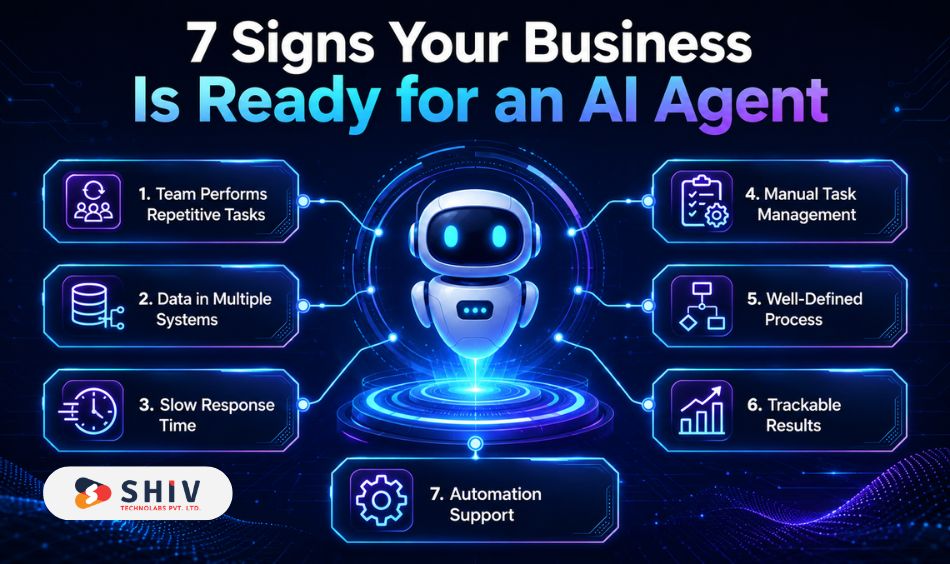
Your business shows readiness through clear, practical signals, not a general sense that AI could help. Each sign below comes with real examples you can match against your own operations. Read them as a checklist for your next decision.
# Sign 1: Your Team Performs Repetitive Tasks Every Day
You are ready when your team runs the same rule-based tasks day after day. High-volume repetition is the clearest signal that an agent can help. AI automation solutions target exactly this kind of work.
These tasks usually follow a predictable pattern. Someone receives a request, checks information, updates a system, and sends a response.
Examples include:
- Checking order status
- Routing support tickets
- Qualifying inbound leads
- Updating CRM fields
- Preparing invoice approvals
- Sending follow-up emails
- Creating internal task summaries
An AI agent can handle these steps when the workflow is clear. It can gather data, follow rules, and prepare actions for approval.
This does not remove your team. It removes avoidable manual effort from their day.
# Sign 2: Important Data Lives in Multiple Systems
Your business may need an AI agent if employees constantly switch between CRM, ERP, helpdesk, and internal databases to finish one task. This usually happens when customer data, order data, finance data, and support data live in separate platforms.
Agents connect these systems and act on the data inside them. AI integration services turn scattered tools into one connected workflow.
For example, a sales representative who checks four tools to update one record loses time on every deal. An enterprise AI agent pulls and updates that data in one flow.
Common systems that AI agents integrate include:
- CRM platforms
- ERP systems
- Helpdesk tools
- Accounting software
- Project management tools
- Internal databases
- eCommerce platforms
This is where AI integration services become important. The agent needs safe access to the right systems before it can complete useful work.
# Sign 3: Response Times Affect Customer Experience
You are ready when slow responses directly affect customer satisfaction or revenue. Speed matters most in support, onboarding, and account management. Fast answers matter when customers ask about orders, pricing, availability, technical issues, refunds, or setup steps.
AI agents for customer service cut wait times by handling routine requests right away.
For example, an AI support agent can:
- Check a customer profile
- Review order history
- Read past support tickets
- Suggest the right response
- Create an escalation task
This improves speed while keeping humans involved for sensitive cases.
# Sign 4: Employees Spend More Time Managing Work Than Doing Work
Your current business is ready when the team spends more time on organizing, reporting, approvals, and data entry than on real work. That imbalance signals a process that an agent can carry. Intelligent automation frees skilled people for judgment work.
For example, a manager spends time creating reports. An AI agent can support internal workflows by performing:
- Creating meeting summaries
- Updating task statuses
- Preparing weekly reports
- Collecting missing information
- Sending reminders
- Tracking approval progress
This helps employees spend more time on decisions, customer work, and business growth.
# Sign 5: You Already Have Well-Defined Processes
AI agents work best when your workflows are clear, documented, and stable. Agents need defined steps to follow and improve. If your team already follows defined steps, an agent can support those steps easily. A process you can write down is a process an agent can run.
A smart AI agent understands what should happen first, what data to check, what rules to follow, and when to ask a human.
Your process is ready if you can answer these questions:
- What starts the workflow?
- What systems are involved?
- What decisions must happen?
- What actions can AI take?
- What needs human approval?
- What result should the workflow produce?
This is one of the most important signs of AI agent readiness.
# Sign 6: You Can Measure Business Outcomes
You are ready when you can measure the result clearly and know where to improve. Clear metrics turn a project into a decision you can track. AI implementation delivers the best results when it is tied to a specific business metric.
Useful metrics include:
- Response time
- Ticket volume
- Resolution time
- Lead qualification time
- Order processing speed
- Manual hours saved
- Error reduction
- Cost per task
- Customer satisfaction
Avoid vague goals like “we want AI.” A better goal is “we want to reduce support response time by 30%.” A measurable baseline proves the AI ROI after launch.
# Sign 7: Leadership Supports Automation
AI agent projects need leadership support because they affect workflows, teams, systems, and decision rules. A small technical experiment is not enough for long-term success. Leaders must agree on the problem, budget, timeline, risk controls, and success metrics.
Leadership support matters because AI agents often require the following:
- Data access decisions
- Process changes
- System integrations
- Security reviews
- Team training
- Governance rules
Without leadership support, the project may stay stuck as a pilot. Agents change how teams work, so executive support keeps the project moving. Change management determines the durability of a deployment.
3 Signs Your Business Is Not Ready for an AI Agent
Honest readiness includes knowing when to wait. Three signs mean your foundation needs work first. Fixing them now saves far more than a project that fails later.
# Sign 1: Your Processes Change Every Week
A workflow that shifts constantly gives an agent no stable path to follow. If every team member handles the same task differently, automation becomes risky.
Start by documenting the process first. Define the trigger, steps, decisions, tools, and expected result. Once the process becomes stable, AI agent implementation becomes easier and safer.
# Sign 2: Your Data Is Incomplete or Unreliable
Your business may not be ready if your data is messy, outdated, or spread across systems without structure. An agent acts on data, so poor data leads to poor outcomes. Poor data can create wrong recommendations, broken workflows, or inaccurate customer responses.
Common data issues include:
- Duplicate customer records
- Missing product information
- Incomplete CRM fields
- Wrong order statuses
- Unclear permissions
- Outdated documents
Clean and connect your data before you start AI agent development.
# Sign 3: You Don’t Know What Problem You’re Solving
Building AI because it is trendy leads to a project with a goal that is simply “we need an AI agent.” That is not a business problem. A use case starts with a named problem and a metric. If you cannot name either, the timing is wrong, not the technology.
A successful AI agent starts with a clear workflow problem.
Better goals include:
- Reduce support workload
- Speed up invoice approvals
- Improve lead qualification
- Reduce order update requests
- Automate onboarding tasks
- Improve internal reporting
If the problem is unclear, start with AI consulting before development.
AI Agent Readiness Checklist
You can settle the readiness question with a quick checklist. Mark each item that is true for your business today. The more you check, the closer you are to a strong start.
Use this checklist before investing in AI agent development.
- We have repetitive, rule-based workflows worth automating.
- Our data is clean, current, and reachable.
- We use connected systems like a CRM or ERP.
- We can measure the outcome that an agent should improve.
- We have leadership support and a budget.
- We understand the exact problem we want to solve.
If you checked most boxes, your business may be ready for AI agents. If a few stay empty, fix those gaps first. Our AI development services help you close them before any build.
Common Business Functions Where AI Agents Deliver Fast Value
AI agents return value fastest in functions with clear, repeatable workflows. The areas below show where mid-market teams see results early. Use them to find your strongest starting point.
# Customer Support
An agent checks order status, updates tickets, and sends follow-ups. It reduces wait times and support load by escalating only those cases that require human efforts.
# Sales Operations
AI agents can qualify leads, enrich CRM records, prepare meeting notes, and schedule follow-ups. This helps sales teams focus on conversations instead of admin work.
# Finance
AI agents can check invoices, match purchase orders, flag missing details, and route approvals. This supports faster finance workflows while keeping approval control with humans.
# HR
AI agents can support onboarding, answer policy questions, collect documents, and assign tasks. This improves employee experience and reduces repeated HR requests.
# IT Helpdesk
AI agents can diagnose common issues, create tickets, suggest fixes, and escalate complex cases. This helps IT teams reduce repetitive tickets and improve service speed.
# Inventory and Operations
AI agents can monitor stock signals, flag exceptions, prepare reports, and trigger reorder workflows. This helps operations teams respond before problems grow.
What Does AI Agent Development Typically Cost?
AI agent development costs between $5,000 and $400,000 or more, depending on complexity. Most mid-market projects land between $40,000 and $150,000. The number depends on autonomy, integrations, data readiness, and compliance needs.
The table below shows typical ranges by project type.
| Project type | cost | What it covers |
|---|---|---|
| Internal AI assistant | $5,000–$20,000 | A single-task helper for internal use |
| Customer service agent | $15,000–$40,000 | Ticket handling, order status, escalation |
| Sales agent | $20,000–$50,000 | Lead qualification, CRM updates, scheduling |
| Multi-system agent | $40,000–$150,000 | Workflows across CRM, ERP, and helpdesk |
| Enterprise AI agent | $150,000–$400,000+ | Multi-agent systems, compliance, deep integration |
Plan for running costs on top of the build. Maintenance, hosting, and model usage usually add 15 to 30 percent of the build cost each year. These ranges can change based on scope. The safest way to estimate cost is to define the workflow first. Our AI agent development services scope each project before pricing it.
Build vs Buy: Should You Use an Existing AI Tool or Build Your Own AI Agent?
Companies should buy when the process is simple and standard. They should build when the workflow is unique, data-sensitive, or deeply connected to internal systems.
| Option | Best fit | Limitation |
|---|---|---|
| Ready-made AI tool | Simple workflows | Limited control |
| SaaS chatbot | FAQs and basic support | Limited action ability |
| Custom AI agent | Complex workflows | Needs planning and development |
| Hybrid model | Mixed needs | Needs clear architecture |
A custom AI agent makes sense when your workflow gives your business a competitive advantage.
For example, a logistics company may need a custom agent for shipment exceptions. A finance team may need a custom agent for invoice approvals.
How Shiv Technolabs Helps Businesses Build AI Agents?
Shiv Technolabs helps mid-market businesses move from idea to a working agent that delivers measurable results. We focus on outcomes you can see, such as less manual work, faster workflows, and better decisions. Our approach blends business sense with technical depth.
Here is how we support each stage of the journey.
- AI consulting that confirms readiness and maps the right workflow before any build.
- Workflow discovery that pinpoints where an agent creates the most value.
- Agent design built around your processes, not a template.
- Integrations with CRM, ERP, and APIs so the agent acts where work happens.
- Testing that validates the agent on real cases before launch.
- Ongoing optimization that refines the agent as your business changes.
Our AI/ML development services and predictive AI development add decision support on top of automation. The result is a system that cuts manual work, sharpens decisions, and keeps operations running smoothly.
Conclusion
The better question is not, “Can we build an AI agent?” The better question is, “Are we ready to get value from one?” That question protects your budget far better than chasing the trend. If your business has repeatable workflows, connected systems, measurable outcomes, and leadership support, AI agents can create real operational gains. If your processes shift weekly or your data is unreliable, fix the foundation first.


Frequently Asked Questions
How do I know if my business needs an AI agent?
Your business needs an AI agent when you run repeatable workflows across connected systems and can measure the outcome. If your data is clean and a process has a clear owner and metric, you are ready. If processes shift weekly or data is messy, fix that first.
What tasks can AI agents automate?
AI agents automate multi-step tasks like ticket routing, order updates, lead qualification, invoice matching, and report generation. They work across tools such as a CRM, ERP, and helpdesk. Unlike chatbots, they take action and complete workflows, not just answer questions.
How much does AI agent development cost?
AI agent development costs $5,000 to $400,000 or more in 2026, based on complexity. Most mid-market projects fall between $40,000 and $150,000. A simple internal assistant sits at the low end, while an enterprise multi-agent system sits at the top. Running costs add 15 to 30 percent yearly.
Can AI agents connect to CRM systems?
Yes, AI agents connect to CRM systems through APIs. They read and update records, log activity, and trigger actions inside the CRM. This connection lets an agent qualify leads, update deals, and sync data, which is what separates a true agent from a basic chatbot.
Are AI agents secure?
AI agents are secure when you build them with proper governance, access controls, and human-in-the-loop checks. Security depends on tiered permissions and clear limits on what the agent can do. Sensitive actions like payments or customer emails should require human approval by design.
Can small businesses use AI agents?
Yes, small and mid-market businesses can use AI agents when they have a repeatable workflow and reachable data. Agents suit any company with multi-step work across tools, not just enterprises. Starting with one focused workflow keeps cost and risk low while it proves value.
What industries benefit most from AI agents?
Retail, eCommerce, finance, healthcare, and B2B services benefit most from AI agents due to high-volume, repeatable work. Any industry with customer support, operations, or data-heavy processes can find strong use cases. The best fit is a clear workflow, not a specific sector.
How long does AI agent implementation take?
A single, well-defined agent can launch in a few weeks once data and guardrails are ready. Complex, multi-system agents take several months because they need deeper integration and testing. A bounded 30-day pilot is a realistic target for a first agent.