Table of Contents
Every quarter, more business teams approve budgets for AI tools, agents, chatbots, and predictive models. Many of those budgets stall inside the first month, and the model rarely causes the delay. The delay starts in business data that sits across scattered systems, with duplicate records, missing fields, and no clear owner. AI works with whatever data you feed it, so weak data quality shows up directly in weak AI output.
Companies planning AI projects often need AI development services after their data sources, quality rules, and access controls are clear. Clear the data hygiene checks first, and every later AI decision gets cheaper, faster, and easier to defend.
How to Become AI Ready: The Short Answer
To become AI-ready, a business should inventory its data sources, clean critical records, define ownership, build reliable pipelines, protect sensitive data, and make trusted data available before investing in AI tools or models.
The order matters, because each step feeds the next one. Data readiness for AI belongs at the start of the project plan, not in a cleanup sprint after the model already returns weak answers.
Six gaps explain most stalled AI projects: unknown sources, poor data quality, unclear owners, weak pipelines, loose access rules, and missing monitoring. Teams that ask how to become AI ready usually already know which of the six hurts most.
What Does It Mean to Be an AI-Ready Business?

An AI-ready business can answer three questions in a single meeting. Where does the data live, who owns it, and can a system read it safely today? Teams that answer those questions quickly move from AI planning into AI delivery, so the practical route to how to become AI-ready starts right there.
# Data Hygiene Comes Before AI Spending
Data hygiene for AI means records that stay complete, current, consistent, and free of duplicates. A model trained on outdated customer records will predict stale customer behavior. A support agent connected to a messy product database will answer customer questions with the wrong product names.
Clean data also protects trust inside the business. Sales teams stop using an AI forecast the moment they spot a customer name they do not recognise. Protecting that trust early costs a few cleanup hours, while rebuilding it after a bad forecast can cost an entire quarter of adoption.
# What Research and Standards Say About Data Readiness for AI
Public guidance from cloud vendors and standards bodies points in the same direction. Data quality, data access, and data governance shape AI accuracy far more than model choice does for most business use cases. Data challenges block AI scaling more often than compute limits or talent gaps.
The NIST AI Risk Management Framework organises AI risk work into four functions: govern, map, measure, and manage. That structure puts governance, data mapping, measurement, and human oversight ahead of production use. It treats data quality, access control, monitoring, and security as core parts of AI risk work, not as optional extras.
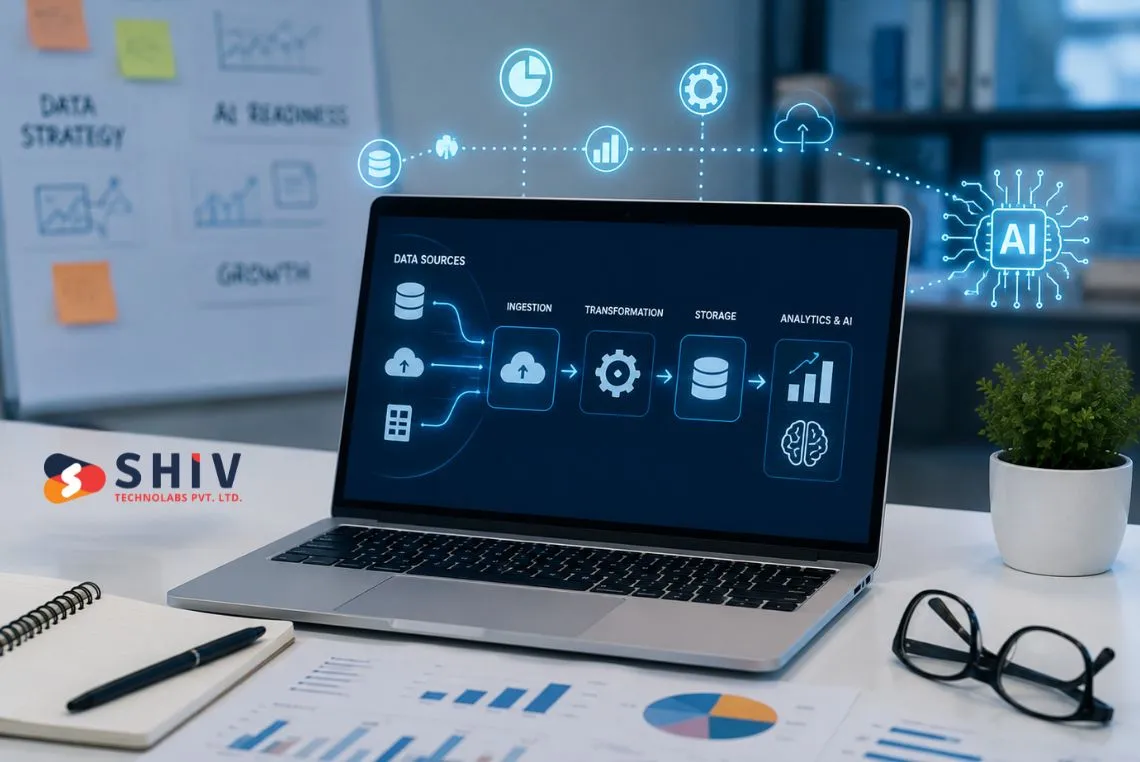
A reliable data pipeline carries a business from scattered data to governed, usable data. It moves records out of source systems, cleans them, checks them, stores them, and hands trusted data to reporting and AI layers.
What Is a Data Pipeline in Simple Terms?
A data pipeline is the set of steps that carries business information from where it is created to where it gets used. Data starts inside source systems, moves through cleaning and checking steps, and lands in a place where people and software can read it. A well-built pipeline runs on a fixed schedule, keeps a record of each run, and raises an alert the moment a step fails.
# The Main Parts of an AI Data Pipeline
Every AI data pipeline follows a similar shape, whether it serves two systems or twenty. The parts stay the same, and only the tools and the scale change. Business readers benefit from knowing what each part does, because each part carries its own risk.
Source Systems, Extraction, and Transformation
Source systems hold the raw records like your CRM, ERP, eCommerce platform, helpdesk, and billing tool. Extraction pulls copies of those records on a schedule, using an ETL pipeline or a modern ELT job. Transformation then reshapes the copies into one common format, so a single customer ID, date format, and status label apply across every system.
Validation follows transformation, and it acts as the quality guard. It flags blank email fields, broken dates, and product codes that match nothing. Teams that run data analytics services on top of a validated layer spend less time arguing about whose number is correct.
Storage, Access, Analytics, and the AI Layer
Cleaned data then lands in a data warehouse or a data lake, depending on structure and volume. A catalogue records what each dataset means, and access control decides who or what may read it. Analytics tools and AI models then read from that governed layer instead of querying raw systems directly.
Monitoring and error handling close the loop. A pipeline that fails without an alert carries a higher business risk than no pipeline at all, because teams keep making decisions on numbers that stopped updating weeks ago.
# How Data Moves from a Source System to an AI-Ready Layer
The table below maps each pipeline stage to a plain meaning and a business example. Use it as a shared reference between business and technical teams.
| Pipeline Stage | Simple Meaning | Business Example |
|---|---|---|
| Source system | The place a record is created | A new deal is added in the CRM |
| Data extraction | Copying records out on a schedule | Nightly pull of orders from Shopify |
| Data cleaning | Fixing gaps, typos, and duplicates | Merging two records for the same buyer |
| Transformation | Reshaping data into one common format | Country codes become a single standard |
| Validation | Checking records against agreed rules | Orders with no customer ID get flagged |
| Storage | Keeping data in a warehouse or lake | Order history stored in BigQuery |
| Cataloguing | Recording what each dataset means | A note that ‘active user’ means 30-day login |
| Access control | Deciding who and what may read data | Support tools read tickets, never salaries |
| Analytics | Turning stored data into reports | A weekly churn dashboard for leadership |
| AI-ready layer | A trusted dataset shaped for models | A curated table for demand forecasting |
| Monitoring | Watching the pipeline for failures | An alert when the nightly job stops |
What Should You Check Before You Spend on AI?
The checks below form your AI-readiness gate. Each row marks something a business should confirm before it signs an AI contract. The right column shows the AI risk that appears when a team skips that check.
| Readiness Area | What to Check | AI Risk if Ignored |
|---|---|---|
| Data source inventory | Every system that holds useful records | AI trains on partial data and misses context |
| Data ownership | A named owner for each source | Quality problems sit unfixed for months |
| Data quality | Completeness, accuracy, and consistency | Confident answers built on wrong inputs |
| Data freshness | How often each source updates | Models predict from a past that has moved on |
| Duplicate records | Repeated customers, products, and vendors | Inflated counts and double-counted revenue |
| Missing fields | Blank emails, phones, dates, and codes | Models drop rows and skew results |
| Access control | Who and what may read each source | Sensitive records reach the wrong tool |
| Consent and privacy | Lawful basis for using personal data | Compliance exposure and forced rollbacks |
| Pipeline reliability | Job success rates and failure alerts | Silent breaks feed stale data to AI |
| Business definitions | Agreed meaning of key metrics | Teams argue about output instead of using it |
| Governance rules | Retention, lineage, and approval rules | Nobody can explain how an answer was formed |
| Monitoring | Alerts on data volume and quality drift | Model accuracy falls without anyone noticing |
What Are the Signs That a Company Is Not AI-Ready Yet?
Bad-data warning signs show up in daily work long before an AI project starts. Operations teams usually spot them first because they carry the manual workload that messy data creates. The table below turns the common complaints into a readiness signal.
| Warning Sign | What It Means | Why It Blocks AI |
|---|---|---|
| Duplicate customers | One buyer exists as several records | Segments, scores, and totals come out wrong |
| Missing email or phone fields | half-filled | |
| Inconsistent product names | One product carries several labels | Recommendations and search results break |
| Old CRM records | Contacts and deals go stale for months | Forecasts reflect a business that has changed |
| Manual spreadsheet updates | People retype data between systems | Errors enter quietly and repeat every week |
| No data owner | Nobody is accountable for a source | Fixes stall and quality keeps sliding |
| Unclear business definitions | Teams count the same metric differently | AI output gets rejected in review meetings |
| Disconnected systems | Tools hold data that never meets | Models see one slice of the customer |
| No data refresh schedule | Updates happen when someone remembers | Answers depend on the day you asked |
| No access control | Everyone can read everything | Sensitive data leaks into AI prompts |
| No audit trail | Changes leave no record | Wrong answers cannot be traced or fixed |
| Low trust in reports | Leaders check numbers by hand | AI adoption stops at the pilot stage |
Three or more of these signs point to a clear conclusion. Data cleanup and pipeline work should come first, and the AI budget should wait a quarter.
Which Business Systems Hold the Data Your AI Will Need?
Most companies hold far more usable data than they realise, and it hides in ordinary tools. A source inventory turns that guesswork into a short, honest list. Work through the table below with the people who use each system daily.
| Business System | Data It Holds | AI-Readiness Question |
|---|---|---|
| CRM | Contacts, deals, pipeline stages, notes | Are duplicate contacts merged and owners named? |
| ERP | Finance, procurement, and operations records | Can the data be read through an API? |
| Ecommerce platform | Orders, products, carts, and customers | Do product names stay consistent everywhere? |
| Helpdesk | Tickets, replies, and resolution times | Are tickets tagged with a stable taxonomy? |
| Marketing automation | Campaigns, opens, clicks, and consent | Is marketing consent recorded per contact? |
| Billing system | Invoices, payments, refunds, and plans | Do billing IDs map to CRM customer IDs? |
| Inventory system | Stock levels, suppliers, and movements | How often do stock counts update? |
| Website analytics | Sessions, events, and conversion paths | Do event names follow one naming rule? |
| Product database | SKUs, attributes, images, and pricing | Is one record the agreed source of truth? |
| Spreadsheets | Manual trackers and side calculations | Which sheets feed decisions and need migrating? |
| Emails or documents | Contracts, proposals, and policies | Which files may an AI tool read safely? |
| Data warehouse | Combined data from several systems | Is it current, documented, and monitored? |
Systems that hold no shared identifiers and exchange no records create the biggest gaps in an AI data pipeline. Businesses often close those gaps with data integration and system integration work before any model appears in the plan.
How Do You Score Data Quality for AI?
A simple score keeps this conversation practical and calm. Rate each high-value data source from one to five, and record the score in your inventory. This gives leadership a shared picture of how to become AI-ready without a long technical debate.
| Score | Data Condition | What to Do Before AI |
|---|---|---|
| 1 | Messy, incomplete, and scattered | Run a source inventory and basic cleanup first |
| 2 | Partially organised but inconsistent | Fix duplicates, blanks, and naming rules |
| 3 | Usable for reporting but weak for AI | Add validation, owners, and refresh schedules |
| 4 | Clean, governed, and integrated | Prepare a curated AI-ready dataset |
| 5 | AI-ready with monitoring and ownership | Start a scoped AI build with clear metrics |
Most companies should hold back expensive AI builds until high-value data reaches a practical 3 or 4. A score of 3 supports a narrow pilot with human review. A score of 4 supports a production AI feature that people will trust.
Governance and Access-Control Basics for AI-Ready Data
Data governance sounds heavy, and it becomes simple once you break it into decisions. Governance answers who owns data, who may read it, how long you keep it, and what an AI system may touch. Business teams can complete most of this checklist without writing a line of code, and the technical work gets much cleaner afterwards.
- Assign data owners for every source system
- Define which fields count as sensitive data
- Map who can access each source today
- Check consent and compliance rules per dataset
- Define retention rules for each data type
- Document data lineage where possible
- Limit AI access to the data a use case needs
- Review third-party tool access every quarter
- Create approval rules for new data requests
- Monitor how data gets used across teams
- Log important changes to records and rules
- Schedule regular data quality checks
Work through this list once, and record the answers in a shared document. Teams building AI/ML development services projects rely on those answers to scope safely and price accurately.
Governance also protects the business when a regulator, a customer, or an auditor asks how an AI answer was produced. Human oversight belongs here too, because someone must review AI output before it reaches customers.
What Should a Data-Readiness Audit Check, and What Does It Cost?
A data-readiness audit turns opinions into evidence. It maps your systems, scores your data, finds pipeline gaps, and produces a costed plan. The checklist below matches how a practical business data audit runs, and it is the same path we use when a client asks how to become AI-ready. List every business system that stores records worth using for AI
- Identify high-value AI use cases with clear owners
- Map the data sources each use case requires
- Check data completeness across key fields
- Check duplicate records in customers and products
- Check freshness and update frequency per source
- Review business definitions for core metrics
- Check ownership and access rules per system
- Review security and privacy risks in each source
- Map pipeline gaps between systems
- Estimate cleanup effort in hours and cost
- Define the first AI-ready dataset to build
- Prepare a 30-day action plan with owners
The output should be a short report, not a slide deck full of theory. It should name the first dataset worth building, the gaps that block it, and the cost of closing them. Business leaders can then approve AI spending with numbers instead of hope.
# Data-Readiness Cost and Timeline Ranges
Costs vary with scope, so use these figures as planning ranges rather than quotes. They reflect common engagements for small and mid-size businesses.
| Work Item | Planning Cost Range | Typical Timeline |
|---|---|---|
| Basic data-readiness audit | $2,000 to $8,000+ | 1 to 3 weeks |
| Small business data cleanup and source inventory | $5,000 to $20,000+ | 3 to 8 weeks |
| Data pipeline setup for 2 to 4 systems | $15,000 to $50,000+ | 6 to 16 weeks |
| Data warehouse or lakehouse setup | $30,000 to $150,000+ | 8 to 20 weeks |
| AI-ready data governance setup | $10,000 to $75,000+ | 4 to 12 weeks |
| Ongoing pipeline monitoring and support | $2,000 to $15,000+ per month | Continuous |
| Enterprise data readiness programme | Scoped per phase | 4 to 9 months or more |
Final pricing depends on data volume, number of systems, data quality, integrations, security needs, compliance needs, cloud setup, automation depth, and reporting needs. These figures are planning ranges, not fixed quotes or fixed timelines.
When Is the Right Time to Spend on AI After a Data Cleanup?
AI spending returns value once the data layer underneath it holds steady. The signals below confirm that your data is ready to support an AI build, and each one is easy to verify in a short review. Treat them as a green-light list before you sign anything.
- The use case is clear and has a business owner
- The required data exists inside known systems
- Data quality scores reach a practical 3 or 4
- Ownership is assigned for every key source
- Access rules are written down and applied
- Pipelines run on schedule and raise alerts
- Sensitive data is protected and limited
- Success metrics are defined and measurable
- Users trust the underlying reports already
- Monitoring and human review are planned
Companies that clear this list get better proposals and tighter estimates from every vendor they approach. A vendor quoting generative AI development services can size the work accurately once source systems, data quality scores, and access rules are documented. The comparison below shows the difference in plain terms.
| Area | Not Ready | AI Ready |
|---|---|---|
| Data sources | Unknown or partly documented | Inventoried, owned, and scored |
| Data quality | Duplicates and blanks are common | Validated against agreed rules |
| Access | Broad access with few limits | Role-based and reviewed regularly |
| Pipelines | Manual exports and spreadsheets | Scheduled jobs with alerts |
| AI outcome | Pilots stall and lose trust | Features reach production and get used |
How Shiv Technolabs Helps Businesses Get Data Ready for AI
Some teams run this work alone, and many prefer a partner for the first pass. Shiv Technolabs helps companies assess data readiness, map data sources, review data pipelines, clean business records, plan AI-ready datasets, and prepare practical AI roadmaps. The work stays advisory first, and the engineering follows the findings rather than leading them.
That approach keeps AI budgets honest. A data engineering and custom software development team can close pipeline gaps once the audit names them, and not before. Book a data-readiness audit with Shiv Technolabs, and get a clear answer on how to become AI-ready before the budget moves.
# Conclusion
AI returns value for businesses that treat their data as a managed asset. Clean records, named owners, reliable pipelines, and clear access rules turn AI from an uncertain bet into a project with a measurable plan. Data pipeline basics are simple enough for any leadership team to follow, and they decide whether an AI budget produces value or frustration.
Start with one high-value use case, score the data behind it, and fix what the score exposes. Book a data-readiness audit, get a costed 30-day plan, and spend on AI once the gate is open. That single step protects the budget you were about to commit.
# Frequently Asked Questions
# What Does AI-Ready Mean for a Business?
AI-ready means your business data is inventoried, clean, current, owned, governed, and reachable through reliable pipelines. Systems can read the data safely, definitions are agreed upon, and sensitive records stay protected. Models then work with trusted inputs instead of guesswork.
# How Do I Know If My Data Is Ready for AI?
Score each high-value source from one to five on completeness, consistency, freshness, and ownership. Sources at three or four support pilots and production features. Sources at one or two need cleanup, duplicate merging, and clear owners first.
# What Is a Data Pipeline in Simple Terms?
A data pipeline moves records from source systems into storage that people and software can use. It extracts data, cleans it, checks it against rules, stores it, and hands trusted data to reporting and AI layers, with monitoring throughout.
# How Much Does a Data-Readiness Audit Cost?
A basic data-readiness audit usually runs from $2,000 to $8,000 or more. Cleanup and source inventory work often runs from $5,000 to $20,000 or more. Final pricing depends on data volume, systems, integrations, and compliance scope.
# How Long Does It Take to Prepare Data for AI?
An audit takes roughly one to three weeks. Cleanup and pipeline planning usually take three to eight weeks. Pipeline implementation runs six to sixteen weeks for many small and mid-size cases, while enterprise programmes take four to nine months or more.
# What Should I Fix Before Spending on AI?
Fix duplicates, missing fields, stale records, and inconsistent naming across core systems first. Assign owners, set access rules, and schedule refreshes. Teams that follow this path know exactly how to become AI-ready before any model contract gets signed.