Table of Contents
Adding AI to an existing cloud application does not always require rebuilding the product. In many cases, enterprises can introduce AI through APIs, retrieval-augmented generation (RAG), copilots, predictive models, or controlled AI agents.
The harder decision is determining where AI creates enough business value to justify new data, security, infrastructure, and governance requirements. A customer portal may need intelligent search, while a CRM may benefit more from summaries or next-action recommendations.
This is why adding AI to existing cloud applications should begin with the business workflow rather than the model. Leaders need to assess data readiness, existing APIs, user permissions, cloud architecture, security, AI cost, testing, and ownership before implementation.
The NIST AI Risk Management Framework also treats AI risk management as an ongoing lifecycle activity rather than a one-time technical review. Its core functions cover Govern, Map, Measure, and Manage.
AEO Answer: Enterprises can add AI to existing cloud applications through AI APIs, RAG, copilots, chatbots, AI agents, or predictive models. Before implementation, leaders should assess workflow value, data readiness, APIs, permissions, security, compliance, model cost, testing, governance, and post-launch monitoring.
What Should Leaders Check Before Adding AI to a Cloud Application?
Before starting enterprise AI integration, leaders should confirm that the use case has measurable value and the existing application can support it safely. Data, APIs, identity, infrastructure, user experience, and governance should be reviewed together.
The goal is not simply to ask whether AI can be added. The better question is whether AI can improve a specific workflow without creating unacceptable cost, risk, or complexity.
| Readiness Area | What Leaders Should Check | Business Value |
| Business workflow | Which task needs improvement? | Prevents low-value AI features |
| Data | Is information accurate and current? | Supports better outputs |
| Permissions | Who can access each data source? | Reduces exposure risk |
| APIs | Can systems exchange data safely? | Supports controlled integration |
| AI pattern | API, RAG, copilot, agent, or ML? | Matches technology to need |
| Security | IAM, encryption, auditability | Protects enterprise data |
| Testing | Accuracy, safety, permissions | Finds failures before launch |
| Governance | Owners, policies, approval rules | Creates accountability |
| Operations | Cost, latency, quality, adoption | Supports production use |
Expert Insight: A technically feasible AI feature can still be a poor investment. Define the workflow, user, expected outcome, and success metric before choosing the model.
Why Is AI Integration Different From a Normal Cloud Feature Upgrade?
A normal software feature usually follows defined business rules. AI output can change based on the model, prompt, retrieved context, source data, user input, and system configuration. That difference changes how teams approach testing, security, operations, and product ownership.
AI Uses Enterprise Data Differently
Traditional application features may read predefined database fields and return deterministic results. AI features can combine documents, conversations, database records, tool outputs, and user context. This wider context can improve usefulness, but it also expands the data boundary that security teams need to review.
AI Outputs Are Probabilistic
A fixed rule can be tested against an expected result. A generative model may produce different valid responses to similar inputs. Teams therefore need evaluation criteria covering correctness, grounding, relevance, safety, and task completion instead of checking only whether the feature runs.
User Trust Depends on AI Behavior
A polished interface cannot compensate for consistently unreliable answers. Users need to understand when AI is providing a suggestion, generating a draft, or performing an action. High-impact decisions may also require source evidence or human review.
AI Creates Ongoing Operating Costs
AI expenditure continues after development. Model calls, input and output tokens, embeddings, retrieval, vector storage, logs, evaluations, cloud infrastructure, and support can all contribute to monthly costs.
Governance Becomes Part of the Workflow
AI governance should not be a document created after development. NIST frames governance as a cross-cutting function across AI risk management. Policies, ownership, access boundaries, evaluation, and escalation paths should therefore exist inside the operating process.
Quick Fact: Microsoft recommends separating AI workloads into layers covering client interaction, intelligence, inference, knowledge, and tools. Each layer can apply its own security and reliability policies.
Is Your Cloud Application Data Ready for AI?
Data readiness is one of the first gates for adding AI to existing cloud applications. An advanced model cannot reliably compensate for missing records, conflicting definitions, outdated documents, or incorrect access permissions. Enterprise data may also be spread across databases, SaaS tools, PDFs, CRM records, data warehouses, support systems, and internal documents.
Check Data Quality and Completeness
Identify the sources the AI will depend on. Review missing fields, duplicate records, inconsistent naming, outdated documents, and conflicting business definitions. Correct the most important gaps before connecting them to the AI layer.
Map Data Access and User Permissions
AI should not become a shortcut around existing authorization rules. If a sales employee cannot access HR records in the application, an AI assistant should not retrieve those records simply because they exist in the same knowledge system.
Separate Structured and Unstructured Data
Structured records and documents often need different retrieval methods. Customer records may come from a database or CRM API. Policies, manuals, contracts, and support documents may require search, chunking, metadata, or RAG.
Define Data Freshness and Source of Truth
An AI response is only as current as its context. Identify which system owns each critical data type and how quickly updates need to reach the AI layer.
Review Residency and Retention
Enterprises should document where sensitive information is stored, where model processing occurs, and how long prompts, responses, embeddings, and logs are retained. Google Cloud, for example, documents security controls across Vertex AI services, including data residency, encryption, and service-perimeter controls.
Classify Sensitive Information
Identify personal, financial, health, contractual, regulated, or confidential business data before implementation. This classification helps determine which information can reach external model services and which needs stronger isolation.
For organizations still preparing their data foundation, integrating generative AI into enterprise applications requires careful consideration of data, infrastructure, security, and implementation.
Expert Insight: Before adding RAG, first settle which source wins when two systems disagree. Retrieval cannot solve unclear data ownership.
Which AI Pattern Fits an Existing Cloud Application?
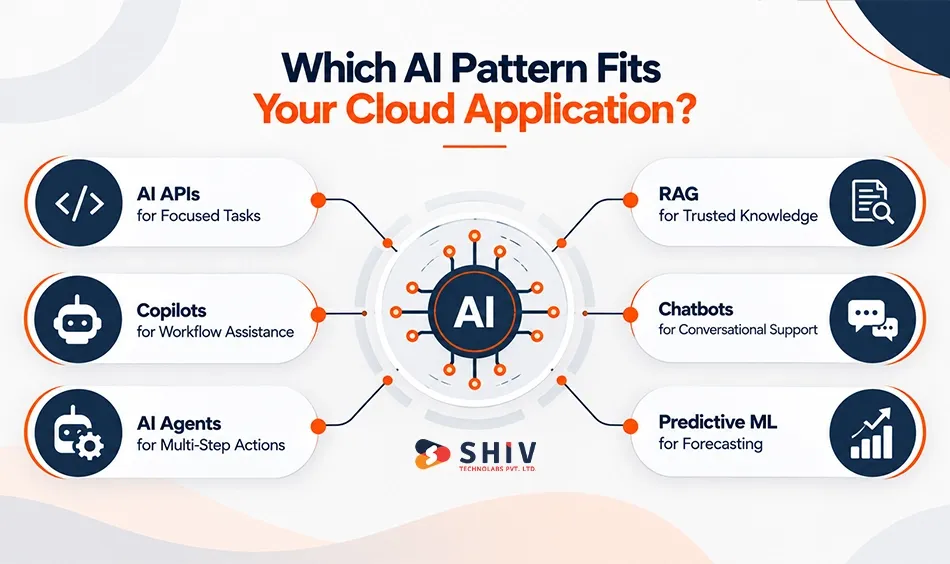
Not every application needs an autonomous AI agent. Many business requirements can be handled with a smaller AI pattern that costs less and creates fewer operational risks. The right choice depends on the workflow, data, required autonomy, latency, and consequences of an incorrect result.
AI API Integration for Focused Tasks
AI APIs work well for summarization, extraction, classification, rewriting, tagging, and other focused functions. They are often a practical starting point because the existing application can send a defined request and receive a defined response.
RAG for Trusted Enterprise Knowledge
RAG connects a model with relevant enterprise information at request time. Microsoft describes RAG as an architecture pattern that supplies grounding data to a language model through a retrieval system. This lets applications control which information supports a generated answer. RAG is useful for policies, manuals, product documentation, internal knowledge, and other source-based answers.
Copilot for In-Workflow Assistance
A copilot sits inside an existing user workflow. It can summarize records, draft responses, answer contextual questions, or suggest next actions without requiring users to leave the application.
Chatbot for Conversational Support
Chatbots can support customer service, onboarding, employee assistance, or guided product information. A production chatbot should include escalation rules for questions it cannot answer safely.
AI Agent for Multi-Step Actions
AI agents can plan and perform multiple steps using approved tools. For example, an agent might review an incoming request, retrieve customer information, create a CRM task, and prepare a response. The additional autonomy requires stronger access controls and approval boundaries. AI agent development involves designing agent architecture and integrating agents with existing infrastructure.
Predictive ML for Scoring and Forecasting
Traditional machine learning may be the better choice for churn prediction, demand forecasting, anomaly detection, risk scoring, or other numeric predictions. The best architecture is therefore determined by the business task rather than which AI technology is receiving the most attention.
Consider: Use an AI API for focused generation tasks, RAG for trusted enterprise knowledge, a copilot for in-app assistance, an agent for controlled multi-step actions, and predictive ML for forecasting or scoring.
What Architecture Works for AI Integration in Existing Cloud Applications?
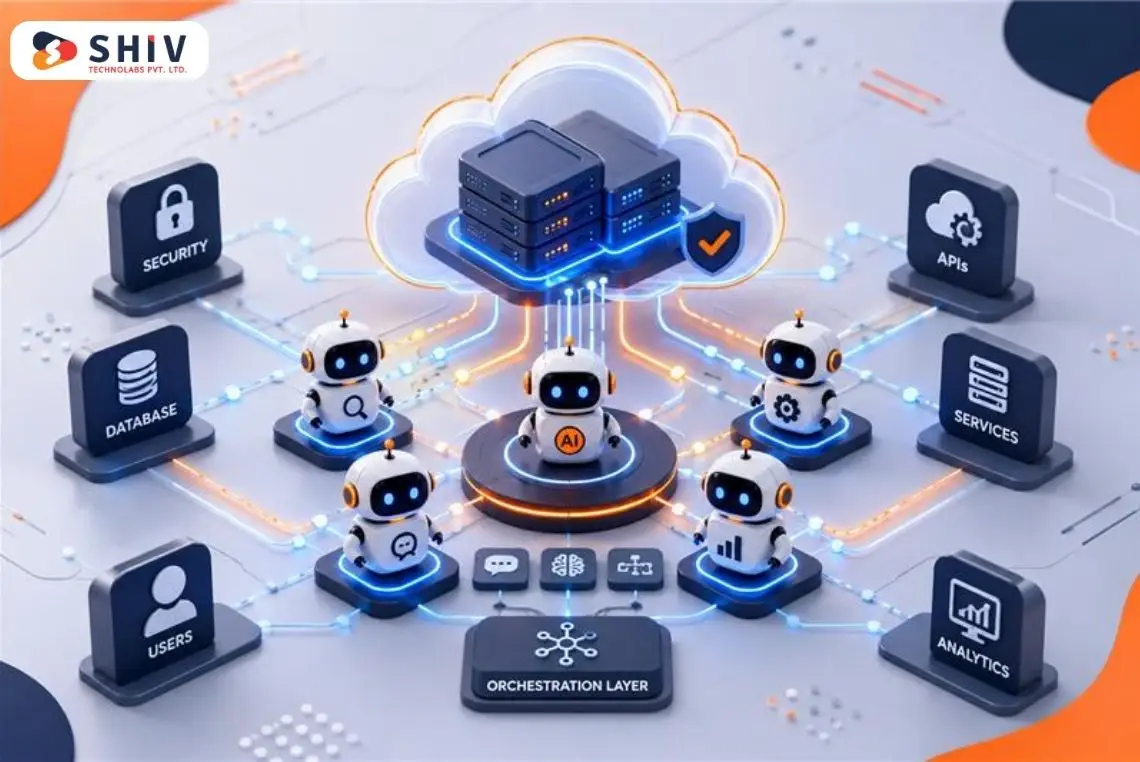
In many cases, the safer architecture is to add AI as a controlled service layer around the existing cloud application, rather than putting model logic throughout the core codebase. Microsoft’s current Azure architecture guidance similarly separates intelligent application workloads into defined layers and recommends adapting the architecture to business goals, technical constraints, and risk posture.
Add a Separate AI Service Layer
The AI service layer can manage prompts, retrieval, model selection, guardrails, and output processing. Keeping this logic separate makes it easier to change models or policies without rewriting the entire cloud application.
Put APIs and Middleware at the Boundary
Existing systems can communicate with the AI layer through controlled APIs. An API gateway can support authentication, request limits, monitoring, and traffic policies. Middleware can transform application data into the format required by AI services. For complex integration requirements, custom API development services can connect existing business systems with new AI components.
Reuse Existing Identity and Permissions
The AI layer should respect the application’s current authorization model. User identity should travel with requests, so retrieval and tools can enforce the same permissions as the underlying system.
Add a Knowledge Layer When RAG Is Needed
A knowledge layer can index approved enterprise information for retrieval. Vector search is one option, but RAG does not require every organization to place all enterprise data inside one vector database.
Use Event-Driven Processing for Long Tasks
Some AI operations should not block the user interface. Document processing, large summarization jobs, classification pipelines, and background agent tasks may work better through queues or event-driven workflows.
Keep the Core Application Stable
Avoid rewriting stable business logic merely to introduce AI. A modular architecture lets teams add, evaluate, replace, or disable AI capabilities while keeping critical application functions independent.
Reference flow:
Existing Cloud App → API Gateway → AI Service Layer → Model/RAG/Agent → Enterprise Data & Tools → Validation → Application Response → Monitoring
Expert Insight: Separating AI from the application’s core logic reduces AI lock-in. Models and orchestration can change faster than stable enterprise workflows.
Where Should AI Appear Inside an Existing Cloud Application?
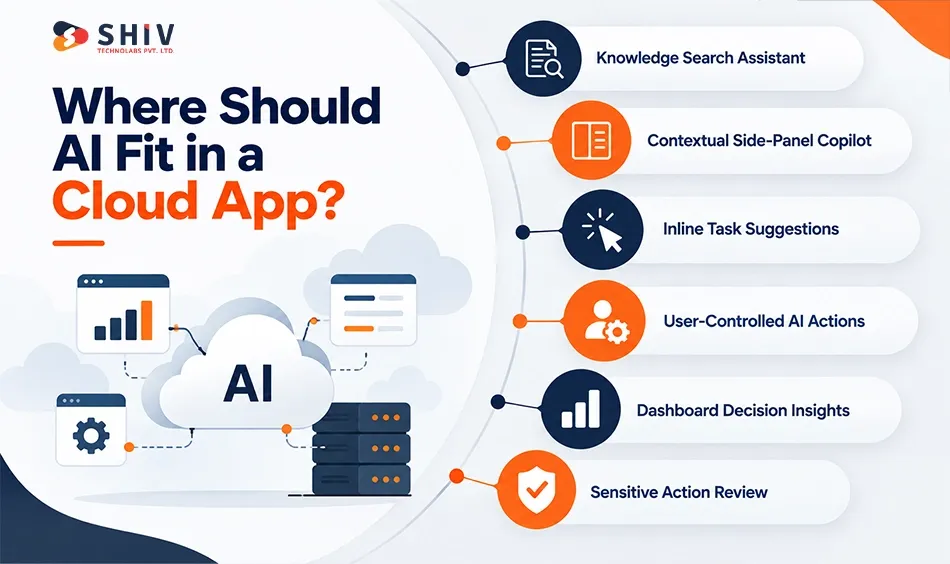
AI adoption depends partly on placement. Users are more likely to use AI when it appears inside a familiar workflow and solves a specific task without forcing them into another application.
Knowledge Assistant for Search
A knowledge assistant works well when users repeatedly search policies, documentation, customer information, or internal procedures. Ground answers in approved sources and show evidence where the use case requires it.
Side-Panel Copilot for Contextual Help
A side panel can assist users while they work inside a CRM, ERP, SaaS platform, or enterprise portal. It might summarize the current record, answer contextual questions, or prepare a next step.
Inline Suggestions for Small Tasks
AI does not always need a chat interface. Inline suggestions can assist with classification, tags, summaries, text completion, or field recommendations directly where users work.
User-Controlled Workflow Actions
A clear button can trigger a specific AI workflow. This pattern works well when users should remain in control of when an AI action begins.
Dashboard Insights for Decision Support
AI can surface patterns, anomalies, forecasts, or suggested actions alongside existing business metrics. The interface should distinguish generated recommendations from verified business facts.
Human Review Queue for Sensitive Actions
High-risk outputs can move into a review queue before they affect customers, finances, records, or external systems. This keeps human responsibility visible where the business consequence is higher.
Quick Insight: The best AI interface is not always a chatbot. Sometimes one contextual suggestion inside an existing workflow creates more value.
How Should Enterprises Test AI Before Production?
AI testing must cover more than whether the feature technically works. Teams should evaluate correctness, grounding, security boundaries, edge cases, latency, failure behavior, and human escalation before a broad release.
Create an Evaluation Dataset
Build representative test cases from real workflow patterns. Include normal requests, ambiguous inputs, incomplete information, unusual cases, and known failure scenarios.
Test Accuracy and Grounding
Compare outputs against trusted answers or source material. For RAG applications, verify that the retrieved evidence actually supports the generated response.
Test Unsupported Claims
Deliberately ask questions that cannot be answered from approved information. The AI should admit uncertainty or escalate rather than invent a confident answer.
Test Permissions
Create users with different roles and verify what each user can retrieve or request. Permission testing is especially important when one AI assistant serves multiple departments or customers.
Test Prompt-Based Attacks
Attempt to override system instructions, extract hidden information, manipulate tools, or bypass access rules. These tests should cover direct user prompts and malicious content inside retrieved documents.
Run Regression Tests
Models, prompts, retrieval settings, policies, and data change over time. Maintain a regression suite so updates can be checked against previously acceptable behavior.
Test Human Review Paths
Verify that high-risk requests actually reach the intended person and that reviewers receive enough context to make a decision. NIST’s AI Resource Center specifically provides resources supporting AI testing, evaluation, verification, and validation.
Expert Insight: Track failures as reusable test cases. A production incident should make the evaluation suite stronger, not remain only an incident report.
What Is the Best Roadmap for Adding AI to an Existing Cloud Application?
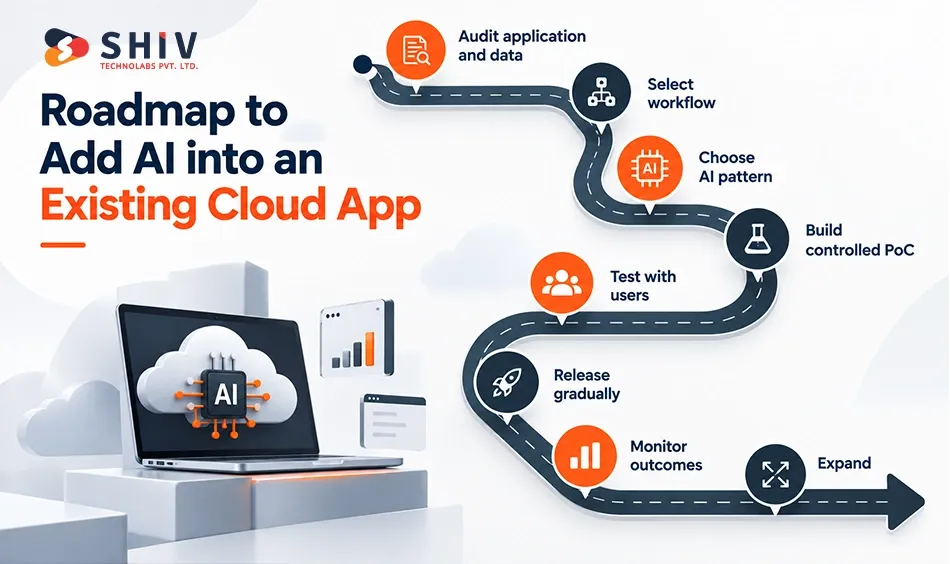
A phased roadmap lowers risk because each stage tests an assumption before the organization expands AI access. The first production use case should be valuable enough to measure but contained enough to govern.
Phase 1: Audit the Existing Application
Map user workflows, data sources, APIs, authentication, integrations, cloud infrastructure, and current operational pain points. Document constraints before selecting the AI pattern.
Phase 2: Select One High-Value Workflow
Choose a task with a clear user, measurable outcome, accessible data, and manageable risk. Avoid launching several unrelated AI features in the first phase.
Phase 3: Choose the AI Pattern and Architecture
Decide whether the workflow needs an API, RAG, copilot, chatbot, agent, or predictive model. Define identity, data access, model routing, logging, and human approval at the same time.
Phase 4: Build a Controlled Proof of Concept
Use a limited dataset and restricted permissions. The proof of concept should test the most important business and technical assumptions rather than demonstrate every possible feature.
Phase 5: Evaluate With Real Users
Test quality, latency, permissions, usability, cost, and escalation with a controlled user group. Record failures and turn them into evaluation cases.
Phase 6: Release in Stages
Increase users, data access, and AI authority gradually. Do not expand all three dimensions at the same time unless the previous stage has demonstrated acceptable behavior.
Phase 7: Monitor Business and AI Metrics
Track quality, failures, adoption, cost, latency, security events, and business outcomes after launch. Microsoft’s architecture guidance recommends iterative AI delivery with safeguards and continuous checks for accuracy and performance.
Phase 8: Expand Only After Value Is Proven
New AI use cases should reuse proven architecture and governance patterns where appropriate. For organizations extending AI across multiple systems, custom software development services can support application modernization alongside AI integration.
| Phase | Action | Decision Gate |
| 1 | Audit application and data | Is the foundation ready? |
| 2 | Select workflow | Is value measurable? |
| 3 | Choose AI pattern | Does architecture fit risk? |
| 4 | Build controlled PoC | Does the approach work? |
| 5 | Test with users | Is quality acceptable? |
| 6 | Release gradually | Is production behavior stable? |
| 7 | Monitor outcomes | Is value sustained? |
| 8 | Expand | Is wider investment justified? |
Consider: A successful proof of concept proves technical possibility. It does not automatically prove production readiness, user adoption, security, or ROI.
Which AI Integration Mistakes Should Enterprise Leaders Avoid?
Most failed AI initiatives are not caused by one bad model decision. Problems often begin when teams skip workflow analysis, connect unreliable data, grant broad permissions, or launch without a measurable definition of success.
| Mistake | Better Decision |
| Model-first planning | Start with workflow |
| AI added to broken process | Redesign the workflow |
| Poor source data | Fix critical data gaps |
| Broad AI permissions | Apply least privilege |
| Standard QA only | Add AI evaluations |
| No production monitoring | Track quality continuously |
| Usage-only reporting | Measure business outcome |
Starting With the Model
Choosing a model before defining the workflow reverses the decision process. Start with the task, risk, data, and outcome. Then choose the technology.
Adding AI Without Workflow Redesign
Placing a chatbot beside an inefficient process does not necessarily improve the process. Decide which steps AI should remove, assist, or change.
Connecting AI to Untrusted Data
Outdated documents and conflicting records produce unreliable context. Fix critical data ownership and quality problems before expanding retrieval.
Granting Too Much Access
Broad permissions increase the impact of mistakes. Give AI components only the data and tools required for the specific workflow.
Skipping AI-Specific Evaluation
Traditional functional testing cannot measure every generative AI failure mode. Add grounding, adversarial, permission, edge-case, and regression evaluations.
Treating Launch as Completion
Models, enterprise data, user behavior, and business processes continue changing. Production monitoring and evaluation should continue after release.
Measuring Adoption Without Value
A large number of prompts does not prove business success. Connect usage to measurable outcomes such as time saved, resolution quality, task completion, revenue influence, or cost reduction.
Expert Insight: High AI usage can hide a weak product. Users may repeatedly prompt the system because the first response failed. Pair adoption metrics with completion and quality metrics.
How Can Shiv Technolabs Add AI to Existing Cloud Applications?
Shiv Technolabs helps enterprises add AI to existing SaaS platforms, portals, and business applications without rebuilding the full system. The process starts with workflow, data, APIs, permissions, security, and business goals. Our AI development services support AI integration, machine learning, NLP, automation, and AI-enabled application development.
Based on the workflow, teams can add RAG, copilots, chatbots, knowledge assistants, or controlled AI agents. Our generative AI development services can support model selection, data planning, guardrails, testing, and integration with CRM, ERP, databases, cloud storage, internal APIs, and other business systems.
Security and governance remain part of the implementation from the beginning. Role-based access, logging, approval rules, evaluation, failure handling, and data boundaries help keep AI use controlled. After launch, teams can track response quality, cost, latency, model behavior, retrieval accuracy, adoption, and business outcomes as the application changes.
AI Should Strengthen Existing Cloud Applications, Not Replace Stable Systems
Enterprise leaders do not need to rebuild every cloud application before adding AI. Existing SaaS products, portals, CRMs, dashboards, and internal tools can often gain useful AI capabilities through controlled APIs, RAG, copilots, predictive models, or AI agents.
The starting point should be workflow value and trusted data. Once the use case is clear, teams can decide what AI should access, whether it should suggest or act, which model pattern fits, and where human approval belongs.
Architecture and governance should protect the stable parts of the existing application. Separate AI services, permission-aware data access, evaluation, audit logs, cost monitoring, and staged releases make future changes easier to control. The final measure is not how much AI the application contains. It is whether the AI improves a measurable workflow while maintaining acceptable quality, security, cost, and user trust.
Frequently Asked Questions
Can AI Be Added to an Existing Cloud Application?
Yes. Many cloud applications can add AI through APIs, RAG, copilots, chatbots, predictive models, or agents without rebuilding the entire application.
Do Cloud Applications Need to Be Rebuilt for AI?
Not usually. A separate AI service layer can connect with existing APIs, data, authentication, and workflows while keeping stable application logic intact.
What Should Leaders Check Before Adding AI to Cloud Software?
Review workflow value, data quality, APIs, permissions, security, compliance, architecture, model cost, evaluation, user adoption, governance, and post-launch operations.
What AI Features Can Be Added to Existing SaaS Applications?
Common options include intelligent search, summarization, copilots, chatbots, recommendations, document processing, predictive analytics, classification, workflow automation, and controlled AI agents.
What Is the Safest Way to Connect AI to Enterprise Data?
Use permission-aware APIs or retrieval layers, apply least-privilege access, minimize sensitive context, log important actions, and require approval for higher-risk operations.
How Does RAG Help Existing Cloud Applications?
RAG retrieves relevant enterprise information at request time and provides it as grounding context, helping generated answers use approved business knowledge.
When Should a Cloud Application Use an AI Agent?
Use an agent when the workflow requires reasoning across several controlled steps or tools. Simpler generation or search tasks usually need less autonomy.
What Security Risks Come With Enterprise AI Integration?
Key risks include sensitive-data exposure, prompt manipulation, excessive permissions, unsafe tool actions, weak auditability, provider risk, and incorrect access to enterprise records.
How Much Does It Cost to Add AI to a Cloud Application?
Cost depends on architecture, models, data, integrations, usage, security, and support. Enterprises should track both implementation cost and cost per completed workflow.
How Should Enterprises Test AI Before Launch?
Test accuracy, grounding, missing-evidence behavior, permissions, adversarial prompts, edge cases, latency, regression behavior, and human escalation before wider production use.
Who Should Own AI Governance in a Cloud Application?
Governance should involve business, data, engineering, security, legal or risk, product, and operations owners with clearly assigned responsibilities.
Can Shiv Technolabs Integrate AI Without Rebuilding Existing Software?
Yes. Shiv Technolabs works with existing software and infrastructure to add AI/ML capabilities and integrations based on the application’s current architecture.