Table of Contents
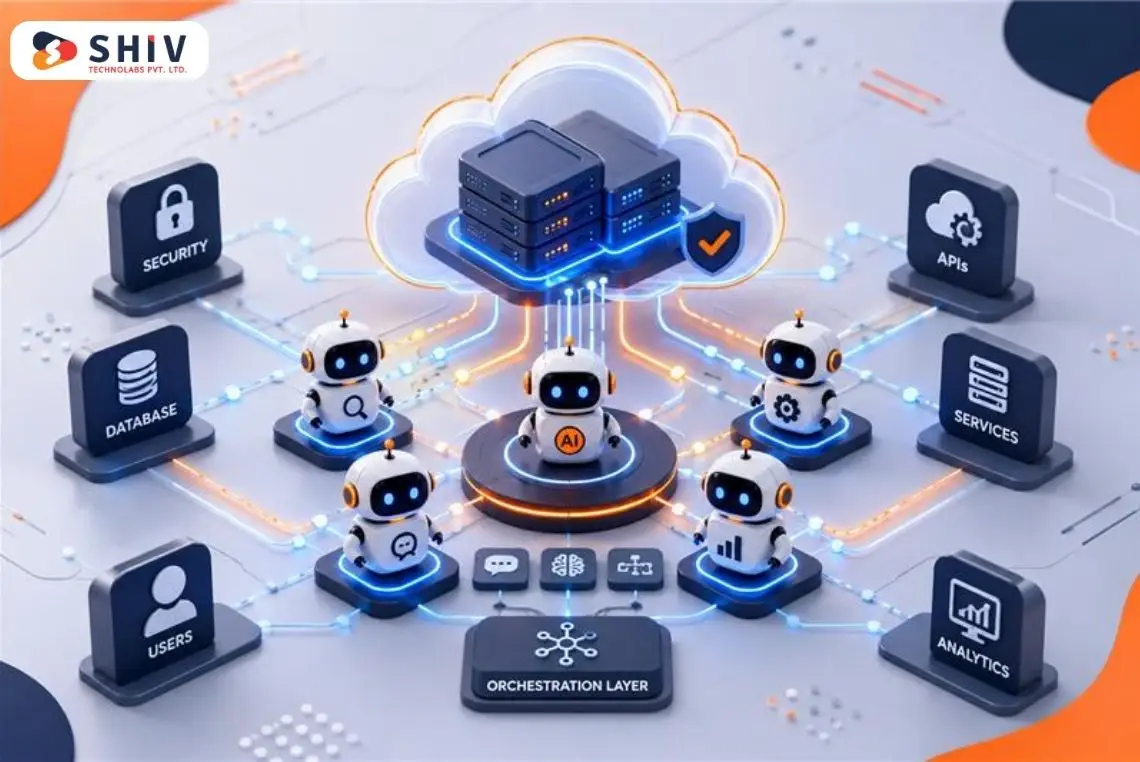
AI agents are becoming more capable inside enterprise systems. Unlike standard chatbots, they can retrieve company data, call APIs, update records, trigger workflows, and interact with ERP, CRM, finance, HR, and SaaS platforms.
That capability changes the governance requirement. An enterprise AI agent needs clear rules for identity, permissions, data access, tool use, approvals, validation, monitoring, and accountability. The goal is controlled autonomy, where agents can perform approved tasks without receiving unnecessary access or authority.
The NIST AI Risk Management Framework provides a useful foundation through its Govern, Map, Measure, and Manage functions. NIST also launched an AI Agent Standards Initiative in 2026 focused on secure and interoperable agent systems.
For enterprises planning AI agent development services, governance should begin during architecture planning rather than after agents receive production access.
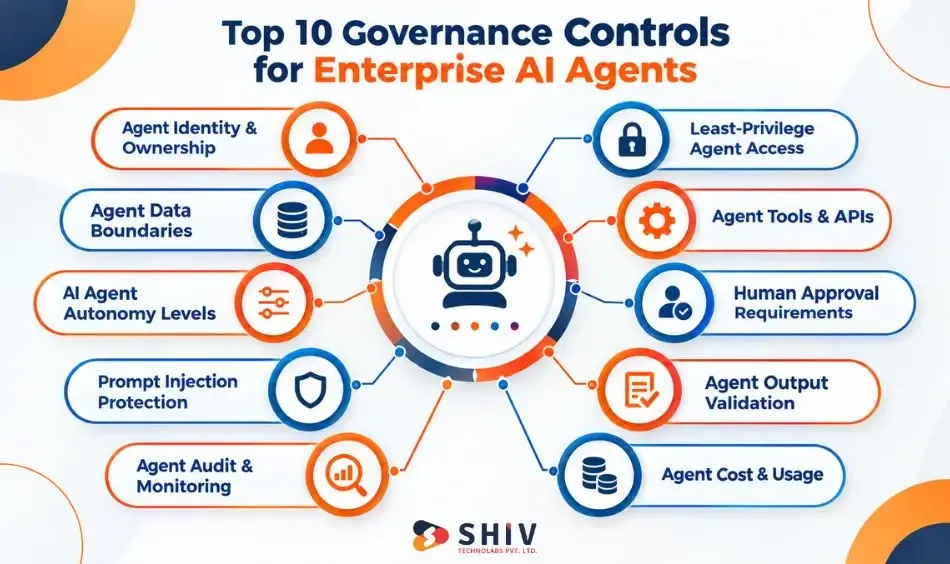
Quick Overview: Governance controls for AI agents define what an agent can access, which tools it can call, what actions it can perform, when human approval is required, and how activity is reviewed. Core controls include identity, least privilege, data boundaries, tool restrictions, autonomy limits, human approval, prompt injection protection, output validation, audit logging, monitoring, and usage controls.
What Governance Controls Do AI Agents Need?
Enterprise AI agent governance is a combination of technical controls, operating rules, human oversight, and continuous review. No single policy can control every risk created when an agent connects to business systems. The controls should follow the agent across its lifecycle. They start with ownership and access, continue through tool execution, and remain active during production monitoring.
| Governance Control | What It Controls | Why It Matters |
| Agent identity | Which agent performed an action | Creates accountability |
| Least privilege | Systems and functions available | Limits unnecessary access |
| Data boundaries | Information available to agents | Reduces disclosure risk |
| Tool registry | APIs and functions agents can call | Controls external actions |
| Autonomy limits | Actions agents can perform independently | Limits excessive agency |
| Human approval | Actions requiring review | Protects sensitive workflows |
| Prompt protection | Untrusted instructions | Reduces manipulation risk |
| Output validation | Responses and action payloads | Catches invalid results |
| Audit and monitoring | Agent behavior and outcomes | Supports investigation |
| Usage controls | Calls, loops, tokens, and costs | Limits runaway activity |
Expert Insight: Treat an enterprise AI agent as a system actor rather than only a language model. Governance must cover what happens after the model generates an answer.
Why Do AI Agents Need Stronger Governance Than Chatbots?
A chatbot mainly generates responses. An AI agent may combine reasoning with retrieval, tool calling, function calling, API access, and workflow execution. That difference increases the possible impact of an error. A wrong chatbot response may confuse a user. An improperly governed agent could modify a CRM record, expose restricted information, send an external message, or initiate an unwanted business process.
Agents Can Read Enterprise Data
Agents connected to retrieval systems may access customer records, internal documents, financial information, support tickets, policies, or operational data. Access therefore needs to respect both the agent’s role and the requesting user’s permissions.
Agents Can Call Tools and APIs
Tool calling turns generated output into potential action. An agent might create a support ticket, query inventory, update an account, or call another enterprise service. Each available tool increases the agent’s action surface.
Agents Can Trigger Business Workflows
An agent may connect several actions into one workflow. An error early in that workflow can affect later systems. Multi-step execution therefore requires permissions, validation, tracing, and stopping conditions.
Agent Actions Can Have Business Consequences
Finance, HR, legal, customer, and security workflows carry different levels of risk. They should not receive identical autonomy. OWASP guidance on excessive agency identifies excessive functionality, permissions, and autonomy as important causes of agent-related risk.
Consider: Governance should be based on the consequence of an action, not simply whether AI performs it.
Control 1: Manage AI Agent Identity and Ownership
Every production AI agent should have a unique identity, defined purpose, responsible owner, approved scope, and documented system connections. Identity makes it possible to determine which agent accessed information or performed an action.
| Identity Item | What to Record |
| Agent ID | Unique machine identity |
| Purpose | Approved business task |
| Business owner | Accountable function |
| Technical owner | Responsible engineering function |
| Connected systems | ERP, CRM, APIs, SaaS |
| Permissions | Read, write, execute |
| Risk classification | Internal risk category |
| Review date | Next governance review |
Assign a Unique Identity to Each Agent
Avoid using one generic identity across unrelated agents where architecture permits separate identities. Unique service identities make permissions, logs, credential rotation, and incident investigation easier to manage.
Assign Business and Technical Owners
The business owner should define the approved purpose and acceptable business behavior. The technical owner should manage architecture, integrations, permissions, testing, monitoring, and technical changes.
Document the Agent’s Approved Purpose
Record what the agent should do and what falls outside its role. Purpose boundaries also help teams decide whether a new tool or permission genuinely belongs to that agent.
Maintain an AI Agent Inventory
Record production agents alongside their owners, connected systems, data classifications, tools, models, and review schedules.
Expert Insight: AI agent identity governance means assigning every production agent a traceable identity, owner, approved purpose, system scope, permissions, and review schedule.
Control 2: Apply Least-Privilege Access for AI Agents
Least privilege means giving an AI agent only the permissions required for its approved task. A support-routing agent, for example, may need ticket data. That does not mean it needs finance records, payroll information, customer exports, or administrator privileges.
Use Role-Based or Attribute-Based Access
RBAC can assign permissions based on defined agent roles. ABAC can make access decisions using attributes such as resource type, environment, user, or sensitivity. Choose controls that fit the organization’s existing IAM architecture.
Scope API Tokens and Service Accounts
Credentials should match the specific functions the agent performs. Where possible, separate read permissions from write or execution permissions.
Protect Secrets Outside Agent Prompts
API keys, passwords, tokens, and credentials should not be embedded directly into prompts. Use approved secrets-management and credential-management systems.
Review Permissions After Changes
Agent functionality changes over time. Permissions should be reassessed when tools, workflows, models, or connected systems change.
Expert Insight: Ask “What is the minimum permission needed for this task?” before asking what the connected platform allows. OWASP’s excessive-agency guidance recommends minimizing extensions, functions, permissions, and agent autonomy.
Control 3: Set AI Agent Data Boundaries
Connecting an AI agent to enterprise data does not mean giving it access to every available source. Data governance should define approved sources, classifications, retrieval permissions, retention rules, and boundaries between users, departments, customers, and tenants.
Define Approved Data Sources
Create an inventory of databases, document repositories, vector stores, APIs, and applications an agent may query. Unapproved sources should remain unavailable by default.
Apply Permission-Aware Retrieval
RAG systems should preserve relevant authorization rules during retrieval. A user should not receive restricted information simply because the vector database contains it.
Separate Data by Sensitivity
Classify information such as public, internal, confidential, restricted, or regulated. Agent policies can then apply different retrieval and action rules to each classification.
Track Retrieval Sources
Where appropriate, preserve information about which source contributed to an agent’s response. Source lineage can support validation, troubleshooting, and audit review.
| Boundary | Governance Question |
| User | Can this user access the information? |
| Agent | Is this agent permitted to retrieve it? |
| Data | Is this classification allowed? |
| Tenant | Can information cross tenants? |
| Purpose | Is this an approved use? |
| Retention | How long can the data remain? |
Expert Insight: Adding RAG does not automatically solve authorization. Access rules must remain effective during retrieval, context assembly, generation, and downstream actions. In broader enterprise AI development, data governance must also align with application permissions and integration requirements.
Control 4: Govern AI Agent Tools and APIs
Tools are the bridge between an agent’s reasoning and enterprise actions. This makes tool governance one of the most important AI agent security controls. Every function, API, MCP tool, database operation, or workflow action should have a defined purpose and permission scope.
| Tool Control | Purpose |
| Tool registry | Defines approved tools |
| API gateway | Central control point |
| Read/write separation | Limits modification rights |
| Input schema | Rejects malformed requests |
| Rate limit | Restricts repeated execution |
| Timeout | Stops stalled calls |
| Tool owner | Creates accountability |
Maintain an Approved Tool Registry
Document every tool available to production agents. Record the tool owner, purpose, allowed operations, authentication method, data classification, and approval requirements.
Separate Read, Write, and Execute Permissions
Reading an invoice and modifying an invoice represent very different risks. Do not bundle these permissions simply because one API supports both.
Validate Tool Inputs
Check generated parameters against schemas and business rules before execution. Do not assume syntactically valid model output represents an authorized action.
Add Rate Limits and Timeouts
Limits can reduce repeated calls, unexpected loops, and unnecessary downstream activity. An API gateway can centralize authentication, traffic policies, logging, and other controls where suitable.
Organizations connecting agents with existing systems can use custom API development services when designing controlled integration layers.
Expert Insight: An AI agent tool registry is an approved inventory of APIs, functions, MCP tools, and enterprise actions available to agents. Each tool should define permissions, authentication, allowed operations, input rules, limits, logging, and ownership.
Control 5: Define AI Agent Autonomy Levels
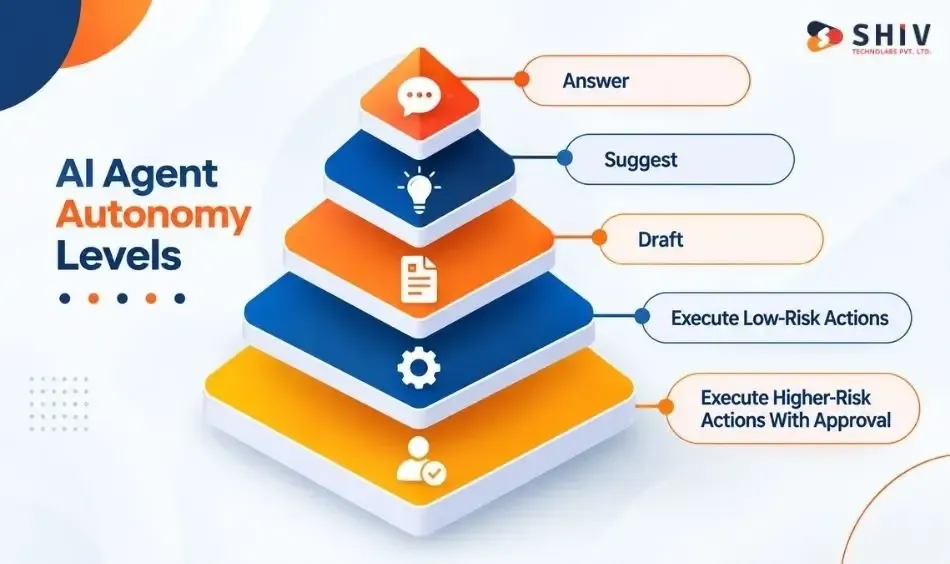
Not every AI agent needs permission to execute actions. A practical governance model can separate agents that answer, suggest, draft, execute low-risk tasks, and request approval for higher-risk actions.
Level 1: Answer
The agent retrieves approved information and generates a response. It does not modify external systems.
Level 2: Suggest
The agent recommends a next action, but a person or another approved process decides whether to proceed.
Level 3: Draft
The agent prepares content or an action payload without sending or executing it. Examples include customer emails, tickets, or structured requests.
Level 4: Execute Low-Risk Actions
The agent can perform narrowly defined, reversible tasks under established policies. Logging and permission checks should remain active.
Level 5: Execute Higher-Risk Actions With Approval
Actions involving significant financial, legal, privacy, security, or customer consequences require appropriate authorization.
Expert Insight: Increase autonomy according to risk, reversibility, and business impact. Reading a record and changing a financial record should never receive identical authority.
Control 6: Define When AI Agents Require Human Approval
Human approval should sit around actions where an incorrect decision could create meaningful consequences. It should be part of workflow architecture rather than a manual cleanup process after execution.
| Action | Possible Control |
| Search approved knowledge | Automatic |
| Summarize internal document | Automatic + logging |
| Draft customer response | Validation or review |
| Change CRM record | Permission + validation |
| Issue refund | Human approval |
| Modify invoice | Human approval |
| Change contract | Appropriate legal review |
| Sensitive HR action | Human oversight |
Require Approval for High-Impact Actions
Financial transactions, contract changes, restricted-data access, policy exceptions, and sensitive customer actions are common candidates. Exact requirements depend on the organization’s policies and applicable regulations.
Define Who Can Approve Each Action
Approval authority should match existing organizational responsibility. An agent should not decide who is authorized to approve its own high-risk action.
Record Approval Decisions
Capture who approved or rejected the action, when it happened, and relevant workflow context. This information supports later investigation and accountability.
Provide Override and Escalation Paths
People need a way to stop, correct, reject, or escalate agent actions. The European Commission’s AI Act overview describes human oversight among requirements applying to high-risk AI systems. Applicability depends on the specific system, role, and regulated use case.
Consider: Human-in-the-loop does not mean humans must approve everything. Place approval gates where consequences justify the additional control.
Control 7: Protect AI Agents From Prompt Injection
Prompt injection occurs when untrusted content attempts to influence an AI system outside its intended instructions. For agents, the risk becomes more serious when manipulated output can trigger tools or access sensitive information.
Treat External Content as Untrusted
User prompts, emails, websites, uploaded files, support tickets, and retrieved documents may contain hostile instructions. Retrieved text should not automatically receive authority over system policies.
Separate Instructions From Retrieved Data
Keep trusted system instructions logically separated from content retrieved for analysis. The agent should distinguish data it needs to process from commands it is authorized to follow.
Validate Tool Calls Independently
A model requesting an action does not make the action authorized. Apply permission checks and business rules outside the generated response.
Test Indirect Prompt Injection
Security testing should include malicious instructions embedded in documents, webpages, emails, and retrieved content.
Example: A support agent reads a document containing hidden instructions to retrieve confidential customer records. The document should remain untrusted data and should not gain permission to change the agent’s policy.
OWASP’s GenAI security guidance provides current guidance covering prompt injection and other risks affecting generative AI and agentic applications.
Control 8: Validate AI Agent Outputs and Actions
Enterprise agents need more than fluent responses. Their outputs may become API parameters, database changes, customer messages, or workflow decisions. Validation should therefore match the output’s downstream effect.
| Output | Validation |
| Factual answer | Approved-source grounding |
| RAG response | Source verification |
| JSON | Schema validation |
| API call | Arguments + authorization |
| Customer message | Policy checks |
| Database update | Business rules |
| Financial action | Validation + approval |
Ground Factual Answers
Where factual accuracy matters, compare answers against approved enterprise sources. Record source information when traceability is required.
Validate Structured Outputs
Use defined schemas for JSON, API payloads, database operations, and function parameters. Reject malformed or unexpected values before they reach downstream systems.
Apply Business Rules
A technically valid action may still violate company policy. Validate relevant limits, account status, workflow state, permissions, and other business conditions before execution.
Escalate Unsupported High-Risk Outputs
When evidence is insufficient or required conditions fail, the agent should stop or route the task appropriately.
Expert Insight: AI agent output validation checks generated answers and action payloads before they affect users or enterprise systems. Controls can include source grounding, schema validation, authorization, business rules, policy checks, and human approval.
Control 9: Audit and Monitor AI Agents
Governance continues after an AI agent enters production. Enterprises need enough observability to reconstruct important actions, identify failures, review overrides, and determine whether performance changes over time.
| Log or Metric | What It Shows |
| Agent identity | Which agent acted |
| Trigger | What initiated execution |
| Retrieval trace | Sources accessed |
| Tool trace | Functions called |
| Action result | What happened |
| Approval record | Who authorized action |
| Override | Where humans intervened |
| Error rate | Workflow failures |
| Evaluation results | Behavior over time |
| Cost per task | Resource consumption |
Log Agent and User Context
Capture the relevant agent identity and triggering user, system, or event. Logging should follow applicable privacy, security, and retention requirements.
Record Retrieval and Tool Activity
Record relevant sources, tools, calls, outcomes, and errors. Multi-step and multi-agent systems may also require tracing across agent-to-agent interactions.
Track Human Overrides
Human corrections can reveal recurring failure patterns. Repeated overrides around one workflow may indicate a policy, prompt, retrieval, model, or integration problem.
Run Evaluations and Regression Tests
Test representative tasks before and after important changes. Model upgrades, prompt changes, new tools, and new data sources can alter behavior.
Expert Insight: Logging only the final answer may not explain an agent incident. Investigation can require the identity, retrieval, tool, approval, and action chain.
Control 10: Govern AI Agent Cost and Usage
Cost controls are also operational controls. Agent workflows may involve repeated model calls, long contexts, tool requests, retries, and multi-agent interactions. Without limits, a faulty workflow can consume resources while repeatedly affecting downstream systems.
| Control | What It Limits |
| Token budget | Excessive model usage |
| Rate limit | Repeated calls |
| Concurrency cap | Parallel workload |
| Retry limit | Repeated failures |
| Loop termination | Runaway execution |
| Model routing | Unnecessary model cost |
| Cost per task | Poor unit economics |
Set Usage Budgets
Set suitable limits by agent, workflow, environment, or business function. Limits can cover model consumption and relevant downstream services.
Add Rate and Concurrency Limits
Rate limits restrict repeated activity. Concurrency caps can prevent an unexpected volume of parallel tasks from overwhelming dependent systems.
Define Loop Termination Rules
Agents should have clear stopping conditions. Limit repeated reasoning, retries, tool calls, or agent-to-agent handoffs where appropriate.
Track Cost Per Completed Task
Total model spend does not show whether an agent is economically useful. Compare cost with successful task completion and business value.
Do You Know? A runaway loop can create two problems at once. It can consume compute while repeatedly creating tickets, messages, records, or API calls.
How Do Governance Controls Map to the AI Agent Lifecycle?
Enterprise AI agent governance should begin before development and continue through retirement. Adding governance only after production makes identity, data access, tool permissions, and workflow architecture harder to change.
| Lifecycle Stage | Priority Governance Controls | Why It Matters |
| Planning | Purpose, ownership, risk assessment | Defines the agent’s business role, accountable owners, expected value, and acceptable risk level. |
| Architecture | Identity, access, data boundaries | Sets clear limits around who the agent represents and which information it can access. |
| Integration | Tool registry, API permissions | Controls which systems the agent can reach and which actions each connection permits. |
| Development | Prompt protection, output validation | Reduces manipulated instructions, unsupported responses, malformed payloads, and unsafe tool requests. |
| Testing | Evaluations, adversarial tests | Checks normal behavior, edge cases, prompt attacks, permission failures, and unexpected workflow paths. |
| Pre-production | Approval gates, action limits | Prevents high-impact actions from reaching live systems without suitable review and authorization. |
| Production | Logging, tracing, alerts | Creates visibility into prompts, sources, tool calls, approvals, actions, errors, and unusual behavior. |
| Operations | Quality, failures, cost | Tracks whether the agent remains accurate, reliable, useful, and financially practical after launch. |
| Change management | Regression testing, permission review | Identifies behavior or access changes after model, prompt, tool, data, or workflow updates. |
| Retirement | Credential revocation, data retention | Removes unused access, closes system connections, and handles stored records according to policy. |
Expert Insight: Governance is strongest when controls follow the agent lifecycle. Security review at launch cannot compensate for excessive permissions designed into the architecture. When integrating generative AI with enterprise apps, security controls, data access, and application permissions should remain aligned throughout the integration process.
What Should an Enterprise AI Agent Governance Checklist Include?
A practical AI agent governance checklist should verify ownership, access, data, tools, autonomy, approval, security, validation, monitoring, and usage before production access is granted. It should then be revisited when agents, models, integrations, business policies, or regulations change.
- Identity: Give every AI agent a unique identity. This helps teams trace actions, permissions, system access, and security events.
- Ownership: Assign both business and technical owners. Business owners define acceptable behavior, while technical owners manage system controls.
- Purpose: Document the agent’s approved tasks and restrictions. A clear purpose prevents teams from extending its role without review.
- Access: Apply least-privilege access across applications, APIs, and data. Grant only the permissions required for each approved task.
- Data: Apply user permissions during retrieval and response generation. Sensitive information should remain unavailable without suitable authorization.
- Tools: Allow access only to registered tools, APIs, and functions. Record each tool’s owner, permissions, limits, and approved operations.
- Autonomy: Define whether the agent can answer, suggest, draft, or execute. Higher-impact actions should receive stricter execution limits.
- Approval: Add human approval before financial, legal, HR, security, or sensitive customer actions. Record every approval and rejection.
- Prompt safety: Test direct and indirect prompt injection scenarios. Treat emails, documents, webpages, and user inputs as untrusted content.
- Validation: Check answers, structured outputs, and action requests before execution. Apply source checks, schemas, permissions, and business rules.
- Audit: Record agent identities, prompts, retrieved sources, tool calls, approvals, and outcomes. These records support investigations and compliance reviews.
- Monitoring: Track failures, blocked actions, human overrides, response quality, and unusual activity. Alerts should identify behavior requiring immediate review.
- Usage: Set limits for tokens, requests, retries, tool calls, execution time, and spending. Stopping rules should prevent uncontrolled loops.
- Review: Reassess controls after model, prompt, data, tool, or permission changes. Set regular reviews based on the workflow’s risk level.
Expert Insights: Before launching an enterprise AI agent, confirm its identity, owner, purpose, permissions, approved data, available tools, autonomy level, approval gates, prompt injection defenses, validation rules, audit trail, monitoring, usage limits, and review schedule.
How Can Shiv Technolabs Help Build Governed AI Agents?
Shiv Technolabs helps enterprises build AI agents with governance considered from the architecture stage. Our AI agent development services support agent workflows, RAG systems, enterprise data connections, API integrations, and controlled tool access. We define how agents interact with business systems while keeping permissions aligned with their approved responsibilities.
Our skilled developers can set up role-based access, human approval points, structured output validation, and controls for sensitive actions. We also test agent workflows against expected scenarios, integration failures, invalid outputs, and permission boundaries. These checks help businesses identify technical risks before agents interact with production systems or important business data.
For broader requirements, our custom software development services support integration with CRM, ERP, SaaS platforms, databases, and internal applications. We can also configure logging, observability, evaluation processes, and post-launch monitoring. These measures give enterprise teams better visibility into agent actions, tool calls, failures, and workflow performance as systems change.
Final Thoughts on Governance Controls for Enterprise AI Agents
AI agents can create business value when their authority matches their purpose. Giving an agent more tools, data, or autonomy than its task requires creates unnecessary operational and security exposure.
Strong governance controls for AI agents establish identity, least-privilege access, data boundaries, approved tools, autonomy limits, human oversight, prompt protection, validation, auditability, monitoring, and usage limits. These controls should remain active as models, integrations, business processes, and regulatory requirements change.
The practical goal is not maximum autonomy. It is controlled, traceable, and appropriately supervised execution across enterprise systems.
Frequently Asked Questions
What Are Governance Controls for AI Agents?
Governance controls are technical and organizational rules that define an AI agent’s identity, permissions, data access, tool use, autonomy, approvals, validation, monitoring, and accountability.
Why Do AI Agents Need Governance in Enterprise Systems?
AI agents can interact with enterprise data and perform actions through APIs and tools. Governance limits inappropriate access and controls actions that could affect business systems.
How Is AI Agent Governance Different From Chatbot Governance?
Chatbot governance focuses heavily on responses and information handling. Agent governance must additionally control tools, permissions, workflow execution, downstream actions, and autonomy.
What Is Least-Privilege Access for AI Agents?
Least privilege gives an AI agent only the data, tools, and permissions required for its approved tasks rather than broad system access.
How Can Enterprises Control AI Agent Tool Use?
Maintain approved tools, separate read and write permissions, validate inputs, apply authorization, set rate limits, and log important tool calls.
What Is Excessive Agency in AI Systems?
OWASP describes excessive agency as risk arising when an LLM-based system receives excessive functionality, permissions, or autonomy that can produce damaging actions.
When Should AI Agents Require Human Approval?
Human approval is particularly relevant for actions with meaningful financial, legal, privacy, employment, security, or customer consequences.
What Should AI Agent Audit Logs Include?
Logs can include agent identity, triggering event, retrieved sources, tool calls, action parameters, results, errors, approvals, overrides, and timestamps.
How Can Companies Control AI Agent Costs?
Organizations can set token budgets, rate limits, concurrency caps, retry limits, loop termination rules, and cost-per-task monitoring.
Which Frameworks Can Support AI Agent Governance?
NIST AI RMF provides a general AI risk-management framework. OWASP provides security guidance for generative AI applications, while applicable regulations such as the EU AI Act may add requirements based on the system and use case.