Table of Contents
Connecting an AI assistant to ERP data has traditionally required custom API work, middleware, and authentication logic. Engineering teams also built a separate layer between the model and the business system. Odoo 20 offers a simpler route through a native MCP server.
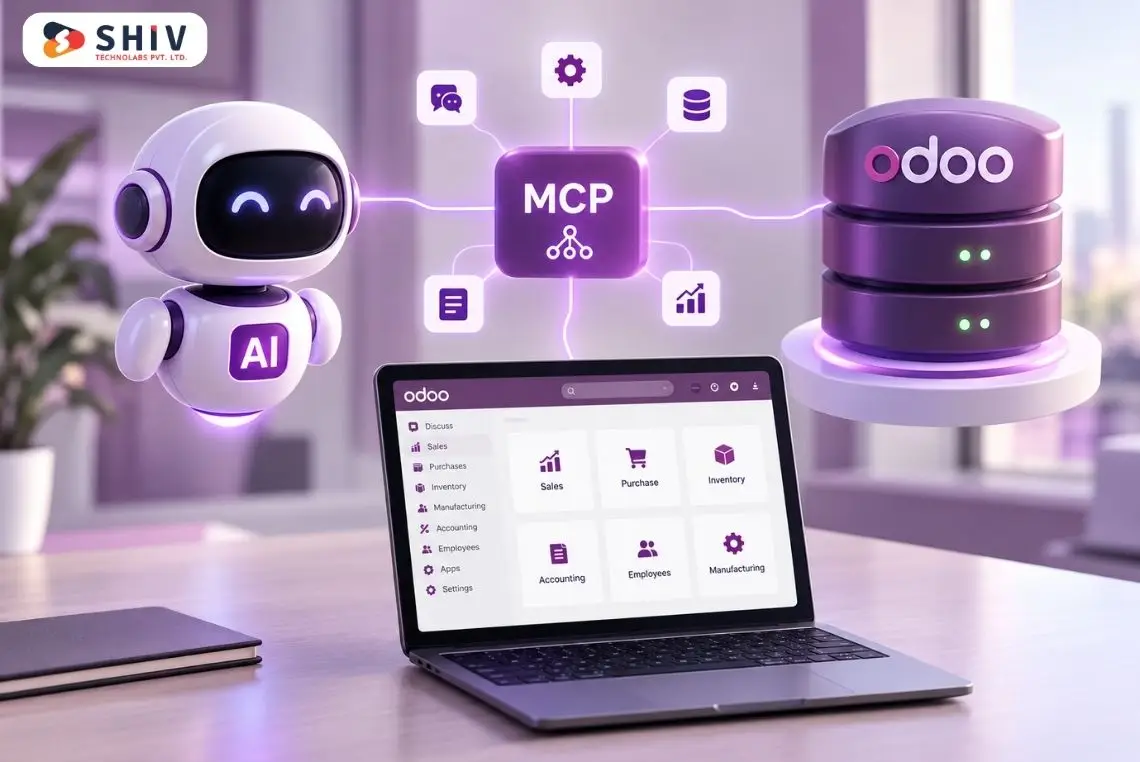
With the Odoo 20 MCP server, an Odoo database can act as a remote Model Context Protocol server. Compatible AI agents connect through a /mcp endpoint and authenticate with an MCP-scoped API key. They then discover available tools and work with permitted Odoo data.
This changes the integration model, but it does not remove the need for technical planning. An An agent that answers pipeline questions carries far less risk than one that edits customer records or triggers business processes.
For organizations planning Odoo development, the key question is what the agent may see and do after it connects.
Quick answer: Odoo 20 can expose an Odoo database as a remote MCP server. External AI clients such as Claude Code, Claude Desktop, Codex, and Antigravity can connect through the database’s /mcp endpoint. Odoo authenticates the connection with an MCP-scoped API key and applies the user’s existing permissions. Odoo exposes five tools by default, and administrators can expose more server actions when required.
What Is the Native MCP Server in Odoo 20?
The native MCP server in Odoo 20 lets an Odoo database act as a remote MCP server for external AI agents. Model Context Protocol, or MCP, provides a standard way for AI applications to communicate with external systems and tools.
In an Odoo 20 setup, the roles are straightforward:
- Odoo database: acts as the remote MCP server.
- AI application: acts as the MCP client.
- /mcp endpoint: provides the connection point.
- MCP-scoped API key: authenticates the user.
- Odoo tools: give the client defined capabilities.
- Existing permissions: determine what the authenticated user can access.
For example, if an organization’s database is hosted at https://example.odoo.com, its MCP server URL is formed by adding /mcp to that database URL. The AI client connects to that endpoint and requests the available tools. It then invokes the right tool for each user request.
Odoo’s official documentation describes the database itself as the remote MCP server rather than requiring a separate MCP service for the native setup.
| Component | Role in the Connection |
| Odoo database | Remote MCP server |
| AI application | MCP client |
| /mcp | Server endpoint |
| API key | Authenticates the user |
| MCP scope | Restricts the key to MCP use |
| MCP tools | Define available operations |
| Odoo permissions | Limit accessible data |
| Server actions | Add explicitly exposed capabilities |
This client-server model makes native MCP relevant for organizations planning AI agent development around ERP data.
Why Does MCP Change the Way AI Agents Work With Odoo?
An AI model without business context can explain what an overdue invoice is. Without controlled data access, it cannot tell a finance team which Odoo invoices are more than 30 days overdue. MCP closes the gap between general knowledge and operational context.
An authorized AI agent can help users answer questions such as:
- Which opportunities have no follow-up activity?
- Which quotations are waiting for approval?
- What did we invoice this quarter?
- Which products need attention based on current inventory data?
- Which project tasks remain blocked?
- Which records match a specific business condition?
The MCP client calls an approved Odoo tool instead of relying on a separate data export for each question. It works only with current records the authenticated user can access.
From Custom Connection Logic to a Standard Agent Interface
Traditional integrations are usually built around application-to-application communication. Developers define endpoints, payloads, business logic, error handling, and data transformations. MCP serves a different purpose. It gives AI clients a standard set of tools they can call in response to natural-language requests.
| Traditional Approach | Odoo 20 Native MCP |
| Custom agent connector | Standard MCP connection |
| Separate endpoint design | Native /mcp endpoint |
| Integration-specific tool definitions | Odoo tools exposed to MCP |
| Manual context preparation | Agent can request permitted Odoo context |
| Application-driven requests | Natural-language requests can trigger tool calls |
| Custom authentication design | Odoo API key and user permissions |
MCP does not remove development work from complex ERP projects. It changes where that work is concentrated. Engineering teams spend more time defining tools, permissions, actions, and approval boundaries.
How Does an AI Agent Connect to Odoo 20?
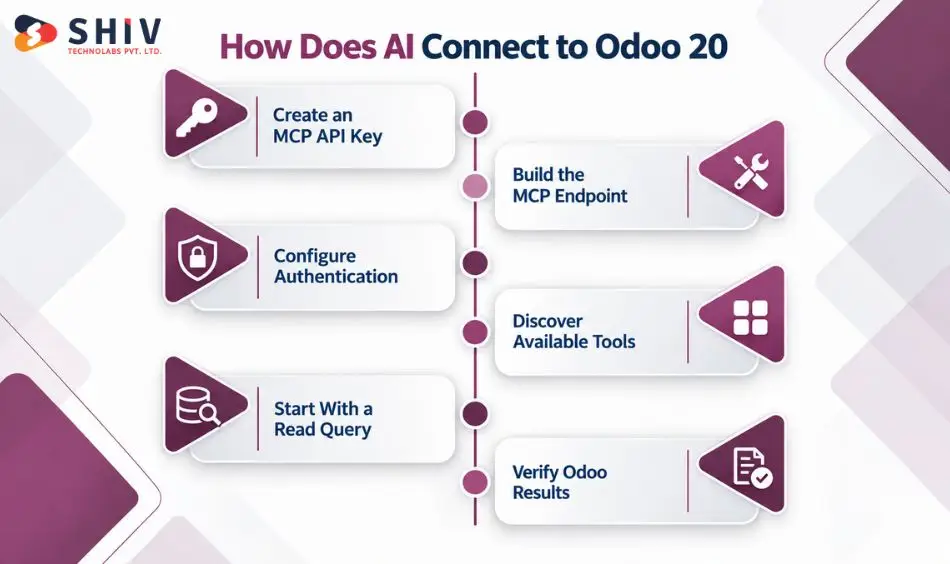
The native connection follows a short sequence:
AI client → /mcp endpoint → authentication → available tools → Odoo data or approved action
The setup begins inside Odoo and ends with testing the client against the tools it needs.
1. Create an API Key With MCP Scope
The Odoo user opens My Preferences, selects the Security tab, and clicks Add API Key. When creating the key, Odoo provides a Scope option. For an MCP connection, select the MCP scope.Users can also set an expiry period, such as one month. Treat the expiry as part of the security design, not a default setting. Odoo shows the key only once, so store it securely immediately.
2. Build the MCP Endpoint
The server address uses the Odoo database URL followed by /mcp.
For example:
https://example.odoo.com/mcp
The AI client needs this endpoint to identify the remote Odoo MCP server.
3. Configure Authentication
The client configuration includes the API key. Odoo’s client examples pass the key in an authorization header as a Bearer token. Because the key represents an Odoo user, a successful connection does not grant unrestricted database access.
4. Let the Client Discover Available Tools
After connecting, the MCP client requests the tools exposed by the Odoo database. The client keeps those tools available for the session and chooses an appropriate tool based on the user’s request.
5. Start With a Read-Oriented Query
A sensible first test is a low-risk query that confirms both connectivity and access boundaries.
For example:
“Show my open opportunities grouped by stage.”
This query confirms that the agent retrieves the expected records before any record changes are tested.
6. Check the Result Against Odoo
Do not treat a technically successful tool call as the end of testing.
Confirm:
- Did the correct tool run?
- Did it return the intended records?
- Were unauthorized records excluded?
- Did the response preserve the right business context?
- Was any action performed that was not expected?
These checks become increasingly important as an agent moves beyond data lookup.
Which AI Clients Can Connect to Odoo MCP?
Odoo’s current MCP documentation provides configuration guidance for several MCP-compatible AI environments, including Claude and Codex. The basic architecture remains similar even though configuration methods vary between clients.
| AI Client | How It Can Fit an Odoo Workflow |
| Claude Desktop | Query Odoo through a configured MCP connection |
| Claude Code | Work with Odoo context alongside development tasks |
| Codex | Use Odoo tools during technical or operational workflows |
| Antigravity | Connect to configured MCP servers for agent tasks |
| Other compatible clients | Connect when they support the required MCP setup |
Each documented example uses mcp-remote, the database /mcp endpoint, and an authorization header with the API key. Compatibility alone, however, should not decide which client a company adopts. Teams should also consider authentication handling, approval behavior, logging, user access, and where the client itself runs.
What Tools Does Odoo Expose to an MCP Client?
Odoo exposes five tools to an MCP client by default. This is one of the most important details to get right. An MCP connection does not give an AI agent unrestricted read-and-write access to the ERP.
Odoo exposes five tools to an MCP client by default:
| Default Tool | Purpose |
| AI Tool: Get Fields | Returns field information |
| AI Tool: Get Models | Provides available model information |
| AI Tool: MCP Retrieve initial context | Gives the agent initial Odoo context |
| AI Tool: Search | Finds permitted records |
| AI Tool: Read group | Groups and summarizes permitted records |
Other tools remain hidden unless they are manually made available. To expose more, administrators open Settings > Technical > Server Actions in developer mode. They then select Available in MCP on the action’s Usage tab. This gives organizations a clear control point. A connected agent should reach only the server actions its task requires.
Can an AI Agent Edit Odoo Records?
Yes, but only through tools or server actions that administrators expose and user permissions allow. The default exposed tools are largely oriented around context, models, fields, searching, and grouped reads. Administrators can add more actions through server actions.
This is where tool design becomes critical. Consider the difference between these tasks:
- Search for overdue invoices.
- Summarize overdue invoice values.
- Identify customers requiring follow-up.
- Update a customer’s payment terms.
- Confirm a purchase order.
- Modify a financial record.
These tasks should not share the same approval or access rules. Odoo’s AI server-action model separates decision-making from execution. The AI can decide which tool fits a request, while the underlying tool contains the execution logic. Enforce business rules inside the tool itself, rather than relying on the model to decide correctly every time.
What Does “Readonly Tool” Mean?
Odoo provides a Readonly Tool setting for server actions exposed through MCP. Marking a tool as readonly tells the AI client that the tool does not modify existing data and can therefore be invoked without user approval. Odoo explicitly notes that this flag does not hide the tool or act as a separate access-control mechanism.
For production planning, teams should therefore think in several layers:
- Which Odoo user owns the API key?
- What can that user access?
- Which tools are exposed to MCP?
- Which tools can modify data?
- Which actions require user approval?
- What business rules are enforced inside each action?
That layered approach is much safer than treating “MCP connected” as a single permission.
How Do Scoped Keys and Odoo Permissions Protect Data?
The API key does more than prove that a client knows a secret. Odoo uses it to authenticate the user’s identity and permissions in the database.
That means an MCP architecture should begin with the user behind the key. A sales-focused AI workflow, for example, may not need access to payroll, HR records, or broad accounting data. Giving the key to an administrator simply because setup is easier defeats much of the value of permission-aware access.
A stronger approach follows the principle of least privilege.
| Security Layer | Question to Ask |
| MCP API key | Is this key created specifically for MCP? |
| Expiration | How long should the key remain valid? |
| Odoo user | Which identity does the agent operate under? |
| Access rights | Which models can that user access? |
| Record rules | Which individual records are visible? |
| Tool exposure | Which server actions are available to MCP? |
| Write behavior | Which tools can change records? |
| Approval | Which actions need human confirmation? |
Shiv Technolabs applies the same principle to custom API integrations. Each integration receives only the access its purpose requires.
Treat the MCP API Key as a Credential
An MCP API key should be treated as a credential.
Teams should:
- Store it outside source code.
- Avoid sharing it in tickets or chat messages.
- Use an appropriate expiry period.
- Revoke keys that are no longer required.
- Avoid reusing one high-privilege key across unrelated agents.
- Review the permissions of the user represented by the key.
A secure connection is not only about transport. It also depends on what happens after authentication succeeds.
Odoo MCP vs Odoo API: Which One Should You Use?
Use MCP when an AI agent needs tools and context. Use the Odoo API for predictable system-to-system integrations. Odoo 20 also provides an external JSON-2 API for programmatic integrations. The two approaches solve different problems.
Use MCP When the AI Agent Needs Tools and Context
MCP fits naturally when an AI agent needs to discover tools and use Odoo information as part of an interactive workflow.
Examples include:
- Natural-language ERP queries
- Sales pipeline summaries
- Inventory exception checks
- Project status reviews
- Agent-assisted research across permitted records
- Controlled actions exposed as tools
Use APIs for Deterministic System Integration
Traditional APIs remain appropriate when two systems need predictable programmatic communication.
Examples include:
- Marketplace inventory synchronization
- Accounting-system integration
- Warehouse data exchange
- Customer portal integration
- BI data pipelines
- Scheduled system-to-system transfers
| Area | Odoo API | Odoo MCP |
| Primary consumer | Application or middleware | AI client or agent |
| Interaction style | Programmatic request | Agent tool call |
| Typical input | Structured payload | User intent interpreted by agent |
| Good fit | System synchronization | Contextual AI workflows |
| Main design concern | Integration logic | Tool and permission boundaries |
| Replaces the other approach? | No | No |
Some projects will use both. An agent might use MCP for interactive analysis while a separate API integration continues handling deterministic data synchronization.
Architecture choice belongs within broader Odoo ERP development. It is not a reason to move every integration to MCP.
Which Odoo MCP Approach Fits Your Needs?
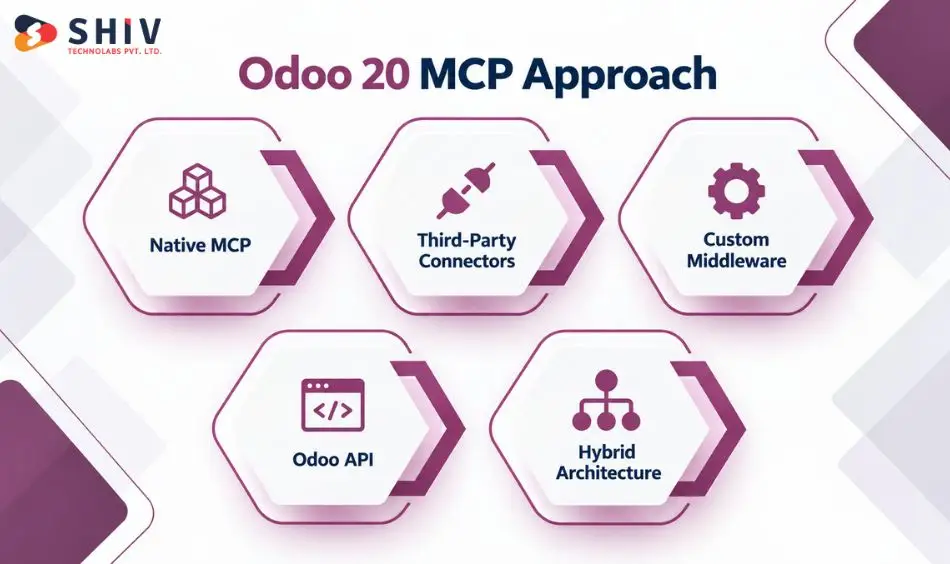
Before native MCP support in Odoo, AI agents typically connected through custom middleware or third-party MCP implementations. These options can still be useful for specific integration needs.
Native MCP Fits Odoo 20 Workflows
Native MCP is the logical starting point for organizations already on Odoo 20. It works best when requirements fit Odoo’s tools, permissions, and server actions. It reduces the need to maintain another MCP layer simply to give an agent access to Odoo.
Third-Party Connectors Can Fill Specific Gaps
A third-party MCP server may still make sense when:
- The business runs an older Odoo version.
- A required tool is not covered by the native setup.
- One MCP layer needs to connect several systems.
- The organization has an established external agent architecture.
Third-party software also creates another trust and maintenance boundary. Review how the vendor handles credentials, which data passes through the connector, and who maintains updates and security.
Custom Middleware Gives Teams More Architectural Control
Larger Odoo environments may need an intermediary layer between AI agents and enterprise systems. Custom middleware can apply business-specific rules, validate requests, and control agent interactions before any action runs.
- Applies organization-specific access rules
- Adds approval steps for sensitive actions
- Supports logging and request validation
- Connects Odoo with multiple enterprise systems
This approach gives teams more control over security and workflow behavior, but it also adds development, testing, and maintenance responsibilities.
Odoo API Works Well for Predictable Integrations
The Odoo API is a strong fit for workflows that follow fixed rules and do not require agent-based reasoning. It works well for structured data exchange, record updates, order creation, or synchronization between Odoo and other business systems.
- Best for deterministic workflows
- Supports system-to-system integrations
- Gives developers direct control over logic
- Requires custom authentication and error handling
APIs remain useful when consistency and predictable behavior matter more than agent orchestration or dynamic decision-making.
Hybrid Architecture Supports Mixed AI and Integration Needs
A hybrid architecture combines native Odoo MCP, APIs, third-party connectors, and custom middleware based on the needs of each workflow. It suits businesses where some processes need AI-driven actions while others still rely on standard integrations.
- MCP supports context-aware agent actions
- APIs handle fixed integration workflows
- Middleware adds business-specific controls
- Third-party connectors can cover specialized gaps
This model suits larger environments, but it requires clear ownership, permissions, and system boundaries.
| Approach | Good Fit | Main Consideration |
| Native Odoo MCP | Odoo 20 agent access | Permission and tool configuration |
| Third-party MCP | Older versions or specialized needs | Vendor trust and maintenance |
| Custom MCP layer | Multi-system agent architecture | Build and maintenance effort |
| Odoo API | Deterministic integrations | Custom integration logic |
| Hybrid architecture | Mixed AI and integration workloads | Clear system boundaries |
Where Can Odoo AI Agents Be Useful in Daily Operations?
The best early use cases usually have a clear question, a limited dataset, and an output that a person can verify.
CRM Follow-Up Review
Instead of manually filtering leads, a sales manager could ask:
“Which open opportunities assigned to my team have no scheduled follow-up?”
The agent can use the permitted search tools to find matching records and summarize them.
Sales Pipeline Reporting
A manager might request:
“Group my open opportunities by stage and summarize the pipeline value.”
This is a natural fit for search and grouped-read capabilities.
Invoice Analysis
A finance user with the necessary permissions might ask for a list or summary of overdue invoices. The first use case can remain read-oriented. Any follow-up action affecting payment terms or records should receive a separate level of review.
Inventory Questions
An authorized user could ask for information about products, stock records, or manufacturing data available within their Odoo permissions. The agent turns a natural-language question into the right tool call, so users do not build filters manually.
Project and Task Reviews
Project teams can use an agent to find blocked work, overdue tasks, or records that meet defined conditions. This helps most when the goal is to cut time spent across ERP views, not to automate the decision itself.
Controlled Operational Actions
Server actions extend the model beyond reporting. For example, a carefully designed action might update a defined field or trigger an existing workflow. The action should enforce its own business rules rather than assuming the AI agent will always provide the right instruction.
Website Content Updates
An authorized user can ask the agent to add a homepage banner or adjust site styling through exposed tools.
What Should Teams Check Before Moving Odoo MCP Into Production?
A successful proof of concept only confirms that the connection works. Production readiness asks a much larger set of questions. Start with read-oriented workflows and make the access model visible to the business owner, Odoo team, and security team.
A practical review should cover:
| Area | Production Check |
| Business purpose | Is the agent solving a defined problem? |
| User identity | Is a suitable Odoo identity being used? |
| Permissions | Does that identity have only necessary access? |
| API key | Is the MCP scope and expiry appropriate? |
| Tools | Are only required tools exposed? |
| Sensitive data | Are finance, HR, and customer records controlled? |
| Server actions | Are business rules enforced in the action? |
| Human approval | Are sensitive changes reviewed? |
| Testing | Has the workflow been tested outside critical production operations? |
| Monitoring | Can unexpected agent behavior be investigated? |
A read-only sales summary is a sensible first production candidate. An autonomous workflow that changes financial records carries far higher risk, even though both use MCP.
Common Odoo MCP Mistakes That Create Unnecessary Risk
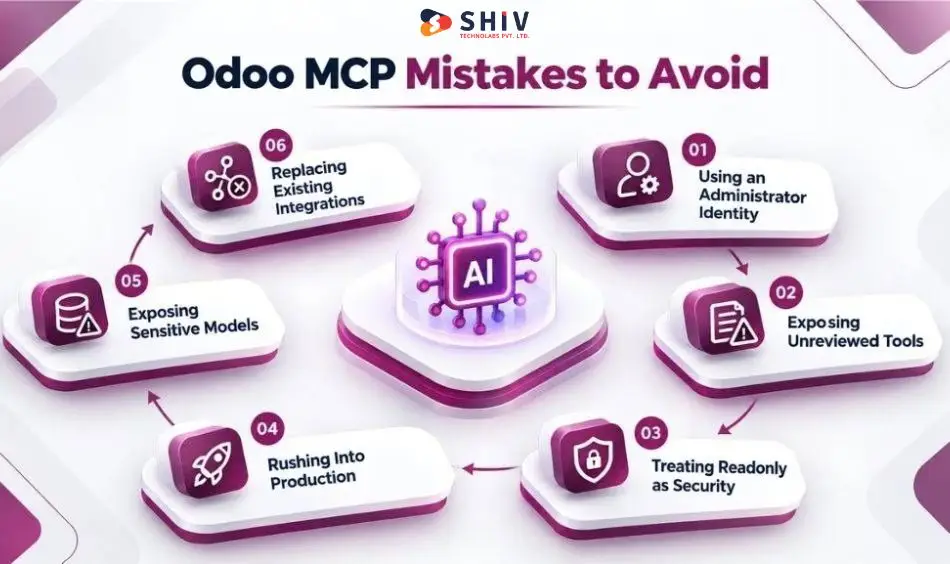
Most MCP problems are unlikely to come from the /mcp URL itself. They are more likely to come from access and tool decisions around it.
Giving the Agent an Administrator Identity
An administrator account simplifies testing but gives the agent far more access than most workflows require. Create access around the business task instead.
Exposing Tools Without Reviewing Their Logic
Server actions can create records, update fields, and trigger workflows. Before making one available in MCP, review its code, arguments, permissions, and business conditions.
Treating “Readonly” as a Security Permission
The Readonly Tool setting tells the client that the action does not modify existing data. It should not replace Odoo access rights, record rules, or careful tool design.
Moving From Demo to Production Too Quickly
A successful query in a test database does not show how an agent will behave with production data, ambiguous prompts, or unusual records. Test failure cases as carefully as successful ones.
Exposing Sensitive Models Too Early
Finance, HR, payroll, customer, and commercial data deserve deliberate access decisions. Begin with the smallest useful dataset and expand only when the use case requires it.
Assuming MCP Replaces Existing Integrations
A reliable integration that syncs thousands of records does not need an AI agent simply because MCP exists. Keep deterministic integrations deterministic where that architecture makes sense.
When Is Custom Integration Still the Better Choice?
MCP is particularly useful for agent-to-tool interaction, but some Odoo requirements remain better suited to APIs, modules, or middleware.
Consider another architecture when the project involves:
- High-volume system-to-system synchronization
- Complex data transformation
- Marketplace or warehouse integrations
- Multi-system transactional workflows
- Strict enterprise approval engines
- Older Odoo versions without the required native functionality
- Business logic that should remain deterministic
- Regulatory controls requiring a dedicated integration layer
A company may also combine approaches. For example, a custom software solution could use APIs for deterministic data exchange while allowing an AI agent to access selected Odoo tools through MCP. The architecture should follow the business requirement rather than forcing every workload through one integration method.
How Shiv Technolabs Can Help With Odoo MCP and AI Agent Integration
Connecting an agent to /mcp is only the first technical milestone. Production work defines the data each agent needs and how Odoo permissions apply. It also sets which server actions to expose and where human review stays. Shiv Technolabs combines Odoo development and AI agent development for projects that need ERP context and AI-driven workflows.
Our team can assist with:
- MCP readiness review: Check the Odoo environment, business requirements, and candidate agent workflows.
- Permission mapping: Define the Odoo users, models, records, and fields required by each use case.
- Tool planning: Decide which default tools are sufficient and where controlled server actions are needed.
- AI agent integration: Connect suitable MCP clients to approved Odoo workflows.
- Custom API development: Build API or middleware layers when MCP is not the right integration pattern.
- Server action design: Add business rules and controlled execution for agent-accessible actions.
- Testing and governance: Review access, outputs, approval points, and production behavior.
- Ongoing technical support: Adapt workflows as business processes and Odoo configurations change.
For some organizations, native Odoo MCP will cover the requirement. Others may need a combination of MCP, APIs, custom modules, and middleware. The first step is deciding which architecture fits each business process.
Contact Shiv Technolabs to assess MCP readiness and plan a secure Odoo AI agent rollout.
Final Thoughts: A Simple Connection Needs a Careful Access Model
Odoo 20 gives AI agents a native route into Odoo through Model Context Protocol. An MCP-compatible client connects to the /mcp endpoint with an MCP-scoped API key. It then works with data within the authenticated user’s Odoo permissions. That removes some of the connection work that previously required a separate agent integration layer. It does not remove the need for architecture and governance.
Organizations still need to choose the agent’s user identity, exposed tools, and accessible records. They must also define approvals before AI-triggered actions change business data. Most organizations should begin with controlled lookup and reporting, then confirm the permission model. Introduce actions only after workflow and approval rules are clear.
That is where Odoo MCP becomes more than a technical connection. It becomes a practical interface between AI agents and ERP operations, with no more authority than each task requires.
Frequently Asked Questions
What Is the Odoo 20 MCP Server?
The Odoo 20 MCP server allows an Odoo database to operate as a remote Model Context Protocol server. MCP-compatible AI clients can connect to the database, discover exposed tools, and work with permitted Odoo data.
Does Odoo 20 Have a Native MCP Server?
Yes. Odoo 20 documentation describes a native MCP setup in which the Odoo database acts as the remote MCP server and external AI agents act as clients.
How Do AI Agents Connect to Odoo Data?
The client connects to the Odoo database’s /mcp endpoint and authenticates with an API key created with MCP scope. It then discovers the tools exposed by the database and invokes them according to the user’s request.
Which AI Clients Can Connect to Odoo MCP?
Odoo currently provides setup guidance for MCP-compatible clients including Claude Desktop, Claude Code, Antigravity, and Codex. Other clients may also work when they support the required MCP connection method.
What Tools Are Available by Default?
Odoo exposes five tools by default: Get Fields, Get Models, MCP Retrieve initial context, Search, and Read group. Other server actions remain hidden until they are deliberately made available to MCP.
Can an AI Agent Edit Odoo Records?
Odoo MCP can support record modifications through appropriate exposed tools or server actions. Teams should restrict these actions carefully and enforce business rules in the underlying tool.
Is the Odoo MCP Server Secure?
Odoo authenticates MCP clients with API keys and applies the associated user’s permissions. Security still depends on appropriate user rights, record rules, key handling, tool exposure, and action design.
Does Odoo MCP Replace the Odoo API?
No. MCP is suited to AI-agent tool access, while APIs remain important for deterministic system integrations, data synchronization, and other application-to-application workflows.
What Is the Difference Between Odoo MCP and JSON-2 API?
Odoo’s JSON-2 API exposes model methods over HTTP for programmatic integrations. MCP gives AI clients a tool-oriented interface that can be selected in response to natural-language requests.
Should Teams Use Native MCP or a Third-Party Connector?
Native MCP is a strong starting point for Odoo 20 when its capabilities fit the use case. Third-party or custom MCP layers may still make sense for older Odoo versions, specialized requirements, or multi-system agent architectures.
How Can Shiv Technolabs Help With Odoo MCP?
Shiv Technolabs supports Odoo architecture, MCP readiness, AI agent integration, permission mapping, server actions, custom APIs, testing, and governance.