Table of Contents
Planning an Odoo rollout starts with one honest question: how long will it take? Most teams want a fixed date, yet an Odoo implementation timeline shifts with the modules you pick, your data quality, and your decision speed.
Companies that map the schedule early avoid the surprises that stall go-live. Businesses planning a multi-module rollout often need structured Odoo implementation services before they lock a go-live date, because scope and sequencing drive the calendar. The plan below covers timeline ranges by project size, a full weekly path, and a go-live readiness checklist. Treat it as a planning tool, not a promise, since every rollout has its own scope. Use it to align your team and reduce timeline slippage from the first week.
How Long Does an Odoo Implementation Take?
Odoo rollouts run on ranges, not fixed dates, because scope decides the pace.
A typical Odoo implementation timeline can range from 4 to 8 weeks for a small rollout, 12 to 20 weeks for a mid-size project, and 6 to 12 months or more for complex multi-module ERP rollouts. Complex projects with custom workflows or integrations need more weeks for testing and training. Consider these figures as planning ranges that varies with data quality and approval speed.
# What Shapes Your Odoo Rollout Schedule?
Odoo follows a proven methodology that sets the rhythm of your schedule. Knowing the phases helps you plan the Odoo implementation timeline with fewer gaps.
Odoo implementation usually follows 5 phases:
- GAP Analysis: maps business needs, project scope, budget, risks, and phasing before configuration starts
- Kick-Off: aligns stakeholders, confirms the plan, and sets access and timelines
- Implementation: runs cycles of configuration, data import, development, and key-user training
- Go-Live: moves the validated system into live use with first-week support
- Second Deployment: handles phase-two refinements, added modules, and improvements after launch
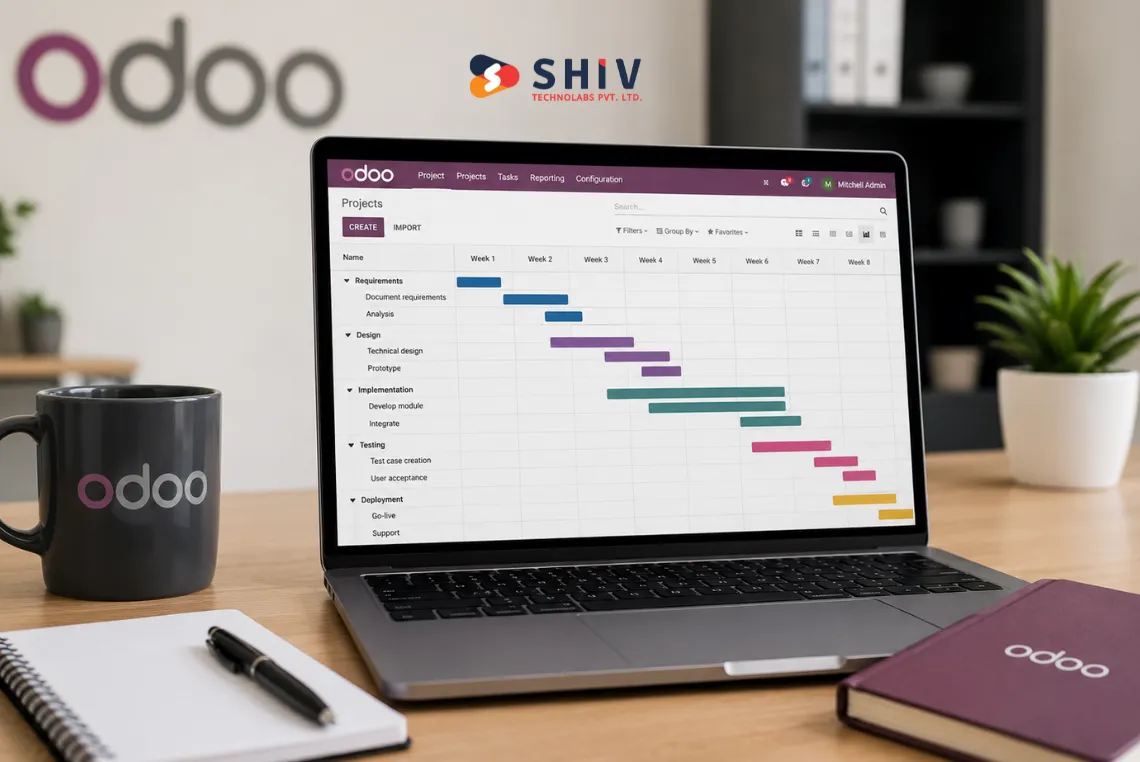
The Implementation phase runs in weekly cycles of analysis, configuration, validation, and key-user training. Larger go-lives require more time because change management scales with each additional user. Odoo Project supports task scheduling and rollout tracking, and the Odoo Project documentation shows how it frames tasks, deadlines, and milestones for exactly this kind of work.
What Is a Realistic Odoo Implementation Timeline by Project Size?
Project size drives the calendar more than any other factor. The table below shows planning ranges for common rollout types.
| Project Type | Approximate Timeline | Typical Scope | Main Timeline Risk |
|---|---|---|---|
| Simple 1 to 2 module rollout | 4 to 8 weeks | CRM or Sales only, standard config | Scope creep pulling in extra apps |
| Small business rollout | 8 to 12 weeks | CRM, Sales, Inventory, or Accounting | Incorrect data slowing imports |
| Mid-size multi-module rollout | 12 to 20 weeks | 3 to 5 connected apps | Late approvals on config decisions |
| Complex rollout with custom workflows | 20 to 36 weeks | Custom modules and integrations | Heavy customization and rework |
| Manufacturing or inventory-heavy rollout | 20 to 36 weeks | MRP, BOMs, warehouse flows | Complex data cleanup and testing |
| Multi-location enterprise rollout | 6 to 12 months or more | Many apps across sites and teams | Change management across locations |
| Phased rollout after first go-live | 4 to 12 weeks per phase | Phase-two apps and reports | Competing priorities and resources |
These ranges are planning guides, not fixed timelines. Your final schedule depends on modules, users, data quality, customization, integrations, approval speed, testing depth, and change management.
# What Happens Each Week During an Odoo Rollout?
This section maps a common 16-week path from kickoff to hypercare. Smaller projects compress these steps, while complex projects stretch them for months.
| Week | Main Focus | What Happens | Possible Slippage |
|---|---|---|---|
| Week 1 | Kickoff | Align stakeholders, set success goals, grant access, build project plan | Missing sponsor or unclear goals |
| Week 2 | GAP Analysis | Map business workflows, check module fit, make scope decisions | Vague scope and open questions |
| Week 3 | Configuration plan | Plan module setup, prepare data templates | Late data template sign-off |
| Week 4 | Core configuration | Configure core modules, validate workflows | Rework from unclear rules |
| Week 5 | Data cleanup | Test imports, review master data | Duplicate or messy records |
| Week 6 | Customization planning | Scope integrations and custom needs | Late integration decisions |
| Week 7 | Development | Build reports, adjust workflows, check integrations | Growing custom scope |
| Week 8 | Internal testing | Track issues, fix configuration gaps | Thin test coverage |
| Week 9 | User acceptance testing | Key users run real workflows | Users unavailable for testing |
| Week 10 | Training | Train users, write process docs | Training pushed too late |
| Week 11 | Go-live prep | Final migration, backup, cutover plan | Cutover steps not rehearsed |
| Week 12 | Go-live | Launch, first-week support | Support gaps on day one |
| Weeks 13 to 16 | Hypercare | Fix priority bugs, review adoption, plan phase two | Phase-two work forced early |
# Weeks 1 to 2: Kickoff and GAP Analysis
The first two weeks set direction. Your team aligns on goals, names a single point of contact, and agrees on scope. GAP Analysis can take a few days to 4 weeks by scope.
# Weeks 3 to 6: Configuration, Data, and Integration Planning
Configuration turns decisions into a working system. Your partner sets up core modules, prepares import templates, and reviews master data. Integration scoping starts now so custom work does not surprise the schedule.
# Weeks 7 to 10: Development, Testing, and Training
Development, testing, and training overlap here. Developers build only what the business truly needs, since extra work risks the date. User acceptance testing usually needs 1 to 3 weeks, and training begins before go-live.
# Weeks 11 to 16: Go-Live and Hypercare
Go-live and hypercare close out the core project. Final migration, backups, and a rehearsed cutover plan protect your data. This window usually runs 1 to 4 weeks depending on adoption and support needs.
# Which Odoo Modules Roll Out First?
Module order affects both risk and speed. Core apps go live first, while complex or nice-to-have apps often move later.
| Odoo Module | Typical Rollout Timing | Why It May Slip |
|---|---|---|
| CRM | Early phase | Custom pipelines and lead rules |
| Sales | Early phase | Complex pricing and quotation logic |
| Purchase | Early to mid phase | Vendor data and approval flows |
| Inventory | Mid phase | Warehouse rules and stock data cleanup |
| Accounting | Mid phase | Chart of accounts and opening balances |
| Manufacturing | Later phase | BOMs, routings, and shop-floor rules |
| POS | Mid to later phase | Hardware setup and payment config |
| Website | Later phase | Content, design, and page structure |
| eCommerce | Later phase | Catalog, payment, and shipping setup |
| HR | Later phase or phase two | Payroll rules and local compliance |
| Project | Mid phase | Task templates and billing links |
| Helpdesk | Phase two | Ticket flows and service rules |
When Does Odoo Data Migration Happen?
Data migration runs across several weeks, not one rushed step. Early audits and clean imports protect your go-live date.
Data migration moves through a sequence of checkpoints, each needing a sign-off before the next starts. Plan each checkpoint into the weekly schedule so nothing gets rushed at the end.
- Data audit: review sources, formats, and gaps
- Data cleanup: fix duplicates, blanks, and errors
- Data mapping: match old fields to Odoo fields
- Import template prep: build templates from the Odoo import spec
- Sample import: load a small batch and check results
- Validation: confirm records with data owners
- Final migration: load production data during cutover
- Rollback planning: keep a backup and a recovery path
- User sign-off: get owners to approve the migrated data
Data audit and cleanup may take 2 to 6 weeks depending on data quality. Sample imports should happen before the final go-live week, never during it. Teams planning heavy data moves often bring in Odoo migration services to protect the schedule.
When Should Testing and Odoo User Training Begin?

Testing and training decide whether go-live feels calm or chaotic, and both start earlier than most teams expect.
Testing moves in layers. Configuration testing checks each setup, integration testing confirms data flows between apps, and user acceptance testing puts real users on real workflows. End-to-end testing then proves the full order-to-invoice process.
Training should start before go-live, not after. Role-based sessions and clear process docs help users feel ready. User acceptance testing often needs 1 to 3 weeks, and complex departments may need separate batches. Structured Odoo customization work should be tested the same way, since custom features carry the most risk.
# What Commonly Delays an Odoo Implementation Timeline?
Most delays trace back to a short list of causes. Spotting them early keeps your Odoo implementation timeline realistic.
| Slippage Cause | How It Delays the Timeline | How to Reduce the Risk |
|---|---|---|
| Unclear scope | Endless changes stall configuration | Lock scope during GAP Analysis |
| Missing SPoC | Decisions wait for days | Name one available owner |
| Slow approvals | Configuration sits idle | Set a 24-hour decision rule |
| Dirty data | Imports fail and repeat | Start cleanup in week one |
| Too much customization | Build and test time grows | Keep custom work minimal |
| Late integration decisions | Rework hits the schedule | Scope integrations early |
| Weak testing | Bugs surface after launch | Use written test scripts |
| Delayed user training | Adoption drops at go-live | Train before the launch week |
| Missing reports | Finance and ops lack numbers | List key reports upfront |
| Unrealistic go-live date | Teams cut testing corners | Set dates from real scope |
| Change resistance | Users avoid the new system | Involve users early and often |
| Phase-two items forced into phase one | Scope balloons past the date | Defer nice-to-have work |
# Who Owns the Rollout Timeline?
Clear ownership keeps every week on schedule. When roles blur, decisions stall and dates slip.
| Role | Timeline Responsibility | Why It Matters |
|---|---|---|
| Project sponsor | Approve scope, budget, and go-live date | Unblocks big decisions fast |
| Internal SPoC | Coordinate users and daily decisions | Keeps the project moving |
| Department heads | Confirm workflows and priorities | Prevents late scope changes |
| Key users | Validate configuration and run testing | Catches issues before launch |
| Implementation partner | Configure, guide, and track work | Holds the plan together |
| Developer | Build only approved custom work | Limits rework and delays |
| Data owner | Clean and approve migrated data | Protects launch-day accuracy |
| Finance owner | Signs off accounts and reports | Keeps books correct at go-live |
| Operations owner | Confirm inventory and process flows | Avoids day-one downtime |
| Support team | Handle first-week issues | Keeps adoption steady |
Unclear responsibility is a leading cause of timeline slippage. Teams that scale fast often hire Odoo developers to cover build work while internal owners focus on decisions.
Is Your Team Ready to Go-Live?
Go-live readiness comes from evidence, not hope. Each item below should carry a clear yes before you set a launch date. Walk the list with every owner during the final week.
- Final scope approved
- Data migration tested
- Core workflows validated
- Integrations tested
- User roles configured
- Access rights checked
- Reports reviewed
- Users trained
- Backup and rollback plan ready
- Support team assigned
- Launch date approved
- Phase-two list documented
A confident go-live rests on tested data, trained users, and a ready support team. When every box holds a yes, your launch date is solid.
What Happens After Odoo Go-Live?
The first weeks after launch decide long-term success. Hypercare keeps users supported while the system settles, and steady support builds trust across every team.
- Track first-week issues
- Monitor critical workflows
- Support finance and operations users
- Review inventory or accounting exceptions
- Fix priority bugs
- Collect user feedback
- Update process documents
- Monitor adoption
- Close launch blockers
- Plan phase-two improvements
Hypercare usually runs 1 to 4 weeks, with heavier support right after launch. Adoption reviews show where users still struggle and guide quick fixes. Ongoing Odoo support and maintenance services keep the system healthy once hypercare ends.
What Can Move to Phase Two?
A realistic first rollout protects your go-live date. Moving non-critical work to phase two keeps the core launch on time.
Deferring the right work is a planning skill, not a failure. Group these items into a phase-two backlog for later.
- Advanced reports
- Complex automation
- Low-priority custom workflows
- Non-critical integrations
- Secondary departments
- Advanced dashboards
- Nice-to-have fields
- Extra approval flows
- Legacy feature matching
Phase-two planning protects the main go-live date and keeps the team focused. A shorter first scope means faster testing and a calmer launch.


# Conclusion
A realistic Odoo implementation timeline comes from planning, not guesswork. When you map each week, name clear owners, clean your data early, and test before launch, your dates hold. Small rollouts finish in weeks and complex projects run for months, so match your plan to your scope. Keep phase-two work out of the first launch to protect your go-live date and your team’s focus.
The next step: turn this weekly view into a schedule built around your modules, users, and integrations. Plan your Odoo rollout with a clear checklist, honest ranges, and steady support, and you will start with fewer surprises. Bring your stakeholders together and set a launch date that your data and testing can support.
# Frequently Asked Questions
How Long Does Odoo Implementation Take?
Most Odoo rollouts run 4 to 8 weeks for a simple setup, 8 to 20 weeks for mid-size projects, and 6 to 12 months or more for complex, multi-location ERP work. Your final schedule depends on modules, data quality, customization, integrations, and approval speed.
What Is a Realistic Odoo Implementation Timeline for Small Businesses?
A small business rollout with CRM, Sales, Inventory, or Accounting usually takes 8 to 12 weeks. Clean data and quick decisions can shorten it, while custom workflows or integrations extend it. Treat this range as a planning guide, not a fixed promise for every project.
What Causes Odoo Implementation Delays?
Common causes include unclear scope, a missing single point of contact, slow approvals, dirty data, and heavy customization. Weak testing and late user training also push dates back. Locking scope early and cleaning data upfront reduce most timeline slippage on a rollout.
When Does Data Migration Happen During Odoo Implementation?
Data audit and cleanup often start in week one and run 2 to 6 weeks. Mapping, sample imports, and validation follow during configuration. Final migration happens during cutover, in the go-live week, after users sign off on the test imports.
How Long Does Odoo User Training Take?
Role-based training usually runs across 1 to 2 weeks and starts before go-live, not after. Complex departments like finance or manufacturing may need separate batches. Early training and clear process docs help users feel ready on launch day itself.
What Should Happen After Odoo Go-Live?
Hypercare should run 1 to 4 weeks after launch. Track first-week issues, fix priority bugs, and support finance and operations users. Collect feedback, monitor adoption, and plan phase-two improvements once the core system runs steady and users trust it.