Table of Contents
When companies decide to add generative AI to their product, most assume the hard part is choosing between GPT-4, Claude, or Gemini. In reality, the model selection is one of the simpler decisions. The harder work is figuring out what context the model should receive, how responses should be shaped, where human review fits in, what happens when the model produces something incorrect, and how to keep operating costs from growing uncontrollably as usage scales.
Companies that skip this planning phase spend months fixing problems that should have been designed out from the start. GenAI app development is the process of building software that connects AI models with real business workflows. These applications generate text, summaries, code, images, or structured responses based on user input. Unlike traditional software that relies on fixed logic, GenAI apps create fresh output each time, based on the context and instructions passed to the model.
This guide covers Generative AI app development in a practical, decision-ready format. It explains real use cases, core features, cost factors, the step-by-step build process, and the answers to the questions most business teams ask before starting.
Quick Answer
GenAI application development is the process of building applications that use AI models to generate text, code, images, or structured responses based on user input. It involves model selection, prompt design, data integration, backend development, output control, and ongoing monitoring. The focus is on reliable, controlled AI output that fits real business workflows.
What Is GenAI App Development, and Why Do Businesses Invest in It?
Generative AI app development goes beyond connecting an API to a user interface. It is the full process of designing, building, and maintaining software where an AI model generates output – rather than simply retrieving stored data or following fixed rules. The application controls what the model sees, how it responds, and what happens to that response before it reaches the user.
Businesses invest in GenAI apps because they can handle tasks that would otherwise require significant human time. Customer queries, content drafts, data summaries, internal knowledge searches, and decision support are all areas where GenAI apps reduce workload while keeping quality consistent. The return depends on how well the application is built – a poorly designed GenAI app produces inconsistent output and erodes trust quickly.
How Does the GenAI App Development Process Work?
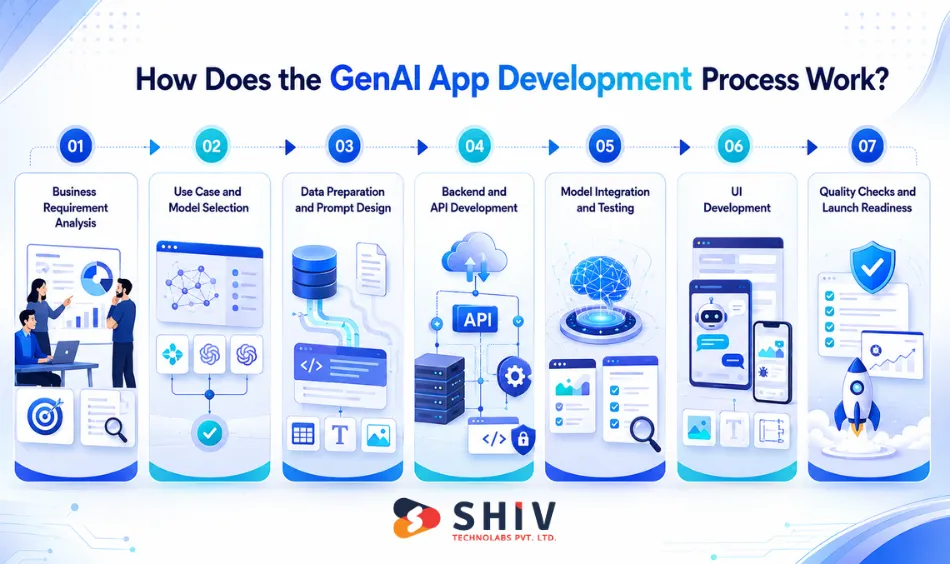
Building a GenAI application is not a single event; it is a structured series of decisions and build phases. Teams that follow this process can create more stable, optimized applications than those that jump to coding before strategic planning and requirement gathering.
Step 1: Business Requirement Analysis
This stage defines what the app must do, who will use it, and what risks need to be managed before any code is written. Teams finalize the primary goal – whether it is customer support, internal knowledge search, content drafting, or something else. It also involves mapping the target audience.
Output types matter at this stage. A support tool that returns short answers has different architecture requirements than an internal tool that generates structured reports. Compliance needs also get mapped here. Applications handling personal data or regulated information require specific controls that affect both the design and the testing plan.
The deliverable from this stage is prioritized with clear success metrics, such as response accuracy rate, time saved per user, or resolution rate improvement.
Step 2: Use Case and Model Selection
Model choice affects output quality, response speed, and monthly cost. This stage compares available options based on the use case requirements identified in step one. Teams decide whether to use a hosted API (faster to start, predictable pricing), a self-hosted open-source model (more control, higher infrastructure overhead), or a hybrid setup.
Context size is a practical factor that many teams overlook. An app that processes long internal documents needs a model with a large context window. An app handling short customer queries can use a faster model without sacrificing quality.
The deliverable is a selected model with a cost estimate per request volume and a set of quality benchmarks for acceptance testing.
Step 3: Data Preparation and Prompt Design
Prompts control how the model behaves. This is where most of the real quality work happens. Teams write prompt templates for different task types like answering questions, generating drafts, summarizing content, extracting structured data, and testing each one against real examples.
If the app needs to reference internal company data, this stage also covers knowledge base setup. Documents are cleaned, chunked, and tagged so the retrieval layer can find the right content before passing it to the model. A retrieval-augmented generation (RAG) setup connects the model to this knowledge base at request time.
The deliverable is a prompt library with versioning rules, a knowledge base structure if needed, and a test dataset of 50-200 real queries with expected outcomes.
Step 4: Backend and API Development
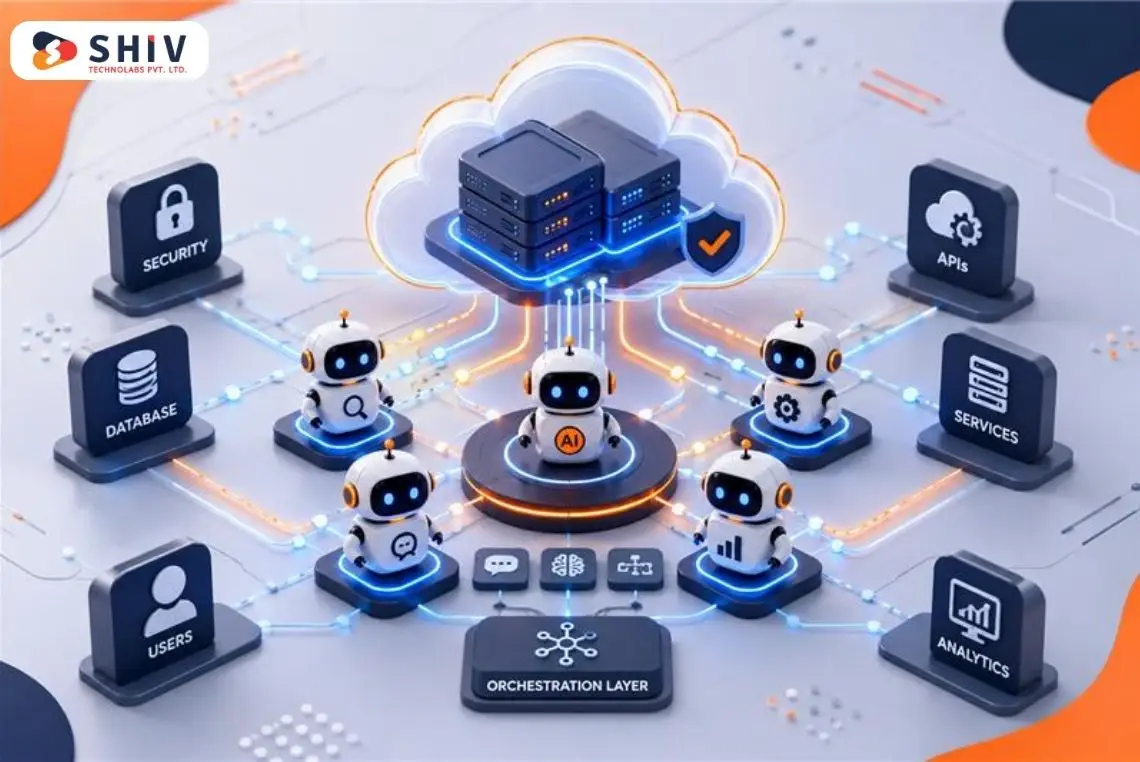
The backend manages what context goes to the model, what rules apply, and what data sources the app can access. This is where control lives. The backend handles authentication, role-based access, rate limits, caching for repeated queries, and logging for every request and response.
Data connectors link the GenAI app to existing business systems like CRM records, support tickets, product databases, and internal documents. Each connector requires its own access controls and should only pass the data relevant to the request, not everything available.
The deliverable is a set of API endpoints, security rules, audit log configuration, cost-control logic, request limits, and caching policies.
Step 5: Model Integration and Testing
This stage validates that the app provides reliable output before users see it. Testing covers accuracy across common queries and edge cases. It also checks how the app behaves when it does not know the answer, whether outputs match the required format, and whether restricted topics are handled correctly.
A GenAI app should respond with ‘I don’t have that information’ or a source-based answer rather than generating a confident but incorrect response. Prompt rules and post-generation checks both contribute to this behavior.
The deliverable is a quality report showing pass/fail results by scenario, final prompt adjustments, and a release checklist confirming production readiness.
Step 6: UI Development
The interface should make GenAI development solutions easy to use and secure. Input guidance, such as example prompts or required fields, reduces poorly formed requests. Response actions like copy, regenerate, shorten, and export help in improving usability. Feedback buttons allow users to mark responses as helpful or not.
Admin panels give teams the ability to update prompts, manage knowledge base content, review usage, and adjust user limits without touching the codebase. For applications that will evolve, a solid admin layer is as important as the user-facing UI.
The deliverable is a tested UI ready for real usage and an admin interface for ongoing management.
Step 7: Quality Checks and Launch Readiness
Before launch, teams should check security, stability, and predictable operating costs. A security review involves PII masking, access controls, and encrypted storage. Monitoring tools are configured to track latency, error rate, token usage, and cost spikes in real time.
The production rollout plan covers staged release, rollback procedures, and model fallback logic if the primary model becomes unavailable. A post-launch support plan defines who handles bug fixes, prompt updates, and knowledge base refresh cycles.
The deliverable is a live production release with monitoring dashboards active and a support and maintenance plan in place.
Also Read: How to Create an AI App: A Complete Step-by-Step Guide
How Much Does GenAI Application Development Cost?
The cost of building a GenAI application depends on the complexity of the use case, the amount of custom data integration required, security requirements, and the traffic volume the app needs to support. Unlike standard software, GenAI apps also carry ongoing model usage costs that continue after launch and grow with usage.
1. Estimated Generative AI app development Cost Ranges
The figures below are based on typical project scopes. Actual pricing varies based on specific requirements, development location, and team structure.
| App Type | Scope | Estimated Cost |
|---|---|---|
| MVP GenAI App | Basic chat or content tool, limited to users | $15,000 – $30,000 |
| Mid-Scale Business App | Data-connected, role-based access, moderate traffic | $30,000 – $70,000 |
| Enterprise GenAI System | High traffic, strict controls, custom workflows, compliance | $70,000 – $150,000+ |
Timelines align with the scope. An MVP development typically takes 2-4 weeks. A mid-scale business app runs 5-8 weeks. Enterprise systems with deep integrations and compliance requirements take 10-18 weeks or longer.
2. Key Factors That Affect GenAI App Cost
The cost of building a GenAI app depends on many factors. Some apps are simple and quick to build, while others need deeper planning, more integrations, and stronger security.
Use case complexity
- A simple chat assistant needs less development work.
- A single-task content tool is also easier to build.
- A multi-role system needs more planning and engineering.
- Systems connected with CRMs, ERPs, and internal data cost more.
Model type and usage
- Larger AI models usually cost more per request.
- Models with longer context windows also increase usage cost.
- High-traffic apps need proper monthly budget planning.
- Usage cost should be planned from the start.
Security and compliance
- Apps handling sensitive data need stronger architecture.
- Audit trails may be required for tracking activity.
- Extra validation layers may be needed.
- Testing time increases for secure and compliant systems.
Ongoing Costs To Plan For
Model usage costs accumulate with every request. Token-based pricing means high-volume applications face meaningful monthly bills from the AI provider alone. Caching repeated queries, setting usage limits, and refining prompts to reduce unnecessary tokens are standard cost-management techniques.
- AI model usage fees are charged per request or per thousand tokens
- Cloud hosting and storage for the backend, database, and monitoring infrastructure
- Ongoing prompt updates, quality tuning, and knowledge base refresh cycles
Thinking about the cost of your Generative AI application development? Shiv Technolabs provides free project estimates with scope-based pricing breakdowns.
What Are the Real-World Use Cases for GenAI Applications?
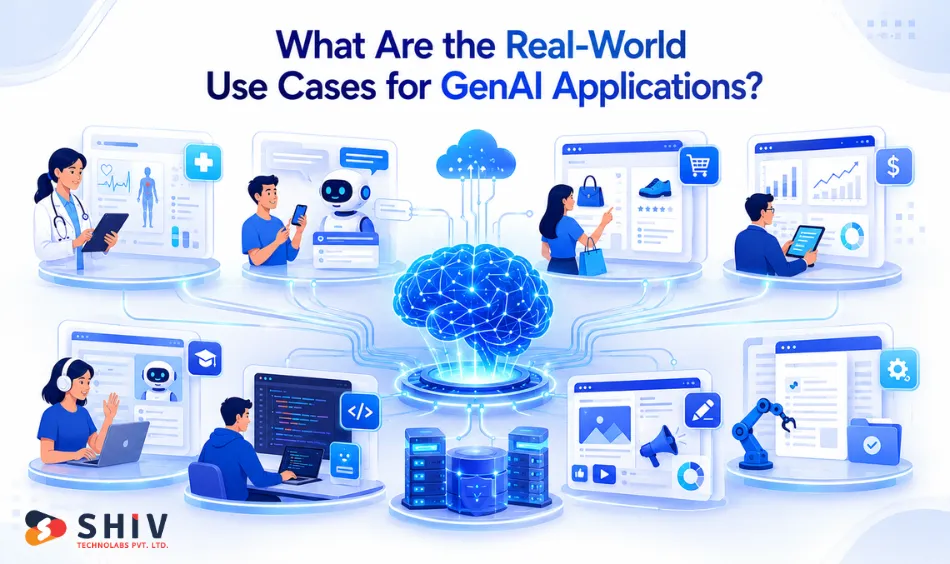
GenAI applications are now used across many business functions. The strongest use cases are tied to clear, repeatable tasks. These tasks usually involve writing, summarizing, searching, answering questions, or reviewing large amounts of information.
A good GenAI app does not replace human judgment. It reduces manual effort and gives people a faster starting point.
1. GenAI in Customer Support
Customer support is one of the most common GenAI use cases. Support teams use GenAI apps to answer common questions, summarize tickets, and help agents respond faster.
Website and app chat assistants
- These assistants answer common customer questions.
- They can help with orders, returns, pricing, product details, and account issues.
- Human agents can handle complex cases.
Support reply drafting
- The AI reads the customer query.
- It creates a suggested response for the support agent.
- The agent reviews, edits, and sends the final reply.
Ticket summarization
- Long support conversations can take time to review.
- GenAI can summarize the issue, customer concern, and previous replies.
- This helps managers and agents act faster.
2. GenAI in Sales and Lead Management
Sales teams use GenAI apps to manage leads, prepare follow-ups, and answer buyer questions. This works well when the system connects with CRM data.
Lead summary generation
- GenAI can summarize lead details from forms, calls, emails, and CRM notes.
- Sales teams get a quick view before follow-up.
Personalized sales emails
- The AI can create email drafts based on buyer interest.
- Teams can adapt tone, offer, and message based on lead stage.
Product or service recommendation assistants
- Buyers can ask questions in natural language.
- The assistant can suggest relevant products or services.
- This helps users make faster decisions.
3. GenAI in Marketing and Content Teams
Marketing teams use GenAI to speed up content work. The AI creates first drafts, variations, and ideas. The team still checks quality, facts, tone, and brand fit.
Blog and article drafting
- The AI can create drafts from outlines, keywords, or briefs.
- Writers can then refine the content with better examples and brand voice.
Ad copy variations
- Teams can create multiple versions of ad copy.
- Each version can target a different audience or campaign goal.
Email campaign content
- GenAI can draft email content for different segments.
- It can support welcome emails, product emails, and follow-up sequences.
Creative campaign ideas
- Teams can generate concepts for social media, ads, and landing pages.
- This helps reduce blank-page time during planning.
4. GenAI in Software Development
Development teams use GenAI tools to reduce repetitive coding work. These tools help developers write, test, and document code faster.
Code suggestions
- GenAI can suggest code snippets and completions.
- It helps with common patterns and boilerplate code.
Test case generation
- The AI can create test cases from functions or user stories.
- Developers still review the logic before use.
Code explanation
- GenAI can explain existing code in simple language.
- This helps new developers understand unfamiliar projects.
Documentation drafting
- The AI can draft API notes, function descriptions, and setup guides.
- Teams can polish the final version before publishing.
5. GenAI in Internal Knowledge Search
Many companies have information spread across documents, tools, and systems. GenAI apps can help employees find answers faster.
Internal knowledge assistants
- Employees can ask questions about policies, processes, or product details.
- The AI can answer using approved company documents.
HR and onboarding support
- New employees can ask about leave rules, benefits, tools, and workflows.
- HR teams can reduce repeated queries.
Document search and summarization
- GenAI can summarize long PDFs, reports, and internal guides.
- This saves time for teams that handle large knowledge bases.
6. GenAI in Finance and Accounting
Finance teams work with reports, invoices, policies, and compliance documents. GenAI helps them review text-heavy information faster.
Financial report summaries
- GenAI can turn long reports into short summaries.
- Teams can quickly see key figures, risks, and changes.
Invoice and document review
- The AI can help identify missing details or mismatched information.
- Human review is still important for approval.
Policy and compliance Q&A
- Teams can ask questions about rules, clauses, or process documents.
- The AI can point users to relevant sections.
7. GenAI in Healthcare
Healthcare teams use GenAI mainly for documentation and communication support. Clinical decisions should always stay with qualified professionals.
Medical note drafting
- GenAI can draft notes from consultation summaries or voice inputs.
- Doctors can review and correct the final note.
Patient query support
- Assistants can answer appointment, billing, and general process questions.
- They should not make clinical decisions.
Healthcare document summaries
- The AI can summarize long records or care instructions.
- This can reduce time spent on routine documentation.
8. GenAI in E-learning and Training
Education and training platforms use GenAI to create learning material faster. They also use it to support learners with better answers.
AI tutors
- AI tutors can answer student questions.
- They can explain the same topic in different ways.
- They can also ask follow-up questions to check clarity.
Quiz and study material generation
- Course teams can create quizzes from source content.
- This helps produce practice material faster.
Training content summaries
- GenAI can summarize long training documents.
- Learners can review key points in less time.
9. GenAI in Retail and eCommerce
Retail brands use GenAI to improve product discovery, customer support, and buying guidance.
Product recommendation assistants
- Shoppers can describe what they need in plain language.
- The AI can suggest matching products.
Product description drafting
- Teams can create product copy faster.
- Writers can review details before publishing.
Shopping support assistants
- GenAI can answer questions about size, delivery, returns, and product features.
- This can reduce support load and improve the buying journey.
10. GenAI in Security and Risk Monitoring
Security teams use GenAI to review alerts, summarize incidents, and support faster response. This use case needs strict controls and review.
Alert summarization
- GenAI can summarize security alerts in simple language.
- Analysts can review the issue faster.
Incident report drafting
- The AI can draft incident timelines and response notes.
- Security teams can verify details before sharing.
Policy risk review
- GenAI can help review internal security documents.
- It can flag missing sections or unclear terms.
Important Layers Behind GenAI Applications
Strong GenAI apps need more than a prompt and a model. They need control, review, and tracking.
# Output Control and Safety Filters
Output filters help control what the app can say. They can limit response length, block restricted topics, and check format before delivery.
This is important for public-facing apps. A customer-facing GenAI app must avoid unsafe, incorrect, or off-brand responses.
Filters can work in three places:
- Prompt instructions
- Model safety settings
- Post-generation validation code
High-risk apps should not depend on one layer only.
Human Review and Feedback Loop
Some GenAI apps need human review before the final response is shared. This is common in healthcare, legal, finance, and compliance tasks.
Even when review is not mandatory, feedback still matters. Users can mark answers as helpful or not helpful. This data helps teams improve prompts and fix weak areas.
Analytics and Usage Tracking
Analytics show how people use the GenAI app. Teams can see common queries, failed answers, user drop-offs, and usage cost.
Tracking should also include token usage and API spending. Without this data, monthly costs can grow without warning.
A good dashboard helps teams improve quality and control cost at the same time.
Why Shiv Technolabs for GenAI App Development?
GenAI applications need careful use-case planning, controlled output design, and backend architecture that stays stable as usage grows. Shiv Technolabs builds GenAI apps around real business workflows rather than surface-level AI features.
The team has delivered AI-driven applications across customer support, healthcare communication, finance documentation, and internal business tooling.
Contact Shiv Technolabs to start with a free project estimate and use-case review.
Conclusion
GenAI development produces real value when it is built around clear use cases, controlled output design, and a realistic understanding of what AI does well and where human oversight matters. The companies seeing the best results are not using the most advanced models; they are building the most disciplined applications.
The software development process matters as much as the technology. Teams that define requirements before selecting models, design prompts before writing code, and test against real queries before launching consistently deliver applications that users trust and continue using.
Whether you are planning a new GenAI product or adding AI capabilities to an existing system, the steps covered in this guide apply. Start with the use case, control the output, monitor the costs, and improve from real feedback.
Frequently Asked Questions
Which step is not typically involved in building a simple GenAI application?
Collecting and preparing large training datasets is not typically part of building a simple GenAI application. Simple apps use existing pre-trained models via API. Custom model training only applies to highly specialized, domain-specific applications. For most business apps, the work involves prompt design, API integration, UI development, and output testing.
How is a GenAI app different from traditional software?
Traditional software follows fixed logic and returns predictable outputs for defined inputs. GenAI apps generate fresh responses each time based on the prompt and context passed to the model. The output is not stored or pre-written. This makes GenAI apps flexible for open-ended tasks but requires additional output controls that traditional software does not need.
What data is required to build a GenAI app?
Simple apps work with public model capabilities and custom prompts only. Apps that need company-specific knowledge – such as internal policies, product details, or support history – require a knowledge base connected to the model through a retrieval layer. Sensitive data requires additional access controls and masking before it reaches the model.
Are GenAI applications safe for business use?
Yes, when built with role-based access control, data masking, audit logging, and output filters. Safety is a design property, not a default feature. Applications handling personal or regulated data require specific architecture decisions made before development begins.
How long does it take to build a GenAI application?
An MVP typically takes 4-6 weeks. A mid-scale business application with data integration runs 8-12 weeks. Enterprise systems with compliance requirements and deep integrations take 14-20 weeks or longer, depending on scope.
Can a GenAI app connect to existing business systems?
Yes. GenAI apps connect to CRMs, ERPs, ticketing systems, internal knowledge bases, and other tools through APIs. Each connection requires its own access control to ensure the model only receives data relevant to the request.
What ongoing costs are involved after launch?
Ongoing costs include AI model usage fees, cloud hosting, monitoring tools, and periodic prompt and knowledge base updates. Model usage fees grow with traffic and are the highest variable cost for high-volume applications.
Does building a GenAI app require custom model training?
No. Most business applications use existing pre-trained models with custom prompts and retrieval layers. Custom model training is necessary only for applications requiring highly specialized domain knowledge that public models do not have, or where strict data privacy prevents using hosted APIs.
What is the most important factor in GenAI app output quality?
Prompt design has the largest impact on output quality. A well-structured prompt with clear task definition, output format requirements, and scope limits produces far more consistent results than a vague prompt sent to a more capable model. Quality is a design decision, not just a model selection decision.