Table of Contents
App security is no longer a non-negotiable. With mobile users relying on their devices to manage their banking accounts, medical records, shopping platforms, and workplace applications, businesses must provide a secure and effortless experience.
As the number of digital threats grows each year, companies are turning to iOS app development services to ensure customer data security without disrupting the customer experience. Face ID integration in iOS apps has already emerged as one of the strongest upgrades, enabling users to instantly log in with a detailed 3D scan of their face.
The use of biometric authentication is on the rise as users demand faster access without a password. The report indicates that over 1.46 billion active Apple devices are in use globally.
This enormous expansion ensures that Face ID is highly available on iPhones and iPad models. Companies using this technology have greater security, less friction, increased user trust, and minimized support problems.
This blog will explain Face ID, Face ID implementation for iPhone apps, and more.
What Is Face ID Authentication in iOS Apps and How Does It Work?
Face ID is an advanced biometric system used by Apple to verify a user’s identity by performing a detailed 3D scan of the user’s face. When you add Face ID authentication to the iOS app environment, you enhance security and convenience, as users do not have to enter passwords or manually enter credentials. Face ID employs machine learning, infrared scanning, and depth mapping to generate an extremely precise image of the user’s facial features.
Apple’s Face ID is very secure. It works without any connection to the server; i.e., biometric information does not go to servers, cloud storage, or other systems. This ensures complete confidentiality and compliance with international laws. The following are the main components that Face ID operates with:
Apple TrueDepth Camera
This system can project over 30,000 infrared dots to scan the geometry of the face of the user provided the user is precise.
Local Authentication Framework
This framework is used by developers to request biometric authentication without raw facial data.
Secure Enclave Storage
All the biometric data is encrypted in a hardware-secured chip that cannot be accessed by any other party, including iOS.
No External Data Storage
No facial data is retained by the device, uploaded to cloud servers, or exchanged with applications or third parties.
The introduction of Face ID into iOS applications provides businesses with a solid foundation that facilitates compliance, speeds logins, and offers users a contemporary experience they appreciate.
Why Should Businesses Implement Face ID in Their iOS Apps?
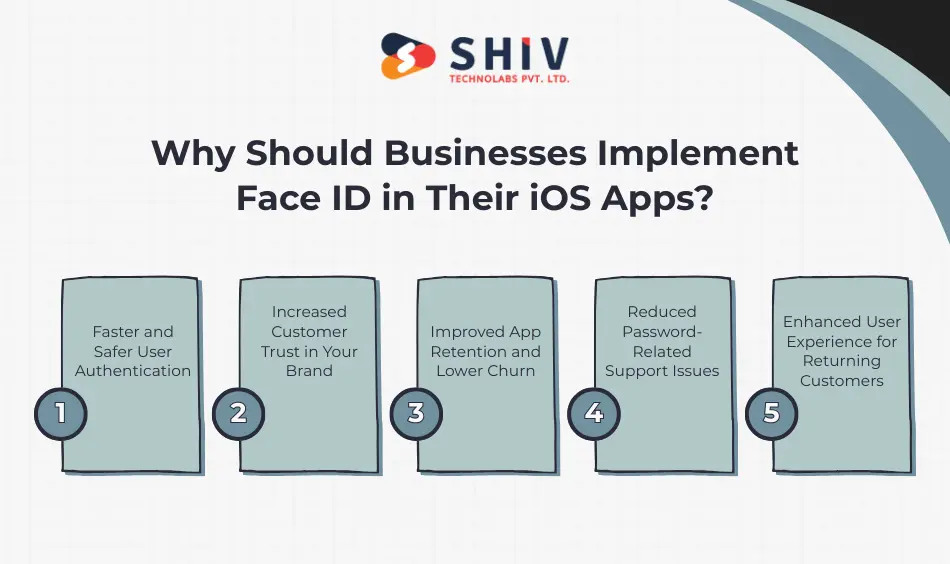
It is a combination of speed, privacy, and reliability. Face ID has become a favourite authentication method across numerous industries. Companies that learn about the advantages of Face ID login in iOS apps soon come to understand its impact on customer trust and the overall effectiveness of the app. If you are planning a broader rollout, review our mobile app development services for end-to-end builds.
Faster and Safer User Authentication
Face ID is adopted instead of time-consuming, frequently reused passwords. Users can unlock the app in 1-2 seconds with instant recognition. This eliminates the friction and decreases the number of unsuccessful logins.
Increased Customer Trust in Your Brand
Customers prefer security-conscious apps. They experience Face ID login as a sign of safety and professionalism with your product. This is particularly critical in sectors that handle sensitive information.
Improved App Retention and Lower Churn
The quicker logins are less frustrating. The faster users access your platform, the higher their retention and lower their churn, the more likely they are to return.
Reduced Password-Related Support Issues
The first number of support tickets is due to password issues. Problems such as forgotten passwords, account lockouts, and password reset instructions are never seen again with biometric entry.
Enhanced User Experience for Returning Customers
Repeat customers experience a hassle-free time. No typing. No delays. Just instant access. This is resulting in greater interaction and higher conversion rates.
Industries that benefit the most
- Fintech apps that require secure account access
- Healthcare apps that store protected medical information – learn about our healthcare app development focus.
- Ecommerce apps that need fast login for checkout speed
- Enterprise apps that authenticate employees for internal tools


How to implement Face ID in an iOS app?
Most entrepreneurs would like to know how to use Face ID in iOS applications without being tech-savvy. Below is a simple breakdown.
Step 1: Permit Face ID in Xcode
The app’s Info settings are configured by the developers to request biometric authentication permissions. This involves providing usage descriptions and Face ID features.
Step 2: Authenticate LocalAuthentication to Check the Device Support
Face ID is not compatible with all gadgets. The Face ID option is only displayed to users in case they check the compatibility using the LocalAuthentication framework of Apple.
Step 3: LAContext Implementation of Biometric Authentication
LAContext is responsible for authentication requests. It activates the Face ID prompt and authenticates the user with on-device biometric data.
Step 4: Add Fallback Methods Such as Passcode or Touch ID
If Face ID is unavailable or fails, apps must provide an alternative authentication method. The most common ways are passcode entry or Touch ID on their compatible devices.
Step 5: Face ID Flow Test on Actual Devices
It is not sufficient to test on simulators. Testing with real devices also provides proper alignment, sensitivity, lighting response, and reliability.
Professional iOS app development teams can carry out these processes safely and without compromising the application’s security, while complying with Apple security protocols and App Store standards. If you need build help, you can hire dedicated iOS developers from our team.
What Are the Key Benefits of Face ID Integration in iOS Apps?
The inclusion of Face ID in the iOS apps is something that provides a great deal of improvements in both performance and user satisfaction, as well as security. The difference is shown in the side-by-side comparison below.
| Feature | Before Integration | After Face ID Integration |
|---|---|---|
| Login Time | 10 to 15 seconds | 1 to 2 seconds |
| Security Level | Medium with password reuse | High with encrypted biometric data |
| User Experience | Standard | Frictionless and modern |
| Conversion Rate | Lower | Higher due to instant access |
| Support Queries | Frequent password resets | Minimal authentication issues |
These enhancements directly affect the engagement and long-term customer loyalty.
What Is the Cost of Implementing Face ID Login for iOS Apps
The Cost of implementing Face ID login in iOS apps would enable businesses to make the right budget. The pricing is based on complexity, application architecture, and necessary security upgrades.
Type of App
Finance, ecommerce, and healthcare apps are more secure by nature and require more time and money to develop.
Complexity of Current Codebase
Codebases, especially old ones, are also slow to integrate with new authentication software.
Integration Time
The majority of Face ID integrations take 15 to 30 hours based on fallback and UI requirements.
QA and Testing
Quality control ensures that Face ID is functional across different device models, lighting conditions, and applications.
Post Launch Maintenance
Being compatible with the latest iOS releases and Apple devices ensures long-term stability.
Approximate Cost to Add Face ID Feature
| Region | Estimated Cost USD | Timeframe |
|---|---|---|
| USA and Canada | $2,000 to $4,000 | 2 to 3 weeks |
| Europe | $1,800 to $3,500 | 2 to 3 weeks |
| India | $1,000 to $2,000 | 2 weeks |
The development of iOS apps by experienced engineers will guarantee optimization of costs and enterprise-level security.
Which iOS App Types Benefit Most from Face ID Implementation
The use of face recognition in iPhone applications is useful across many sectors, as biometric identification provides speed and assurance.
Finance and Banking Apps
- Secure login
- Rapid payment checking.
- Security against unauthorised access.
Healthcare Apps
- Safe access to patient records
- Protection of personal medical information
- Compliance with privacy standards
For HIPAA-style guidance, see our recent healthcare article on secure stacks similar to Zocdoc-class apps: Build Healthcare Web App Like Zocdoc.
Ecommerce Apps
- Faster login during checkout
- Reduced cart abandonment
- Auto-filled saved credentials.
Enterprise Apps
- Authentication for internal tools
- Secure employee access
- Support for zero-trust policies.
Common Mistakes to Avoid During Face ID Integration
Corporations that have tried to integrate internally usually commit errors that would impact on performance or security.
- Not Checking Device Compatibility: Face ID is available only on devices with a TrueDepth camera. When enabling the feature, one should always check the support.
- Skipping Fallback Authentication: If Face ID fails, users should be able to sign in with a passcode or another method.
- Disregard of Apple Biometric Guidelines: Apple is very strict in the use of biometrics. The violation may result in the rejection of the App Store.
- Lack of Thorough QA Testing: It is a problem with testing on simulators. Actual testing of the device is obligatory.
Partnering with specialists in Face ID integration for iOS applications helps avoid such problems and delivers consistent performance.
How Face ID Authentication Improves Business Security and User Trust
The usefulness of Face ID authentication of iOS applications is more than just comfortable. It also greatly increases brand credibility. Apple encrypts biometric data to the highest standards, and all information is safely stored on the device. This gives users confidence that their login method is not only modern but also safe.
Trust Building Outcomes
- Reduced fraud attempts
- Higher user engagement
- Strong customer loyalty
- Increased trust in sensitive transactions.
Biometric authentication ensures user safety, which directly drives retention and long-term brand value.
Why Choose Experts for Face ID Integration?
The collaboration with developers specialising in iOS app development services will ensure a smooth, secure, and Apple-compliant implementation.
Benefits of Hiring Experts
- Swift and SwiftUI qualified developers available.
- Rapid development with reduced flaws.
- Continuous support of updates and iOS releases.
- Stable code that is of high quality.
- Interoperability with other authentication systems.
Your business requires a secure upgrade? Contact us today at Shiv Technolabs. Our team of experts ensures that Face ID is installed without flaws and in accordance with your product objectives.
Conclusion
One of the most effective ways to improve your security, performance, and user experience is to upgrade your mobile application to use Face ID. Biometric authentication provides your brand with a competitive advantage as customers seek immediate access and unquestionable assurance, while minimizing friction with each access.
Looking for an expert iOS app development company? Shiv Technolabs is a leading iOS app development company equipped with a team of expert developers who specialise in ensuring that Face ID operates effectively in accordance with Apple’s recommendations and scales to the latest device version.
Shiv Technolabs offers global-level iOS app development services that help companies integrate biometric capabilities, enhance security, and develop high-performance applications. Want to fix and update to add Face ID authentication to the iOS app for secure, seamless authentication?
Frequently Asked Questions (FAQs)
1. How long does it take to add Face ID authentication to an iOS app?
Integration of Face ID typically takes 2-3 weeks, depending on the app’s complexity, required fallbacks, and testing. Testing larger apps with more security layers or more complex authentication flows can take longer.
2. Can Face ID be added to older iPhones?
Face ID is compatible with iPhones that have a TrueDepth camera, which began with iPhone X and later iPhones. Touch ID or passcode-based fallback can be used with older devices.
3. Is Face ID safe for financial or healthcare apps?
Yes, Face ID is highly secure because Apple uses encrypted biometric storage in the Secure Enclave, which is also used in apps that handle sensitive data, such as banking and medical apps. Data never leaves the device.
4. What is the average cost of Face ID integration in business apps?
The Cost to implement Face ID for iOS app login will range from $1,000 to $4,000, depending on the development location, the complexity of the codebase, and testing requirements.
5. Can I add Face ID authentication without updating my entire app?
Yes, Face ID can be used as a stand-alone feature without re-coding the entire program. This is why it is a cost-effective upgrade that enhances security and the user experience.