Table of Contents
Mobile apps have become the center of how people interact, shop, learn, and connect. Businesses that once relied only on websites are shifting towards digital transformation solutions providers to reach users faster and build brand loyalty.
For startups and enterprises alike, a well-built app is no longer a luxury; it’s a primary customer touchpoint. The mobile app development process becomes a success not just with coding. It’s about following a structured path, understanding user needs, creating a design that feels natural, writing efficient code, testing across devices, and maintaining it long after launch.
This guide walks you through the entire process of developing a mobile app end-to-end, from idea validation to post-launch analytics.
Whether you’re a founder planning your first app or a business leader refining your digital strategy, you’ll understand how to create a mobile app, how modern apps are designed, developed, tested, and released successfully.


How Modern Mobile Apps Are Actually Built?
Behind every app that feels smooth and intuitive lies a process built on precision and teamwork. Developers, designers, and strategists work together to turn a rough idea into a reliable digital product. While the details differ across projects, every successful app follows a similar flow, one that connects creative thinking with technical execution.
It starts with defining what the app should achieve. Whether it’s meant to simplify bookings, boost sales, or deliver entertainment, clear goals help shape every feature and function. From there, teams decide on the right tools, frameworks, and platforms – choices that affect speed, design flexibility, and long-term maintenance.
Unlike earlier years, mobile app development is faster and more data-aware. AI-assisted coding, automated testing, and predictive UX tools help reduce development cycles and improve product quality. The process is no longer linear; it’s iterative. Teams release early versions, gather feedback, and refine features continuously to match real user behavior.
This structured yet flexible flow is what keeps modern apps competitive, and it’s what you’ll see in detail in the next section: the key stages of the mobile app development lifecycle.
The Step-by-Step Process of Developing a Mobile App
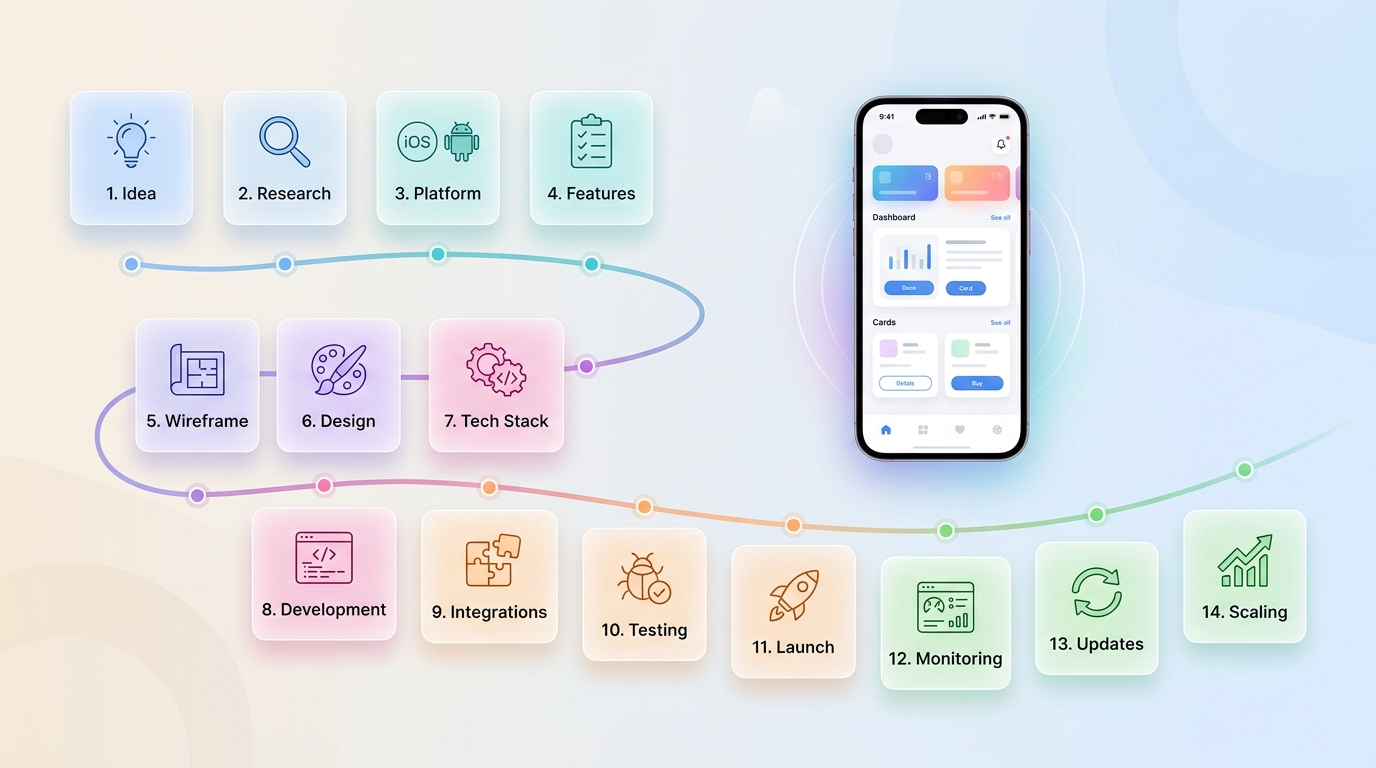
Building an app isn’t a one-shot process, it’s a sequence of well-defined stages that connect business logic, design clarity, and technical structure. Here’s how modern mobile apps take shape, from the first idea to post-launch updates.
1. Define Business Goals and App Purpose
Every successful mobile app starts with a clear reason to exist. Without this, development turns into guesswork and wasted cost.
Start by identifying the core problem your app will solve. This could be improving customer experience, automating internal processes, or creating a new revenue channel.
Next, define your target audience. Who will use your app? What challenges do they face? What kind of experience do they expect? Clear answers here shape every decision that follows.
You also need to decide your business model early. Common models include:
- Subscription-based apps
- One-time purchase apps
- Marketplace platforms
- Service-based apps
- Freemium apps with paid features
A simple way to structure this step is:
- Problem → What issue are you solving?
- Users → Who faces this problem?
- Value → Why will they use your app instead of alternatives?
2. Market Research and Competitor Analysis
Before building anything, you need to know what already exists. Many apps fail because they repeat ideas without understanding competition.
Start by listing top competing apps in your niche. Study them on:
- Features and functionality
- User interface and navigation
- App Store reviews (this is gold for insights)
- Pricing and monetization
Focus on identifying:
- What users like
- What users complain about
- Missing features or gaps
This helps you avoid mistakes and find opportunities.
Also validate demand by checking:
- Search trends
- Industry reports
- User communities (Reddit, forums, etc.)
3. Choose App Type and Platform
Choosing the right platform affects cost, performance, and long-term growth.
You have three main options:
Native Apps
Built separately for iOS and Android.
- Best performance
- Higher development cost
Cross-Platform Apps
Single codebase for both platforms (Flutter, React Native).
- Faster development
- Cost-effective
Web Apps / PWA
Browser-based apps that work like mobile apps.
- Lower cost
- Limited device features
Your choice depends on:
- Budget
- Timeline
- Performance needs
- Target audience devices
4. Architecture Setup and Code Foundation
One of the biggest mistakes is trying to build everything at once.
Start with an MVP (Minimum Viable Product). This includes only the features required to solve the main problem.
Divide features into:
- Must-have features (launch version)
- Secondary features (future updates)
Create basic user flows like:
- Sign-up → Browse → Action → Checkout
- Login → Dashboard → Task completion
This step keeps development focused and prevents delays.
5. Create Wireframes and App Architecture
Wireframes are simple layouts that show how your app will work before design begins.
They help define:
- Screen structure
- Navigation flow
- Placement of elements
At the same time, plan your app architecture:
- How data will flow
- Backend structure
- API connections
This step reduces confusion during development and helps teams stay aligned.
6. UI/UX Design and Prototyping
This is where your app starts to look and feel real.
UI/UX design focuses on:
- Clean and simple interface
- Easy navigation
- Clear call-to-action elements
Create a clickable prototype so you can:
- Test user experience
- Identify confusion points
- Get early feedback
A good design improves:
- User retention
- Conversion rates
- Overall usability
7. Select Technology Stack
Your tech stack defines how your app is built and how it performs.
Key components include:
- Frontend (user interface)
- Backend (server, logic)
- Database (data storage)
- APIs (communication between systems)
Also decide:
- Cloud provider (AWS, Firebase, etc.)
- Security layers
- Scalability approach
Choosing the right stack early avoids future rebuilds.
8. App Development (Frontend + Backend)
This is the execution phase where your app is built.
Frontend Development
- Builds screens and user interface
- Focuses on responsiveness and usability
Backend Development
- Handles logic, database, and APIs
- Manages authentication and data processing
Development usually happens in phases:
- Sprint-based cycles
- Regular testing
- Continuous improvements
9. Third-Party Integrations
Most apps depend on external tools to function properly.
Common integrations include:
- Payment gateways (Stripe, Razorpay)
- Analytics tools (Firebase, Mixpanel)
- Communication APIs (SMS, email)
- CRM or ERP systems
This step saves time and adds advanced features without building everything from scratch.
10. Testing and Quality Assurance
Testing is critical before launch. Even small bugs can impact user trust.
Types of testing include:
- Functional testing (features work correctly)
- Performance testing (speed and load handling)
- Security testing (data protection)
- Device compatibility testing
Fix issues in multiple testing cycles before release.
11. App Deployment and Launch
Once testing is complete, your app is ready for release.
Steps include:
- Preparing app store assets (screenshots, descriptions)
- Meeting App Store and Play Store guidelines
- Submitting the app for review
Approval may take time depending on compliance.
12. Post-Launch Monitoring and Support
Launch is not the end. It is the start of real user interaction.
Track:
- App performance
- Crash reports
- User behavior
Collect feedback through:
- Reviews
- Support tickets
- Surveys
This helps identify improvements quickly.
13. Maintenance and Updates
Apps require continuous updates to stay relevant.
Regular updates include:
- Bug fixes
- Feature improvements
- OS compatibility updates
- Security patches
Ignoring this step leads to user drop-off.
14. Scaling and Growth Planning
Once your app gains users, you need to scale.
Focus on:
- Handling higher traffic
- Improving performance
- Adding advanced features
Scaling may involve:
- Upgrading servers
- Improving database performance
- Expanding integrations
How Long Does It Take to Build and Launch a Mobile App?
Every app follows a similar flow, but no two timelines are the same. Development duration depends on app complexity, features, integrations, and testing depth. For example, a simple to-do list app can be ready in weeks, while a fintech or delivery platform can stretch over several months.
Project managers often divide the timeline into stages — planning, design, development, testing, and deployment — each with its own deliverables. The total duration also shifts based on the chosen technology stack and the number of supported platforms (Android, iOS, or both).
Below is a clear breakdown showing average timeframes for different app types.
| App Type | Approx. Duration | Core Features | Best Fit For |
|---|---|---|---|
| Utility App | 2–4 weeks | Simple UI, login, notifications | Internal tools, single-function apps |
| eCommerce App | 8–10 weeks | Catalog, payments, cart, analytics | Retailers, D2C brands |
| On-Demand Delivery App | 10–12 weeks | Real-time tracking, chat, ratings | Food, taxi, and courier startups |
| Social Media App | 10–12 weeks | Feed, stories, chat, and content moderation | Communities, creators |
| Enterprise App | 15–20 weeks | Role-based dashboards, data sync, reports | Enterprises, B2B solutions |
What Affects the Development Timeline
- Feature volume – The more modules you add, the longer coding and testing take.
- Design detail – Advanced UI animations and motion effects increase effort.
- Third-party integrations – Payment gateways, APIs, and AI tools require extra testing.
- App platform count – Android + iOS doubles design and testing cycles.
- Iteration cycles – Feedback-based improvements after beta release extend timelines but raise app quality.
In most cases, the ideal development window for a full-featured, production-ready app sits between 2 to 4 months. Adding predictive analytics, AI chat, or IoT integration can increase it slightly, but the payoff is stronger engagement and long-term retention.
Cost Breakdown Building a Mobile App
Estimating the cost of developing a mobile app depends on far more than just design or coding. The total investment comes from several layers, project planning, design complexity, feature count, backend structure, integrations, testing, and long-term maintenance.
App development pricing also varies by region and team composition. For example, a project in the United States can cost three to four times more than the same app built in India with an equally skilled team. As AI and automation tools become mainstream, timelines may shrink, but quality assurance and post-launch management still add to the total budget.
Below is a cost overview to help visualize realistic spending based on app type and purpose.
| App Type | Estimated Cost (USD) | Purpose |
|---|---|---|
| Informational App | $5,000 – $12,000 | Showcase content, company info, or product catalog |
| eCommerce App | $12,000 – $25,000 | Product listings, cart, checkout, analytics, and user profiles |
| Social Media App | $25,000 – $50,000 | Feeds, posts, messaging, notifications, and media upload |
| On-Demand Service App | $20,000 – $45,000 | Real-time tracking, chat, payments, and review system |
| Enterprise App | $30,000 – $80,000+ | Role-based dashboards, analytics, CRM, and ERP integration |
1. Additional Cost Factors to Consider
- Platform selection: iOS, Android, or both directly affects design and QA cost.
- App design quality: Custom illustrations or animations add 15–25% extra.
- Backend complexity: Apps using AI, IoT, or multi-user data management cost more.
- Ongoing maintenance: Typically 10–20% of total development cost per year.
- App store charges: Small but recurring (Google Play and App Store fees).
2. Cost-Saving Practices
- Build an MVP first — focus on core features, gather feedback, and expand later.
- Choose a cross-platform framework (Flutter or React Native) to save time and cost.
- Outsource specific tasks like testing or UI to specialized teams.
For Detailed Info on Mobile App Development Costs, Read Our Blog!
Tech Stack Used in Modern Mobile Apps
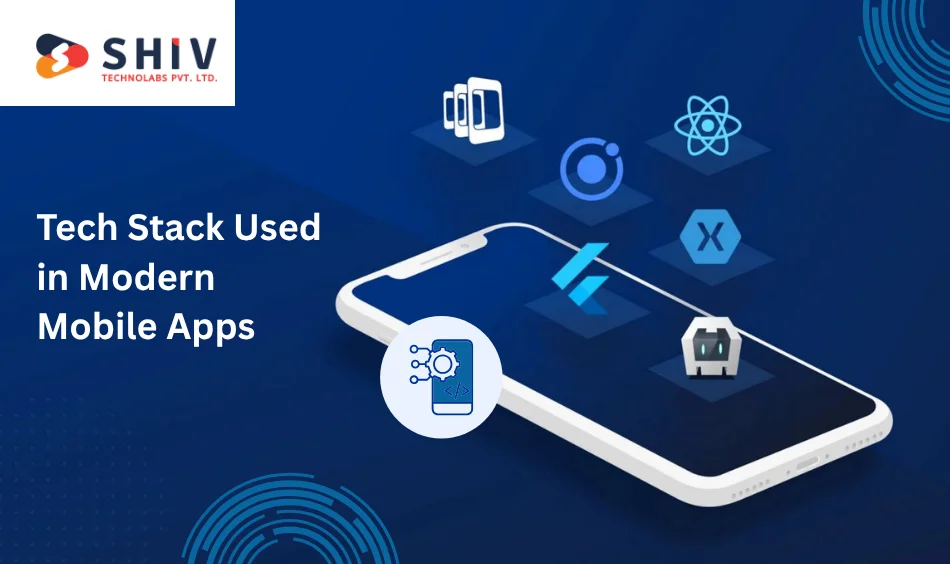
Every app’s performance, scalability, and maintenance depend heavily on the technology stack it’s built on. The right combination of frontend, backend, and database tools defines how fast the app loads, how secure it is, and how easily it can evolve.
Here’s what a typical tech stack looks like for high-performing mobile apps.
1. Frontend Technologies
The frontend determines what users see and interact with. Developers use frameworks and languages that deliver smooth animations, quick rendering, and native-like experiences across devices.
Popular choices:
- Flutter: Single codebase for Android, iOS, web, and desktop; strong UI performance.
- React Native: Ideal for startups wanting faster delivery with a cross-platform setup.
- SwiftUI: For iOS apps that demand native transitions and accessibility control.
- Kotlin Multiplatform: Reduces redundant code while retaining platform-specific UI quality.
- Jetpack Compose: Google’s modern toolkit for Android UI with faster development cycles.
2. Backend Frameworks
The backend is the engine that drives all data processing, authentication, and communication between app screens and the server.
Common backend technologies used by expert teams:
- Node.js: Lightweight, scalable, and great for real-time apps.
- Laravel: PHP-based framework ideal for structured APIs and admin panels.
- Django: Secure Python framework for data-heavy or AI-integrated applications.
- Firebase: Serverless backend by Google for quick MVPs and real-time updates.
- AWS Lambda: Enables event-driven functions and auto-scaling for global users.
3. Database and Storage Solutions
Data defines every app’s behavior — from login details to personalized feeds. Choosing the right database ensures quick access and stable synchronization across devices.
Preferred databases:
- PostgreSQL: Open-source, reliable, and handles complex data relationships.
- MongoDB: Flexible NoSQL database ideal for apps with dynamic data models.
- MySQL: Trusted choice for structured applications with large datasets.
- Firestore: Real-time data syncing, perfect for chat or tracking apps.
- Redis: Used for caching to improve performance in high-traffic apps.
4. DevOps and Supporting Tools
Efficient workflows help teams deliver updates quickly and maintain app reliability after launch.
Frequently used tools:
- GitHub/Bitbucket for version control and collaboration.
- Jenkins/Bitrise for continuous integration and deployment.
- Docker/Kubernetes for scalable container management.
- Firebase Crashlytics for real-time crash reporting.
- Jira for agile project management and sprint tracking.
Selecting the right stack depends on app type, scalability goals, and available budget. Startups often prefer cross-platform frameworks like Flutter, while enterprises opt for native builds to handle heavy data operations and integrations.
Common Mistakes to Avoid During Development
Even well-planned app projects can face hurdles if certain fundamentals are ignored. Many delays, bugs, and user drop-offs occur due to preventable mistakes during the development phase. Here are some of the most common ones to watch out for.
1. Skipping MVP Validation
Building every feature at once is one of the biggest reasons apps fail early.
Start with a Minimum Viable Product (MVP) to test user response before scaling up. It reduces financial risk and provides real-world feedback to refine future updates.
2. Poor UI/UX Consistency
A mismatched interface — inconsistent fonts, confusing icons, or scattered navigation — drives users away quickly.
Consistent layouts and visual hierarchy across screens create comfort and trust. Always test designs with real users before locking final prototypes.
3. Ignoring Performance Optimization
Apps that load slowly or drain battery lose retention fast.
Developers must focus on clean code, caching, and image compression to reduce lag. Use tools like Firebase Performance or Android Profiler to monitor efficiency.
4. Overlooking Security Early On
Many developers postpone encryption and authentication, which can expose sensitive data.
Security should be built from day one — including SSL, token-based login, and data encryption for user privacy.
5. Neglecting Cross-Device Testing
Testing only on one device or platform often causes UI breaks on others.
Run QA sessions across multiple screen sizes and operating systems to avoid poor display issues or inconsistent interactions.
6. No Post-Launch Planning
Releasing an app is only half the job.
Skipping post-launch updates or analytics tracking prevents growth. Monitor crashes, study behavior metrics, and release timely updates to maintain engagement. Avoiding these mistakes early saves months of rework and helps keep the development budget under control.
Every successful app project balances creativity, testing, and data-driven decision-making — not just code quality.
Why Businesses Trust Shiv Technolabs for Mobile App Development?
Building a mobile app in USA is more than writing code — it’s about shaping digital experiences that align with real business goals. At Shiv Technolabs, we help startups and enterprises translate their ideas into reliable, high-performing mobile applications.
Our in-house experts handle every step — from concept validation to post-launch optimization — ensuring your app performs smoothly across devices and scales with your business growth. We combine design precision with technical expertise to deliver mobile solutions that feel fast, intuitive, and user-focused.
What we offer:
- Custom Android, iOS, and cross-platform app development
- MVP design and development for startups
- Integration with AI, IoT, and enterprise systems
- Dedicated QA, maintenance, and support teams
- Agile development model with transparent reporting
With years of experience and a proven delivery record, Shiv Technolabs has become a preferred mobile app development company for brands looking to build scalable digital products. Whether you’re planning a new idea or modernizing an existing app, our team is ready to make it happen.
Final Thoughts
Mobile app development has evolved into a structured yet flexible process — one that balances creativity, speed, and scalability. From the first sketch on a whiteboard to the final app release, every stage plays a crucial role in shaping user experience and business impact.
Whether you’re building a basic utility app or a data-driven enterprise solution, success lies in following a defined process — backed by skilled developers, thorough testing, and continuous improvement. A well-planned mobile app not only improves engagement but also strengthens brand identity in a highly connected digital space.
At Shiv Technolabs, our mobile app development services focus on long-term reliability. We combine strategy, design, and modern technologies to deliver apps that stand out for performance and usability. If you’re planning your next mobile project, it’s the right time to take the first step with a structured plan and the right technology partner.
FAQs
1. How much does it cost to build a mobile app?
The cost of developing a mobile app typically ranges from $5,000 to $80,000+, depending on app type, features, platforms, and design complexity.
2. Why do mobile app development costs vary so much?
App costs differ based on project size, UI/UX quality, number of integrations, backend setup, and whether it’s built for Android, iOS, or both platforms.
3. Which type of mobile app is the most expensive to build?
Enterprise and social networking apps are the most expensive, usually ranging between $30,000 and $80,000+, due to advanced features, scalability, and data management.
4. How much does a basic mobile app cost?
A simple informational or utility app with minimal features generally costs $5,000 to $12,000 and can be completed in 8–10 weeks.
5. How does location affect app development pricing?
Development costs are higher in countries like the USA, UK, and Canada, whereas India offers equally skilled developers at one-third of the price for the same quality.
6. Are there any hidden costs in mobile app development?
Yes, ongoing costs like maintenance (10–20% per year), server hosting, app store fees, and regular updates add to the long-term budget.
7. How can I reduce the cost of building a mobile app?
You can save costs by building an MVP first, choosing cross-platform frameworks like Flutter or React Native, and outsourcing specific modules to specialized teams.
8. Can Shiv Technolabs help estimate my mobile app budget?
Yes. Our team at Shiv Technolabs provides detailed cost breakdowns and project timelines based on your app goals and features — so you know exactly what to expect before development begins.
9. Does Shiv Technolabs offer cost-effective app development for startups?
Absolutely. We specialize in budget-friendly mobile app development for startups, offering MVP design, cross-platform builds, and modular development options that balance cost, speed, and scalability.