
Table of Contents
Flutter continues to be one of the most used multi-platform frameworks, with 46% of cross-platform developers choosing it as their main tool in 2025. Its community has also crossed 2 million active developers, showing strong, steady growth heading into 2026.
Businesses pick Flutter because it helps create Android, iOS, Web, and Desktop apps from a single codebase with fast build cycles and strong UI control.
As apps grow in features and size, the need for clear structure, stable code, and performance-focused habits becomes more important. Poor coding choices can lead to slow screens, heavy rebuilds, and long testing cycles.
This guide covers the top 10 Flutter Best Practices to Follow in 2026, helping developers and teams build clean, stable, and future-ready apps.


Why Best Practices Matter in Flutter App Development?
Flutter developers utilize a strong way to build apps for Android, iOS, Web, and Desktop without writing separate codebases. This is one reason the framework keeps growing each year. But as projects grow in size, small mistakes made early can lead to slow screens, confusing code, and longer development time.
Many Flutter apps run into issues such as:
- UI rebuilds that slow down scrolling
- Widgets that become too large and hard to manage
- State changes that are hard to track
- Code that becomes difficult to update
- App size growing beyond store guidelines
Following best practices helps prevent these problems before they appear. It also helps teams work together without confusion, shortens development cycles, and keeps the app steady as new features are added.
In 2026, businesses expect apps to run fast on mid-range phones, support more platforms, and offer a clean UI. Best practices create the foundation needed to reach these goals.
Best Practices Every Flutter Project Should Follow in 2026
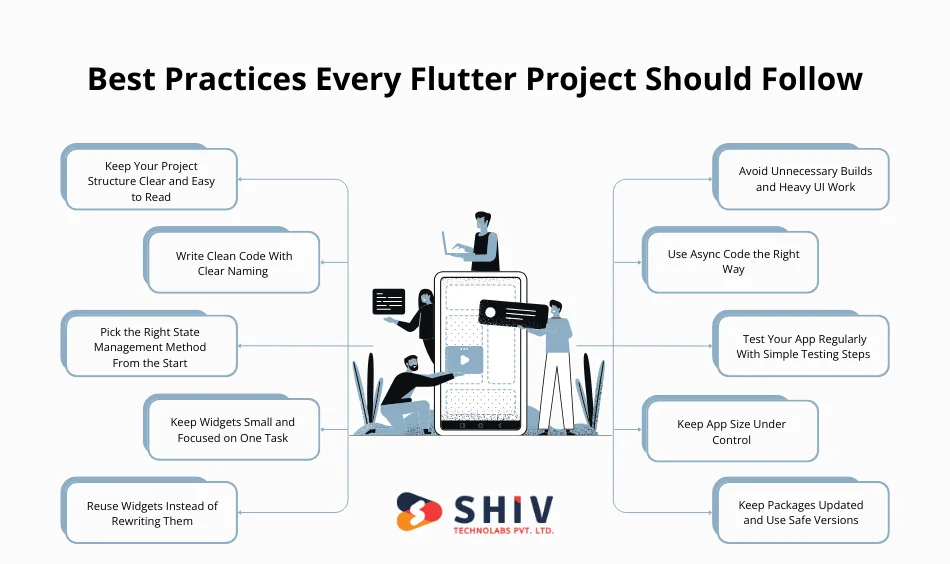
Building a Flutter app is not only about writing code that works — it’s about writing code that stays clear, stable, and easy to expand as the project grows. These best practices help teams avoid common issues such as slow screens, hard-to-read files, and unplanned refactoring.
The points below cover structure, naming, state handling, UI behavior, testing, and long-term care. Each one plays an important role in keeping the app ready for updates in 2026 and beyond.
1. Keep Your Project Structure Clear and Easy to Read
A clean project structure is one of the most important parts of a long-term Flutter app. When folders and files are arranged in a simple and predictable way, it becomes easier for any developer—new or experienced—to understand how the app works.
A clear structure helps with:
- Faster onboarding of new developers
- Easier debugging
- Smoother code reviews
- Cleaner feature updates
A common and simple structure looks like this:
lib/
├── features/
│ ├── login/
│ ├── dashboard/
│ ├── profile/
├── common_widgets/
├── services/
├── models/
├── utils/
├── main.dart
This type of separation keeps related code together and reduces confusion as the app grows. It also avoids the “everything in one folder” problem that makes scaling harder.
2. Write Clean Code With Clear Naming
Clear naming makes a huge difference in how easy your code is to read, share, and update. In a growing Flutter project, developers often move across files, features, and modules. If names are vague or too short, the code becomes confusing and slows down progress.
Good naming helps with:
- Faster understanding of features
- Smooth team communication
- Easier debugging and testing
- Cleaner long-term maintenance
Example of unclear naming:
var d;
var s1;
function x() {}
Example of clean naming:
var userData;
var selectedItem;
function loadUserProfile() {}
Clear naming reduces mistakes and keeps the project readable even after months or years. It’s one of the simplest habits that has the strongest impact.
3. Pick the Right State Management Method From the Start
State management is one of the most important decisions in any Flutter project. It controls how data moves across screens and how UI reacts to changes. Picking the wrong method early can lead to hard-to-fix issues, repeated code, and confusing logic.
A clear choice at the beginning helps with:
- Predictable data flow
- Easier debugging
- Faster feature development
- Smooth teamwork
Common state management methods include:
- Provider – simple apps or early-stage projects
- Riverpod – flexible, modern, and widely used in 2025–2026
- Bloc – strong for apps with strict, event-driven flow
- GetX – simple for managing state and navigation
Choosing the method should match the size of the project, team skill level, and long-term plans. A stable approach from day one keeps the code neat as the app grows.
4. Keep Widgets Small and Focused on One Task
Widgets are the core building blocks of every Flutter app. When a widget grows too large, it becomes harder to read, harder to test, and more likely to slow down the UI. Keeping widgets small helps developers understand their purpose quickly and avoid unexpected behavior.
Small, focused widgets help with:
- Cleaner UI updates
- Faster builds and less heavy rendering
- Easier code reviews
- Better testing and debugging
Example of a large widget that does too much:
- Handles layout
- Loads data
- Applies logic
- Updates UI
Better approach:
Split it into smaller widgets, such as:
- A layout widget
- A button widget
- A data widget
- A card widget
This approach makes each widget responsible for one thing, which keeps the app steady and easier to manage as new features are added.
5. Reuse Widgets Instead of Rewriting Them
One of Flutter’s strengths is its widget-based system, which makes it easy to build reusable UI parts. Reusing widgets keeps the design consistent and reduces the amount of code you need to maintain. When developers rewrite the same UI again and again, the project becomes messy and harder to update later.
Reusing widgets helps with:
- Consistent design across all screens
- Smaller codebase
- Faster development
- Easier updates when design changes
Common reusable widgets include:
- Buttons
- Text fields
- Cards
- Headers
- Loading indicators
- Spacing and padding helpers
When the design team makes changes, you only update the widget in one place, and the whole app reflects it. This saves time and prevents mismatched styles.
6. Avoid Unnecessary Builds and Heavy UI Work
One of the most common causes of slow screens in Flutter is unnecessary widget rebuilds. When the UI rebuilds more often than required, scrolling becomes rough, animations lag, and mid-range devices struggle to keep up. Reducing rebuilds is key to keeping the app smooth.
Limiting rebuilds helps with:
- Better frame rates
- Faster UI reactions
- Lower battery use
- Smoother animations
Simple ways to reduce heavy UI work:
- Use const widgets where possible
- Keep expensive widgets outside frequently rebuilt areas
- Use keys wisely
- Avoid placing too much logic directly inside build methods
- Break down large widgets into smaller parts
A clean approach to rebuilding control helps the app stay fast on all device types, especially budget phones, which form a large user base even in 2026.
7. Use Async Code the Right Way
Flutter apps often fetch data from APIs, load files, or run tasks that take time. If these tasks are handled on the main thread, the UI can freeze, buttons may stop responding, and the app may feel slow. Using async code correctly keeps the UI active while background work continues smoothly.
Good async practices help with:
- Smooth user interactions
- Faster screen loading
- Better handling of long tasks
- Reduced chance of UI freezes
Key points to follow:
- Use async/await for clear, readable code
- Keep heavy operations away from the UI thread
- Show loading states to inform users
- Use FutureBuilder or StreamBuilder for data that changes over time
- Avoid running long loops or heavy calculations inside build methods
Managing async behavior well keeps the app stable on all devices and prevents unexpected lags during key actions like login, data sync, or form submissions.
8. Test Your App Regularly With Simple Testing Steps
Testing is one of the easiest ways to catch issues before they reach users. Many Flutter projects skip testing early on, which leads to bugs, broken screens, and unexpected crashes later. Regular testing keeps the app steady and reduces the time spent fixing problems during release cycles.
Consistent testing helps with:
- Finding bugs early
- Keeping features stable as the app grows
- Safer code changes
- Fewer issues in production
Types of tests that work well in Flutter:
- Unit tests: Check individual functions
- Widget tests: Check UI behavior
- Integration tests: Check full user flows
Even a few simple tests can prevent major issues later. Adding testing to the weekly routine saves time and makes the app more reliable for long-term use.
9. Keep App Size Under Control
Large app size is a common problem in mobile development. Flutter gives good control over how big the final build becomes, but if the project grows without planning, the app may become too heavy for stores or slow to install on devices. Keeping the app size light improves downloads and overall user experience.
Managing app size helps with:
- Faster installation
- Better reach in regions with slow internet
- Lower device storage use
- Higher chance of store approval
Simple ways to reduce app size:
- Compress images and avoid large raw assets
- Remove unused packages and files
- Use vector graphics when possible
- Split the app into smaller build variants
- Avoid embedding unnecessary fonts or heavy libraries
A lighter app loads faster, feels cleaner, and gives a better first impression to new users.
10. Keep Packages Updated and Use Safe Versions
Flutter apps depend on many external packages for UI, APIs, storage, navigation, and more. While packages save time, outdated or poorly maintained ones can create build errors, security risks, or unexpected bugs. Keeping packages updated—and choosing them wisely—helps maintain long-term stability.
Good package habits help with:
- Fewer build issues
- Better security
- Smoother feature updates
- Long-term project reliability
Key points to follow:
- Check update notes before upgrading
- Avoid adding too many packages for small tasks
- Track package health and maintenance frequency
- Test your app after each update
- Lock versions for stable releases
A well-maintained package list keeps your Flutter app steady and reduces problems as the framework continues to evolve toward 2026 and beyond.
Common Mistakes Developers Should Avoid
Even with the right tools, many Flutter apps face issues because of habits that slow down performance or make the code hard to maintain. Avoiding these mistakes helps keep the project clean, stable, and easy to grow.
Some of the most common mistakes include:
- Creating very large widgets that mix layout, logic, and UI work.
- Writing business logic inside UI files makes testing difficult.
- Using too many third-party packages leads to a bigger app size and more bugs.
- Choosing random state management methods without planning.
- Running heavy tasks inside build methods, causing slow screens.
- Skipping tests, which allows bugs to enter production.
- Ignoring app size, which causes slow installs and storage complaints.
Fixing these issues early prevents larger problems in the future and makes the app easier to manage as new features are added.
Tools and Plugins That Help You Follow Flutter Best Practices

Flutter offers several built-in tools and helpful plugins that make it easier to maintain clean code, track performance, and keep the project stable. Using these tools regularly can prevent issues and support steady development cycles.
Useful tools and plugins include:
1. Dart DevTools
A built-in toolkit that helps check performance, memory use, rebuild counts, and UI rendering. Great for spotting slow areas in the app.
2. Flutter Inspector
Helps visualize widget trees, see layouts clearly, and understand how widgets interact on the screen.
3. Lint Rules
Adding lint rules keeps the code clean and consistent. It highlights bad patterns and suggests better approaches before they become bigger issues.
4. VS Code Extensions
- Flutter
- Dart
- Error Lens
- GitLens
These extensions improve coding speed, error tracking, and overall productivity.
5. Android Studio Plugins
- Flutter Plugin
- Dart Plugin
- Device Manager
Helps manage emulators, inspect code, and test apps across different devices.
6. Package Health Checker
Before adding a package, checking its maintenance status, update history, and popularity helps avoid future compatibility problems.
Using these tools as part of the daily workflow keeps the app steady, clean, and closer to production-ready quality.
When to Apply Flutter Best Practices in a Project
These best practices are not meant to be used only at the end of a project. They work best when applied throughout the full development cycle. Using them at the right stages helps avoid rework and keeps the app steady as new features are added.
1. During Project Setup
- Set a clean folder structure
- Pick the right state management method
- Decide naming rules and coding style
2. During Feature Development
- Split widgets into smaller parts
- Reuse common UI elements
- Keep logic separate from UI
3. Before Testing
- Check async behavior
- Reduce unnecessary rebuilds
- Clean unused packages or assets
4. During Maintenance
- Update packages safely
- Improve app size where possible
- Add new lint rules for better code quality
5. During Team Collaboration
- Follow shared naming and structure rules
- Avoid personal coding shortcuts
- Keep code reviews focused on clarity
Using these best practices at every stage helps the project stay healthy and ready for updates in 2026 and beyond.
How Flutter Best Practices Help Business Owners and App Founders
Best practices are not only for developers — they also bring clear benefits to business owners, founders, and product teams. A well-structured Flutter app reduces cost, speeds up updates, and improves long-term performance.
Here’s how these practices support business goals:
1. Lower Development and Maintenance Cost
Clean code, reusable widgets, and stable architecture reduce the need for repeated work. This cuts down the number of hours required to build and maintain features.
2. Faster Release Cycles
When the code is clear and organized, developers can add new screens and features quickly without spending time understanding old code.
3. Better User Experience
Smooth performance, light app size, and stable UI keep users happy. This increases user retention and app ratings.
4. Higher Reliability
Consistent testing, safe package updates, and balanced state management reduce the chances of unexpected crashes. This gives founders peace of mind during big launches.
5. Easier Scaling
Apps that follow a good structure and Flutter best practices can grow without breaking. New modules, screens, or platforms (like web or desktop) can be added without rewriting the whole app.
6. Stronger Long-Term Value
Investing in code quality early helps the app stay relevant for years, making future updates easier and less costly.
These advantages make best practices essential not only for technical teams but for the overall success of the product.
Follow Flutter Best Practices for Your App – Shiv Technolabs
Building a strong Flutter app requires a clean structure, steady performance, and the right development approach.
At Shiv Technolabs, our team follows modern Flutter standards that help businesses build apps that are fast, stable, and ready for long-term growth. Whether you want to build a new app or upgrade an existing one, our developers bring clarity and predictable results to every stage of the project.
What You Get With Our Flutter Team
- Flutter app development services
- Feature planning and app architecture
- Clear folder structure and naming rules
- Stable state management based on project needs
- Reusable UI components for consistent design
- Smooth animations and a light app size
- Regular testing and safe package updates
- Support for Android, iOS, Web, and Desktop
Our goal is to build apps that perform well on all devices and remain easy to maintain as your business grows. With the right practices and a skilled team, your Flutter project stays strong in 2026 and beyond. Contact us now for more information!
Conclusion
Flutter continues to grow as a strong choice for building apps that run on multiple platforms. But the real success of a Flutter project depends on the habits followed during development. Clean structure, clear naming, smart state handling, smooth UI, regular testing, and safe package management all play a major role in keeping the app steady as it grows.
By following these ten best practices, developers and teams can build apps that load fast, stay stable, and remain easy to expand for new features in 2026 and beyond. With the right approach, your Flutter project stays ready for future updates and delivers a better experience to users on every device. Contact Shiv Technolabs – the best Flutter app development company!
FAQs
1. Is Flutter a good choice for long-term app development?
Yes. Flutter continues to grow each year, with strong community support and regular updates. Its single codebase approach makes it a safe choice for long-term projects that need Android, iOS, Web, or Desktop support.
2. Which state management method is good for large apps?
For large projects, structured methods like Bloc or Riverpod work well. They offer clear data flow, easier debugging, and better control when the app becomes complex.
3. How often should I test my Flutter app?
Testing should happen throughout the project, not just before release. Adding simple unit tests and widget tests weekly helps catch issues early and keeps the app stable.
4. How can I reduce the size of my Flutter app?
You can keep the app size light by compressing images, removing unused packages, avoiding heavy assets, and using split builds. This improves installs and overall user experience.
5. Can Flutter apps match the speed of native apps?
Yes. Flutter’s rendering system allows smooth animations and fast UI performance. With the right practices—such as avoiding heavy rebuilds—Flutter apps can match native-level speed in most cases.
6. What is the best way to keep my Flutter project clean as it grows?
Use clear folder structures, naming rules, reusable widgets, and consistent state handling. Regular code reviews also help keep the project tidy over time.
7. Are there risks in using too many third-party packages?
Yes. Too many packages can increase app size and create compatibility issues. Always check the package maintenance status and add only what is necessary.
8. Does Flutter support building apps for web and desktop?
Yes. Flutter supports Android, iOS, Web, Windows, macOS, and Linux. With the same codebase, you can expand your app to multiple platforms as your project grows.