Table of Contents
Odoo 17 has supported finance, inventory, sales, manufacturing, CRM, and other business operations since November 2023. According to Odoo’s official supported versions documentation, Odoo 17 is planned to reach the end of standard support in September 2026.
This deadline does not mean every Odoo 17 database will stop working. It means businesses must assess the risks of running a version outside Odoo’s standard support window. These risks may affect security updates, bug fixes, third-party apps, integrations, and future maintenance costs.
An upgrade also involves more than moving a database. Custom modules, Studio changes, reports, tax rules, APIs, and daily workflows must work correctly on the selected version.
The decision is also not limited to an Odoo 18 to Odoo 19 upgrade. Some businesses may consider Odoo 19, while others may use the project to review Odoo.sh, Odoo Online, or their existing on-premise environment. This guide explains what Odoo 17 end of support means, the available upgrade options, and the checks required before migration.
Quick Overview: Odoo 17 is planned to reach the end of standard support in September 2026. Businesses should review their edition, hosting, custom modules, third-party apps, integrations, database, and critical workflows before choosing Odoo 18, Odoo 19, or a short-term extended-support path where applicable.
| Required action | Why it matters |
| Confirm the edition | Community and Enterprise follow different upgrade processes |
| Check the hosting model | Odoo Online, Odoo.sh, and on-premise need different plans |
| Audit custom modules | Custom code often controls project scope |
| Review third-party apps | Some apps may not support the target version |
| Map integrations | APIs and scheduled jobs may change after migration |
| Create a staging database | Testing must happen before production migration |
| Run user acceptance testing | Business users can confirm that daily tasks still work |
| Prepare a rollback plan | The database can be restored if a major issue occurs |
| Schedule the upgrade | A clear date prevents an open-ended delay |
What Does Odoo 17 End of Support Mean?
Odoo provides support, bug fixes, upgrades, and security updates for its three most recent major versions. When a new major version changes this group, an older release can leave standard support.
The application will not automatically close when Odoo 17 reaches this point. Users may still be able to access the database and perform regular work. However, keeping an unsupported ERP version can create growing operational and technical risks.
Standard Fixes May Become Limited
Older versions may no longer receive the same standard attention for bugs and security issues. A newly reported problem may already be fixed in a newer version without receiving a fix for Odoo 17. This situation matters when the database stores financial, customer, supplier, inventory, or employee information.
App Compatibility Can Decline
Third-party app developers often focus on supported Odoo releases. An app may continue working on Odoo 17, but future updates may only support Odoo 18, Odoo 19, or later versions. Before upgrading, list every paid, free, and private app installed in the database. Confirm whether each app has a supported replacement.
Integration Problems Can Increase
Payment gateways, shipping services, marketplaces, banking tools, and business intelligence platforms regularly change their APIs. Older Odoo connectors may not support these changes. A failed connector can affect orders, payments, stock levels, reports, or customer records.
Maintenance May Cost More
Technical work on an older version can take longer because fewer developers and app vendors continue supporting it. Temporary fixes may also add code that must be rewritten during the eventual upgrade. For this reason, September 2026 should be treated as a planning deadline rather than the day when upgrade discussions begin.


Should You Upgrade Odoo 17 to Odoo 18 or Odoo 19?
There is no single version choice that fits every Odoo database. The decision depends on custom code, app availability, business risk, project time, and the desired support period.
| Decision factor | Odoo 18 | Odoo 19 | What to check before choosing |
| Upgrade scope | A smaller version jump may make it easier to retain current workflows. | A larger jump gives you a chance to review workflows you want to change. | List the processes that must work at launch and those you plan to redesign. |
| Standard support | Planned through September 2027. | Planned through September 2028. | Decide when you would realistically be ready for another upgrade. |
| Custom modules | May require fewer changes, depending on the code. | May need more review and rework. | Test each business critical module on both versions before estimating cost. |
| Third party apps | An established app may already support this version. | Compatibility needs confirmation from each vendor. | Get written confirmation for every app and integration you rely on. |
| Testing and launch | May suit a narrower project scope. | May need more time if you also change processes. | Compare test results, launch effort, and staff training needs. |
| Best fit | Businesses that want to retain heavily customized workflows with fewer planned changes. | Businesses that want a longer support period and are ready to review their ERP setup. | Choose based on tested compatibility and total project effort, not version number alone. |
These dates make Odoo 18 and Odoo 19 the two obvious upgrade candidates for many Odoo 17 users. However, their longer support periods do not automatically make either option the right choice.
Choose Odoo 18 for a Smaller Change
Odoo 18 may be suitable when a business has many custom modules, complex inventory rules, local accounting changes, or several third-party apps. The smaller version gap can make code comparison and issue diagnosis easier. It can also reduce the number of workflow changes introduced during one project. However, Odoo 18 has a shorter remaining support period than Odoo 19. Businesses choosing this path should consider when another upgrade may be required.
Choose Odoo 19 for a Longer Runway
Odoo 19 may suit businesses that want more time before the next support deadline. It can also be a suitable target when the company plans to replace old modules or revise business processes.
A direct move to Odoo 19 may require more work. Developers must review changes across two major versions, while users may need added training for interface or workflow changes. Before selecting Odoo 19, confirm that every business-critical third-party app supports it.
Delay the Upgrade Only With Controls
Some companies cannot migrate immediately because of peak trading periods, financial audits, production schedules, budgets, or unavailable app versions. A short delay can be managed, but it needs a written plan. Useful controls include:
- Increasing database and file backup frequency
- Reviewing user access and server security
- Freezing non-essential custom development
- Monitoring integrations and scheduled jobs
- Recording known bugs and manual workarounds
- Setting a final target version and migration date
For Odoo.sh users, continued support remains available after a version reaches three years and six months of age. Odoo states that a 25% subscription surcharge then applies. Odoo 17 is scheduled for removal from Odoo.sh on October 31, 2029. This extended period should not be treated as a reason to delay planning. It gives businesses extra time for controlled migration when an immediate upgrade is not possible.
What Should You Audit Before an Odoo 17 Upgrade?
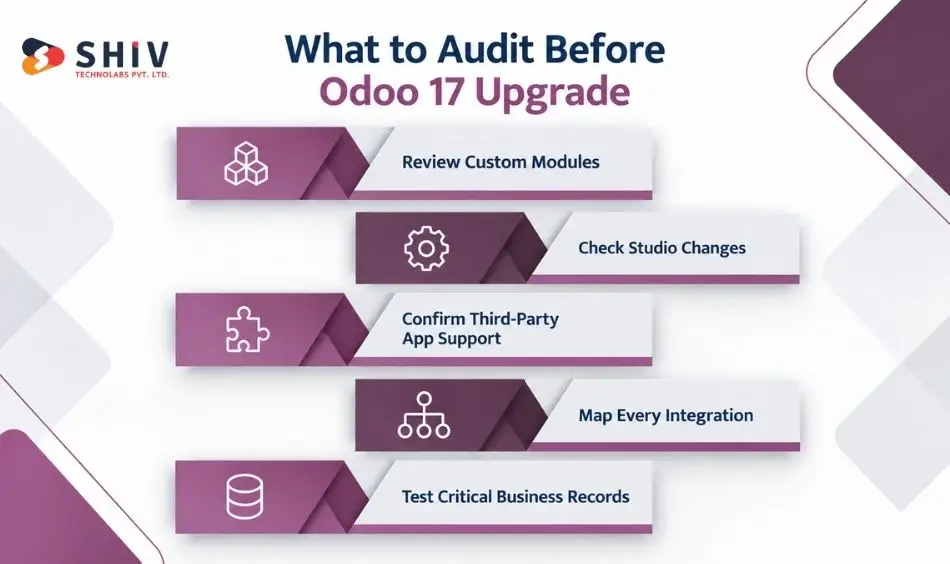
The database version is only one part of the project. Most migration effort comes from the systems built around the database. A proper audit creates a record of what must be retained, replaced, rewritten, or removed.
Review Custom Modules
List every custom module and record:
- Its business purpose
- The department using it
- Dependencies on other modules
- Code quality and documentation
- Whether standard Odoo now provides the same function
- Changes required for Odoo 18 or Odoo 19
Unused custom modules should not automatically move to the new version. Removing them can reduce future maintenance work.
Check Studio Changes
Odoo Studio lets teams add fields, change views, create reports, and set approval rules. These changes may not appear during a review of custom module code. Test each change in a copy of the upgraded database.
- Check that custom and computed fields show the correct values.
- Confirm that automated actions run at the right time and produce the expected result.
- Test approval rules with the staff who approve requests.
- Review email templates to check their content, recipients, and record details.
- Compare modified reports with the original database to check their figures.
Confirm Third-Party App Support
Do not assume an app will work because its name appears in the Odoo Apps Store. Confirm the exact supported version with the app developer.
If an app has no compatible release, the business may need to:
- Wait for the developer’s update
- Select a replacement app
- Build a custom alternative
- Remove the function from the migration scope
Map Every Integration
Document all systems that send data to or receive data from Odoo. This may include:
- Payment gateways
- Shipping providers
- eCommerce platforms
- Marketplaces
- CRM or marketing platforms
- Banking systems
- Payroll tools
- Power BI and other reporting platforms
- Custom mobile or web applications
Businesses with several connected systems may need custom API development services to update authentication, data mapping, webhooks, or scheduled transfers.
Test Critical Business Records
Migration testing should cover more than record counts. Users must confirm that data still produces the right business result.
| Area | What to verify |
| Accounting | Journals, taxes, fiscal positions, balances, invoices, and reports |
| Inventory | Warehouses, routes, lots, serial numbers, and valuation |
| Manufacturing | Bills of materials, work centres, operations, and planning rules |
| Sales | Price lists, discounts, quotations, orders, and invoices |
| Purchasing | Vendors, purchase rules, receipts, and bills |
| POS | Devices, payment methods, sessions, receipts, and offline activity |
| HR | Employee records, leave rules, permissions, and payroll connections |
| Reporting | Dashboards, PDF reports, exports, and scheduled emails |
Option 1: Should You Upgrade Odoo 17 to Odoo 18?
An Odoo 17 to Odoo 18 upgrade can be considered when reducing the version gap is more important than obtaining the longest available support runway. This can be particularly relevant for customized ERP systems where every custom module, integration, report, and workflow needs careful testing.
Odoo 18 Can Reduce the Version Gap
Moving one major version forward limits the number of release-level changes that teams need to assess at once. That does not mean the migration is automatically simple. Custom modules still need compatibility work where required.
Heavily Customized Systems May Benefit From a Smaller Step
Custom Python modules, Studio configurations, reports, automated actions, and integrations can increase migration effort. Odoo’s official upgrade documentation states that custom-module source code must be updated for the target Odoo version before upgrading databases that contain those modules.
Odoo 18 Still Requires Full Testing
A smaller version jump does not remove the need for UAT. Accounting, inventory, sales, purchasing, manufacturing, POS, reporting, scheduled jobs, emails, and integrations should still be tested against real business scenarios.
| Odoo 18 May Fit When | Reason |
| Customization is extensive | Smaller version gap |
| Migration risk is a priority | Changes can be assessed incrementally |
| Third-party dependencies are numerous | Compatibility may be easier to review |
| Timeline is constrained | Scope may be easier to manage |
| Modernization is staged | ERP changes can happen in phases |
Expert Insight: Odoo 18 can be a practical choice when the objective is controlled migration rather than maximum support runway. Base the decision on actual dependency testing.


Option 2: Should You Upgrade Odoo 17 Directly to Odoo 19?
An Odoo 17 to Odoo 19 upgrade can make sense for businesses seeking a longer standard-support window and willing to conduct broader testing. Odoo currently lists Odoo 19 standard support through September 2028.
Odoo 19 Provides a Longer Support Window
Moving directly to Odoo 19 can reduce the pressure to plan another major-version move as quickly as an Odoo 18 migration would. This can matter when an ERP upgrade already requires significant business involvement.
Support Broader ERP Modernization
Some organizations use an upgrade project to reassess outdated modules, redundant customizations, reporting, integrations, and manual processes. In that case, a larger migration may be part of a wider ERP modernization effort.
Compatibility Requires Deeper Review
Do not assume a custom module or marketplace app that works on Odoo 17 will work unchanged on Odoo 19. Check each dependency against the target version.
Allow More Time for UAT
A larger change deserves wider functional testing. Department-level users should test the workflows they actually perform rather than relying only on technical QA.
| Odoo 19 May Fit When | Reason |
| Longer support runway matters | Planned support extends to September 2028 |
| Modernization is already planned | Old customizations can be reassessed |
| Custom code is manageable | Larger version gap may be practical |
| Required apps support Odoo 19 | Compatibility blockers are reduced |
| Testing capacity is available | Broader validation can be completed |
Expert Insight: Odoo 18 may suit Odoo 17 systems that prioritize a smaller version gap and controlled migration. Odoo 19 offers a longer planned standard-support window but can require broader module, integration, and workflow testing.
Option 3: Can You Stay on Odoo 17 After September 2026?
Technically, an Odoo 17 system does not necessarily stop operating immediately after its standard-support period ends. However, staying on Odoo 17 should be treated as a deliberate short-term decision rather than an indefinite upgrade strategy.
A Short Delay May Sometimes Be Necessary
Businesses may need to postpone migration because of year-end accounting, peak sales periods, audits, manufacturing schedules, budget cycles, or dependency issues. In those cases, document why the delay exists and set a target upgrade window.
Odoo.sh has a Defined Extended Lifecycle
Odoo’s current Odoo.sh FAQ states that once an Odoo version is 3 years and 6 months old, continued support remains available with a 25% subscription surcharge. The same documentation currently states that Odoo 17 will be fully phased out from Odoo.sh on October 31, 2029.
Add Controls During Any Delay
Use the delay period to reduce migration risk rather than continuing normal development indefinitely.
| Short-Term Control | Purpose |
| Security review | Identify immediate exposure |
| Reliable backups | Protect ERP data |
| Customization review | Prevent unnecessary legacy work |
| App assessment | Find compatibility blockers |
| Integration monitoring | Identify external failures |
| Upgrade owner | Maintain accountability |
| Target date | Prevent indefinite delay |
Consider: If you must delay, avoid building a large new customization backlog on Odoo 17. Every additional dependency can become part of the later migration scope.
Option 4: Should You Change Odoo Hosting During the Upgrade?
An Odoo ERP upgrade is also a useful point to reassess hosting. Odoo Online, Odoo.sh, and on-premise environments support different levels of technical control and customization.
Odoo Online Can Fit More Standard Implementations
Odoo Online removes much of the infrastructure-management responsibility. However, businesses that depend on custom Python modules need to review whether their requirements fit the platform. Odoo’s custom database documentation notes that custom modules containing Python files cannot be installed on Odoo Online.
Odoo.sh Supports Custom Development Workflows
Odoo.sh provides development, staging, and production environments around Odoo projects. Its upgrade platform can use a production backup to create an upgraded staging environment where teams can test custom modules and upgrade scripts.
On-Premise Provides Greater Infrastructure Control
On-premise environments can fit organizations that need direct responsibility for infrastructure, security configuration, hosting, or internal deployment policies. That control also means the organization carries more operational responsibility.
| Hosting | Can Fit | Review Carefully |
| Odoo Online | Standard implementations | Custom-code requirements |
| Odoo.sh | Custom modules and staged development | Technical project management |
| On-premise | Infrastructure-control requirements | Security and maintenance |
| Self-managed cloud | Flexible infrastructure | Operations and security ownership |
Businesses changing ERP architecture can also review ERP and CRM development services when existing Odoo workflows interact with wider business systems.
How Should You Plan the Odoo 17 Upgrade?
Odoo recommends testing an upgraded database before using it in production. The test process should include technical checks and real tasks completed by department users.
1. Document the Current System
Record the Odoo edition, hosting setup, installed modules, custom code, Studio changes, database size, integrations, and active users. This system map becomes the base for effort estimates and testing.
2. Select the Target Version
Compare Odoo 18 and Odoo 19 against app compatibility, support length, custom module work, user training, and the available project window. Do not select a target version based only on its release date.
3. Take Complete Backups
Back up the database, filestore, custom modules, configuration files, integration settings, and related documents. Test whether the backup can be restored. An untested backup does not provide a reliable recovery path.
4. Upgrade a Staging Copy
Run the upgrade on a database copy. Never use the production database as the first test. For infrastructure changes, DevOps consulting services can support server preparation, environment checks, backups, and release planning.
5. Update Modules and Integrations
Migrate custom modules and replace incompatible apps. Test APIs, webhooks, scheduled actions, email services, payment gateways, and shipping connections. Keep a written record of each change.
6. Run User Acceptance Testing
Ask users from finance, sales, purchasing, inventory, manufacturing, HR, and management to test real tasks. Each department should approve its workflows before production migration.
7. Plan Downtime and Rollback
Set the production freeze time, final backup process, migration sequence, validation checks, communication plan, and rollback conditions. Choose a go-live window with lower business activity when possible.
8. Monitor the New Version
After launch, check server logs, failed jobs, integration errors, access rights, report values, and user feedback. Keep the previous environment protected until the agreed validation period ends.
What Odoo 17 Upgrade Mistakes Should You Avoid?
Many upgrade problems begin before the production migration itself. Weak inventory, insufficient testing, and undocumented dependencies can create more risk than the database upgrade process.
Waiting Until the Support Deadline
Starting too late reduces the time available for module fixes, app replacements, UAT, and scheduling. Begin the audit while there is still room to change the plan.
Testing Only Technical Functions
A page loading successfully does not mean the underlying business process is correct. Test complete workflows such as quote-to-cash, purchase-to-pay, manufacturing, inventory valuation, returns, and reporting.
Ignoring Custom Module Dependencies
One custom module may depend on several others. Review dependency chains before estimating migration effort.
Forgetting Scheduled Jobs and Integrations
Automated actions can fail quietly after an upgrade. Include cron jobs, webhooks, imports, exports, emails, APIs, and external sync processes in the test plan.
Skipping User Training
Interface or workflow changes can affect daily productivity even when the migration is technically correct. Prepare relevant users before go-live.
Expert Insight: The best upgrade test is not “Does Odoo open?” It is “Can each department complete its critical business processes correctly from start to finish?”
What Determines Odoo 17 Upgrade Cost and Timeline?
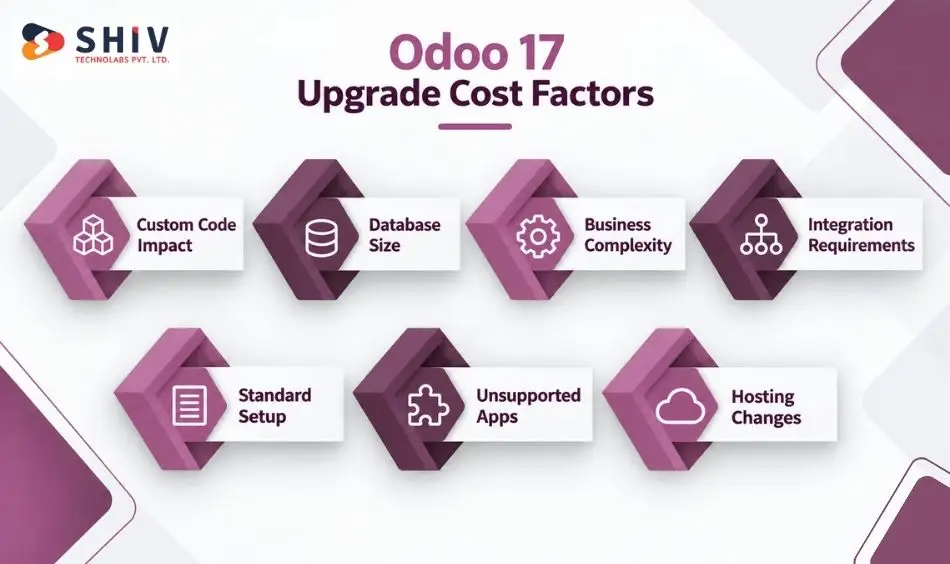
There is no reliable fixed price or timeline for every Odoo 17 upgrade. Migration effort depends on the difference between the current environment and the target version.
Custom Code Can Increase Migration Work
Each custom module may require code review, compatibility changes, data migration logic, and testing. Poorly documented customizations usually require more discovery.
Database Size Affects Testing and Cutover
Larger databases can require more time for test runs, validation, backup handling, and production cutover. Data quality issues can add further work.
Business Complexity Increases UAT
Accounting, manufacturing, multi-company operations, inventory valuation, POS, and complex approval flows can require broader validation.
Integrations Add Separate Testing
Every external system creates another dependency. Changes to APIs, authentication, data formats, or workflow behavior may require integration work.
Standard Setup Is Usually Simpler to Upgrade
If your team mainly uses Odoo’s standard features, there may be less code to change. You still need to check your data, reports, user access, and daily tasks. These checks help you see how much work the upgrade will take.
Unsupported App Can Delay the Upgrade
Ask each app vendor whether their app works with your target Odoo version. If an important app has no compatible version, you may need to replace it or rebuild what it does. Allow time to make that choice and test the result.
Hosting Move Adds Work
If you plan to change where Odoo runs, include that move in the upgrade estimate. Your team will need to set up the new environment and check backups, files, access, and integrations. Test these before choosing a date to switch over.
Consider: Ask for an upgrade estimate after the system audit, not before. Module count alone is rarely enough to estimate a customized ERP migration accurately.
How Can Shiv Technolabs Support an Odoo 17 Upgrade?
Shiv Technolabs helps businesses assess and migrate Odoo systems across cloud and on-premise environments.
Our skilled developers can support:
- Odoo 17 database and module audits
- Odoo 18 and Odoo 19 upgrade planning
- Custom module migration
- Odoo Studio change reviews
- Third-party app compatibility checks
- API and integration updates
- Odoo.sh and on-premise migration
- Staging database setup
- User acceptance testing
- Go-live and rollback planning
- Post-upgrade issue monitoring
Our ERP and CRM development services can also support wider process changes when an Odoo upgrade forms part of a larger ERP project.
A system audit before the deadline can identify technical blockers while there is still time to resolve them.
Final Verdict
Odoo 17 end of support in September 2026 should be treated as an upgrade planning deadline. The system may continue running, but app compatibility, security coverage, integrations, and maintenance can become harder to manage.
Odoo 18 may suit businesses that want a smaller version change. Odoo 19 may suit companies seeking a longer support period and planning broader ERP improvements.
Start with a full audit. Then test the selected version in staging, validate real business workflows, and prepare a rollback plan before production migration.
Frequently Asked Questions
When does Odoo 17 support end?
Odoo 17 is planned to reach the end of standard support in September 2026. Businesses should confirm the latest date through Odoo’s official supported versions page.
Will Odoo 17 stop working after support ends?
No. An Odoo 17 database does not automatically stop working. However, standard fixes, app support, security coverage, and compatibility may become limited over time.
Should I upgrade Odoo 17 to Odoo 18 or Odoo 19?
Choose Odoo 18 when customisation depth and lower migration risk are the main concerns. Consider Odoo 19 when a longer support period is important and sufficient testing time is available.
Do custom Odoo modules need migration?
Yes. Custom modules must be reviewed and updated for the target version. Their models, views, methods, dependencies, security rules, and JavaScript code may require changes.
Can Odoo Community be upgraded?
Yes, but Community migrations are usually more self-managed than Enterprise upgrades. The project may require community migration scripts, manual database work, and module changes.
How long does an Odoo 17 upgrade take?
The timeline depends on database size, custom modules, Studio changes, integrations, third-party apps, and testing needs. A standard setup may take weeks, while a heavily customized ERP can take several months.