Table of Contents
Your sales team reviews new leads every morning. Inventory managers repeatedly check low-stock products. Finance employees spend hours gathering figures for reports. These tasks are necessary, but much of the work involves searching records, comparing information, and preparing routine updates.
Odoo 20 AI agents can help reduce this administrative workload. With authorized tools and relevant ERP data, agents can retrieve information, prepare summaries, create records, and support automated workflows. Businesses planning Odoo development services can use these capabilities to address repetitive processes across departments.
Released in September 2026, Odoo 20 introduced additional agentic automation capabilities. According to the official Odoo 20 release notes, AI agents can be triggered by automated and scheduled actions, create and update records, and work with external AI connections through MCP.
The opportunity is not to automate every task. It is to identify activities where employees spend time on repetitive work and where AI can produce reliable, measurable results.
This article examines eight practical Odoo 20 AI agent use cases, their implementation requirements, important safeguards, and methods for measuring time saved.
What Are AI Agents in Odoo 20, and How Do They Work?
Odoo 20 AI agents are configurable assistants that use natural-language instructions, assigned skills, connected information sources, and authorized tools to perform tasks within an Odoo environment. Unlike a basic chatbot that only generates answers, an AI agent can retrieve ERP records and perform supported actions, building on the capabilities introduced in Odoo 20.
For example, a sales manager can ask an agent to identify opportunities without recent activity. The agent can retrieve permitted CRM information and prepare a follow-up summary. With additional tools and permissions, it may also create or update relevant records.
Odoo’s AI agent documentation describes how agents use system prompts, skills, tools, and information sources. Available actions depend on the installed applications and the agent’s configuration.
AI Agents, Skills, Tools, and Data Sources
An Odoo AI agent operates through several connected components. Its system prompt defines its purpose and expected behavior. Skills provide instructions for particular tasks, while tools determine which actions the agent can perform.
Information sources provide the business context needed to answer questions. Depending on the configuration, these sources may include knowledge articles, documents, PDFs, or connected records.
For example, a customer support agent might use approved product documentation to answer common questions. A CRM-focused agent may use assigned tools to retrieve or create leads. Without the required tools, an agent cannot independently perform every action available in Odoo.
Agentic Automation Through Scheduled and Triggered Actions
Traditional ERP automation follows predefined conditions. An AI agent can add interpretation and context when a workflow requires more than fixed rules.
Odoo 20 supports agent-triggered automation through scheduled or predefined actions. This allows businesses to connect AI capabilities with events such as new records, approved contracts, or recurring operational checks.
For example, a configured workflow might review newly created CRM leads and prepare an assignment recommendation. Another could examine inventory exceptions each morning and notify the responsible team.
However, triggering an agent does not automatically make the entire workflow reliable. Teams must define the tools, instructions, permissions, and error-handling behavior.
Record Creation, Updates, and Information Retrieval
Odoo 20 supports agent capabilities for retrieving information and creating or updating records through assigned tools.
An agent might search customer records, create a lead, or update a permitted field when the necessary skills and permissions are available. The precise actions depend on the configured tools and the user’s access rights.
This creates opportunities for reducing repetitive data entry, but it also introduces risks. Incorrect instructions or incomplete business information can produce unsuitable updates. Sensitive actions should therefore require validation or approval.
How MCP Connects External AI Assistants to Odoo
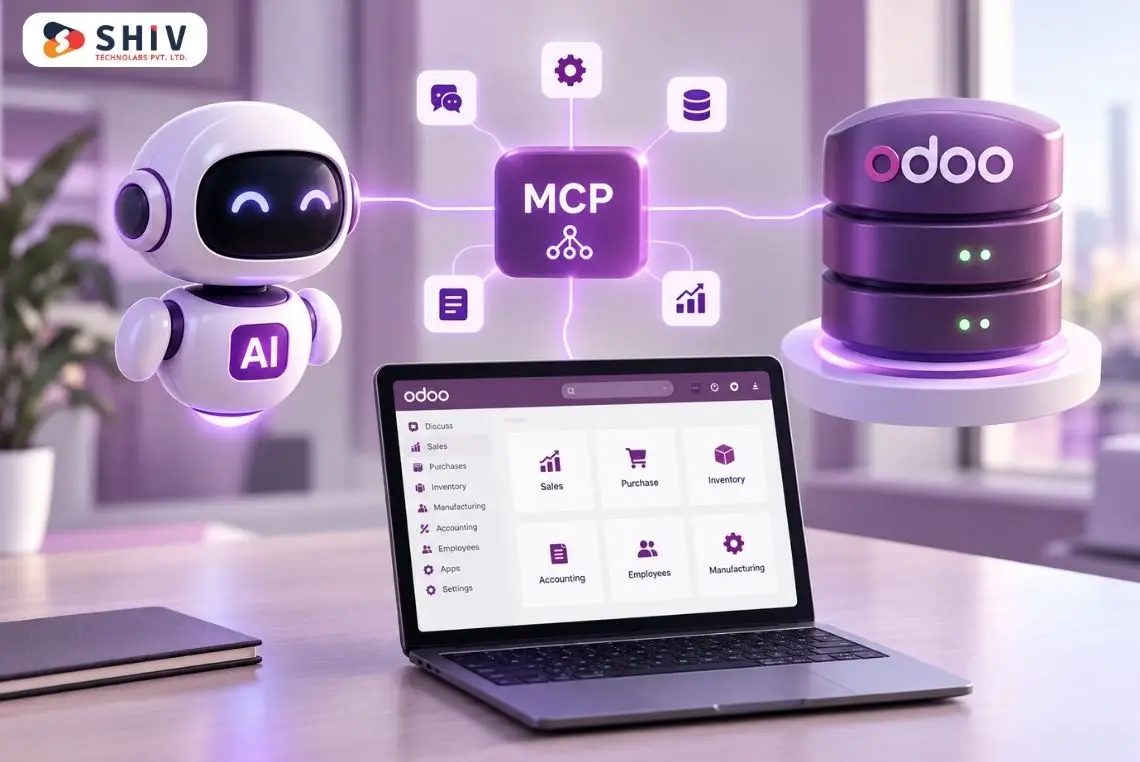
Odoo 20 also introduces a native Model Context Protocol server. MCP allows compatible external AI clients to communicate with an Odoo database through exposed tools.
For example, an authorized external assistant may retrieve sales information, summarize invoices, or access other permitted ERP records. Administrators control which server actions are exposed and which permissions apply.
The official Odoo MCP server documentation describes authentication, tool exposure, and database access.
Must read: Odoo 20 Native MCP Server: How AI Agents Connect to Odoo Data.
Odoo AI Agents vs. Traditional ERP Automation
| Capability | Traditional Automation | Odoo AI Agents |
| Instructions | Fixed rules and conditions | Natural-language instructions with assigned tools |
| Data handling | Predetermined fields | Can interpret permitted business information |
| Execution | Defined workflow | Tool-supported actions |
| Exceptions | Predefined handling | Can assist with interpretation and escalation |
| Best use | Predictable repetitive tasks | Tasks involving language, context, or varied inputs |
Expert insight: AI agents are not automatically better than standard automation. If a task follows stable rules and requires no interpretation, a conventional automated action may be simpler, cheaper, and more predictable.
What Are the 8 Best Odoo 20 AI Agent Use Cases for Businesses?
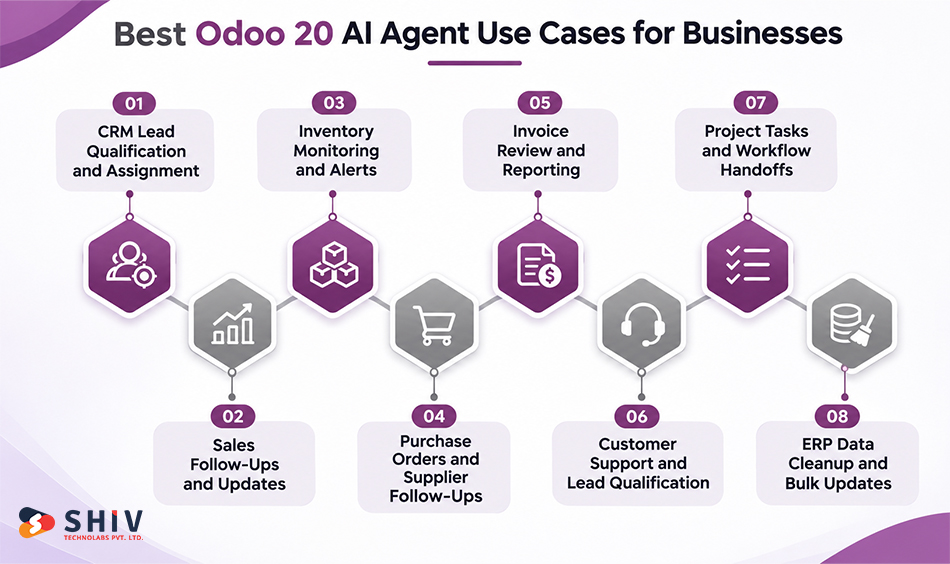
The most useful Odoo 20 AI agent use cases involve frequent activities with clear inputs, measurable outcomes, and manageable risks. These include CRM management, sales administration, inventory monitoring, purchasing, finance, customer support, project management, and data maintenance.
The eight examples below describe practical workflows. Some use documented Odoo AI capabilities directly, while others require additional skills, server actions, integrations, or custom development.
1. CRM Lead Qualification and Salesperson Assignment
Sales teams often receive inquiries from websites, campaigns, referrals, and other channels. Employees then review the details, identify the customer’s interests, and assign the lead to the appropriate salesperson.
An Odoo AI agent can help classify incoming inquiries based on available information. With authorized CRM tools and configured assignment rules, it can prepare lead summaries, identify missing details, and support lead routing.
For example, an agent might examine new inquiries, group them by product interest, and identify leads without valid contact information. The sales team can then focus on qualified opportunities rather than manually sorting every record.
Odoo’s AI documentation describes a Create Leads skill, while its release announcement discusses automated lead assignment as a possible workflow.
Example agent instruction:
Review new CRM leads, group them by product interest, and flag records missing contact details. Recommend the appropriate salesperson using our approved assignment rules.
Business value: Less manual lead sorting and more consistent follow-up preparation.
Measure: Average lead processing time, assignment accuracy, and number of leads requiring manual correction.
Important consideration: Lead ownership should follow approved business rules. Do not allow an agent to assign high-value opportunities solely from an uncertain interpretation of a customer’s message.
2. Sales Follow-Ups and Opportunity Updates
Sales representatives spend time checking opportunity stages, reviewing previous conversations, and identifying customers who need follow-up. When the pipeline grows, these administrative activities can consume time that could be spent speaking with prospects.
An AI agent can retrieve permitted CRM information and summarize opportunities that require attention. It can identify records without recent activity, prepare follow-up notes, and suggest next steps based on available data.
With suitable tools, the workflow may also create activities or update authorized CRM fields. However, sending customer messages and making commercial commitments should remain subject to approved rules and review requirements.
Example agent instruction:
Identify open opportunities without activity during the past seven days. Group them by salesperson and prepare recommended follow-up actions.
Business value: Less time preparing follow-up lists and better visibility into neglected opportunities.
Measure: Time spent on pipeline reviews, overdue activities, and follow-up completion rates.
Expert insight: Start with read-only opportunity reviews before allowing automatic record updates. This helps the sales team evaluate whether the agent correctly interprets opportunity stages, customer history, and follow-up priorities.
3. Inventory Monitoring and Low-Stock Alerts
Inventory managers regularly review stock levels, warehouse availability, reorder thresholds, and incoming supplies. These checks are important, but manually examining the same information every day can be time-consuming.
An Odoo AI agent can retrieve authorized inventory data and prepare exception reports. It may identify products below configured reorder thresholds, group items by warehouse, and summarize stock conditions requiring attention.
The agent should use actual Odoo inventory records and established replenishment rules. It should not invent demand forecasts or assume that every low-stock product requires immediate purchasing.
Businesses managing several warehouses can also benefit from AI-powered inventory management in Odoo, particularly when forecasting, stock monitoring, and replenishment planning require additional intelligence.
Example agent instruction:
Identify products below their configured reorder thresholds. Group them by warehouse and include current available quantities.
Business value: Faster stock exception reviews and less repetitive reporting.
Measure: Time spent reviewing inventory exceptions, alert accuracy, and number of missed low-stock conditions.
Important consideration: Stock availability, forecasted quantities, and reorder thresholds represent different concepts. The workflow must use the correct fields and respect existing inventory planning rules.
4. Purchase Order Preparation and Supplier Follow-Ups
Purchasing teams regularly compare stock requirements, supplier information, previous orders, and expected delivery dates. Preparing purchase requests often involves gathering details from several Odoo records.
With the necessary Purchase application tools or custom server actions, an AI agent can help collect this information and prepare draft purchasing recommendations.
For example, an agent could identify products below reorder thresholds, retrieve preferred supplier details, and prepare a review list. A buyer could then approve the proposed quantities and supplier selections.
Manufacturing businesses can connect purchasing workflows with inventory automation in manufacturing using Odoo ERP to coordinate stock requirements, supplier information, and procurement activities.
Example agent instruction:
Prepare a purchasing review for products below reorder levels. Include preferred suppliers, available stock, and relevant purchasing information.
Business value: Reduced preparation time and fewer repetitive supplier lookups.
Measure: Purchase request preparation time, correction rate, and time spent gathering supplier information.
Expert insight: Purchase order preparation and purchase order confirmation should be separate actions. The agent may prepare a draft, but supplier commitments, prices, and order confirmation should follow established approval procedures.
5. Invoice Review and Financial Reporting
Finance teams frequently collect invoice totals, compare reporting periods, and review outstanding transactions. Preparing these summaries manually may require repeated searches and calculations across accounting records.
An Odoo AI agent can retrieve authorized accounting information and assist with report preparation. For example, it can summarize invoice activity, compare periods, and identify transactions requiring further review.
Odoo’s MCP documentation includes examples involving comparisons of invoicing information between quarters.
The agent should work from actual accounting records and clearly distinguish draft invoices, posted invoices, payments, and other financial states. Human review remains necessary before financial figures are used in formal reporting.
Example agent instruction:
Compare the total invoiced amount for this quarter with the previous quarter. Show the difference and identify the records used in the calculation.
Business value: Less repetitive financial data collection and faster preparation of internal summaries.
Measure: Report preparation time, reconciliation accuracy, and number of manual corrections.
Important consideration: AI-generated financial summaries are not substitutes for accounting controls. Payment approvals, journal postings, and sensitive financial changes should remain under authorized supervision.
6. Customer Support and Live Chat Qualification
Customer support teams often answer repeated questions about products, service availability, order processes, and company policies. Many inquiries can be addressed using approved documentation, while others require human assistance.
Odoo AI agents can support Live Chat conversations by retrieving relevant information and responding to common questions. Depending on the setup, they can also help qualify inquiries and create leads. Odoo documents these capabilities in its AI Live Chat documentation.
For example, a visitor may ask about available services or request information about a product. The agent can use approved knowledge articles to prepare a response and transfer the conversation when the request requires account-specific or sensitive information.
Example agent instruction:
Answer customer questions using approved support articles. Escalate pricing disputes, account-specific requests, and unresolved issues to the support team.
Business value: Less repetitive answering and more consistent initial support.
Measure: First-response time, response accuracy, escalation quality, and time spent per inquiry.
Expert insight: Restrict customer-facing agents to approved sources where appropriate. Outdated product information or unsupported claims can create more support work than the agent saves.
7. Project Task Creation and Workflow Handoffs
When a sales opportunity becomes an approved project, employees may need to create tasks, assign responsibilities, and prepare onboarding activities. Repeating these steps manually can delay the transition between sales and delivery teams.
A configured Odoo AI workflow can help prepare project tasks using approved templates and relevant business records. It may populate task descriptions, suggest assignments, and organize project information for review.
Odoo’s Meet Odoo 20 announcement describes project creation after contract signing as an example of agentic automation.
The workflow still requires appropriate triggers, tools, and project configuration. Businesses should define which contract status starts the process and what information is required before tasks are created.
Example agent instruction:
When a project contract is approved, prepare onboarding tasks using our standard template and include the relevant project details.
Business value: Faster project setup and fewer missed administrative handoffs.
Measure: Time from contract approval to project setup, missing task details, and correction frequency.
Important consideration: An agent should not treat an unsigned quotation or informal customer message as final project approval. Use a verified business event to trigger the workflow.
8. ERP Data Cleanup and Bulk Record Updates
ERP systems accumulate incomplete contact records, inconsistent descriptions, missing classifications, and outdated information. Employees may spend considerable time identifying these issues and preparing corrections.
Odoo 20 AI agents can assist with record searches, data reviews, and permitted updates. A configured agent might identify contacts missing required fields, prepare a correction report, or update selected records after approval.
This is useful for administrative data maintenance, but it also requires careful safeguards. AI should not guess missing tax identifiers, payment details, or other sensitive information. For larger datasets, a controlled workflow can separate identification, review, approval, and execution. This reduces the risk of widespread incorrect changes.
Example agent instruction:
List customer contacts missing tax identification details. Prepare a review report without changing any records.
Business value: Less repetitive data review and more consistent record maintenance.
Measure: Time per reviewed record, correction accuracy, and percentage of records requiring additional manual work.
Expert insight: Begin with read-only data quality reports. Permit bulk updates only after field validation, sample testing, approval, and a suitable recovery plan.
Which Odoo 20 AI Agent Use Cases Save the Most Time?
Not every AI agent delivers the same business value. The potential time savings depend on how frequently the task occurs, how much manual work it requires, and how often employees need to review or correct the agent’s results.
A workflow that saves two minutes but runs hundreds of times per week may provide more value than a complex automation used once a month. However, the savings must be weighed against setup, monitoring, and operating costs.
The following comparison can help businesses select a suitable starting point.
| Odoo AI Agent Use Case | Main Time-Saving Opportunity | Suggested KPI |
| CRM lead qualification | Manual lead review | Minutes per qualified lead |
| Sales follow-ups | Opportunity tracking | Preparation time per review |
| Inventory monitoring | Stock exception checks | Hours spent reviewing stock |
| Purchase preparation | Supplier and product lookups | Time per purchase request |
| Financial reporting | Repetitive data collection | Report preparation time |
| Customer support | Repeated customer questions | Handling time per inquiry |
| Project handoffs | Manual task creation | Project setup time |
| Data cleanup | Repetitive record reviews | Minutes per corrected record |
Which use case should come first? Choose a workflow that occurs frequently, has reliable data, and produces an outcome employees can verify. CRM follow-up summaries, support knowledge retrieval, and inventory exception reporting can be practical initial candidates.
Avoid beginning with autonomous financial changes or complex purchasing approvals. These workflows involve greater business risk and usually require stronger controls.
How Do You Implement an AI Agent in Odoo 20?
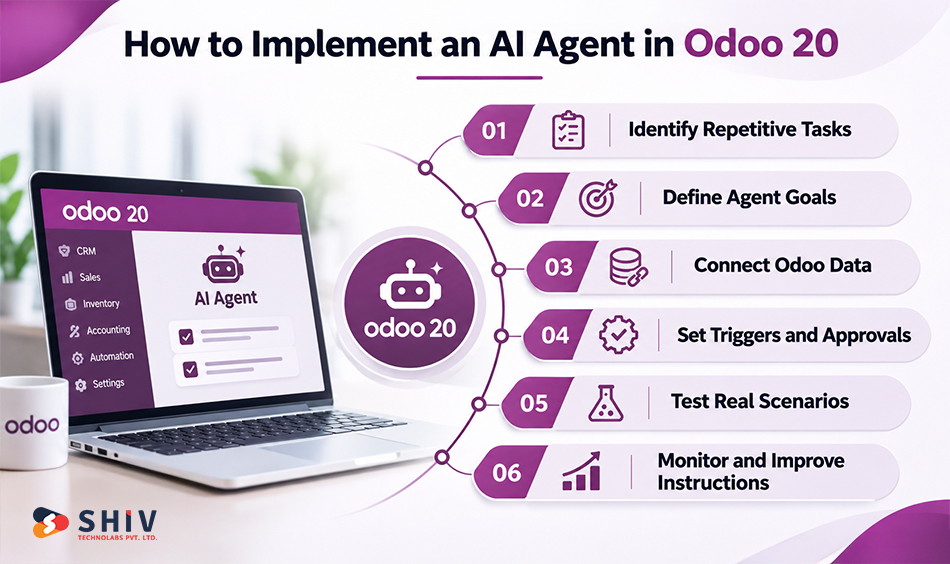
Implementing an Odoo 20 AI agent starts with selecting a business process, not writing a prompt. Teams need to determine which records the agent can access, what actions it can perform, and how its results will be reviewed.
Odoo provides configurable agents, skills, tools, and automation capabilities. More complex projects may require custom Odoo development to connect several modules or introduce business-specific controls.
1. Identify a Repetitive Business Process
Start by examining activities that employees repeat daily or weekly. Record the time required, the number of records involved, and the common problems employees encounter.
Choose a task with a clear beginning and end. For example, preparing a daily CRM follow-up list is easier to measure than asking an agent to manage the entire sales department.
2. Define the Agent’s Role and Expected Outcome
Describe the task in specific terms. State which records the agent should examine, what information it should return, and which actions are prohibited.
For example, a CRM review agent might identify opportunities without recent activity and prepare a report. It should not automatically change opportunity stages or contact customers unless those actions are separately authorized.
3. Connect Relevant Odoo Data Sources and Tools
Assign the skills and tools required for the workflow. These may involve record searches, information retrieval, record creation, or other supported actions.
Use approved information sources when the agent needs business policies or procedural instructions. Odoo supports sources such as Knowledge articles, documents, PDFs, and web links. Keep these sources current so the agent does not rely on outdated instructions.
4. Configure Triggers, Permissions, and Human Approvals
Determine whether the agent runs when requested, on a schedule, or after a defined business event.
Restrict its permissions to the necessary records and actions. Require human approval for financial commitments, sensitive record changes, supplier communications, and other high-impact operations.
5. Test the Agent With Realistic Business Scenarios
Use a non-production environment where possible. Test complete records, missing information, duplicate records, unusual values, and requests outside the agent’s permitted scope.
Compare the agent’s results with the expected business outcome. A successful tool execution does not automatically mean the business decision was correct.
6. Monitor Performance and Improve Instructions
Review execution history, incorrect outputs, employee corrections, and failed actions. Update instructions when recurring errors appear.
Odoo 20 supports automation conversations that help teams inspect agent behavior. Its official release notes describe improvements to automation feedback and agent progress reporting.
Expert implementation insight: Start with a controlled pilot involving one department and a limited set of records. Expand access only after the team has measured accuracy, correction effort, and operational value.
What Should Businesses Consider Before Using Odoo 20 AI Agents?
AI agents can reduce repetitive work, but their usefulness depends on data quality, access controls, operating costs, and workflow design. A poorly configured agent may create additional review work instead of reducing it.
Before implementation, businesses should evaluate the technical environment and decide which tasks genuinely benefit from AI. Teams should also distinguish built-in Odoo functionality from requirements involving custom tools or integrations.
Data Quality and Access Permissions
AI agents depend on the information they can access. Incomplete customer records, outdated supplier details, or inconsistent inventory information can affect their results.
Review data quality before connecting an agent to critical processes. Use appropriate Odoo access rights and record rules to restrict sensitive information. An agent should not receive broader permissions simply because the development team wants to simplify testing.
AI Accuracy and Human Approval Requirements
AI-generated summaries and recommendations can contain mistakes. Agents may misunderstand ambiguous requests, select unsuitable records, or produce incomplete explanations.
Define which results employees must review. Read-only reporting generally presents less risk than changing accounting records, confirming purchase orders, or sending customer communications. Sensitive actions should have clear approval boundaries and validation rules.
For further reading, Shiv Technolabs’ AI governance articles discuss enterprise controls and operational considerations for AI agents.
Integration and Custom Development Needs
Standard agent tools may be sufficient for straightforward information retrieval or record creation. More advanced workflows may require custom server actions, cross-module logic, or external integrations.
For example, a purchasing agent that combines inventory data, supplier information, approval rules, and an external procurement platform may require additional development.
Businesses building these workflows can assess the scope through AI development services and Odoo integration planning.
AI Usage Credits and Operating Costs
Odoo 20’s release notes state that AI features require In-App Purchase (IAP) credits. Actual consumption depends on the AI services and usage involved.
Odoo’s documentation also warns that installing the AI application on the Standard pricing plan can trigger an upgrade to the Custom plan. Review the current Odoo pricing and subscription conditions before budgeting.
Implementation costs may also include custom development, testing, monitoring, maintenance, and employee review time. A low-cost pilot can become expensive if it generates unnecessary requests or requires frequent corrections.
Workflow Monitoring and Error Handling
Every production workflow needs a defined response when the agent cannot complete its task.
For example, the agent may encounter missing data, insufficient permissions, an unavailable integration, or an ambiguous request. The system should report the problem rather than silently making an unsupported decision.
Assign responsibility for reviewing failures and correcting recurring issues. Monitor both technical execution and business accuracy, since a completed action can still produce an unsuitable result.
Consider this: Before allowing an agent to modify records, confirm that the workflow has validation rules, approval controls, error reporting, and a recovery procedure.
How Can You Measure ROI From Odoo AI Agents?
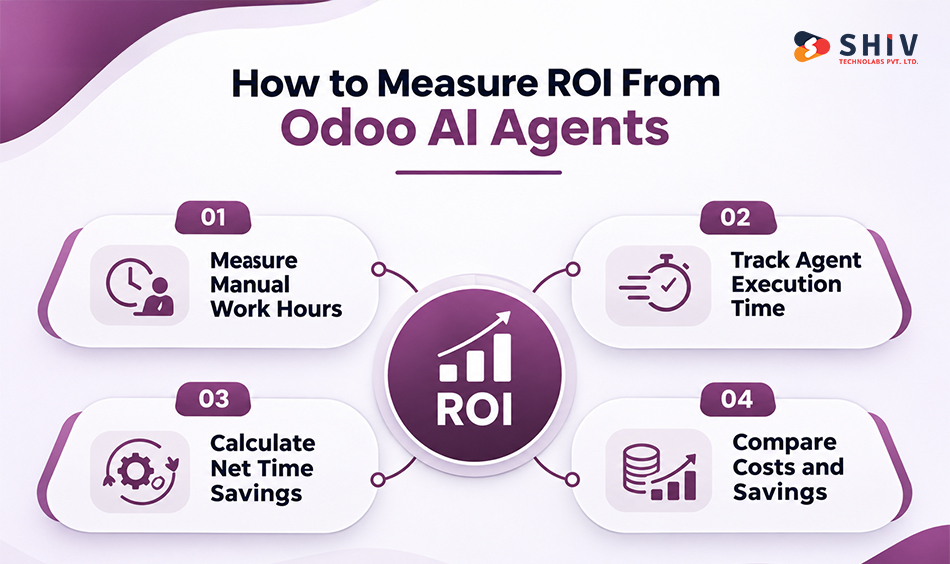
The return on an Odoo AI agent should be measured against actual employee effort and operating costs. Completing a task automatically does not necessarily mean the business saves time, particularly when employees must review every result.
A practical ROI assessment compares the original manual workflow with the complete AI-assisted workflow. Include preparation, execution, validation, corrections, and exception handling.
Measure Manual Work Before Automation
Record how long employees currently spend completing the task. Use representative samples rather than estimates based on a single unusually simple example.
For CRM lead qualification, measure the time spent reviewing inquiries, classifying leads, assigning ownership, and preparing follow-ups. Record the monthly workload so the results can be compared after implementation.
Track Agent Execution and Review Time
After introducing the agent, measure how long the workflow takes from beginning to approved completion.
Include employee review time, correction work, and failed executions. If an agent completes the initial task quickly but requires extensive corrections, the net savings may be small.
Calculate Net Time Saved
Use a simple calculation to compare the original process with the new workflow.
Net Hours Saved = Manual Hours Avoided − Review and Correction Hours
For example, suppose a business processes 500 CRM leads each month. Manual processing previously required four minutes per lead. After introducing an agent, the total handling time, including review, falls to one minute.
The calculation would be:
- Previous handling time: 2,000 minutes per month
- New handling time: 500 minutes per month
- Net time saved: 1,500 minutes, or 25 hours per month
This is a hypothetical example, not a documented Odoo customer result. Actual savings depend on workflow complexity, agent accuracy, and review requirements.
Compare Operating Costs Against Savings
Time savings should be considered alongside implementation and operating expenses.
Include AI usage credits, software subscriptions, custom development, maintenance, monitoring, and employee review costs. Businesses should also consider whether saved time is redirected toward higher-value work.
A useful pilot should produce measurable evidence before additional departments or workflows are added.
Expert insight: Track both productivity and accuracy. A workflow that saves 25 hours but introduces frequent incorrect customer records may create more business risk than value.
When Should You Hire an Odoo AI Agent Development Partner?
Not every Odoo AI agent requires custom development. A straightforward information-retrieval assistant may be configured using existing skills and sources. More complex workflows often need technical assistance because they involve several modules, sensitive information, or business-specific approval rules.
An experienced Odoo development partner can help when the project involves:
- Cross-module workflows involving CRM, Sales, Inventory, Purchase, or Accounting
- Custom AI skills, tools, and server actions
- Third-party integrations and MCP connections
- Sensitive record updates and permission requirements
- Agent testing, monitoring, and ongoing maintenance
The development partner should begin with the business process and expected outcome. A successful implementation is not measured by the number of agents created, but by whether the workflow saves time without introducing unacceptable errors.
Businesses with specialized requirements may also need custom software development for middleware, external system connections, or additional approval mechanisms.
How Shiv Technolabs Helps Build Custom Odoo AI Agents
At Shiv Technolabs, we help businesses connect AI capabilities with existing software and ERP processes. Our team works on Odoo customization, integration, AI development, and business workflow automation.
We begin by examining the repetitive activities that consume employee time. From there, we assess available Odoo capabilities, data requirements, and any custom development needed to support the proposed workflow.
Our technical support can cover:
- AI workflow assessment: Identify suitable processes and measurable outcomes.
- Odoo agent configuration: Define agent roles, instructions, skills, and sources.
- Custom tools and server actions: Build controlled actions for business-specific tasks.
- MCP and API integration: Connect approved AI clients and external systems.
- Permissions and approvals: Define access boundaries and human review requirements.
- Testing and monitoring: Validate results, investigate errors, and maintain workflows.
Our Odoo development services and AI development services support businesses planning these types of integrations.


Final Verdict: Start With High-Value Odoo AI Agent Use Cases
Odoo 20 AI agents can support repetitive ERP activities across CRM, sales, inventory, purchasing, accounting, customer support, projects, and data maintenance. Their value comes from reducing manual work while keeping business information accurate and important decisions controlled.
Businesses should begin with one measurable workflow, configure only the necessary tools, and test results against actual records. Once accuracy, permissions, and operating costs are validated, the same approach can be extended to other departments.
The best starting point is not the most complex agent. It is the task where employees can demonstrate meaningful time savings with manageable risk.
Frequently Asked Questions
What Business Tasks Can Odoo 20 AI Agents Automate?
They can support CRM lead management, sales follow-ups, inventory reviews, purchasing preparation, financial summaries, customer support, project setup, and record maintenance. Available actions depend on configuration.
Can Odoo AI Agents Create and Update Records Automatically?
Yes. Odoo supports record creation and updates through assigned tools. The agent needs appropriate permissions, and sensitive actions should follow approved validation and review procedures.
How Do Odoo 20 AI Agents Differ From Traditional Automation?
Traditional automation follows fixed conditions and actions. AI agents can interpret natural-language instructions and use assigned tools, making them useful for tasks involving varying information or context.
Can AI Agents Manage Sales Leads and Inventory in Odoo?
They can assist with lead classification, CRM record reviews, stock exception reports, and related activities. Automatic assignments or updates require suitable tools and workflow rules.
Does Odoo 20 Support External AI Agents Through MCP?
Yes. Odoo 20 provides a native MCP server that allows compatible external AI clients to interact with permitted ERP data and exposed tools.
Are Odoo 20 AI Agents Available in Community Edition?
Availability depends on the specific AI feature, edition, installed applications, and deployment configuration. Businesses should verify current Odoo licensing and module support before implementation.
How Much Does It Cost to Implement Odoo AI Agents?
Costs depend on licensing, IAP credit usage, workflow complexity, custom tools, integrations, testing, and maintenance. A project estimate should be based on the required actions and expected workload.
Do Odoo AI Agents Require Programming?
Some agents can be configured using existing Odoo features. Workflows requiring custom server actions, external integrations, or specialized business rules may need development.
How Can Businesses Measure Time Saved With Odoo AI Agents?
Compare the original manual processing time with the complete AI-assisted workflow, including employee review and corrections. Then assess the savings against implementation and operating costs.