Table of Contents
Businesses using Odoo often depend on integrations that employees rarely see. An eCommerce store may sync orders every few minutes. Accounting software may exchange invoice records, while a warehouse system updates inventory quantities automatically. Many of these connections still rely on XML-RPC or JSON-RPC.
With Odoo 20, the question is whether those existing integrations will continue working. XML-RPC is not fully removed in Odoo 20. The old db service has been removed, but the common and object services remain temporarily available. According to Odoo’s official external API documentation, these remaining services are deprecated and scheduled for removal in Odoo 22.
This change matters beyond developers. A failed API connection can delay orders, interrupt accounting records, or leave inventory information outdated. Businesses preparing for an upgrade should review their existing integrations before changing versions. Working with an experienced Odoo development company can also help identify dependencies that are difficult to trace.
This guide explains the updated Odoo JSON-2 API timeline, what still works, which integrations face the greatest risk, and how to prepare for migration.
Quick Answer: What Changed in Odoo 20 API?
Odoo 20 removes the legacy db service from XML-RPC and JSON-RPC. However, the common and object services remain available temporarily and are scheduled for removal in Odoo 22. The JSON-2 API is the recommended replacement for new external integrations. The change affects different API services in different ways.
| API Area | Odoo 20 Status | Business Meaning |
| XML-RPC | Deprecated | Existing connections need review |
| Legacy JSON-RPC | Deprecated | Migration planning is necessary |
| db service | Removed | Database scripts may fail |
| common service | Temporarily available | Authentication calls need migration planning |
| object service | Temporarily available | Model-based integrations need migration |
| execute_kw | May still work | Should be replaced before removal |
| JSON-2 API | Recommended replacement | Preferred for new integrations |
Why Odoo 20 API Changes Matter Beyond Developers
API deprecation may sound like a technical maintenance issue. However, integrations often support everyday business activities. A connector failure can affect customer orders, supplier invoices, warehouse updates, or reporting accuracy.
Old API Calls Often Hide Inside Business Workflows
A company may have used the same Odoo integration for years without reviewing how it communicates with the ERP. The connection may still use XML-RPC even when the surrounding software has received regular updates.
Vendor Connectors May Use Legacy RPC
Third-party connectors sometimes hide their API methods from business users. A Shopify, accounting, or marketplace integration may depend on deprecated Odoo services without making that dependency obvious.
Upgrade Projects Can Expose Hidden Dependencies
An integration that works in the current environment may behave differently after an Odoo upgrade. This is especially important when scripts use the removed db service or depend on older libraries.
Business Teams Feel the Impact When Syncs Break
When integrations fail, the effects often appear in operational data. Sales teams may see missing customer records. Finance teams may find delayed invoices, while warehouse employees work with incorrect stock quantities.
API Migration Needs Clear Ownership
Each integration should have an assigned owner who understands its purpose, vendor, technical dependencies, and business importance. Without ownership, deprecated connections can remain unnoticed until an upgrade causes problems.
| Business Workflow | Possible Legacy API Dependency |
| Ecommerce | Products, customers, orders, inventory |
| Accounting | Invoices, payments, vendor bills |
| Warehouse | Stock moves, transfers, picking records |
| CRM | Leads, contacts, activities |
| Mobile apps | Authentication, search, record updates |
| BI reporting | Scheduled data extraction |
| Marketplaces | Listings, orders, stock updates |
| Administration | Database backups and duplication |
Businesses connecting several applications through Odoo should review their wider ERP architecture. ERP and CRM development services can support planning when multiple systems share critical records.
Odoo API Timeline From Odoo 19 to Odoo 22
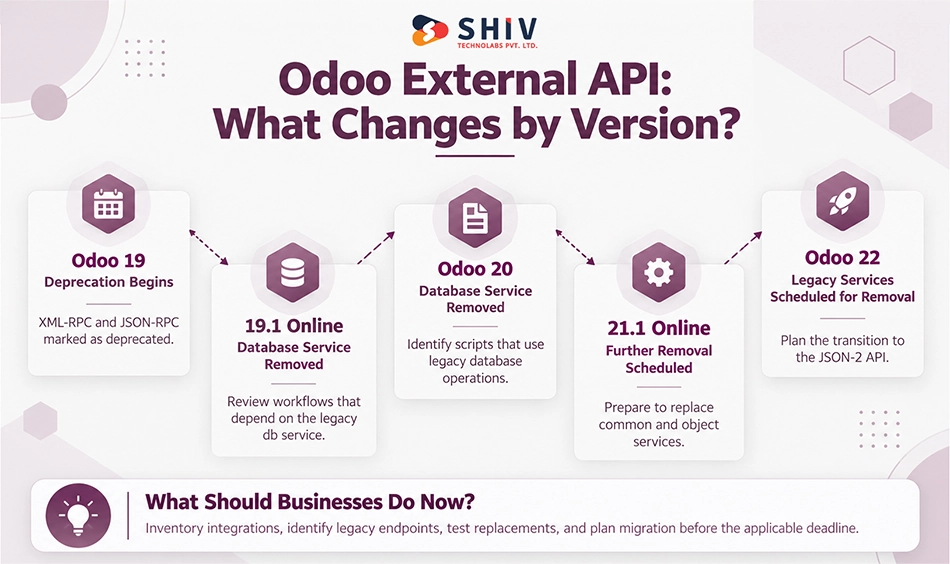
The most important detail is that Odoo is removing legacy RPC services in stages. The schedule gives businesses time to replace older integrations, but some database-management functions are already affected.
Odoo 19 Marks XML-RPC and JSON-RPC as Deprecated
Odoo 19 identifies the legacy external RPC APIs as deprecated. Businesses using these endpoints should begin documenting dependencies and preparing a migration plan.
Online 19.1 Removes the db Service
For Odoo Online, the legacy database service was removed in Online 19.1. This matters for any supported workflows or tools that previously depended on that service.
Odoo 20 Removes the db Service
Odoo 20 removes the db service from the legacy external RPC interface. The change can affect administrative scripts that list, create, duplicate, back up, or restore databases.
Online 21.1 Is the Scheduled Removal for Common and Objects
Odoo’s documented timeline schedules the remaining legacy services for removal in Online 21.1. Businesses using Odoo Online should account for its release schedule rather than relying only on major on-premise version numbers.
Odoo 22 Is the Scheduled Removal for Common and Object
The common and object services are scheduled for removal in Odoo 22. This creates a migration deadline for integrations using legacy authentication and model operations.
The timeline is based on Odoo’s external API documentation. Because future release schedules can change, teams should confirm the latest documentation when setting migration deadlines.
What the Removed db Service Means for Existing Integrations
The db service is different from the object service used for ordinary business records. It handles database administration rather than day-to-day operations such as reading customers or updating sales orders.
Database Listing Calls May Break
Some scripts request a list of available databases before connecting to a particular environment. If those scripts depend on the removed legacy service, they need another supported approach.
Backup and Restore Scripts Need Review
Organizations sometimes use automated scripts to create database backups or restore environments. These scripts should be checked for legacy db service calls before upgrading.
Database Duplication Tools May Fail
Development and testing teams may use database duplication to prepare staging environments. If their duplication process relies on the removed RPC interface, the workflow requires changes.
Admin Automation Needs a New Path
Administrative scripts may handle database creation, deletion, or configuration tasks. These operations need a supported replacement appropriate to the hosting environment.
Odoo Online and On-Premise Risk Differs
Odoo Online provides a managed environment, while self-hosted installations offer more control over infrastructure and administrative tools. The available replacement depends on the hosting model and the operation being performed.
| Legacy db Operation | Odoo 20 Risk |
| List databases | Legacy API call removed |
| Create database | Legacy API call removed |
| Duplicate database | Legacy API call removed |
| Backup database | Legacy API call removed |
| Restore database | Legacy API call removed |
| Delete database | Legacy API call removed |
| Change master password | Legacy API call removed |
| Read normal business records through object | Temporarily supported, but deprecated |
Important: JSON-2 should not be assumed to provide a direct replacement for every database-management operation. Teams must identify supported administration tools or hosting-specific procedures.
Does execute_kw Still Work in Odoo 20?
The execute_kw method remains available in Odoo 20 through the legacy XML-RPC and JSON-RPC interfaces, but these APIs are deprecated. Businesses using it should review their integrations and plan a transition to the JSON-2 API.
execute_kw Belongs to the object Service
Many older Odoo integrations use execute_kw to call model methods. Typical operations include reading customer records, creating sales orders, updating products, and retrieving invoice information.
The object Service Is Deprecated but Not Removed Yet
Odoo 20 retains the legacy object service temporarily. This allows some existing connectors to continue functioning while businesses prepare for the newer API.
Working Now Does Not Mean Safe Long Term
A connector may pass its current tests but still depend on an endpoint scheduled for removal. That makes it a future compatibility risk, particularly when the connector is essential to daily operations.
Odoo 22 Is the Deadline for Many Model Calls
Businesses should plan to replace legacy model calls before the scheduled removal. The work may involve changing authentication, endpoint URLs, request formats, error handling, and integration logic.
| Legacy Integration | Odoo 20 Status | Action |
| /xmlrpc/2/object | Temporarily available | Plan JSON-2 migration |
| execute_kw | May still work | Map model methods |
| /xmlrpc/2/common | Temporarily available | Review authentication |
| /xmlrpc/2/db | Removed | Replace affected workflows |
| New external connector | Legacy RPC not recommended | Build using JSON-2 |
What Is JSON-2 and Why Is Odoo Moving There?
JSON-2 is Odoo’s newer external API for applications that need to communicate with Odoo data and business models. It replaces the older service-based RPC approach with a different request structure.
JSON-2 Is the New External API Path
The JSON-2 API uses routes built around Odoo models and their methods. For example, a supported model method can be called through a route following this structure:
/json/2/<model>/<method>
This differs from sending model operations through the older object service.
It Replaces the Old Service-Based RPC Pattern
Legacy XML-RPC integrations often communicate through /xmlrpc/2/common and /xmlrpc/2/object. JSON-2 uses a newer interface for model operations, reducing dependence on those deprecated service endpoints.
It Uses API-Key-Based Access
JSON-2 supports API-key authentication through an authorization header. A typical request uses:
Authorization: bearer <API_KEY>
The API key should belong to an appropriately authorized user and be stored securely.
It Changes How Integrations Are Built
Migrating to JSON-2 is not simply replacing an XML payload with JSON. Developers need to review model methods, request structures, permissions, responses, and error handling.
It Still Needs Security and Testing
The newer API does not automatically make every integration secure or reliable. Teams must validate user permissions, record rules, input handling, transaction behavior, and synchronization results.
| Legacy RPC APIs | JSON-2 API |
| Service-based requests | Model-and-method routes |
| XML-RPC or legacy JSON-RPC | JSON-based API |
| common and object services | Updated external model operations |
| Older authentication workflows | API-key authentication |
| Legacy integration libraries | HTTP-based integration approach |
| Deprecated | Recommended replacement |
Odoo’s External JSON-2 API documentation provides the technical reference for endpoint usage, authentication, and supported behavior.
How to Find Hidden XML-RPC and JSON-RPC Usage
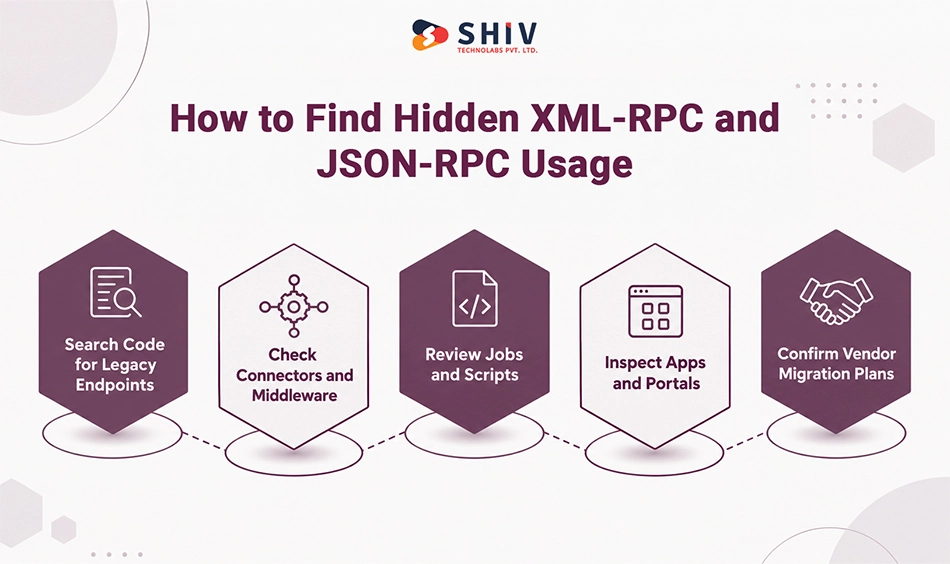
The first migration challenge is identifying every system that still calls the old endpoints. Businesses should not limit the audit to their main ERP application. Legacy API usage may exist in external servers, scheduled scripts, vendor platforms, and mobile apps.
Search Source Code for Old Endpoints
Developers should search repositories for common XML-RPC and JSON-RPC patterns. Useful search terms include:
- /xmlrpc
- /xmlrpc/2
- /jsonrpc
- execute_kw
- xmlrpc.client
- ServerProxy
Search results should be reviewed to determine whether the code is active, unused, or maintained by another team.
Check Vendor Connectors and Middleware
Some connections are managed through third-party software or middleware. Ask each vendor which Odoo API it uses and whether JSON-2 support is available.
Review Scheduled Jobs and Scripts
Scheduled jobs may run without direct user interaction. Review cron jobs, background workers, ETL processes, reporting exports, and database administration scripts.
Inspect Mobile Apps and Customer Portals
Mobile applications and customer portals may call Odoo for authentication, record searches, order updates, or account information. These integrations require testing because failures can affect customers directly.
Ask Vendors for JSON-2 Roadmaps
For vendor-managed integrations, request written confirmation of supported Odoo versions and API migration plans. A vendor’s general claim of Odoo compatibility may not confirm that its connector supports JSON-2.
| Where to Check | What to Look For |
| Source repositories | Legacy endpoint strings |
| Python scripts | ServerProxy, execute_kw |
| PHP integrations | XML-RPC libraries and JSON-RPC calls |
| Middleware | API wrappers and Odoo connectors |
| Mobile applications | Authentication and model operations |
| Scheduled jobs | Background synchronization |
| Vendor tools | API compatibility documentation |
| Server logs | Requests to deprecated routes |
For older systems with limited documentation, custom software development services can help address application code that needs to be updated alongside the API connection.
Which Odoo Integrations Should Move to JSON-2 First?
Not every integration has the same level of risk. A failed internal reporting script may be inconvenient. A failed order synchronization process can affect customers, fulfillment, and revenue. Prioritization should consider both the removal timeline and business impact.
Database Management Scripts
Scripts using the removed db service deserve immediate attention. They may already be incompatible with Odoo 20.
High-Volume Order and Inventory Syncs
Ecommerce and warehouse connections often exchange data throughout the day. Failed synchronization can create stock differences, delayed fulfillment, and inaccurate order information.
Accounting and Invoice Connectors
Finance integrations require careful testing because missing or duplicated records can affect accounting accuracy.
Customer-Facing Apps and Portals
Customer-facing applications should receive high priority because API failures may prevent users from accessing essential functions.
Vendor Connectors Without Clear Support Roadmaps
Third-party integrations become a greater risk when the vendor cannot confirm support for the replacement API. Businesses may need to plan alternatives before the next major upgrade.
JSON-2 Migration Roadmap for Odoo Teams
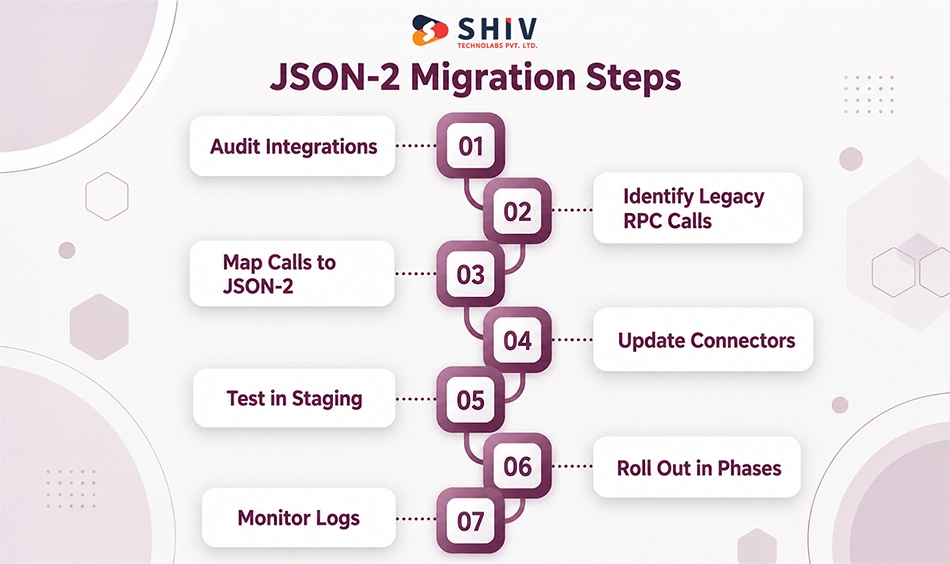
A successful migration begins with understanding existing integrations. Teams should move from discovery to testing in a controlled sequence rather than rewriting every connector at once.
Step 1: Create an Integration Inventory
Document every external system connected to Odoo. Include the integration owner, purpose, hosting environment, vendor, API endpoints, data exchanged, and business importance.
Step 2: Separate db, common, and object Calls
Classify each legacy API call according to the service it uses. This helps identify connections affected immediately by Odoo 20 and those facing later removal.
Step 3: Map Old Calls to JSON-2
Review the model methods used by existing integrations. Determine the appropriate JSON-2 route, authentication requirements, request format, and expected response. Database administration calls require a separate replacement strategy where JSON-2 does not provide an equivalent.
Step 4: Rewrite or Wrap Connectors
Developers can update existing connectors directly or create a reusable integration layer. An API wrapper may help when several applications use similar Odoo operations. For complex integration projects, custom API development services can support connector redesign and implementation.
Step 5: Test in a Staging Environment
Use a staging database with representative data. Test normal requests, permission failures, missing records, invalid input, network interruptions, and repeated requests. Also review transaction behavior. Multiple JSON-2 requests should not be assumed to share one database transaction.
Step 6: Roll Out by Business Function
Migrate integrations in manageable groups. For example, begin with administrative scripts, followed by critical operational connections, then reporting and lower-priority tools.
Step 7: Monitor Logs After Migration
Review API errors, synchronization delays, failed records, and unexpected data differences. Keep responsible teams available during the initial production period.
Security Checks During JSON-2 Migration
Changing an API connection is also an opportunity to review how external applications access ERP data. Older integrations may use broad permissions or credentials that have not been reviewed for years.
Review API Users
Identify which Odoo users or service accounts are associated with each integration. Remove unused access and document who owns active credentials.
Use Least-Privilege Access
Give integrations access only to the models, records, and operations they require. A reporting tool that only reads sales information should not receive unnecessary administrative permissions.
Avoid Reusing Admin Credentials
Administrative accounts should not be the default choice for external integrations. Dedicated users with limited permissions make access easier to review.
Rotate Old Keys
Replace outdated credentials as part of migration planning. Store API keys securely and avoid placing them directly in source code or public repositories.
Log and Monitor API Activity
Record important request outcomes, synchronization failures, and permission errors. Logs should help teams investigate problems without exposing sensitive credentials or unnecessary personal information.
Hosting Differences: Odoo Online, Odoo.sh, and On-Premise
The migration approach also depends on where Odoo is hosted. Businesses should confirm both the release timeline and the technical controls available in their environment.
Odoo Online Has an Earlier Timeline
Odoo Online follows its own release schedule. The documented removal of db in Online 19.1 and the scheduled removal of common and object in Online 21.1 make timeline planning especially important.
Odoo.sh Needs Code and Deployment Planning
Odoo.sh projects may contain custom modules, integrations, and deployment processes. Teams should review repositories, dependencies, staging branches, and automated jobs before migration.
On-Premise Users Must Audit Custom Scripts
Self-hosted businesses may have database administration scripts and locally maintained integrations that are not visible in Odoo’s standard application interface. These require direct technical review.
Vendor-Managed Connectors Need Written Confirmation
Businesses relying on third-party vendors should request a supported-version statement and JSON-2 migration timeline. This helps distinguish confirmed compatibility from assumptions.
How Shiv Technolabs Helps With Odoo API Migration
The move from legacy XML-RPC and JSON-RPC requires more than changing endpoint URLs. Businesses need to identify existing dependencies, preserve important workflows, and test integrations before production changes. Shiv Technolabs provides Odoo development services for businesses planning API migration, custom integrations, and ERP upgrades.
XML-RPC and JSON-RPC Audit
Our team reviews existing API connections, scripts, scheduled jobs, and third-party integrations to identify deprecated endpoints.
Legacy Connector Mapping
We document the models, methods, authentication flows, and business processes used by existing connectors.
JSON-2 Migration Planning
We help define migration priorities, replacement routes, technical requirements, and testing procedures.
Custom API and Middleware Development
Our developers can update legacy connectors and build middleware for applications that exchange data with Odoo.
ERP, CRM, Ecommerce, and Accounting Testing
We review important data flows across business systems, including orders, invoices, stock updates, and customer records.
Security and Permission Review
We assess API access, integration users, credentials, and record permissions as part of migration planning.
Staging, Rollout, and Monitoring Support
Our team supports testing, phased releases, and post-migration troubleshooting to reduce operational disruption.
Contact us to audit your Odoo API dependencies and plan your JSON-2 migration before the scheduled Odoo 22 removal.
Final Verdict: Odoo 20 Starts the Breakage Window, Odoo 22 Ends It
Odoo 20 marks the point where businesses can no longer treat legacy RPC integrations as something to fix later. The removal of the db service already affects database administration scripts, while common and object services may continue working only for a limited period. That creates a transition window rather than an immediate full shutdown.
For existing integrations, the priority should be understanding which workflows still depend on XML-RPC or JSON-RPC and how critical those workflows are to daily operations. Model-based calls through execute_kw may still function for now, but relying on deprecated services increases upgrade risk and can turn a future version change into a production issue.
Odoo 22 is the point businesses should plan against. New integration work should move toward the supported JSON-2 API, while existing connectors should be audited, mapped, and migrated in stages. The real objective is not simply replacing an old protocol. It is protecting the business processes behind it, including orders, accounting, inventory, and other connected systems, so future Odoo upgrades do not interrupt operations.
Frequently Asked Questions
Is XML-RPC Removed in Odoo 20?
No. Odoo 20 removes the legacy db service, while common and object remain temporarily available but deprecated.
Does execute_kw Still Work in Odoo 20?
Yes, existing execute_kw calls may still work through the deprecated object service. Businesses should plan migration before its scheduled removal.
What Is the db Service in Odoo?
The legacy db service handled database administration operations such as listing, creating, duplicating, backing up, restoring, and deleting databases.
Which Odoo API Services Are Removed in Odoo 20?
The legacy db service is removed. The common and object services remain temporarily available under Odoo’s published deprecation timeline.
When Will common and object Be Removed?
Odoo currently schedules removal in Odoo 22 and Odoo Online 21.1. Check the latest official documentation before setting migration deadlines.
Is JSON-RPC Also Deprecated?
Yes. Odoo’s legacy external JSON-RPC API is deprecated alongside XML-RPC, so businesses should audit both types of integration.
What Is the JSON-2 API?
JSON-2 is Odoo’s newer external API for accessing supported models and methods using JSON requests and API-key authentication.
Should New Odoo Integrations Use JSON-2?
Yes. New external integrations should use the supported JSON-2 API rather than introducing dependencies on deprecated XML-RPC or JSON-RPC services.
Which Integrations Should Migrate First?
Prioritize removed db service calls, order and inventory synchronization, accounting connections, customer-facing applications, and unsupported vendor connectors.
How Can I Find XML-RPC Usage in My Codebase?
Search for /xmlrpc, /jsonrpc, execute_kw, ServerProxy, and related client libraries. Also inspect scheduled jobs, middleware, and vendor integrations.
Does This Affect Odoo Online Differently?
Yes. Odoo Online follows a separate release timeline, with earlier scheduled removal milestones than the major on-premise Odoo versions.
How Can Shiv Technolabs Help With JSON-2 Migration?
Shiv Technolabs can audit legacy endpoints, update connectors, plan JSON-2 integration, review permissions, test business workflows, and support production rollout.