
Table of Contents
Users’ patience with sluggish applications is rapidly declining. It has been found that 53% of users drop an app that takes longer than 3 seconds to load, and a 1-second wait decreases conversions by 7% or more.
With rising competition among mobile apps, speed is no longer a luxury; it directly influences retention, ratings, and revenue. That is why Flutter app development services deliver modern brands with performance from day one.
Flutter performance optimization is essential for minimizing bouncing, enhancing screen transitions, and providing a consistent UX across devices. Between Flutter app speed optimization and measurable Flutter app load-time subtraction, optimization is what stands between applications users endure and those they adore.
In this blog, we break down proven Flutter performance techniques that can cut load times by up to 50% and explain when expert Flutter development services make the biggest impact.


Why Is Flutter Performance Optimization Crucial for App Success?
The speed of any app also directly affects users’ perceptions of quality, trust, and reliability. When an app slows down or lags during user interaction, the friction is attributed to the brand, not the device, the network, etc.
Slow Flutter applications are characterized by higher uninstall rates, shorter time spent, and lower app store ratings.
From a business perspective, business problems imply a decrease in lifetime value (LTV), a decrease in conversion funnels, and increased support costs. That is why performance optimization in Flutter is not only a technical issue but also a guarantee of income.
The current mobile application development services include performance checks at all levels, since it is much more costly to optimize after launch than to develop correctly in the first place.
What Happens When Apps Lag or Stutter?
The user’s experience:
- UI hangs in between screens.
- Lost animation frames (jank).
- Scroll lag in long lists
- Delayed responses to taps
All of these problems are monitored in the QA with profiling tools in mobile app development services. Their disregard for them translates to the lack of retention and avoidable rework after the launch.
Key Factors That Affect Flutter App Speed

The fixes mentioned above are important, but firstly, the performance of Flutter is affected not only by the internal architecture decisions but also by the external assets.
Slow-running Widgets, unoptimized images, excessive re-builds and blocking network calls all combine to create slower experiences. Below is a clear breakdown of common performance bottlenecks and their optimizations.
Common Performance Issues and Fixes in Flutter Apps
| Performance Factor | Impact on Speed | Recommended Optimization |
|---|---|---|
| Widget Rebuilds | Higher CPU load | Use const constructors + manage setState |
| Large Images | Slower rendering | Compress + cache with CachedNetworkImage |
| Heavy Animations | Frame drops | Simplify logic or use Lottie |
| Unoptimized Lists | Memory spikes | Prefer ListView.builder / SliverList |
| Network Calls | Startup delay | Async loading + caching |
Each of these factors directly contributes to Flutter app load time reduction and smoother rendering pipelines.


How to Improve Flutter App Speed by 50%?
Flutter provides strong tooling, and the output is determined by developers’ usage. Here are some known techniques that can provide up to 50% performance improvement when used properly.
Profile Your App Using Flutter DevTools
Measurement is the first step to optimization. Frame rendering, memory allocation and CPU usage are revealed in Flutter DevTools. Identifying jank points and heavy-to-rebuild widgets lets a team focus on fixes rather than guessing. Profiling shows the losses of milliseconds, mostly in startup and navigation.
Reduce Widget Rebuilds with Better State Management
The most important performance killer is excessive widget rebuilding. When only parts of the trees have to be updated, do not recreate them. Tools such as Provider, Riverpod, or Bloc isolate the scope of a rebuild and significantly reduce CPU load.
Use const Constructors Wherever Possible
Immutable widgets marked with const are compiled once and reused. This reduces rebuild overhead and memory churn. Large widget trees benefit significantly from const usage, especially in static UI sections.
Cache Network Images and Assets Efficiently
Images that skip caching trigger decoding and network access repeatedly. For broader production visibility, pair caching with analytics/performance monitoring to watch real-user timing. This alone can trim screen load by 20–30%.
Apply Lazy Loading for Long Lists
Never load 1,000 items at once. Rendering only visible items. Use lazy builders such as ListView.builder and SliverList. This avoids memory spikes and allows smooth scrolling.
Optimize Animations for GPU Rendering
Implicit animations should not be overused. Use GPU-optimized animations, minimize the number of layers and precompile shaders where feasible to prevent first-time animation jank.
Limit API Calls During Startup
Essential data should only be loaded during startup. Delay non-essential API calls until the initial frame is rendered. Even with background activities, users feel the app is fast.
Always Test in Release Mode
Debug builds add overhead. The release mode should be tested under real-world conditions to obtain accurate measurements.
Flutter Debug vs Release Mode Performance
| Build Type | Avg Load Time | CPU Usage | Frame Stability |
|---|---|---|---|
| Debug | 4.5 sec | 85% | Frame drops |
| Release | 2.2 sec | 55% | Smooth |
Which Tools Support Flutter Rendering Optimization?
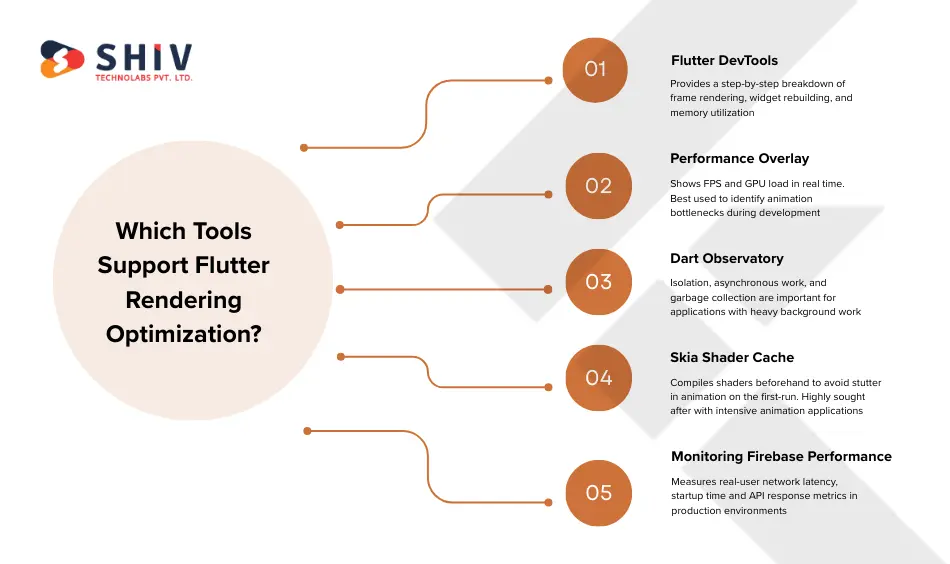
The Flutter ecosystem includes mature tools that enable performance tuning to be measurable and repeatable.
- Flutter DevTools: Provides a step-by-step breakdown of frame rendering, widget rebuilding, and memory utilization. Critical in the diagnosis of jank and leaks.
- Performance Overlay: Shows FPS and GPU load in real time. Best used to identify animation bottlenecks during development.
- Dart Observatory: Isolation, asynchronous work, and garbage collection are important for applications with heavy background work.
- Skia Shader Cache: Compiles shaders beforehand to avoid stutter in animation on the first-run. Highly sought after with intensive animation applications.
- Monitoring Firebase Performance: Measures real-user network latency, startup time and API response metrics in production environments.
How to Maintain Flutter App Performance Long-Term?
There is no one-time solution for performance. OS updates, SDK modifications, and feature additions can be speed-degrading when uncontrolled.
- Carry out Quarterly Performance Audits: Regressions are realized in time through regular audits. This quarterly profiling is to ensure that new features do not affect load time or animations.
- Update the Flutter and Dart SDKs: Engine-level optimizations are included in these updates. Modernization avoids compatibility issues and unlocks performance advantages.
- Examine Load-Time Patterns Analysis: Examine cold-boot, slow-screen, and problem-specific situations to inform optimization priorities.
- Apply Automated Testing Pipelines: CI pipelines with performance benchmarks prevent slow code from reaching production.
- Measuring User Performance with Firebase: Using real-world metrics will reveal what labs are overlooking. Firebase emphasizes area or device bottlenecks.
Periodic check-ups ensure your applications are operating properly. Every Flutter app development project includes proactive optimization, performance audits, and long-term support, so your Flutter app stays fast as it grows.
When Should You Hire Flutter Developers for Optimization Projects?
The following are the best instances of when it is high time to engage a Flutter developer in optimization works:
Crashes When Under heavy user load
When your application crashes under heavy traffic, it indicates memory inefficiency or an asynchronous overload. Expert Flutter coders can profile isolates and resolve concurrency issues.
Memory Overflow or Leaks
Memorial leakages decrease performance with time. Practitioners define the problem of retention and mismanagement of the lifecycle.
UI Lag on Animations
Jank points to rendering inefficiencies. Professionals optimize pipeline trees and graphics.
Excessive Cold-Start Times
Retention was impaired by cold starts over 3 seconds. Optimization reduces initialization costs and postpones heavy tasks.
User Complaints on App Speed
When reviews report being slow, optimization is no longer an option.
If performance remains slow, it is time to contract Flutter developers to conduct a full optimization audit.
Conclusion
The optimization of the flutter performance is an ongoing discipline – it is not a one-time job. Speedier apps reduce bounce rates, enhance retention, and have a direct positive revenue impact. Profiling, smart widget management, caching, and long-term monitoring help businesses reduce Flutter app load time by 50%, providing users with a smoother experience.
For brands that require high-speed scalability, it counts to partner with a reputable Flutter app development firm. Shiv Technolabs provides high-performance mobile solutions, supported by profound Flutter expertise, proactive monitoring, and scalable architecture.
To achieve continuous advancement and scalable solutions, work with a reliable Flutter application development company committed to delivering long-term performance excellence.
Frequently Asked Questions (FAQs)
1. What is the best way of measuring Flutter app performance?
Profiling, use Flutter DevTools to profile and FPS; use the Performance Overlay to capture real-user performance metrics. Firebase Performance monitoring. A combination of these tools provides precise information on rendering, memory usage and network delays.
2. Why do Flutter apps slow down to load?
Among the most common are large assets, overbuilding widgets, blocking API calls during startup and a lack of caching strategies. These issues are aggravated by the state’s poor administration.
3. Are Flutter applications as fast as native applications?
Yes, with reliable Flutter performance optimization, release-mode executables are as fast as native in most real-world applications, including animations and startup times.
4. What do I do to correct lag in animations or scrolling?
Minimize widget trees, minimize rebuilding, use const constructors, enable shader caching and avoid heavy implicit animations.
5. In what situations do I need to hire professionals to optimize?
If basic fixes cannot resolve the issue or affect user reviews and revenue, it is time to find Flutter developers to perform advanced profiling and optimization.