Table of Contents
One of the most important aspects of warehouse operations is efficient inventory management. Nonetheless, inventory tracking issues in ERP systems are a problem for most businesses, including inaccurate stock levels, slow order fulfillment, and unrelated warehouse work processes. Reports show that 43% of the businesses continue to use manual methods of tracking inventory, with 62% of the companies cited to have operational inefficiencies as a result of the lack of inventory visibility.
At this point, the Odoo inventory module is one of the most effective solutions for helping businesses gain greater control over warehouse processes. Nevertheless, all the warehouses have different workflows, and general ERP modules might not cover all the specifics of their work.

Odoo inventory customization enables companies to develop a tailored Odoo inventory module that aligns with their warehouse processes, automation needs, and real-time tracking requirements.
About Odoo Inventory Management System
Odoo inventory management software is a component of the Odoo ERP environment that enables companies to monitor stock, manage warehouses, automate product purchasing and manufacturing, and track inventory flow in real-time.
Odoo, unlike conventional inventory tools, offers a centralized system in which inventory operations become directly linked with:
- Purchasing Modules
- Sales Orders
- Manufacturing Processes
- Accounting Records
- Shipiing And Logistics
# Core Features of the Odoo Inventory Module
A typical odoo inventory module consists of a number of default functionalities that are aimed at facilitating warehouse management.
These features include:
- Instant Inventory Management
- Barcode Scanning
- Automated Stock Movements
- Management Of Warehouse Location
- Batch Tracking And Serial Number Tracking
- Multi-Warehouse Management
- Automated Replenishment Policies
These capabilities are robust, but numerous business organizations need more customization to fit their warehouse operations.
Why Businesses Need Odoo Inventory Customization
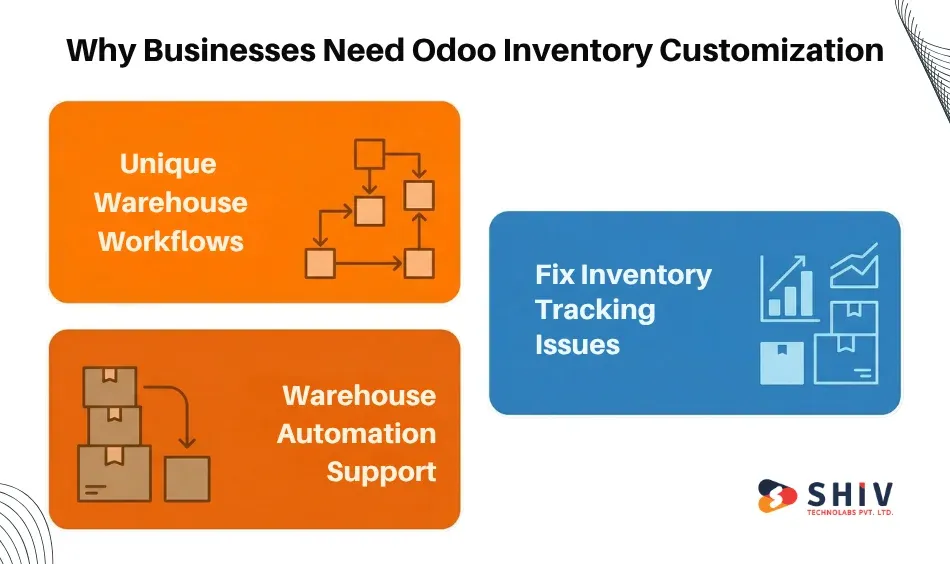
Each warehouse setting differs in its operations, storage arrangements, and operational needs. A default inventory system might not fulfill all the business needs.
This is the reason why Odoo inventory customization is necessary.
The ability to customize the inventory module enables companies to tailor the ERP solution to their operational processes, automation needs, and reporting requirements.
# Addressing Unique Warehouse Workflows<
Inventory processes across industries differ. For example:
- The eCommerce warehouses aim to ship orders quickly.
- Factories are focused on tracking raw materials.
- Retail warehouses are concerned with stock availability.
An Odoo custom inventory module enables companies to set up a workflow based on these needs.
# Solving Inventory Tracking Problems in ERP
Inventory tracking issues that occur in ERP systems are many, and they include:
- Inaccurate Stock Levels
- Delayed Inventory Updates
- Inability To See The Warehouse
- Errors In Manual Reconciliation
These issues are addressed with the assistance of custom inventory modules that enhance data synchronization and automation.
# Supporting Warehouse Automation
Modern warehouses are becoming dependent on automation.
The businesses can execute the following features by automating their warehouses with Odoo:
- automated rules in the movement of stocks
- barcode-based picking
- automated reorder triggers
- automation of warehouse workflow
Automation enhances process efficiency and eliminates human error.
Key Steps to Plan a Custom Odoo Inventory Module
A custom Odoo inventory module can be planned only in a somewhat systematic way to enable the system to correspond with business processes and warehouse operations.
The necessary steps businesses are supposed to undertake are listed below.
Step 1: Existing Warehouse Operations Analysis
Businesses should review their existing warehouse operations before the Odoo inventory module can be developed. This analysis ought to entail:
- Receiving processes of inventory
- Product Storage Methods
- Picking And Packing Processes
- Stock Transfer Processes
- Equivalents of Inventory Reporting
The recognition of inefficiencies in existing processes helps identify the areas that need to be customized.
Step 2: Find Inventory Tracking Problems.
Among the main objectives of the customization, there is a solution to the inventory tracking issues in ERP systems.
The businesses should find out problems like:
- incorrect stock quantities
- delayed inventory updates
- warehouse visibility restrictions.
- stock reconciliation mistakes.
Knowledge of these challenges aids in formulating the requirements for the custom module.
Step 3: Decision Warehouse Automation Requirements
Warehouse efficiency can be greatly enhanced through automation.
The automation requirements to be considered by businesses intending to automate warehouses with Odoo include:
- Automated Stock Record Changes.
- Barcode Scanning Workflows
- Automated Reorder Rules
- Warehouse Routing In Real Time.
Step 4: Inventory Workflow Design.
After defining the requirements, the second step is to design warehouse workflows in the ERP system.
Some of the major workflow elements are:
- receiving processes of products
- Internal stock transfers
- Warehouse picking operations
- shipment processing
- inventory audits
These workflows should be consistent with the day-to-day operations of the warehouse.
Step 5: Odoo Inventory Integration planning
An effective inventory system should integrate with the rest of the ERP modules.
Odoo inventory integration guarantees a smooth flow of inventory and other business processes. Crucial integrations comprise:
- Sales Order Integration
- Purchase Order Integration
- Accounting Integration
- Shipping Integration
- Manufacturing Integration
This integration will maintain proper data flow among departments.
Step 6: Requirements Reporting and Analytics
Warehouse managers need detailed reports to track inventory performance. Custom reporting facilities can consist of:
- Stock Movement Reports
- Inventory Aging Reports
- Warehouse Performance Boards
- Order Fulfillment Analytics.
The high reporting enhances the operational decision-making.


Important Features to Include in a Custom Odoo Inventory Module
Some of the more sophisticated features that enhance warehouse performance should be considered when the business plans the development of the Odoo inventory module.
# Advanced Inventory Tracking
Warehouse efficiency is based on proper inventory tracking.
Custom modules can include:
- Real-Time Stock Tracking
- Multi-Location Inventory Management
- Serial Number Tracking
- Batch Tracking
These properties enhance inventory visibility in the warehouses.
# Barcode and RFID Integration
Barcode scanning is very useful for enhancing warehouse operations.
Benefits include:
- Increased Product Recognition
- Reduced Picking Errors
- Improved Stock Accuracy
RFID-based inventory tracking is also practiced in some warehouses.
# Automated Reordering Rules
Automatic replenishment will provide balance in the inventory levels.
Some of the rules businesses can come up with include:
- Minimum Stock Thresholds
- Automatic Creation Of Purchase Orders.
- Replenished By The Suppliers.
# Multi-Warehouse Management
Firms with several storage sites require a high level of warehouse management.
Custom modules can manage:
- Warehouse Transfers
- Stock Tracking Through Location.
- Management Of Distribution Centers.
This is a requirement in big operations.
How Odoo Inventory Integration Improves Warehouse Efficiency?
Odoo inventory integration enables the warehouse systems to interact with other modules of the ERP. This is a great deal of connectivity that enhances operational efficiency.
# Sales and Order Management Integration
Stock availability checks are so automatic when sales orders are generated.
In case there is a shortage of inventory, the system may cause:
- purchase orders
- manufacturing orders
- stock transfers
This guarantees easy order fulfillment.
# Procurement Integration
The inventory systems can interface with procurement modules.
For example, purchase orders in Odoo are automatically created when stock levels fall below set thresholds. This minimizes the manual procurement processes.
# Accounting Integration
Financial records are updated automatically by inventory transactions.
This makes proper tracking of costs and financial reporting.
Conclusion
The warehouse operations require proper inventory tracking, effective workflows, and streamlined system integration. An inability to maintain a well-organized inventory system can lead to stock inaccuracies, delayed order delivery, and business inefficiencies. Custom Odoo inventory module planning enables companies to create an inventory system that best fits their warehouse operations.
This is the point at which it is necessary to deal with a professional Odoo module development company. Shiv Technolabs is a reliable Odoo module development company, providing custom ERP development, module customization, and integrations with business systems.
Frequently Asked Questions (FAQs)
What is the Odoo inventory module?
The Odoo inventory module is an element of the Odoo ERP system that handles inventory, stock, and warehouse activities, as well as tracks products and their movements. It enables enterprises to track inventory in real time and streamline warehouse operations.
Why do businesses need Odoo inventory customization?
Odoo inventory customization is necessary for businesses so that the ERP system can be tailored to their warehouse procedures. Customization enables organizations to automate operations, enhance inventory management, and address operational problems that standard modules may not address.
What problems can a custom Odoo inventory module solve?
Problems that can be addressed in a custom Odoo inventory module include poor stock tracking, slow inventory updates, inefficient warehouse workflows, and poor system integration. Tailor-made solutions help companies enhance operational performance and inventory precision.
How does Odoo inventory integration improve operations?
Odoo inventory integration links the inventory system to sales, procurement, manufacturing, and accounting systems. This guarantees real-time data synchronization and higher-order fulfillment efficiency and the removal of manual data-entry errors.
Why should businesses hire Odoo developers for module development?
Hiring skilled Odoo developers is important to ensure that custom modules are developed efficiently and properly integrated with existing ERP systems. Professional developers will be able to develop scalable solutions, automate warehouse-related tasks, and streamline the overall inventory management system.