Table of Contents
Introduction
Sales teams lose time when they spend hours checking leads that never become real opportunities. The bigger issue is not only productivity. It is a poor qualification. When a lead enters your CRM system without the right context, score, or routing logic, your experts either chase the wrong people or respond late to the right ones.
As per Harvard Business Review, companies that respond to a new lead within an hour are nearly seven times more likely to qualify it than those that wait even 60 minutes longer, and the average company still takes 42 hours to make first contact. Manual qualification cannot move that fast at volume, and rushed reps make inconsistent calls.
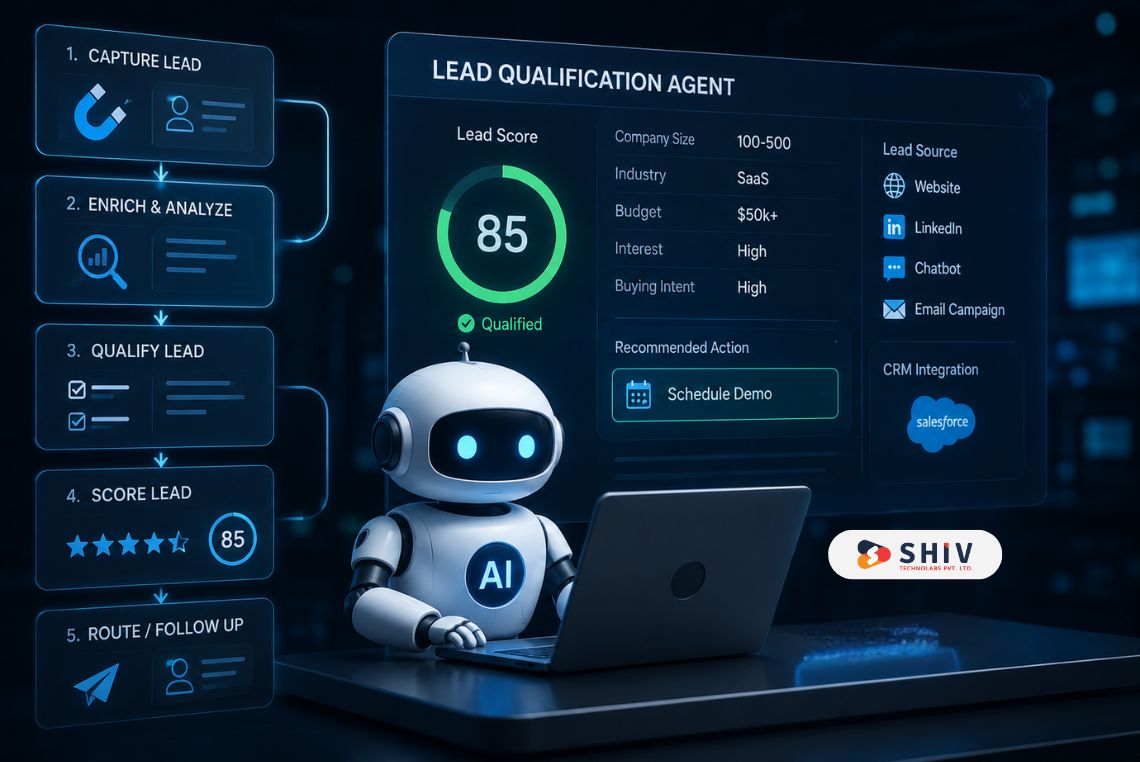
An AI agent for lead qualification helps solve this gap. It captures lead data, enriches the profile, checks buying intent, scores the lead, updates the CRM, and routes the right lead to the right salesperson.
This guide builds one step by step and follows a single sample lead from form submission to a booked meeting. These patterns are based on experience building CRM workflows and B2B automation systems for teams that require consistent lead qualification across thousands of records, operating reliably at any time of day.
Quick Answer: What Does an AI Lead Qualification Agent Do?
An AI lead qualification agent reviews new leads, checks whether they match your ideal customer profile, scores them based on fit and intent, updates your CRM, and routes qualified leads to sales. It can also ask missing questions, send follow-ups, book meetings, and push low-fit leads into nurture workflows.
A lead qualification agent usually performs these actions:
- Captures lead details from forms, chat, ads, email, or CRM
- Enriches the lead profile with company and role data
- Checks fit, intent, urgency, and negative signals
- Assigns a lead score
- Routes hot leads to sales
- Sends warm leads to nurture
- Updates CRM fields and notes
- Sends alerts to sales teams
- Tracks outcomes for future scoring improvements
The main value is not just automation. It helps sales teams spend more time on leads that are actually worth calling.
| Expert Insights– As a team that builds AI agents, CRM workflows, and custom sales automation systems, Shiv Technolabs has seen one pattern clearly: the best AI agents start with a strong sales process before the technology comes in. |
AI Agent vs Chatbot vs Automation: Clear the Confusion First
Many companies use the terms chatbot, automation, and AI agent interchangeably. They do not. A chatbot usually answers questions or follows a set conversation flow. Workflow automation moves data between tools based on fixed rules.
An AI agent can reason through the lead, call tools, update CRM records, assign a score, and decide the next workflow based on context.
# What Makes It an AI Agent?
An AI agent can do more than reply to a message. It can review lead data, compare that lead against your qualification rubric, check missing fields, trigger enrichment, update CRM records, and route the lead based on score and confidence.
This makes it useful for sales teams because lead qualification is rarely one fixed rule. A lead might look weak based on company size but strong based on urgency. Another lead may have a perfect job title but no buying intent. An AI sales agent can handle that context better than a static workflow.
For companies building conversational sales systems, the difference between a chatbot and an agent matters. Shiv Technolabs has covered this in detail in its guide on agentic AI vs traditional chatbots, which can support readers who want a deeper comparison before building.
# Where Rule-Based Automation Stops
Standard workflow automation is fast and reliable, but it is rigid. It struggles the moment a lead does not fit the template:
- Fixed rules and static triggers only
- Limited personalization and no deeper reasoning
- No flexible handling of unclear or incomplete data
- Breaks on edge cases it was not explicitly told to expect
For example:
- If a form field says “Enterprise,” assign the lead to enterprise sales.
- If the country is “USA,” assign the lead to the North America team.
- If the budget is below a set number, send the lead to nurture.
This works until the lead data becomes incomplete, messy, or mixed. A lead may skip the budget field but visit the pricing page three times. Another lead may mention urgency in a chat message but select the wrong company size. Rule-based workflows often miss these signals.
An AI agent can read structured and unstructured data together. That is where it becomes more useful.
# Chatbot vs Workflow Automation vs AI Agent
| Area | Chatbot | Workflow Automation | AI Agent |
| Main purpose | Answer questions | Move data or trigger actions | Qualify, reason, and act |
| Intelligence level | Low to medium | Rule-based | Context-based |
| Data access | Limited | Tool-based | CRM, forms, enrichment, chat, email |
| Tool use | Basic | Strong for fixed flows | Strong for flexible workflows |
| CRM updates | Limited | Yes, by rules | Yes, with scoring and notes |
| Lead scoring | Basic | Fixed scoring | Fit, intent, urgency, confidence |
| Human handoff | Simple | Rule-based | Context-aware |
| Best use case | Website FAQs | Data syncing | Sales qualification workflow |
If your first touch is a website conversation, the agent often sits behind a conversational layer. Teams that want that layer built well usually pair the agent with dedicated AI chatbot development services so lead capture, intent detection, and tone stay on brand before scoring even begins.
How an AI Agent for Lead Qualification Works in 6 Steps
At a high level, every qualification agent follows the same loop. Here is the full AI lead qualification workflow in a simple 6-step format:
- Capture the lead
The agent receives the lead from a form, chatbot, ad campaign, email, or CRM. - Enrich the lead data
It adds missing context such as company size, industry, role, region, website, and firmographic data. - Converse or parse intent
It reads form answers, chat messages, page visits, email activity, or direct replies to detect interest. - Score the lead
It scores the lead based on fit, intent, urgency, and negative signals. - Route the lead
It sends hot leads to sales, warm leads to nurture, and low-fit leads to a polite disqualification path. - Learn from outcomes
It compares scores with sales results and improves the scoring logic over time.
This section acts as the map. Now let’s build the agent and follow one sample lead through the process.
Lead Qualification Use Case: Following One Sample Lead
For this guide, let’s use one sample lead.
Sample Lead:
Ananya Rao, Head of Operations at FlowBase, a B2B SaaS company with 220 employees. She submits a demo request for an AI-powered CRM automation system.
At first, the form only gives basic information:
| Field | Value |
| Name | Ananya Rao |
| ananya@flowbase.com | |
| Company | FlowBase |
| Job title | Head of Operations |
| Message | We want to automate lead qualification and CRM updates |
| Lead source | Demo form |
| Page visited | AI agent development services page |
This is a good start, but it is not enough for sales. The AI agent needs to enrich the lead, score it, and decide what should happen next.
How to Build an AI Lead Qualification Agent
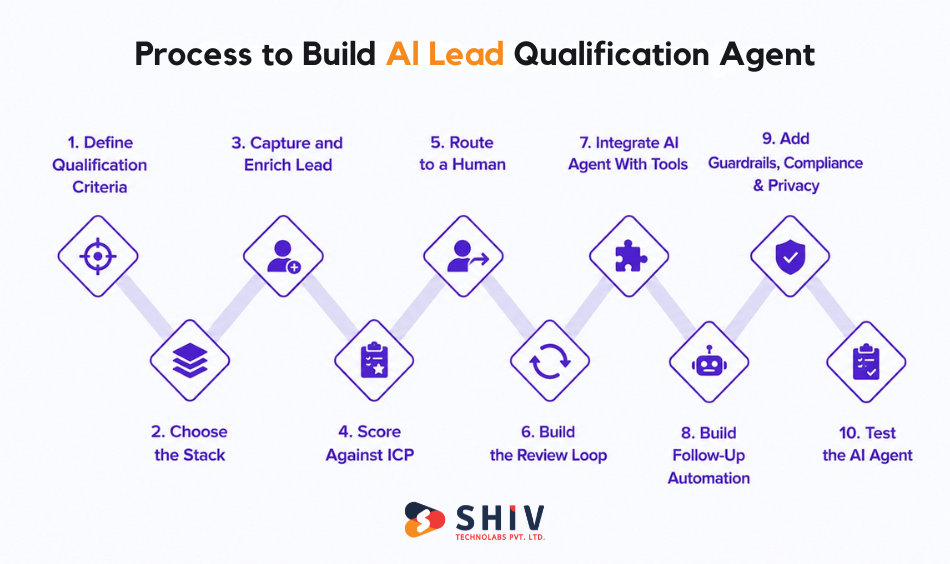
This section outlines the step-by-step approach to building an AI agent for lead qualification, covering workflow design, decision logic, tool integration, and conversation structure to ensure effective lead capture, scoring, and routing.
# Step 1: Define the Qualification Criteria
An AI agent is only as good as the criteria you give it. Before choosing any tool, write down what makes a lead qualified. Cover four signal types: fit (does the company match your ICP), intent (do they show buying interest), urgency (is there a timeline), and negative signals (reasons to disqualify). Assign weights, then connect the total to a status such as MQL, SQL, or meeting-ready.
| Signal | Weight | Example | Score | Reason |
| Company size fit | 25 | 200 employees | 23 | In ICP range of 50 to 500 |
| Industry fit | 20 | Logistics SaaS | 20 | Target vertical |
| Decision role | 20 | Operations Manager | 16 | Strong influence, not final sign-off |
| Intent signal | 20 | Requested a demo | 18 | High-intent action |
| Urgency | 15 | Within the quarter | 13 | Clear near-term timeline |
| Negative signal | 0 to -30 | None found | 0 | Not a student, competitor, or spam |
Sample lead score: Priya totals 90 out of 100. That clears the meeting-ready threshold, so the agent will fast-track her rather than send her to nurture.
# Step 2: Choose the Stack: No-Code, Low-Code, or Custom
There is no single right stack. The choice depends on how much control, customization, and data ownership you need. Stay vendor-neutral and pick the path that fits your team.
| Build Path | Best For | Setup Speed | Customization | Data Control |
| No-code agent builder | Small teams, standard flows | Fast | Low | Limited |
| Low-code (n8n or Make + enrichment + LLM API) | Mid-market, custom logic | Medium | Medium to high | Good |
| Custom (LangChain or LangGraph + middleware + CRM APIs) | Enterprise, bespoke scoring | Slower | Full | Full |
A no-code platform works when you need basic lead capture, scoring, and routing. A low-code stack can use tools like Make, n8n, enrichment APIs, and an LLM API. A custom setup can use LangChain, LangGraph, CRM APIs, custom middleware, and private business rules.
Choose custom development when you need advanced scoring, custom CRM logic, compliance control, or deep system integration. Shiv Technolabs offers AI agent development services for companies that want agents built around real business workflows, not only generic chatbot flows.
For Priya’s company, a low-code stack of a form tool, an enrichment API, an LLM scoring step, and CRM actions is enough to go live in weeks and still allows custom rubric logic.
# Step 3: Capture and Enrich the Lead
The agent should not ask for too many fields in the first form. Long forms reduce completion rates. Instead, collect only what matters first, then enrich the rest. Firmographic data, role, company size, industry, funding, and website behavior all sharpen the score.
Useful form fields include:
- Name
- Business email
- Company
- Role
- Requirement
- Company size
- Timeline
- Budget range
- Preferred contact method
Now compare the sample lead before and after enrichment. This enrichment gives the AI agent enough context to score the lead more accurately.
| Field | Before Enrichment | After Enrichment |
| Name | Priya Sharma | Priya Sharma |
| priya@company.com | priya@company.com | |
| Company | (blank) | Company Logistics Pvt Ltd |
| Job title | (blank) | Operations Manager |
| Company size | (blank) | 200 employees |
| Industry | (blank) | Logistics software |
| Region | (blank) | India |
| Lead source | Demo form | Demo form (organic search) |
# Step 4: Score Against the ICP
Pass the enriched data to the LLM with your criteria as the system prompt. The agent can receive a system instruction like this:
“Score this lead based on fit, intent, urgency, and negative signals. Return the score, confidence level, reason, and recommended next action. Do not make unsupported assumptions. If key information is missing, ask for it or route to human review.”
Structured output keeps routing reliable and gives sales a reason they can trust. Here is the agent’s output for Priya:
[code lang="json"]
{
  "lead_score": 90,
  "fit_score": 41,
  "intent_score": 31,
  "urgency_score": 13,
  "confidence": 0.88,
  "reason": "ICP-fit logistics SaaS, ops decision influencer,
             demo request with a same-quarter timeline.",
  "recommended_action": "Fast-track to sales rep",
  "crm_status": "Sales Qualified Lead"
}
[/code]
# Step 5: Route and Hand Off to a Human
Routing turns a score into action. Define clear bands so the agent always knows where a lead goes, and attach a context summary to every human handoff so the rep does not start cold.
| Score Range | Lead Status | Routing Action | Human Action |
| 80 to 100 | Sales qualified | Assign to rep, alert instantly | Book or take the meeting |
| 60 to 79 | Marketing qualified | Send to nurture, re-score later | Review if capacity allows |
| 40 to 59 | Borderline | Hold for human review | Manual qualify |
| Below 40 | Cold or invalid | Nurture or disqualify | None unless re-engaged |
Priya scores 90, so the agent assigns her to an available rep, fires a Slack alert, and posts a three-line summary with her company, timeline, and the demo she asked for.
# Step 6: Build the Review Loop
The AI agent should improve over time. That only happens when sales feedback comes back into the system.
A useful review loop includes:
- Weekly audit of qualified and disqualified leads
- Sales feedback on lead quality
- Review of false positives and false negatives
- Prompt updates
- Rubric version tracking
- New enrichment signals
- CRM outcome tracking
A qualification agent is never set and forget. Build a weekly habit: audit the most recent qualified and disqualified leads, gather sales feedback on accuracy, update the prompt, version the rubric, and track CRM outcomes back to scores. Add new enrichment signals as you learn which ones predict real deals.
Teams that want the scoring logic, integrations, and review loop engineered into a maintainable system often bring in custom AI development services rather than stitch fragile no-code steps that break the first time the CRM schema changes.
# Step 7: Connect the AI Agent With CRM and Sales Tools
Scoring is useless if it never reaches the systems where selling happens. Connect the agent to your CRM and sales stack. Without that, it becomes a separate AI layer that sales teams may ignore.
CRM Field Mapping
The CRM should receive clean, usable fields. Map the agent output to real CRM fields like lead status, lifecycle stage, lead score, source, qualification notes, sales owner, and next action. Consistent mapping keeps reporting clean.
Sales Pipeline Updates
The agent can create an opportunity for qualified leads, set the deal stage, designate an owner, add notes, update the deal stage, add the lead to the appropriate pipeline, and set a task reminder. This helps in ensuring that nothing gets stuck in a queue.
Calendar and Meeting Booking
Hot leads should be able to book the consultation easily. The agent matches expert availability, sends a calendar link, books the demo, and adds a reminder flow to reduce no-shows. The agent should still follow your sales rules. For enterprise leads, it may send the lead to a sales team first instead of directly booking.
Sales Alerts and Notifications
A hot lead should not wait in the CRM. The agent can send instant alerts to Slack, CRM notifications, emails, sales task tools, or Teams for high-intent leads with a short summary. A useful sales alert should include the lead score, company, reason, urgency, and recommended action.
# Step 8: Build Follow-Up Automation
Not every lead is ready for a sales call. Follow-up automation helps keep good leads moving without forcing sales to chase every contact manually.
Personalized Email Follow-Ups
The agent creates a relevant follow-up email based on the lead’s needs, references their expressed interest, and sends it with a clear next step to improve response rates..
Meeting Reminder Workflows
For booked meetings, the agent can send reminders before the call. Send demo reminders and calendar confirmations, with an easy reschedule option, meeting agenda, and pre-call questions. This reduces no-shows and gives the sales team better context.
Nurture Flows for Not-Ready Leads
Warm leads may not need an immediate sales call. The agent can send them to a nurture sequence with relevant content. The agent shares relevant resources, such as an AI agent use case guide, CRM automation checklist, build vs. buy comparison, case studies, or an ROI calculator. This helps keep leads engaged until their buying intent becomes stronger.
# Step 9: Add Guardrails, Compliance, and Data Privacy Controls
AI lead qualification agents need safety precautions from day one, not after the first incident. Sales data can include personal information, company details, budget notes, and deal context.
Limit Access to Sensitive CRM Fields
Apply role-based access, field-level permission, data minimization, sensitive field restrictions, and limited write access. So the agent reads only the fields it needs. For example, the agent may update lead status but should not change closed-won revenue fields.
Add Approved Response Templates
The agent should use approved response templates for first-response emails, disqualification messages, nurture emails, demo booking messages, and sales handoff summaries. This ensures consistent, accurate, and compliant communication. The agent ensures all messaging is brand-safe and compliance-safe by using sales-approved templates and never making unsupported claims.
Keep Human Approval for High-Value Leads
Enterprise deals, high-value accounts, borderline lead scores, and compliance-sensitive leads are routed through a human-in-the-loop review before any commitment. Human approval is required when deal size is high, lead scores are uncertain, compliance risk is present, or data confidence is low. It is also required when the lead asks complex questions or when contract and pricing terms are involved. AI should support sales decisions, not replace human judgment too early.
Track Decisions and Logs
Every AI decision should be traceable. Track original lead data, enriched data, score, reason, agent output, routing action, human override, and the CRM action. A clean audit trail supports governance and makes failures easy to trace.
# Step 10: Test the AI Agent Before Launch
Testing is where many AI agent projects succeed or fail. Do not launch the agent directly on live leads without validation. Four checks catch most problems.
Test With Historical Leads
Use past CRM data to test scoring accuracy. Test with closed-won, lost, qualified, low-fit, and disqualified leads from your CRM. Check whether the agent would have scored past leads correctly.
Test With Edge Cases
Edge cases help reveal weak points. Test spam, job seekers, students, competitors, incomplete forms, and vague requirements. The agent should handle these smoothly and prevent poor routing decisions.
Compare AI Score With Sales Judgment
Ask SDRs or sales managers to review the AI score, sales score, final sales decision, and reason for mismatch and flag disagreements. This creates a feedback loop before launch, and the acceptance rate is your real accuracy metric.
Check CRM Updates and Routing
Test every workflow before going live. Check CRM field sync, owner assignment, alerts, deal creation, booking meetings, disqualification paths, duplicate lead handling, and nurture enrollment. A lead qualification agent is only useful when the full workflow works smoothly.
Build vs Buy: An Honest Decision Framework for AI Agent Development
You do not always need a custom AI agent. Sometimes a ready-made platform is enough.
# Use a Platform When Speed Matters
A ready-made AI sales tool works well when:
- You need quick setup
- Your sales process is simple
- CRM fields are standard
- You do not need deep customization
- Your team wants basic lead scoring and routing
This can work for smaller teams or early-stage sales operations.
# Use a Custom Build When Control Matters
A custom AI lead qualification agent works better when:
- You use a custom sales framework like MEDDPICC
- You need custom scoring logic
- Your CRM workflow is complex
- You need strong data privacy
- You have multiple lead sources
- You need custom reporting
- You want full control over data and routing
For companies with unique qualification logic, custom software development services can help connect the AI agent with CRM, sales tools, APIs, dashboards, and internal workflows.
# Cost and Timeline Comparison
| Factor | Platform | Custom Build | Factor | Platform | Custom Build | Factor |
| Setup speed | Days to weeks | Weeks to months | Setup speed | Days to weeks | Weeks to months | Setup speed |
| Customization | Limited | Full | Customization | Limited | Full | Customization |
| CRM flexibility | Standard connectors | Any system via API | CRM flexibility | Standard connectors | Any system via API | CRM flexibility |
A basic AI lead qualification setup can be built faster when the CRM is clean and the workflow is simple. Enterprise-grade agents take longer because they need deeper testing, security review, CRM rules, and sales alignment.
What Goes Wrong and How to Prevent It
AI agents can improve sales workflows, but they can also create problems if teams treat them as fully autonomous too soon.
# False Negatives
A false negative happens when a good lead gets marked as low quality. This can happen when the scoring threshold is too strict, important context is missing, enrichment data is incomplete, or the rubric ignores hidden buying signals. The safer approach is to send borderline leads to human review instead of rejecting them automatically.
# Hallucinated Reasoning
An AI agent may make assumptions if instructions are weak. For example, it may assume a company has a budget just because it is large. That is not safe. The agent should only score based on available evidence. Required reason fields, confidence scores, approved prompts, and human review for uncertain cases help reduce this risk.
# Stale Enrichment Data
Enrichment tools can return old or wrong data. A company size may be outdated, a job title may have changed, or funding data may not be current. To prevent this, refresh enrichment data, show source confidence, allow sales to correct fields, and review mismatches during audits.
# Over-Aggressive Knockouts
Some teams create hard disqualification rules too early. For example, “If budget is missing, disqualify.” This can reject good leads who simply skipped the field. Use confidence thresholds and human review before disqualifying leads that may still be valuable.
Measuring Results: Prove the ROI
An AI lead qualification agent should be measured against real sales outcomes, not vanity metrics. Sales teams that adopted AI in the past year reported 83% revenue growth versus 66% for teams that did not adopted AI. Track your own numbers against a clear baseline.
| KPI | Before AI Agent | After AI Agent | Business Impact |
| Time to first response | 2 hours | 5 minutes | Faster sales contact |
| Qualification accuracy | 60% | 80% | Better sales focus |
| MQL to SQL rate | 25% | 38% | Stronger pipeline |
| Lead-to-meeting conversion | 8% | 14% | More booked calls |
| SDR hours saved | 0 | 10 hours weekly | Lower manual workload |
| Cost per qualified lead | High | Lower | Better sales efficiency |
| Routing accuracy | Manual | Automated | Fewer missed leads |
# Track Response-Time Improvement
Speed matters because buyer interest fades quickly. A lead who asks for a demo today should not wait until tomorrow. Track how long it takes to send the first response, assign a sales owner, and book the first meeting.
# Track Qualification Accuracy
Sales teams should review whether the agent is sending them better leads. The most useful signals are sales accepted leads, rejected leads, score mismatch rate, and sales feedback notes.
# Track Revenue Impact
The final goal is pipeline and revenue, not just automation. Track opportunity creation rate, pipeline value, deal conversion, and revenue from AI-qualified leads.
Use Case Recap: Full Journey of the Sample Lead
Ananya submits a demo form asking about CRM automation. The AI agent captures her details, enriches her profile, identifies FlowBase as a 220-person B2B SaaS company, checks her role and intent, assigns a score of 80, updates the CRM as a sales-qualified lead, sends a summary to the sales representative, and recommends a fast follow-up. The sales representative receives the context, confirms her timeline, and books a demo. The outcome then feeds back into the review loop to improve future scoring.
This full journey shows the real difference between basic automation and an AI agent. The agent does not only capture the lead. It helps qualify, prioritize, route, and improve the sales workflow.
Tech Stack Needed to Build an AI Lead Qualification Agent
There are diverse tech stacks available to build an AI agent. The exact stack depends on your CRM, data sources, and sales process.
# AI Model or LLM Layer
This layer reads lead data, detects intent, asks missing questions, and creates scoring reasons. It usually includes an LLM, natural language processing, intent detection, prompt management, scoring logic, and confidence scoring.
# CRM System
The agent needs to work with your CRM. Common CRM options include HubSpot, Salesforce, Zoho CRM, Pipedrive, and Microsoft Dynamics CRM.
# Lead Enrichment Tools
Lead enrichment adds company and contact context. Useful enrichment data includes company size, industry, region, website, funding, role, technology stack, and revenue range.
# Workflow Automation Tools
Workflow tools help move data between systems. Teams often use Zapier, Make, n8n, custom APIs, or internal middleware depending on workflow complexity.
# Analytics and Reporting Layer
A reporting layer helps measure results. It should track lead response time, qualification score, routing accuracy, meeting booking rate, sales accepted lead rate, and revenue impact.
Common Mistakes When Building an AI Lead Qualification Agent
Building an AI lead qualification agent often looks straightforward, but small design mistakes can significantly impact lead quality, routing accuracy, and conversion outcomes. Most issues arise not from the model itself, but from unclear rules, weak context handling, or over-automation without human oversight.
# Scoring Leads Without Routing Rules
A score is only useful when it triggers the right action. A lead scoring model without routing becomes another field in the CRM that no one uses.
# Asking Too Many Questions Too Early
Long forms and long chatbot flows create friction. Ask only what is needed first, then use enrichment and follow-up questions.
# Using Poor-Quality CRM Data
Bad CRM data creates bad AI results. Clean duplicate records, missing fields, old lifecycle stages, and inconsistent lead sources before building.
# Not Involving Sales Teams
Sales teams should help define the rubric, review the scores, and report mismatches. Without sales input, the agent may qualify leads that reps do not trust.
# Treating AI as Fully Autonomous Too Soon
Start with human review for borderline and high-value leads. Give the agent more autonomy only after it proves reliable.
How Shiv Technolabs Helps in Building Optimized AI agent
An AI lead qualification agent needs more than a prompt. It needs process design, CRM integration, scoring logic, testing, monitoring, and sales alignment. Dedicated development experts can help plan the full AI agent workflow before development begins.
# Workflow and Qualification Strategy
The first step is to review your current sales process, lead sources, qualification criteria, and handoff process. They audit the funnel, define the criteria, and design a workflow that fits how you actually sell.
# CRM and Data Integration
Reliable integration is where most builds fail. The AI agent needs clean CRM access, field mapping, API integration, and data consistency across tools. Experienced teams sync lead data cleanly across your CRM and sales tools through stable API connections.
# Custom Scoring and Routing Logic
Custom logic helps the AI agent company match your sales process, ICP, pricing model, and qualification method.
# AI Chatbot and Conversation Design
For website leads, the agent needs a conversational flow that asks the right questions without making the visitor feel interrupted. Strong AI chatbot development services help create a natural first interaction while collecting the right details for accurate lead scoring.
# Testing, Monitoring, and ROI Tracking
The agent should be tested before launch and reviewed after launch. This includes scoring accuracy, routing accuracy, sales feedback, and ROI tracking.
Final Verdict: Build the Agent Around Sales Outcomes, Not AI Hype
An AI agent for lead qualification works best when it is built around a clear sales outcome. Start with one goal, such as booking more qualified demos or reducing time spent on low-fit leads. Then define your scoring criterias, connect clean CRM data, add enrichment, set routing rules, and keep human review for uncertain leads.
The best AI lead qualification systems do not replace sales teams. They help sales teams respond faster, focus on better leads, and spend less time on manual qualification work. Build the agent around your sales process first. The AI should support that process, not create a new one that your team does not trust.
FAQs
# What is an AI agent for lead qualification?
An AI agent for lead qualification captures lead data, enriches the profile, checks fit and intent, scores the lead, updates the CRM, and routes qualified leads to sales.
# What is the difference between an AI chatbot and an AI agent for lead qualification?
An AI chatbot usually answers questions or follows a script. An AI agent can reason through lead data, use tools, update CRM records, score leads, and route them based on context.
# How does AI lead qualification work?
AI lead qualification works by collecting lead data, enriching it with company information, checking it against qualification rules, assigning a score, and routing the lead to sales or nurture.
# How much does it cost to build an AI agent for lead qualification?
The cost depends on the CRM, data sources, scoring complexity, integrations, and security needs. A simple no-code setup costs less, while a custom enterprise agent needs a higher budget.
# How long does it take to deploy one?
A simple setup can be launched in a few weeks if the CRM is clean and the workflow is clear. A complex custom agent may take longer due to testing, integrations, and compliance checks.
# Do I need a developer, or can a non-technical team build it?
A non-technical team can use no-code tools for simple workflows. A developer or AI team is helpful when you need custom scoring, CRM integration, security controls, or advanced routing.
# Does this work for B2C as well as B2B?
Yes, but the scoring logic changes. B2B lead qualification usually focuses on company fit, role, budget, and timeline. B2C qualification may focus more on behavior, intent, location, and purchase readiness.
# Which is better, a no-code platform or a custom build?
A no-code platform works best for simple workflows and fast setup. A custom build works better when you need deeper CRM integration, custom scoring, data control, compliance, or advanced sales logic.
# Can AI agents replace SDRs?
AI agents can reduce manual SDR work, but they should not fully replace SDRs in complex sales. They work best as qualification assistants that prepare, score, and route leads for human follow-up.
# Which CRM works best with AI lead qualification?
AI lead qualification can work with HubSpot, Salesforce, Zoho CRM, Pipedrive, and Microsoft Dynamics CRM. The best choice depends on your current sales process, data quality, and integration needs.