Table of Contents
An AI chatbot can answer hundreds of questions and still contribute very little to leads or sales. The problem is often not the AI model itself. The chatbot may answer a pricing question correctly, yet never help the visitor compare options, request a quote, book a call, or reach the right person.
That gap is becoming more important. A 2026 Gartner survey found that customers are about three times more likely to use third-party GenAI tools than company-provided chatbots for service issues. Among customers already using GenAI, 58% had used it to complete a task, rising to 74% in B2B settings. Gartner argues that businesses should move toward conversational, action-oriented experiences instead of treating AI as a standalone chatbot.
If your AI chatbot is not converting, look beyond its response speed. Intent recognition, business data, conversation flow, CTAs, human handoff, and measurement usually have a much greater effect on business outcomes. AI development services can support businesses that need AI connected with real workflows, data, and customer journeys rather than another isolated website widget.
Quick Answer: An AI chatbot often fails to convert because it answers questions without helping visitors complete the next action. Improve conversion by training it around real customer intent, connecting live business data, designing page-specific conversations, adding contextual CTAs, creating reliable human handoffs, and measuring leads, sales, and assisted revenue rather than chat volume.

Why Is Your AI Chatbot Not Converting?
A chatbot conversation has business value when it helps the visitor make progress. That progress could mean choosing a product, resolving an objection, requesting a quote, booking a demo, completing checkout, or reaching the right support agent.
A chatbot that simply returns information may reduce search effort, but it leaves the visitor responsible for figuring out what to do next.
The six most common conversion gaps are:
- Weak intent recognition: It recognizes words but misses why the visitor is asking.
- Disconnected business data: It cannot reliably access current products, pricing, inventory, CRM, or order information.
- Generic conversation flows: Every visitor receives similar prompts regardless of page or buying stage.
- Missing next actions: Good answers end without a relevant conversion path.
- Poor failure recovery: Confused users enter loops instead of reaching a person.
- Weak measurement: The business knows how many chats started but not how many produced useful outcomes.
Where Does the Conversion Gap Usually Appear?
| Chatbot Problem | What the Visitor Experiences | Business Impact |
| Poor intent recognition | Relevant question, generic response | High-intent visitors leave |
| No business-data access | Uncertain price, stock or product answer | Buying decision gets delayed |
| Generic flow | Same experience on every page | Buying stage gets ignored |
| No contextual CTA | Answer ends without direction | Fewer leads or purchases |
| Weak fallback | Repeated or uncertain responses | Trust drops |
| Chat-volume reporting | Engagement appears healthy | Revenue impact stays unclear |
Key point:
Do not start by asking, “How can we get more people to open the chatbot?” First ask, “What should happen after someone starts a conversation?”
What Does Chatbot Conversion Actually Mean?
Chatbot conversion is the percentage of conversations that contribute to a defined business outcome, such as a qualified lead, booked consultation, product selection, purchase, or successful support resolution. There is no useful universal conversion goal for every chatbot. The right outcome depends on the website, visitor intent, and business model.
For a B2B software company, a chatbot that generates 50 email addresses may perform worse than one generating 15 sales-qualified demo requests. An eCommerce chatbot may create value without collecting a single lead if it helps customers find suitable products and continue to checkout.
Match the Conversion to the Business Model
| Business Type | Primary Chatbot Conversion | Useful Secondary Signal |
| B2B services | Qualified consultation request | Pricing/service-page visit |
| SaaS | Demo or trial signup | Plan comparison |
| Ecommerce | Product selection or assisted purchase | Add-to-cart |
| Real estate | Qualified property inquiry | Viewing request |
| Healthcare/wellness | Appointment or service inquiry | Relevant service selection |
| Education | Qualified course/admission inquiry | Program comparison |
This distinction changes how you evaluate chatbot conversion rate. Chat starts, messages per conversation, and response speed are operational metrics. They do not tell you whether the chatbot contributes to revenue.
A better measurement framework connects chatbot interactions with CRM outcomes, eCommerce events, bookings, and sales.
What Does a Conversion-Focused AI Chatbot Look Like?
The difference is not simply better language. A conversion-focused chatbot understands what the visitor wants, uses relevant business context, guides the next action, and recognizes when automation should give way to a person.
| Passive Chatbot | Conversion-Focused Chatbot |
| Same greeting everywhere | Opens according to page and visitor context |
| Trained mainly on FAQs | Trained around questions, objections and intent |
| Uses static information | Accesses relevant business data |
| Answers and stops | Suggests an appropriate next action |
| Guesses when uncertain | Uses fallback and escalation rules |
| Starts every conversation fresh | Preserves useful context |
| Measures chat volume | Connects conversations with leads and revenue |
This is also where the distinction between a traditional chatbot and more action-oriented AI becomes important. A conversational interface may answer questions, while an AI agent can potentially perform defined actions across connected systems.
The right approach depends on the business process. Adding more autonomy is useful only when it removes a genuine customer or operational bottleneck.
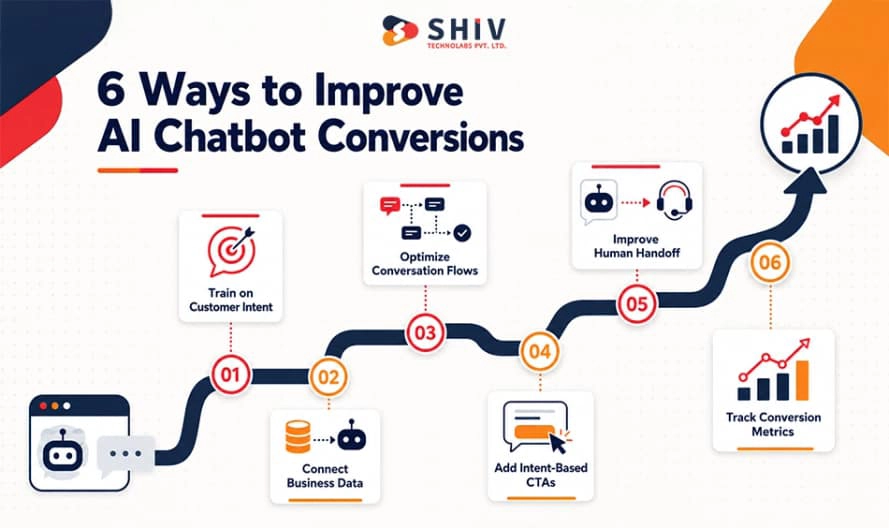
Fix 1: Train the Chatbot on Real Customer Intent, Not Just FAQs
A chatbot trained only on FAQs can answer known questions, but it may still miss why the visitor is asking. Conversion improves when the chatbot recognizes buying intent, objections, urgency, and the next action that would help the customer move forward.
Use Sales Questions, Not Only Support Questions
Support FAQs are useful, but they rarely capture the questions people ask before buying. Add pricing questions, service-fit questions, product comparisons, implementation concerns, and common objections from real customer conversations.
This helps the chatbot respond to commercial intent instead of treating every query like a support request.
Add Real Objections From Calls, Forms, and Emails
Sales calls, inquiry forms, support tickets, and email threads often contain better training material than a generic FAQ page.
Look for repeated objections such as:
- “Is this suitable for my business size?”
- “Can this integrate with our existing system?”
- “Why should I choose this option?”
- “How long will implementation take?”
These questions often appear close to conversion.
Group Questions by Buyer Stage
A visitor at the awareness stage needs different information from someone comparing plans or requesting a quote.
Map intents into stages such as discovery, comparison, pricing, objection handling, high-intent inquiry, and support. This gives the chatbot a clearer role at each point in the journey.
| Buyer Stage | Example Intent | Chatbot Goal |
| Discovery | “What does this do?” | Explain relevance |
| Comparison | “Which option is better?” | Help shortlist |
| Pricing | “How much will this cost?” | Clarify and guide |
| Objection | “Will this work with our ERP?” | Resolve concern |
| High intent | “Can I get a quote?” | Capture and route |
Keep the Knowledge Base Updated
A chatbot can lose trust quickly when it gives outdated pricing, policy, service, or product information. Assign owners for important knowledge sources and review them whenever pricing, product details, policies, or service scope changes.
Add Rules for Unknown or Unclear Questions
The chatbot should not guess when intent is unclear. A better response is to ask one focused clarification question or move the conversation to a human when confidence remains low.
Quick Suggestion
Review the last 50–100 sales and support conversations. Repeated objections, comparison questions, and escalation reasons are often the best inputs for conversion-focused chatbot training.
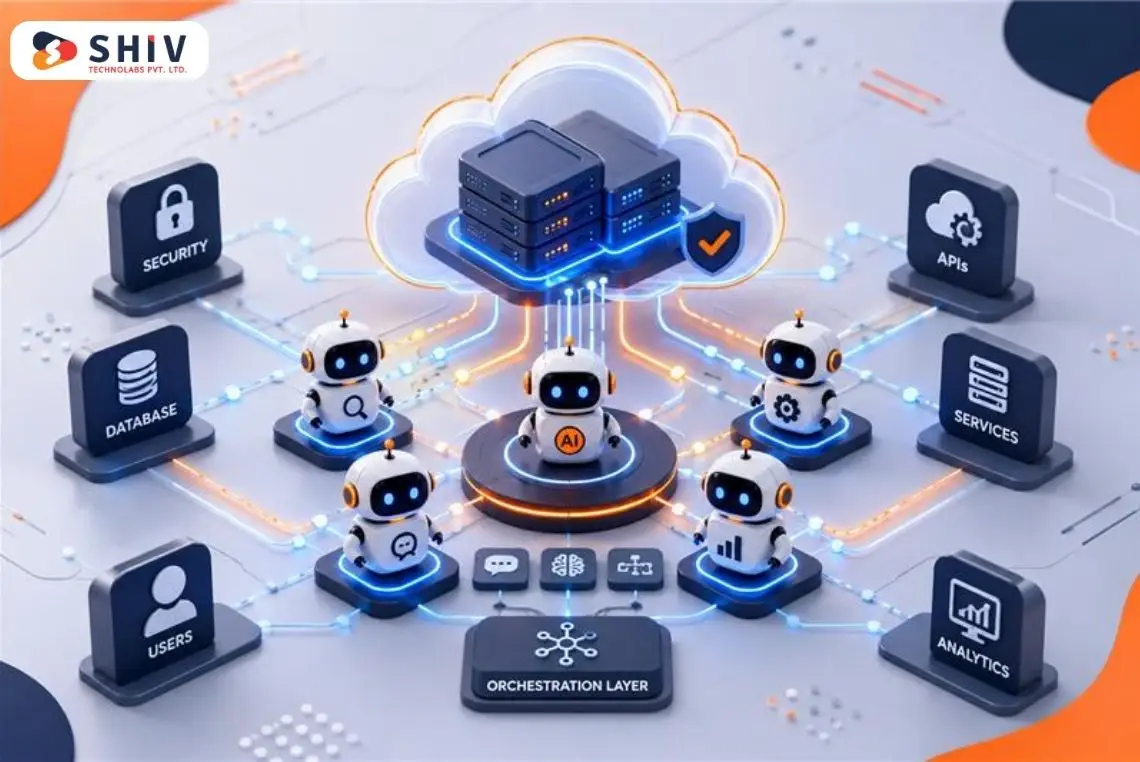
Fix 2: Connect the Chatbot to Product, Pricing, Inventory, and CRM Data
A chatbot cannot guide customers well if it lacks access to the information required to make a recommendation. Static FAQs may explain what you sell, but they cannot reliably answer live questions about stock, pricing, account status, or order progress.
Connect Product Data for Better Recommendations
For eCommerce, the chatbot should understand product attributes, variants, specifications, compatibility, and use cases. This makes recommendations more useful because the chatbot can compare products against the customer’s actual requirement instead of returning generic suggestions.
Connect Pricing and Plan Data
Pricing questions often signal strong buying intent. The chatbot should use current plan, package, or pricing information and clearly state when a custom quote is required. Avoid allowing it to invent prices when the pricing model varies by project or account.
Use Live Inventory and Availability Data
An eCommerce chatbot should not recommend a product that is unavailable or cannot reach the customer in time. Connecting inventory, warehouse, or product availability data allows the chatbot to give answers that reflect the actual buying situation.
Use CRM Data for Lead Qualification
CRM context can help identify returning leads, account history, company type, or previous inquiries. This can make qualification more relevant and prevent the chatbot from asking users to repeat information the business already has.
Expert CRM development services can support workflows where chatbot data needs to move into lead qualification, sales routing, and account-management systems.
Connect Order and Support Data
For support use cases, order status, delivery, returns, subscription, or account information may be more useful than general knowledge. The chatbot should retrieve this information through controlled APIs rather than rely on stale training data.
| Data Source | Conversion Value |
| Product catalog | Better recommendations |
| Pricing system | Accurate cost guidance |
| Inventory | Prevents unavailable recommendations |
| CRM | Better lead qualification |
| Order system | Faster support resolution |
| Knowledge base | Consistent policy answers |
Expert Insight: Do not connect every system simply because it is technically possible. Give the chatbot access only to data that improves a specific customer decision or workflow.
Fix 3: Rewrite Conversation Flows Around the Customer Journey
Many underperforming chatbots use the same opening message and conversation logic across the entire website. That ignores one of the strongest signals available: where the visitor is and what they are likely trying to do.
Build a First-Time Visitor Flow
New visitors often need help understanding the business, product range, or service fit. The chatbot can ask one simple question about their goal and guide them toward the most relevant service, product category, or resource.
Create a Returning Visitor Flow
Returning visitors may already know the basics. If consent and system access allow it, the chatbot can use previous context, CRM data, or account information to avoid repeating the same discovery questions.
Use a Pricing Page Flow
Pricing-page visitors usually have stronger commercial intent than homepage visitors. The chatbot should focus on plan differences, eligibility, implementation cost, custom pricing, or whether the visitor needs a sales consultation.
Use a Product Page Flow
A product-page visitor may need help with size, fit, specifications, compatibility, stock, delivery, or comparison. The chatbot should work like a buying assistant rather than repeat the product description.
Use a Cart or Checkout Flow
At this stage, the chatbot should remove final purchase friction. Useful topics include shipping, returns, payment methods, delivery estimates, discounts, warranty, and product compatibility.
Create a Support and Escalation Flow
Support conversations need a different objective from sales conversations. The chatbot should first try to resolve the issue, then escalate with the relevant context if it cannot complete the task.
| Page | Likely Intent | Best Chatbot Role |
| Homepage | Understand options | Direct visitor |
| Service page | Evaluate fit | Clarify requirements |
| Product page | Validate purchase | Compare and recommend |
| Pricing page | Evaluate cost | Explain and qualify |
| Cart | Remove friction | Resolve purchase concerns |
| Support page | Fix issue | Resolve or escalate |
For workflows that require the AI to take defined actions across connected systems, AI agent development services can support more action-oriented experiences.
Fix 4: Add Clear CTAs Instead of Ending With Answers
Answering a question is useful, but it is not the same as helping the customer move forward. A conversion-focused chatbot should recognize when the user has reached a decision point and offer a relevant next action.
Offer a Demo or Consultation
A visitor asking detailed implementation, pricing, or service-fit questions may be ready to speak with a specialist. The chatbot can offer a demo or consultation only when the conversation shows enough intent to make the CTA relevant.
Suggest the Right Product or Plan
When the chatbot has enough information about customer needs, it can recommend a product, package, or plan rather than leaving the user to search manually. The recommendation should explain why the option fits, not simply present a link.
Guide Users Toward Cart or Checkout
For eCommerce, a recommendation should connect naturally to the next buying action. That may mean viewing the selected product, choosing a variant, adding it to the cart, or continuing to checkout.
Capture Contact Details at the Right Moment
Contact forms should appear after value has been provided. For example, asking for an email after a custom quote request makes sense. Asking for it before answering a basic question can create unnecessary friction.
Offer Human Help for High-Intent Conversations
Some visitors are ready to buy but need reassurance or a custom answer. Give them a clear route to a sales or support person rather than forcing them through more chatbot questions.
| Customer Intent | Better CTA |
| Pricing | Get a quote |
| Plan comparison | Find the right plan |
| Product choice | View recommended option |
| Cart hesitation | Check delivery details |
| Technical requirement | Talk to a specialist |
| High-intent inquiry | Book a consultation |
Quick Suggestion: Replace generic endings such as “Can I help with anything else?” with one contextual action based on what the customer has just asked.
Fix 5: Build a Better Fallback and Human Handoff Flow
A chatbot does not need to answer every question to support conversion. It needs to know when the conversation should remain automated and when a human will provide a better outcome.
Detect Low-Confidence Answers
When the chatbot is uncertain, it should avoid presenting a guess as fact. Confidence thresholds, retrieval checks, or response rules can trigger clarification or escalation when reliable information is unavailable.
Avoid Dead-End Replies
Responses such as “I don’t understand” without another option create an immediate dead end. A better fallback asks one useful clarification question, provides a verified resource, or offers human assistance.
Escalate With Conversation Context
Human handoff should carry the conversation forward rather than restart it. Pass the user’s intent, important answers, viewed page, qualification details, and reason for escalation to the person receiving the conversation.
Route Leads and Support Queries Correctly
Not every handoff belongs to the same team. Pricing and project inquiries may go to sales, while order problems, refunds, and account issues should reach support. Routing rules help reduce delays.
Let Users Choose Human Help
Customers should not need to fight the chatbot to reach a person. Make human assistance visible when the request becomes complex or when the visitor directly asks for it.
Research on chatbot failure recovery suggests that repeated automated failures can increase preference for human recovery.
| Failure Type | Better Response |
| Unclear request | Ask one clarifying question |
| Low-confidence answer | Offer verified information or human help |
| Repeated failure | Escalate |
| High-value lead | Route to sales |
| Order problem | Pass order context to support |
| Complex issue | Create ticket with conversation summary |
Expert Insight: A successful handoff is not a chatbot failure. In high-value or complex conversations, escalation can be the correct conversion path.
Fix 6: Track the Right Chatbot Conversion Metrics
Total chats tell you how often people use the chatbot. They do not tell you whether the chatbot contributes to leads, sales, or support outcomes. Conversion reporting should follow what happens after the conversation begins.
Track Conversation-to-Lead Rate
Measure how many chatbot conversations result in a lead. This gives a clearer view of whether chatbot engagement creates commercial opportunities rather than simply activity.
Measure Qualified Lead Rate
Lead volume can be misleading when most inquiries are poor fits. Track how many chatbot-generated leads meet your actual sales criteria.
Track Product Recommendation Clicks
For eCommerce, monitor whether users act on the chatbot’s recommendations. Low click rates may indicate irrelevant recommendations, weak explanations, or poor CTA placement.
Measure Add-to-Cart and Checkout Assistance
Track how often chatbot conversations contribute to cart activity or checkout progression. This can reveal whether the chatbot is actually reducing buying friction.
Track Human Handoff Completion
Measure whether escalated customers successfully reach the correct sales or support person. A high handoff rate with low completion may indicate routing or staffing problems rather than chatbot issues.
Review Drop-Offs and Unanswered Questions
Conversation abandonment is useful diagnostic data. Look for repeated exit points, unanswered topics, confusing questions, or moments where the chatbot asks for too much information.
Measure Assisted Revenue
Where possible, connect chatbot engagement with transactions, CRM opportunities, or closed sales. This provides a clearer business case than engagement metrics alone.
| Metric | What It Tells You |
| Conversation-to-lead rate | Whether chats create leads |
| Qualified lead rate | Lead quality |
| Recommendation clicks | Product suggestion relevance |
| Add-to-cart assist rate | Buying support impact |
| Handoff completion | Escalation effectiveness |
| Drop-off rate | Conversation friction |
| Unanswered questions | Knowledge gaps |
| Assisted revenue | Commercial contribution |
Expert Insight
The most useful chatbot conversion metrics include conversation-to-lead rate, qualified leads, assisted conversions, recommendation clicks, successful handoffs, drop-off points, unanswered questions, and assisted revenue. Total chat count should be treated as an engagement metric, not a conversion metric.
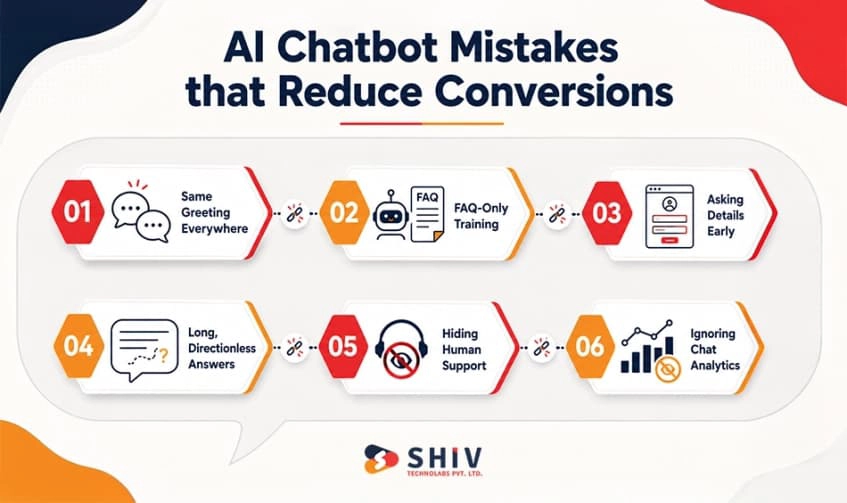
Low conversion rarely comes from one dramatic failure. More often, small problems appear throughout the conversation and gradually make the chatbot less useful.
Using the Same Greeting Everywhere
“Hi, how can I help?” places the work back on the visitor. A service-page visitor could instead receive help choosing the right service. A pricing-page visitor could be offered plan clarification. Page context gives the chatbot an immediate starting point.
Training Only on FAQs
FAQs answer known questions but rarely cover buying objections, comparison requests, edge cases, or the language customers use during sales conversations. Combine controlled knowledge with real customer-intent data.
Asking for Contact Details Too Early
Lead capture should follow value and intent. Asking for personal information before helping the visitor can make the chatbot feel like another form rather than an assistant.
Giving Long Answers Without Direction
More detail is not always more helpful. Give the customer enough information to make progress, then offer the most relevant next step.
Hiding Human Support
Customers should have a clear route to human help when the issue requires it. Making escalation difficult can turn a manageable limitation into frustration.
Ignoring Conversation Analytics
Repeated unanswered questions, drop-offs, failed handoffs, and weak CTA engagement are signals about what needs improvement. A chatbot should evolve from real usage data rather than assumptions.
AI Chatbot Conversion Checklist
Before increasing chatbot traffic or investing in additional features, audit whether the current experience can turn customer intent into measurable action.
| Area | Conversion-Ready When |
| Intent | The chatbot recognizes common buying and support intents |
| Knowledge | Important answers are current and controlled |
| Business data | Required product, pricing, CRM or order data is accessible |
| Conversation flow | Responses adapt to page and customer context |
| CTA | High-intent conversations have a relevant next action |
| Lead capture | Contact details are requested at an appropriate point |
| Fallback | Uncertain responses do not become loops |
| Human handoff | Context follows the customer during escalation |
| Analytics | Leads, drop-offs and business outcomes are measurable |
A chatbot that fails several of these checks may not need a completely new model. Improving the surrounding data, workflow, integrations, and measurement can sometimes produce more value than replacing the AI itself.
How Can Shiv Technolabs Help Fix a Low-Converting AI Chatbot?
Shiv Technolabs can review the full chatbot journey to find where users drop off, where responses lack context, and where high-intent conversations fail to become leads or sales. Through our AI development services, we can improve intent mapping, knowledge sources, response logic, and chatbot workflows.
Our support can include:
- Chatbot audit and intent mapping
- Knowledge base and retrieval setup
- CRM, ERP, product, and API connections
- Lead qualification and routing
- Context-aware CTA flows
- Human handoff workflows
- Conversion and performance tracking
For broader technical requirements, our software development services can support backend systems, integrations, and custom application components around the chatbot. Contact us to identify where your current chatbot is losing conversion opportunities and what needs to change next.
Final Verdict: Your AI Chatbot Should Guide, Not Just Reply
An AI chatbot that is not converting does not necessarily need more conversations. It needs to make existing conversations more useful.
Start with customer intent. Give the chatbot access to the business information needed to answer accurately. Adapt conversations to the visitor’s journey, offer contextual next steps, and move complex requests to people without forcing customers to start again.
Most importantly, connect chatbot activity with leads, purchases, bookings, support outcomes, and revenue. That turns chatbot improvement from a conversation-volume exercise into a measurable business process.
The six fixes can be reduced to a simple model:
Intent → Data → Journey → Action → Handoff → Measurement
When those elements work together, conversational AI has a clearer role in both customer experience and conversion.
Key Takeaways
- Train around intent, not only FAQs. Sales questions and objections reveal what customers need before taking action.
- Connect relevant business data. Current pricing, products, inventory, CRM, and order information make responses more useful.
- Adapt conversations to context. Homepage, pricing, product, cart, and support visitors have different goals.
- Give each high-intent conversation a next step. Match CTAs with the customer’s current need.
- Make human assistance easy. Escalation should preserve context rather than restart the conversation.
- Measure business outcomes. Leads, assisted purchases, qualified opportunities, handoffs, and revenue matter more than chat count.
Frequently Asked Questions About AI Chatbot Conversion
Why Is My AI Chatbot Not Converting?
An AI chatbot often fails to convert when it provides information without recognizing customer intent or guiding the next action. Weak business-data connections, generic flows, poor CTAs, failed handoffs, and limited conversion tracking can also reduce results.
What Is a Good AI Chatbot Conversion Rate?
There is no single useful benchmark for every chatbot because conversion depends on its purpose, traffic source, industry, and customer journey. Define the desired outcome first, such as qualified leads, demos, purchases, or resolved support requests, and measure improvement against your own baseline.
How Can I Improve AI Chatbot Conversions?
Start by reviewing real conversations and identifying common intents, objections, unanswered questions, and drop-off points. Then improve knowledge sources, business-data connections, page-specific flows, contextual CTAs, human escalation, and conversion measurement.
Why Do Users Leave Chatbot Conversations?
Users may leave when responses are generic, inaccurate, repetitive, too long, or unrelated to their actual goal. Asking for personal information too early or making human support difficult can create additional friction.
Should an AI Chatbot Ask for Contact Details First?
Usually, lead capture works better when the visitor understands why the information is needed. For example, requesting an email after a visitor asks for a custom quote provides clearer value than requiring contact details before answering a basic question.
How Do AI Chatbots Generate Leads?
A lead-generation chatbot identifies customer intent, answers relevant questions, gathers appropriate qualification details, and guides high-intent visitors toward actions such as requesting a quote, booking a consultation, or speaking with sales.
What Data Should an AI Chatbot Connect To?
The answer depends on its role. Common sources include product catalogs, pricing, inventory, CRM records, knowledge bases, order systems, calendars, support platforms, and internal APIs. Connect only the data needed for the chatbot’s defined tasks.
When Should a Chatbot Hand Off to a Human?
Human handoff is useful when confidence is low, the chatbot repeatedly misunderstands the request, the issue is complex, or the conversation reaches a high-value sales or support situation.
What Chatbot Metrics Should I Track?
Track conversation-to-lead rate, qualified leads, recommendation clicks, assisted conversions, successful handoffs, unresolved questions, conversation drop-offs, and assisted revenue. These metrics show business impact more clearly than total conversation volume.
Can an AI Chatbot Increase Ecommerce Sales?
It can support ecommerce conversion when it helps customers compare products, check relevant information, resolve purchase concerns, and move toward cart or checkout. Its impact should be measured through assisted product clicks, add-to-cart events, checkout activity, purchases, and revenue rather than chatbot engagement alone.