Table of Contents
Mobile app development is entering a period where users may expect apps to do more than respond to taps. Gartner forecasts that AI assistants could contribute to a 25% drop in mobile app usage by 2027, signaling a possible shift in how people access digital services. gartner.com
For businesses, the challenge is deciding where an AI agent can save time without adding confusion. An agent might help users find a product, schedule an appointment, or complete a request across connected services, but each feature needs a clear purpose and reliable safeguards.
This article covers mobile app development trends for 2027, including how AI agents could shape app features and workflows. Explore mobile app development services for ways to plan an app around real user tasks.
Quick answer: AI agents are changing mobile app development by allowing assistants to perform tasks through APIs, platform intents, and approved tools. Apps can also include agents that handle multi-step workflows, use voice or image inputs, and combine on-device models with cloud AI. Developers must account for permissions, privacy, reliability, and human approval before allowing agents to take important actions.
How Are AI Agents Changing Mobile App Development?
AI agents are changing mobile apps from interfaces that depend entirely on user navigation into systems that can also respond to structured requests from approved assistants.
Traditionally, users opened an application, selected features, completed forms, and moved through several screens. Agentic applications can support a different process where an AI assistant interprets a request and coordinates the required actions.
For example, a customer could ask a delivery application to change a delivery date. Instead of opening the app and following several steps, an authorized agent could check available dates, prepare the change, request confirmation, and submit it.
This shift introduces three important development requirements:
- Agent-accessible functions: Applications need secure APIs, platform intents, or supported tools that allow approved agents to request actions.
- Task-based workflows: Developers must design how agents complete multiple steps, handle errors, and request user approval.
- Reliable permissions: Businesses need clear rules for accessing information, changing records, and confirming sensitive actions.
According to Gartner’s agentic AI predictions, 33% of enterprise software applications are forecast to include agentic AI by 2028, compared with less than 1% in 2024.
Expert Insight: Agent accessibility may become another way for users to interact with business applications. However, supporting AI agents does not automatically increase downloads, engagement, or revenue. The business value depends on whether agents complete useful tasks reliably.
Human-Era Apps vs Agent-Era Apps: What Changes?
Agent-era applications do not eliminate traditional mobile interfaces. They add structured ways for assistants and connected systems to request actions on behalf of authorized users. This affects architecture, accessibility, input methods, testing, and the way users find application capabilities.
| Dimension | Traditional Mobile App | Agent-Ready Mobile App |
| Primary interaction | User opens screens | User or approved agent initiates tasks |
| Interface | Menus, forms, buttons | Screens, intents, APIs, and tools |
| Input | Touch and text | Touch, voice, images, and natural language |
| Task completion | User follows each step | Agent can coordinate approved steps |
| App discovery | App Store and search | App Store plus supported agent integrations |
| AI processing | Often cloud-based | On-device, cloud, or hybrid |
| Personalization | Rules and user preferences | Context-aware actions with permissions |
| Development | Conventional coding workflows | AI-assisted coding with human review |
| Security | Authentication and access controls | Additional tool scopes, approvals, and audit trails |
The biggest architectural difference is that application capabilities must become accessible beyond their visual screens. A feature hidden entirely inside a user interface may be difficult for an external agent to use reliably.
However, agent accessibility is not the same as public access. Authentication, authorization, and user consent remain necessary wherever sensitive information or consequential actions are involved.
1. Mobile Apps Become Accessible to AI Agents
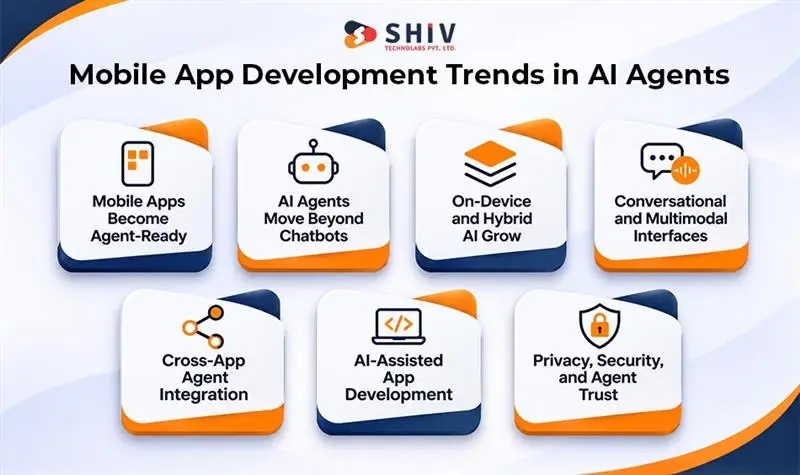
One of the most important mobile app development trends for 2027 is the shift toward agent-accessible application functions. Developers can expose selected capabilities through platform frameworks, secure APIs, and supported agent tools.
Instead of navigating an application screen by screen, an authorized assistant can request a specific action. The application then validates the request, checks permissions, and returns the appropriate result.
Apple’s App Intents framework supports this approach by allowing developers to define app actions and entities for supported system experiences. Its official App Intents documentation explains how developers can make selected functions available through platform integrations.
How Agent-to-App Interaction Works
The interaction between an AI agent and a mobile application relies on a structured sequence of requests, validation checks, and executions. Understanding each phase helps developers construct reliable and predictable agentic workflows.
- User request: A person asks an assistant to complete a specific task.
- Intent identification: The assistant identifies the requested action and necessary information.
- Tool selection: The system identifies an approved application function.
- Permission check: The application verifies access and required authorization.
- Action execution: The approved function performs the requested operation.
- Result confirmation: The application returns the outcome to the user.
For example, a logistics app might expose shipment tracking, delivery rescheduling, and proof-of-delivery retrieval through supported interfaces. An authorized agent could then complete these requests without requiring customers to locate each feature manually.
What Developers Should Build
Preparing an application for AI agent integration requires establishing explicit software boundaries and communication mechanisms. Engineering teams should prioritize key capabilities that maintain data integrity and user control.
- Structured app actions: Define clear functions with documented inputs, outputs, and possible errors.
- Secure API access: Protect business functions through authentication and authorization.
- Platform integrations: Use App Intents or other supported frameworks where appropriate.
- User confirmation: Require approval before sensitive or consequential actions.
- Error handling: Provide clear responses when requests cannot be completed.
These requirements should be considered during application planning, particularly when businesses are evaluating mobile app development services for products that may support AI-assisted interactions.
Expert Insight: Making an app accessible to agents is not the same as making every feature public. Developers should expose only necessary capabilities and apply permissions to individual actions.
2. In-App AI Agents Move From Chatbots to Task Completion
Traditional AI chatbots primarily answer questions or retrieve information. Agentic mobile applications can go further by coordinating several actions to complete a user’s request.
For example, a customer support chatbot might explain how to reschedule an appointment. An agentic application could check availability, prepare the new booking, request confirmation, and update the appointment record.
This shift changes how developers design workflows. Applications need reliable connections between AI models, business rules, databases, and external services.
Common Agentic Mobile App Use Cases
In-app AI agents are expanding across diverse industries to automate complex business workflows and routine tasks. The following examples highlight key sector applications and the expected operational improvements for end users.
| Industry | Agentic AI Use Case | Expected User Benefit |
| Healthcare | Prepare appointment changes | Fewer manual scheduling steps |
| Retail | Find products and prepare orders | Faster product selection |
| Logistics | Reschedule deliveries | Easier shipment management |
| Finance | Categorize transactions and prepare reports | Reduced manual work |
| Travel | Compare bookings and prepare itinerary changes | Faster planning |
| Field services | Prepare job summaries and service reports | Less repetitive administration |
| SaaS | Collect information across connected tools | Faster task completion |
These examples describe potential applications rather than guaranteed results. Actual implementation depends on available APIs, permissions, and the reliability of connected systems.
What Makes an Agent Different From a Chatbot?
An agentic application typically needs several capabilities:
Unlike simple conversational assistants, autonomous agents execute multi-step operations that require robust underlying architectural capabilities. Effective task completion depends on integrating several core system functions.
- Task planning: Break a user request into manageable actions.
- Tool calling: Access approved application functions and connected services.
- Context handling: Maintain relevant information during a workflow.
- Human approval: Request confirmation before important actions.
- Failure recovery: Handle missing data, unsuccessful operations, and unexpected results.
- Result verification: Confirm whether the requested task was completed.
Businesses considering AI development services should begin with one measurable use case rather than adding an agent to every application feature.
Expert Insight: The most important performance metric is not how many questions an agent answers. It is how often the agent completes the intended task correctly, safely, and without unnecessary user intervention.
3. On-Device and Hybrid AI Become Important Architecture Choices
On-device AI allows supported model operations to run directly on a smartphone. This can reduce network dependence, support certain offline functions, and limit the amount of information transmitted to external servers.
However, local processing has limitations. Model availability depends on the device, operating system, memory, and hardware capabilities. Complex requests may still require cloud processing.
Apple’s Foundation Models framework supports selected on-device intelligence features, while Google’s Gemini Nano documentation explains supported local AI capabilities on Android.
On-Device AI vs Cloud AI vs Hybrid AI
Choosing the appropriate AI processing location is a critical decision that influences app latency, data privacy, and operational expenditures. A side-by-side comparison reveals key trade-offs across deployment models.
| Factor | On-Device AI | Cloud AI | Hybrid AI |
| Processing location | Smartphone | Remote servers | Device and cloud |
| Internet requirement | Not always required | Usually required | Depends on task |
| Response speed | Can be fast for supported tasks | Depends on network and service | Task-dependent |
| Privacy considerations | Some data can remain local | Data may be transmitted | Selective data processing |
| Model capability | Limited by device resources | Access to larger models | Combines available capabilities |
| Operating costs | Device and development costs | Usage and infrastructure costs | Mixed cost structure |
| Offline support | Possible | Limited | Possible for selected functions |
| Suitable applications | Local summaries, classification | Complex reasoning and connected workflows | Apps with varied AI requirements |
How Hybrid AI Can Work
A hybrid architecture routes tasks according to their requirements. Simple operations may run locally, while more demanding requests can use an approved cloud model.
For example, a field service application might process basic text locally while using cloud services to retrieve equipment records or coordinate several business systems.
Developers should consider:
Implementing a hybrid AI strategy requires balancing local device performance with cloud computing resources. Developers must systematically evaluate operational factors to ensure seamless task handoffs and optimal app responsiveness.
- Device compatibility and model availability.
- Response time and processing requirements.
- Sensitive data handling and user permissions.
- Battery usage, memory consumption, and storage.
- Cloud inference costs and expected usage.
- Fallback behavior when network access is unavailable.
Expert Insight: On-device AI should not be selected only because it sounds more advanced or private. The appropriate architecture depends on the task, supported devices, accuracy requirements, and total operating costs.
4. Conversational and Multimodal Interfaces Change App Interaction
Mobile applications are increasingly supporting natural-language requests, voice commands, images, and camera input alongside traditional controls.
Instead of selecting several filters, a customer may describe the product they want. A technician could photograph a machine component and request assistance identifying a visible issue.
These experiences use multimodal input, where applications process more than one type of information to interpret a request.
Important Multimodal Features
Multimodal inputs allow users to interact with applications using natural language, images, and context-aware elements. The table below outlines common multimodal features alongside their technical implementation needs.
| Feature | Example Application | Development Requirement |
| Voice commands | Request account information | Speech recognition and intent handling |
| Image input | Identify visible product characteristics | Image processing and validation |
| Conversational search | Find products using natural language | Search and language interpretation |
| Camera assistance | Inspect equipment information | Camera access and image analysis |
| Text and image combination | Describe a problem using a photograph | Multimodal model integration |
| Adaptive interface | Present relevant actions based on context | Clear rules and user controls |
What Businesses Should Consider
Conversational input can make certain tasks easier, but it also introduces uncertainty. Voice recognition may misunderstand names, images may be unclear, and users may omit important information.
Applications should provide ways to correct requests and confirm important actions. Traditional controls should remain available for users who prefer direct interaction or require accessible alternatives.
Useful development priorities include:
Integrating multimodal capabilities successfully requires balancing interface convenience with system reliability. Engineering priorities should focus on providing flexible interaction channels without compromising usability.
- Natural-language search and command handling.
- Clear confirmation when a request is ambiguous.
- Support for text, voice, and image input where valuable.
- Accessible alternatives to AI-based interaction.
- Reliable fallback behavior when models cannot interpret a request.
Expert Insight: Conversational interfaces should reduce the number of steps required for meaningful tasks. They should not replace simple navigation when buttons, menus, or forms provide a faster experience.
5. Cross-App Context and Agent Interoperability Become More Important
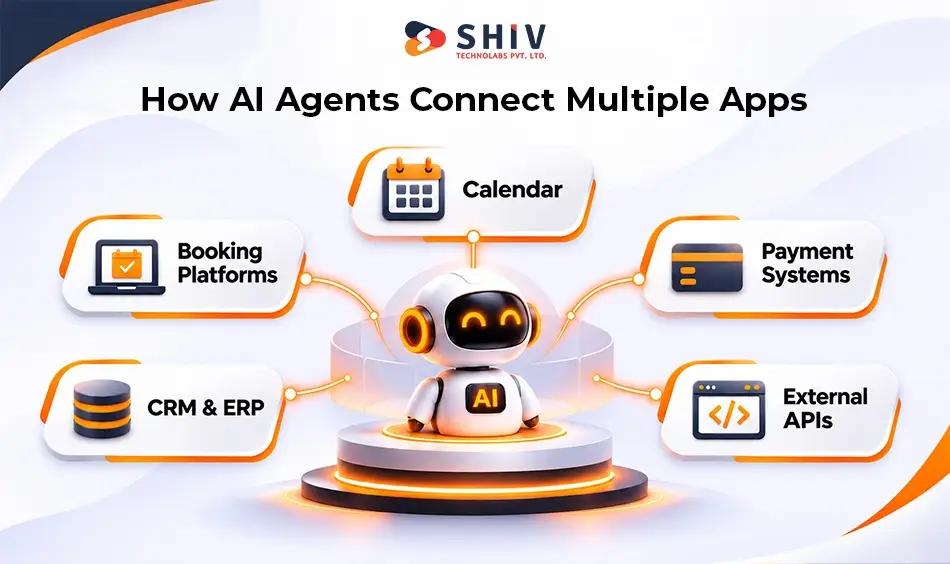
AI agents may need information from several applications to complete one request. A travel assistant, for example, could require access to a calendar, booking platform, and payment service.
This creates demand for secure communication between applications and external systems. Developers must define which information an agent can access and which actions it can perform.
The Model Context Protocol provides an open approach for connecting AI applications with tools and data sources. However, MCP is one integration option, not a requirement for every mobile application.
How Connected Agent Workflows Differ
Connected agent architectures streamline cross-application workflows by securely sharing context across independent services. Comparing standard app interactions with connected agent models highlights key operational differences.
| Traditional Application | Connected Agent Workflow |
| User opens separate apps | Agent coordinates supported services |
| Information is entered repeatedly | Approved context may be reused |
| Each system has separate navigation | Tools expose selected functions |
| Users manage every step | Agent prepares steps and requests approval |
| Integrations follow fixed workflows | Agents can select from approved tools |
| Permissions are often app-specific | Additional cross-service permissions are needed |
What Developers Need to Build
Applications supporting cross-app interactions should include:
Enabling cross-app capabilities demands robust data protection and explicit service boundaries. Technical teams must implement targeted controls to support safe interoperability across external ecosystems.
- Well-defined APIs: Expose specific functions rather than unrestricted system access.
- Scoped permissions: Limit access to the information required for a task.
- Secure authentication: Verify the identity and authorization of requesting systems.
- Context controls: Define which information can be shared or retained.
- Activity records: Track important requests and completed actions.
- Recovery procedures: Handle failed operations across connected services.
For enterprise applications, these requirements may involve CRM, ERP, identity management, and external data sources. Existing integrations should be reviewed before adding new agent capabilities.
Expert Insight: Cross-app context is useful when it reduces repetitive work. It becomes risky when agents receive more information or authority than the task requires.
6. AI-Assisted Development Changes How Mobile Apps Are Built
AI is also changing the development process. Coding assistants can help teams prepare components, generate tests, review documentation, and investigate software defects.
Design-to-code tools may reduce repetitive implementation work during prototyping. However, generated code still requires technical review, particularly when it affects security, performance, or business logic.
Development teams must also consider how AI tools interact with different mobile technology stacks.
How AI Supports Different Development Activities
AI assistance enhances efficiency across every phase of the mobile development lifecycle, from initial requirement gathering to long-term maintenance. The breakdown below details the balance between automated tooling and engineering oversight.
| Development Activity | Potential AI Assistance | Human Responsibility |
| Requirement planning | Organize feature descriptions | Validate business requirements |
| UI prototyping | Generate initial layouts | Review usability and accessibility |
| Code generation | Prepare components and functions | Review architecture and quality |
| Testing | Suggest test cases | Validate coverage and results |
| Debugging | Identify possible causes | Confirm fixes and side effects |
| Documentation | Prepare technical drafts | Verify accuracy |
| Code review | Flag possible issues | Make final engineering decisions |
| Maintenance | Assist with issue investigation | Approve and test changes |
Native vs Cross-Platform Development in the Agent Era
Native and cross-platform frameworks remain relevant, but agentic features may introduce platform-specific requirements.
Selecting a technical stack in the agent era requires evaluating how frameworks interface with platform-native AI capabilities. Each development technology offers distinct options for implementing agent integration.
| Technology | Common Use | Agentic AI Consideration |
| Swift | Native iOS development | Apple frameworks and App Intents |
| Kotlin | Native Android development | Android AI APIs and platform integrations |
| Flutter | Cross-platform applications | Native bridges may be required |
| React Native | Cross-platform applications | Native modules for platform-specific capabilities |
| Kotlin Multiplatform | Shared application logic | Platform-specific UI and AI integrations |
A cross-platform codebase can reduce duplicated development work, but it does not automatically provide identical AI capabilities on every device.
For businesses planning mobile app development, framework selection should reflect the application’s required integrations, target devices, performance needs, and maintenance expectations.
Expert Insight: AI-generated code may reduce time spent on routine tasks, but it cannot replace engineering decisions. Architecture, testing, security, and production maintenance remain essential.
7. Privacy, Trust, and Agent Safety Become Core Requirements
Agentic applications introduce additional security considerations because AI systems may request actions across several connected services.
For example, a finance application could allow an agent to summarize transactions. Allowing the same agent to transfer money requires stronger authorization and explicit user approval.
Developers must separate low-risk information requests from actions that change records, create purchases, or affect other users.
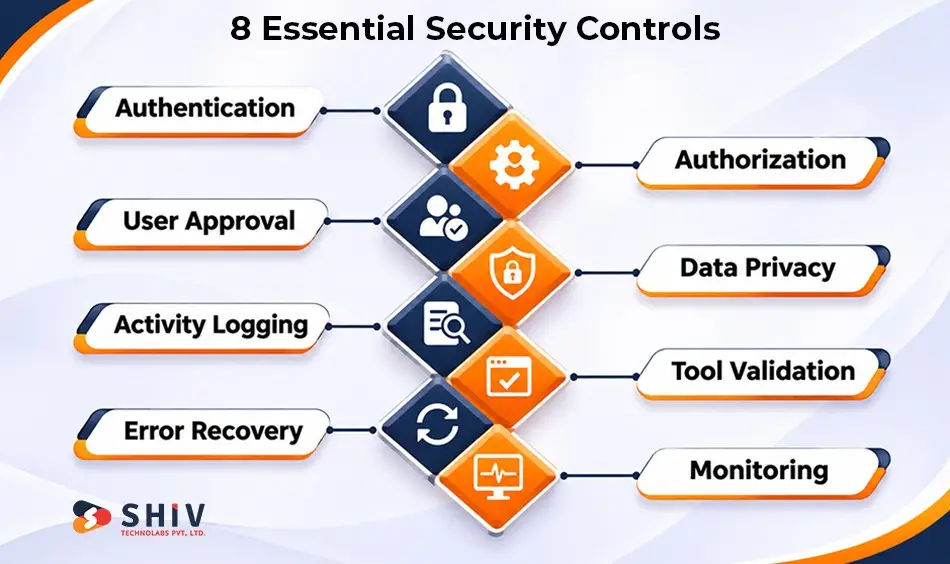
Important Agentic AI Security Controls
Deploying agentic AI introduces complex security challenges around data privacy, privilege escalation, and unintended execution. Implementing targeted security safeguards ensures application safety and compliance.
| Security Requirement | Why It Matters | Recommended Approach |
| Authentication | Verifies who is requesting access | Use approved identity systems |
| Authorization | Restricts available actions | Apply task-specific permissions |
| User approval | Protects consequential decisions | Confirm sensitive actions |
| Data privacy | Limits unnecessary information sharing | Minimize collected and transmitted data |
| Activity logging | Supports investigation and accountability | Record important agent actions |
| Error recovery | Handles unsuccessful operations | Provide safe fallback procedures |
| Tool validation | Prevents invalid or unauthorized requests | Validate inputs and outputs |
| Monitoring | Identifies unusual behavior | Review failures and suspicious activity |
What Makes an Agent Trustworthy?
A trustworthy agent should clearly communicate its intended action, request permission when necessary, and report the result.
Users should be able to review important decisions and stop or correct supported operations. Applications should also distinguish between information generated by AI and verified business records.
Security requirements become especially important for applications handling financial information, healthcare records, customer accounts, or confidential enterprise data.
Expert Insight: Agent autonomy should increase only when the application can demonstrate reliable permissions, accurate actions, and appropriate recovery procedures.
Will AI Agents Replace Traditional Mobile App Interfaces?
AI agents are unlikely to replace traditional mobile app interfaces entirely. Instead, they will provide another way for users to complete selected tasks.
Visual interfaces remain important for browsing products, reviewing documents, comparing options, managing settings, and confirming sensitive decisions.
For example, an agent might prepare a hotel reservation, but the user may still prefer a visual interface to compare rooms, review photographs, and confirm payment details.
Where Agents and Traditional Interfaces Fit Best
Determining whether to use graphical interfaces or autonomous agents depends heavily on the specific task requirements and user intent. The comparison below illustrates ideal deployment scenarios for each interaction model.
| Task | Traditional Interface | AI Agent |
| Browse a product catalog | Strong fit | Can assist with filtering |
| Compare visual designs | Strong fit | Can summarize differences |
| Reschedule an appointment | Requires manual steps | Can coordinate approved actions |
| Prepare a report | Manual data collection | Can gather and organize information |
| Confirm a payment | Clear review interface | Can prepare the transaction |
| Change account settings | Direct user control | Can assist with permitted changes |
| Complete repetitive workflows | Often time-consuming | Potentially useful |
The practical direction is a combination of direct interaction and agent-assisted workflows. Users should remain free to choose the interaction method that suits their needs.
Expert Consideration: An application should not force users into an AI conversation when a simple button or form provides a better experience.
What Should Businesses Build First? A 2027 Agent-Readiness Plan
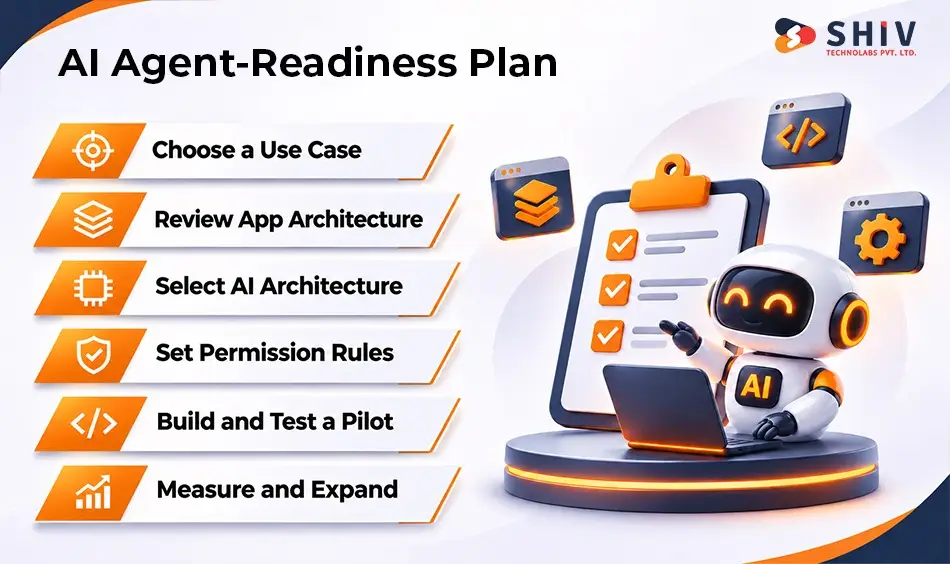
Businesses planning mobile applications for 2027 should begin with a specific problem rather than a broad commitment to AI agents.
The strongest starting point is a repetitive or multistep task with a measurable outcome. This makes it easier to assess whether agentic AI delivers meaningful value.
Step 1: Identify a Valuable Use Case
Choose a task that customers currently find difficult, repetitive, or time-consuming. Examples include appointment scheduling, report preparation, shipment updates, and information retrieval.
Document the current process and identify where delays occur. This provides a baseline for evaluating the proposed agent.
Step 2: Review Existing Application Architecture
Identify which application functions are accessible through APIs and which remain embedded entirely in the user interface.
Determine whether selected capabilities need platform intents, new endpoints, or changes to authentication.
Step 3: Select an AI Processing Approach
Assess whether tasks should run locally, through cloud models, or through a hybrid arrangement.
Consider device compatibility, privacy requirements, response quality, expected usage, and operating costs.
Step 4: Define Permissions and Approval Rules
Separate information retrieval from actions that change business records or affect customers.
Require appropriate approval for purchases, cancellations, payments, and other consequential operations.
Step 5: Build and Test a Limited Pilot
Start with one use case and a small set of approved tools. Test incomplete requests, incorrect information, unavailable services, and failed actions.
Record task completion rates, errors, user corrections, and processing costs.
Step 6: Review Results Before Expanding
Compare pilot results against the original business problem. Expand only when the application demonstrates reliable outcomes and manageable operating costs.
Gartner has forecast that more than 40% of agentic AI projects may be canceled by the end of 2027 because of costs, unclear business value, or inadequate risk controls. This makes disciplined evaluation important before expanding agent capabilities.
Agent-Readiness Checklist for Founders
Before integrating agentic capabilities into production systems, organization leaders should conduct a thorough readiness evaluation. The following checklist covers key operational, architectural, and security considerations.
| Readiness Question | Why It Matters | Status |
| Is there a clearly defined use case? | Prevents unnecessary AI investment | ☐ |
| Are important app functions available through APIs? | Supports agent access | ☐ |
| Are permissions defined for every action? | Protects users and business data | ☐ |
| Is the AI processing architecture selected? | Controls performance and costs | ☐ |
| Are sensitive actions subject to approval? | Reduces unintended operations | ☐ |
| Are fallback workflows available? | Supports recovery from errors | ☐ |
| Can task success be measured? | Establishes business value | ☐ |
| Have privacy requirements been reviewed? | Supports responsible data handling | ☐ |
| Has the pilot been tested with realistic requests? | Identifies operational weaknesses | ☐ |
For businesses that need assistance with these decisions, AI development services can support use-case assessment, architecture planning, and implementation.
What Mobile App Architecture Makes Sense for 2027?
There is no single architecture suitable for every AI-enabled mobile application. The right structure depends on the intended tasks, target devices, business systems, and security requirements.
Many applications may benefit from separating user interaction, AI processing, agent tools, and business data into clearly defined layers.
Recommended Architecture Components
Modern mobile applications supporting AI agents benefit from a layered architectural design that separates interface elements from orchestration logic. The key infrastructure components and technologies are summarized below.
| Architecture Layer | Main Responsibility | Common Technologies |
| User interaction | Touch, voice, image, and text input | SwiftUI, Jetpack Compose, Flutter, React Native |
| AI processing | Interpret requests and generate responses | On-device models, cloud models |
| Agent orchestration | Coordinate multistep tasks | Tool calling, workflow logic |
| Integration layer | Connect app functions and services | REST APIs, App Intents, MCP where appropriate |
| Business systems | Store and process business information | Databases, CRM, ERP, payment services |
| Security layer | Control access and approvals | Authentication, authorization, logging |
| Monitoring | Measure performance and failures | Analytics, application monitoring |
Example: AI-Assisted Appointment Scheduling
Consider a healthcare scheduling application where users request appointment changes through natural language.
The application could follow this sequence:
A practical example of AI orchestration can be observed in automated appointment scheduling tasks. The step-by-step process below highlights how system checks and user approvals maintain workflow precision.
- Receive the user’s scheduling request.
- Identify the relevant appointment and available dates.
- Check the user’s authorization.
- Retrieve available appointment slots.
- Present suitable alternatives.
- Request confirmation before changing the booking.
- Update the scheduling system.
- Return the confirmed appointment details.
This workflow illustrates how an AI agent can coordinate application functions while preserving user control. Actual healthcare implementations would also need appropriate privacy, identity, and regulatory safeguards.
Expert Insight: Architecture should follow the task. A simple AI feature may need only a local model, while an enterprise agent may require several integrations, approvals, and monitoring systems.
When Should Businesses Work With a Mobile App Development Partner?
Specialist development support becomes valuable when an application requires complex integrations, native AI frameworks, custom agent workflows, or strict security requirements.
An existing application may also need architectural changes before approved agents can access its important functions.
Signs That Specialist Development Support May Be Needed
As application architecture increases in complexity, partnering with specialized development teams can help overcome technical hurdles. The table below outlines key business indicators and corresponding technical needs.
| Business Requirement | Potential Technical Work |
| Existing app has no agent-accessible functions | API and tool development |
| App needs native AI integration | Platform-specific implementation |
| Multiple systems must share information | Secure integration architecture |
| Sensitive actions require approval | Authorization and confirmation workflows |
| App must support iOS and Android | Cross-platform and native integration planning |
| AI operating costs are uncertain | Architecture and usage assessment |
| Existing workflows are difficult to automate | Backend and workflow redesign |
Before selecting a partner, define the application’s intended users, business goals, target platforms, existing systems, and security requirements.
A clear scope helps teams distinguish necessary technical work from features that can be implemented through simpler automation or standard application functionality.
Build Agent-Ready Mobile Applications With Shiv Technolabs
Mobile applications are beginning to support both direct user interaction and AI-assisted task completion. Businesses planning for this shift need reliable architecture, secure integrations, and practical development priorities.
Shiv Technolabs works with businesses on mobile app development, AI integration, backend systems, and custom software solutions. These capabilities can support applications that require agent-accessible functions, connected workflows, or platform-specific AI features.
A suitable project should begin with the business problem and existing technical requirements. From there, teams can identify useful AI capabilities, define permissions, and establish an implementation plan.
Businesses planning new applications or extending existing products can review Shiv Technolabs’ mobile app development services to assess the available development approaches.


Final Thoughts
Mobile app development in 2027 will increasingly involve designing applications for both people and AI agents. This shift affects how features are accessed, how tasks are completed, and how applications connect with other systems.
App Intents, on-device AI, multimodal input, MCP, and AI-assisted development create opportunities for new application experiences. However, these technologies should support clearly defined business and customer needs.
For founders and engineering leaders, the strongest approach is to start with one useful task, build secure access to the required systems, and expand only after measuring reliable results.
Frequently Asked Questions
How Will AI Agents Change Mobile Apps in 2027?
AI agents will allow supported applications to complete selected tasks through APIs, platform intents, and approved tools. Users may request actions through natural language instead of following every screen manually. Traditional interfaces will remain important for review, confirmation, and direct control.
What Is an Agentic Mobile App?
An agentic mobile app uses AI to plan and coordinate actions toward a user’s goal. Unlike a basic chatbot, it can interact with approved tools and business systems. Important actions should remain subject to appropriate permissions, validation, and user approval.
How Do I Make My App Work With AI Agents Like Siri or ChatGPT?
Start by identifying useful actions and exposing them through supported platform integrations or secure APIs. Apple’s App Intents supports selected Siri and system interactions. Other AI assistants have their own integration requirements, so compatibility must be assessed individually.
What Is On-Device AI, and Why Does It Matter?
On-device AI runs supported model operations directly on a user’s device. It can reduce network dependence, support certain offline tasks, and limit external data transmission. However, available capabilities depend on hardware, operating systems, model support, and application requirements.
Will People Talk to Apps Instead of Tapping in 2027?
Conversational interaction is likely to become more common, particularly for searching, requesting assistance, and completing multistep tasks. However, touch interfaces will remain useful for browsing, comparing options, precise input, and reviewing important decisions. Most applications will benefit from supporting multiple interaction methods.
Will AI Agents Replace Mobile Apps?
AI agents are unlikely to replace mobile applications entirely. Instead, they may become another way to access app functions. Applications will still need interfaces, secure backend systems, data management, and reliable workflows to support both human and agent interactions.
Does Every Mobile App Need an AI Agent?
No. An AI agent is useful when it can solve a meaningful problem that simpler interfaces or automation cannot address efficiently. Businesses should assess customer needs, task complexity, implementation costs, and risks before adding agentic capabilities.
What Is the Best Mobile App Architecture for 2027?
The appropriate architecture depends on the application’s requirements. Many AI-enabled apps may benefit from combining native or cross-platform interfaces, secure APIs, selected on-device processing, cloud services, and controlled agent tools. No single architecture is suitable for every product.
How Does AI Change the Mobile App Development Process?
AI-assisted tools can support code generation, prototyping, documentation, testing, and debugging. They may reduce repetitive development work, but human engineers remain responsible for architecture, security, performance, integration quality, and production readiness.