Table of Contents
Instagram took 10 years and billions of dollars to become what it is today. But the underlying model, photo sharing, social feeds, short videos, and direct messaging, can be built as a focused MVP for a fraction of that cost.
Startups are doing it right now. Fitness communities, local event apps, creator platforms, niche social networks for professionals, they all follow the same playbook.
This guide shows you how to build an app like Instagram from the ground up. What to build first, which tech stack to choose, what it will actually cost you, and what a social media app development for startups looks like in 2026.
No guesswork. Just a clear path from idea to working product.
QUICK ANSWER
How much does it cost to build an app like Instagram for startups?
MVP cost ranges from $30,000 to $200,000+, depending on features, team location, and tech stack.
A startup-ready MVP typically costs $50,000 to $90,000 and ships in 4 to 6 months.
What features do you need at a minimum?
User profiles, photo/video posting, a social feed, direct messaging, search, and push notifications.
What tech stack should you use?
Flutter or React Native for mobile, Node.js or Python for backend, AWS S3 for media, and Firebase for real-time chat.
What Type of Social App Are You Building?
Before writing a single line of code, get specific about what you are building. Most startup founders say they want to build an app like Instagram. But Instagram is many things at once. You don’t need all of them.
Here are the three most common types of social apps that startups build:
- Photo and video sharing app with follows, feeds, likes, and comments. This is the core Instagram model.
- Niche community app built for a specific audience. Fitness, food, fashion, local businesses, or professional groups.
- Social commerce platform where users discover, share, and buy products from creators or brands.
Each type has a different feature set and a different app development cost. Pick one before planning your MVP.
Example: A fitness community app might skip the shopping features and focus on workout posts, challenge feeds, and trainer profiles. That cuts development time by 30% or more.
Core Features Startups Can Include to Build an App Like Instagram
These are the features every social app needs. Without them, you don’t have a product. You have a prototype.
1. User Registration and Profiles
- Sign up via email, phone, or Google and Apple login
- Profile photo, bio, and follower or following count
- Public and private account settings
Example: A startup building a food community app added a ‘cuisine preference’ field to profiles. This small addition improved feed relevance from day one.
2. Photo and Video Posting
- Upload from camera roll or capture in-app
- Crop, filter, caption, tag, and set location before posting
- Support for short-form video between 15 and 90 seconds
3. Home Feed and Stories
- Scrollable feed showing posts from followed accounts
- Story bar at the top with 24-hour auto-delete
- Likes, comments, saves, and share options on each post
4. Direct Messaging
- One-on-one and group chats
- Image sharing, emoji reactions, and read receipts
- Message requests for accounts the user does not follow
Example: A creator platform added voice messages to DMs in their second sprint. It became the most-used feature among their early adopters.
5. Search and Discovery
- Search by username, hashtag, and topic
- Trending posts and suggested accounts to follow
- This is the main growth engine for new user acquisition
6. Push Notifications
- Alerts for new follows, likes, comments, mentions, and messages
- User-controlled notification settings
- Scheduled digests for lower-activity users
7. Admin Panel
- View and manage all users from one dashboard
- Flag and remove content that violates platform rules
- Track bugs, crashes, and platform-wide analytics
Smart Features That Improve User Retention
Core features bring users in. These features keep them coming back every day. You don’t need all of them at launch. Add them in order of impact on your specific user base.
- AI-Powered Feed Curation: Shows posts based on user behavior, not just who they follow. Apps using this report 2 to 3x longer session times.
- Auto-Tagging with Computer Vision: AI scans uploaded photos and suggests relevant hashtags automatically. Reduces friction at the moment of posting.
- AR Face Filters: Snapchat-style filters for Stories. High shareability. Especially effective for apps targeting users under 30.
- Auto-Captions for Video: Makes content accessible and keeps users watching when the sound is off. This is how most people scroll social feeds.
- AI Content Moderation: Flags offensive content before it goes live. Reduces manual moderation load by up to 70%.
- Best Time to Post Suggestions: Analyzes when your users are most active and suggests ideal posting windows for each creator.
- Chatbot Onboarding: Guides new users through their first post and follow-up actions. Reduces drop-off in the first 24 hours.
Note: AI features add $20,000 to $40,000 to your MVP development cost. Prioritize the ones that directly support your app’s core value.
Which Tech Stack Should You Use?
Your stack has to handle media uploads, real-time messaging, and a growing user base without rebuilding everything after 10,000 users.
Here is what works for social media app development in 2026:
| Layer | Recommended Tools | Why It Works |
|---|---|---|
| Mobile Frontend | Flutter or React Native | One codebase for iOS and Android. Faster to build and cheaper to maintain. |
| Backend / API | Node.js or Python (Django, FastAPI) | Both handle concurrent users well. Python is better for AI-heavy features. |
| Database | PostgreSQL or MongoDB | PostgreSQL for structured data. MongoDB for flexible content schemas. |
| Media Storage | AWS S3 or Google Cloud Storage | Built for large media files. Scales without additional config. |
| Real-Time Messaging | Firebase or Socket.IO | Firebase is faster to set up. Socket.IO gives more control. |
| AI and Vision | OpenAI, Google Vision API, Amazon Rekognition | Production-ready APIs for tagging, moderation, and content analysis. |
Tip: Start with cross-platform mobile development and a single backend service. Do not build separate iOS and Android apps until you have validated the product with real users.
How to Build an App Like Instagram: Step-by-Step
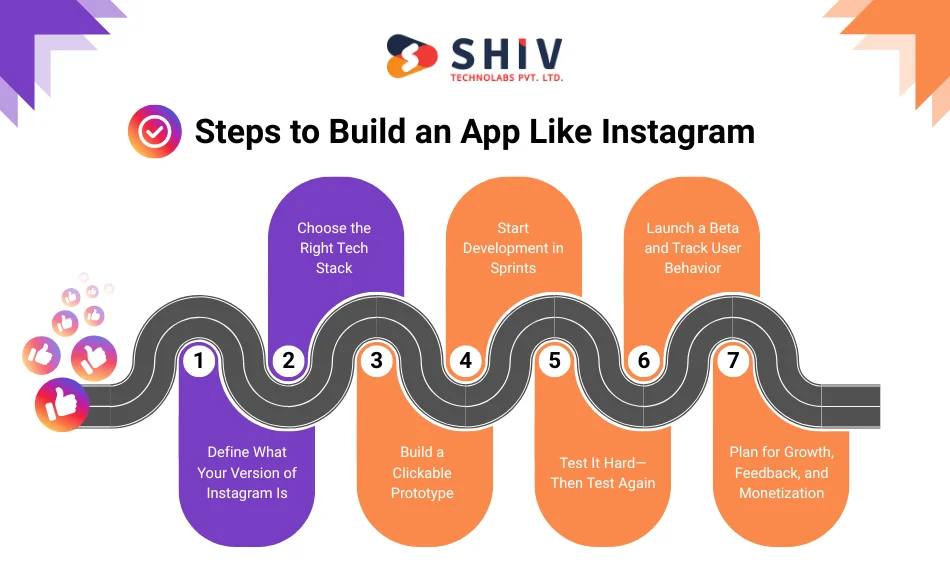
Most startups fail because they are built in the wrong order. The steps below are sequenced for a reason. Each one reduces risk before the next one begins. Follow this order, and you protect your budget, your timeline, and your team’s momentum.
Step 1: Define Your Niche and Core User
Instagram serves everyone. Your app should not.
- Write a one-paragraph description of your ideal user
- List the top 5 features they would use on day one
- Identify what problem your app solves that Instagram does not
Example: A startup building a local events app defined their user as ‘a 25-35 year old professional who wants to find and share weekend activities within 10 miles.’ This kept their feature list focused and their MVP cost under $60,000.
Step 2: Build a Clickable Prototype
- Use Figma or Adobe XD to design key screens
- Cover signup, home feed, post creation, profile, and DMs
- Test with at least 10 real users before any development starts
This step costs $2,000 to $5,000 and can save $30,000 or more in rework later.
Step 3: Choose Your Stack and Set Up Infrastructure
- Set up cloud storage, database, and authentication services
- Configure your development, staging, and production environments
- Agree on version control and deployment workflows with your team
Step 4: Develop in Agile Sprints
Work in 2-week cycles. Build one feature group per sprint.
- Sprint 1: Signup, user profiles, home feed
- Sprint 2: Post creation and photo or video viewing
- Sprint 3: Stories, likes, comments, and push notifications
- Sprint 4: Direct messaging and search
- Sprint 5: AI tagging, moderation tools, admin panel
Track everything in Jira or Trello. Review and demo after each sprint. Do not let scope creep into the next cycle.
Step 5: Test Across Real Devices
- Test upload speed on 5G and WiFi connections
- Check feed load time. Target under 2 seconds.
- Test messaging for missed messages and delivery delays
- Verify push notifications on iOS and Android separately
- Test AI features for accuracy and false positive rates
Use TestFlight for iOS beta builds and Firebase App Distribution for Android.
Step 6: Launch a Closed Beta
Start with 100 to 500 real users. Do not launch publicly until you understand user behavior.
- Which features do they use most?
- Where do they drop off?
- What do they ask about most in support?
Use Mixpanel or Amplitude for behavioral analytics. This data shapes your next six months of development.
Step 7: Monetize and Scale
- In-app advertising or sponsored posts
- Subscription tiers with premium features or ad-free access
- Creator tools: paid content, tips, or fan memberships
- Brand partnership or affiliate commerce integrations
Plan your monetization model before launch. Retrofitting it later is expensive and disruptive to users.
Get more details: How to Develop A Successful Mobile App?
How Much Does It Cost to Build an App Like Instagram?
The cost to build an Instagram clone app has shifted in 2026. AI tooling has made some parts of development faster, which reduces hours on standard features. At the same time, demand for experienced mobile app developers has pushed hourly rates up in most markets. The result is a wider range between budget builds and full-featured products.
Here is what you should expect to pay today.
1. Development Cost by Country
| Country | Hourly Rate (USD) | Estimated MVP Cost |
|---|---|---|
| United States | $130 to $200/hr | $160,000 to $230,000 |
| Canada | $110 to $170/hr | $140,000 to $210,000 |
| United Kingdom | $100 to $160/hr | $120,000 to $190,000 |
| Australia | $100 to $150/hr | $120,000 to $180,000 |
| Germany | $110 to $170/hr | $140,000 to $210,000 |
| India | $30 to $55/hr | $40,000 to $75,000 |
| Philippines | $25 to $45/hr | $35,000 to $60,000 |
India and the Philippines remain the strongest value markets. Rates have risen slightly due to higher demand, but quality has also improved significantly, with more teams now specializing in AI-integrated social apps.
2. Cost by Developer Experience
| Developer Type | Hourly Rate (USD) | Estimated MVP Cost |
|---|---|---|
| Junior Developer | $25 to $40/hr | $30,000 to $50,000 |
| Mid-Level Developer | $40 to $70/hr | $50,000 to $85,000 |
| Senior Developer | $70 to $120/hr | $90,000 to $140,000 |
| Full Team (3-5 devs + PM + QA) | $50 to $90/hr avg | $100,000 to $175,000 |
For most startup MVPs, a mid-level offshore team gives the best return. Senior developers are worth the premium when you are building scalable architecture from day one.
3. Development Cost by Tech Stack
| Stack Option | Tools Used | Estimated MVP Cost |
|---|---|---|
| Low-Code / No-Code | FlutterFlow, Firebase, Supabase | $18,000 to $30,000 |
| Cross-Platform | Flutter or React Native + Node.js + MongoDB | $40,000 to $70,000 |
| Native (iOS and Android) | Swift, Kotlin, Django backend | $80,000 to $135,000 |
| AI-First Stack | React Native + Python + OpenAI + Vision API | $90,000 to $165,000 |
BUDGET PLANNING AT A GLANCE
- Testing an idea / tight budget: $30,000 to $50,000
- Startup-grade MVP (global-ready): $60,000 to $100,000
- AI-powered, fully featured app: $120,000 to $220,000+
Your final number depends on your feature list, team location, and whether you include AI.
Why Startup Founders Choose Shiv Technolabs to Build Their Social Apps?
At Shiv Technolabs, we have helped startups with social media app development located in the US, UK, Canada, UAE, Australia, and across the world.
Here is what you get when you work with our team:
- Full-stack team under one roof: UI/UX design, mobile app development, backend engineering, and QA. No coordination gaps.
- Proven stack experience: Flutter, React Native, Node.js, Python, Firebase, and AI integrations. We have built with all of them.
- Architecture built to scale: We design for 100,000 users from day one, not just for demo day.
- Transparent process: Weekly sprint demos, clear timelines, and no technical jargon in client calls.
- Post-launch support: We stay involved after go-live for bug fixes, feature updates, and performance monitoring.

Start Small. Validate Fast. Build What Your Users Actually Want.
Building an app like Instagram does not mean building everything Instagram has today. It means building the right features for your specific audience, testing them with real users, and shipping updates fast based on what you learn.
The startups that win are not the ones with the biggest budgets. They are the ones with the clearest plan. If you have an idea and want to know whether it is buildable and at what cost, the next step is a conversation with the expert development team.
Book a free call with the Shiv Technolabs team and get a clear development roadmap.
Frequently Asked Questions
How much does it cost to build an app like Instagram?
A startup MVP typically costs between $30,000 and $90,000, depending on features and team location. An AI-powered full version can reach $100,000 to $150,000.
How long does it take to build a social media app?
A focused MVP with core features takes 2 to 3 months with a dedicated team. Adding AI features or native development for both iOS and Android can extend this to 4 to 6 months.
Do I need to build separate apps for iOS and Android?
Not at the MVP stage. A cross-platform framework like Flutter or React Native lets you ship to both platforms from one codebase, cutting time and cost by up to 40%.
What are the must-have features for a social app MVP?
User profiles, photo and video posting, a home feed, direct messaging, search, and push notifications. These seven features are the foundation of any working social platform.
Can I build a social app without AI features?
Yes. AI features improve retention but are not required at launch. Add them in a second phase once you have real user data to guide which AI features will have the most impact.
What is the best tech stack for a social media app?
Flutter or React Native for mobile, Node.js or Python for backend, AWS S3 for media storage, and Firebase for real-time messaging. This stack handles scale well and is cost-effective to build with.
Should I hire a development agency or freelancers?
For a social app with real-time features, media handling, and AI, an agency is the safer choice. Freelancers require significant coordination and often leave gaps in QA and architecture. A good agency costs more per hour but delivers faster with fewer surprises.
How do I monetize a social media app?
The most proven paths are in-app advertising, premium subscriptions, creator tools like paid content or tipping, and brand partnerships. Plan your monetization model before launch. Retrofitting it after launch disrupts user experience.